Sponsored

Why can't my car initiate Spotify?

outie

Well-Known Member
First Name
Dennis
Joined
Nov 16, 2021
Threads
2
Messages
243
Reaction score
157
Location
SoCal
Vehicles
Tesla Model X, McLaren 750S Spider, Taycan GTS
Country flag
Sorry you are having this experience. As the OP I finally got Spotify integration working, but was underwhelmed by it, mostly because CarPlay works so much better. Occasionally the PCM will blackout and reboot itself while I am driving. I decided this is more entertaining than annoying (I have to tell myself this repeatedly) because in reality, the car is all about the driving, not the PCM. The only time that is an issue is if I am dependent on the navigation but then again, it generally reboots within a minute and I still have the nav working on my phone during that time.

Granted, my issues are not as serious as yours and I'm without any advice other than to remind you that you still have an awesome car to drive. I might, on the other hand, contact the dealer and ensure you have the latest update. Seeing you are in SoCal, there doesn't seem to be a reason our cars would perform so differently on this issue.
Thanks. Yes at this point I'll just have to bring it in. There is just something wrong with it.
Sponsored


Butthead007

New Member
First Name
Sebastian
Joined
Jul 4, 2023
Threads
0
Messages
3
Reaction score
0
Location
Weinerville, Ca
Vehicles
taycan turbo
Country flag
I know how to fix it. Luckily, my intellect is superior. Just thought about it and boom, it worked.
 

pnw-ev-nerd

Well-Known Member
Joined
Mar 19, 2021
Threads
4
Messages
113
Reaction score
65
Location
Seattle suburbs
Vehicles
Porsche Taycan 4S Cross Turismo
Country flag
It's been fixed for me. Both Spotify and Google search in nav.

Per PCNA:

I don't believe I can go too far into the specifics but the issue stemmed from the data package that is specifically set up for the use of Online radio and other services of the nature. There was an issue where our system removed the package and we just had to enable the data package again. Once enabled everything began to function as normal.
When I asked if they're investigating why it happened, they (promptly!) replied with:

Yes, we are investigating why the package was removed for your Taycan and other owner's vehicles. I do not have more information past this though. We have not seen a reoccurrence of the package removal for other vehicles since activating the packages again.
(copied from my post over at https://www.taycanforum.com/forum/t...h-in-navigation-not-working.16189/post-255754 )
 

SergeyIndy

Well-Known Member
First Name
Sergey
Joined
Dec 19, 2021
Threads
41
Messages
2,445
Reaction score
1,831
Location
Indianapolis
Vehicles
24 Macan GTS, 23 Taycan Turbo, 20 Cayenne Turbo
Country flag
I am new and my son linked Spotify and worked flawlessly when we brought the car home.
Now, on a drive to his tennis practice, Spotify Icon is greyed out, when you press it "(i) Function not available". I wonder if someone can help figure this out. We do not use any CarPlay so no iPhones are connected. I use a Pixel Phone and it connects and all other services work just fine, but I do not use Android Auto. Otherwise, the car is only 1 month since activation so everything should still be working. I do not even know where to start to figure this out. My Porsche App showing Spotify as Account Linked.


OP
OP
4thPcar

4thPcar

Well-Known Member
First Name
Ian
Joined
Aug 11, 2021
Threads
74
Messages
909
Reaction score
837
Location
Del Mar CA
Vehicles
Previously: 914, 944 and 997 911S. Now Taycan
Country flag
I am new and my son linked Spotify and worked flawlessly when we brought the car home.
Now, on a drive to his tennis practice, Spotify Icon is greyed out, when you press it "(i) Function not available". I wonder if someone can help figure this out. We do not use any Car Play so no iPhones are connected. I use a Pixel Phone and it connects and all other services work just fine, but I do not use Android Auto. Otherwise, the car is only 1 month since activation so everything should still be working. I do not even know where to start to figure this out.
I wish i could tell you it would be worth the effort! I don't use it however I do have Carplay. Good luck!
 

Speuk

Well-Known Member
First Name
Simon
Joined
May 6, 2022
Threads
11
Messages
1,142
Reaction score
615
Location
United Kingdom
Vehicles
MY 2023 CT 4S in Dolomite Silver/ MY2025 4S ST in Volcano Grey
Country flag
I am new and my son linked Spotify and worked flawlessly when we brought the car home.
Now, on a drive to his tennis practice, Spotify Icon is greyed out, when you press it "(i) Function not available". I wonder if someone can help figure this out. We do not use any CarPlay so no iPhones are connected. I use a Pixel Phone and it connects and all other services work just fine, but I do not use Android Auto. Otherwise, the car is only 1 month since activation so everything should still be working. I do not even know where to start to figure this out. My Porsche App showing Spotify as Account Linked.
It becomes greyed out for a number of reasons including.....
Poor mobile signal - check LTE is showing on main screen and if so check signal strength for built in sim.
Porsche servers down or slow.
It usually comes back after a while but even when it is working it is not great and often freezes due to poor connectivity.
Android Auto works much better so worth adding to your Pixel
 

SergeyIndy

Well-Known Member
First Name
Sergey
Joined
Dec 19, 2021
Threads
41
Messages
2,445
Reaction score
1,831
Location
Indianapolis
Vehicles
24 Macan GTS, 23 Taycan Turbo, 20 Cayenne Turbo
Country flag
That explains it, so the native integration relies on the built LTE signal so if that is not reliable then it may work intermittently, so ideally, need to connect which would be son's phone as source for music and play from there since it may get a higher signal such as 5g.


Speuk

Well-Known Member
First Name
Simon
Joined
May 6, 2022
Threads
11
Messages
1,142
Reaction score
615
Location
United Kingdom
Vehicles
MY 2023 CT 4S in Dolomite Silver/ MY2025 4S ST in Volcano Grey
Country flag
That explains it, so the native integration relies on the built LTE signal so if that is not reliable then it may work intermittently, so ideally, need to connect which would be son's phone as source for music and play from there since it may get a higher signal such as 5g.
It should also be fine with your Pixel which I assume is 4G?
I choose to use a cable connection with my Samsung s20+ 5G as it seems to not make the phone run so hot compared to wireless android auto running Spotify plus running either Waze or Amigo in the background to get speed camera alerts. On the Samsung you have to enable the developer settings to access the menu to switch off wireless AA.
 

SergeyIndy

Well-Known Member
First Name
Sergey
Joined
Dec 19, 2021
Threads
41
Messages
2,445
Reaction score
1,831
Location
Indianapolis
Vehicles
24 Macan GTS, 23 Taycan Turbo, 20 Cayenne Turbo
Country flag
It should also be fine with your Pixel which I assume is 4G?
I choose to use a cable connection with my Samsung s20+ 5G as it seems to not make the phone run so hot compared to wireless android auto running Spotify plus running either Waze or Amigo in the background to get speed camera alerts. On the Samsung you have to enable the developer settings to access the menu to switch off wireless AA.
Very helpful, son has S22 phone with 5G so he can play from his. Magically, Spotify icon lit up and he was able to play from Passenger screen from the built in app. I like all my setups clean, so will not be adding Spotify app to my phone. I have the latest Pixel 7 and it does have 5G and AA, but if I ever use AA (currently disabled), it will be wired. Frist, trying to make sure all works without complicating with AA.

However:
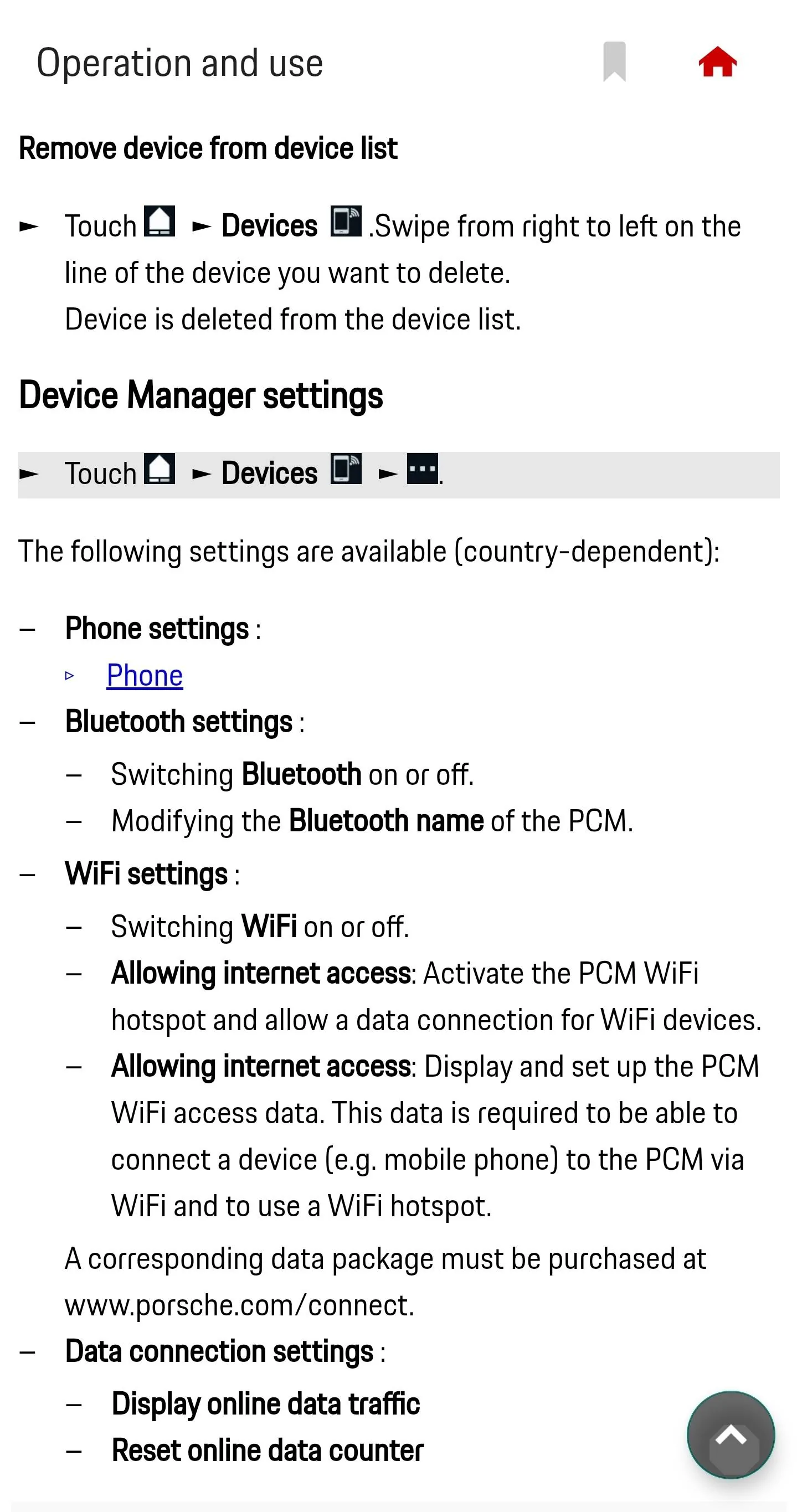
- Very confused by the phone icon on the Passenger screen with a line across it. This may be my son's S22 and it shows in the Device list, but if I want to remove it, how, there is no function I could find to remove devices.
- Center screen has a phone icon with no line across it, assume this is my phone and all good.
- Accounts app to check if the car logged in with Porche ID, cannot seem to login and just spinning, or showing me a QR code, either when away from home or at home, so not sure what to think of it, but everything seems to work fine in the car and in the app as far as controlling car functions, such as precool, needed to use before heading back home from tennis practice, it is hot outside, car showing 105F as outside temp, and precooled nicely.
 

Speuk

Well-Known Member
First Name
Simon
Joined
May 6, 2022
Threads
11
Messages
1,142
Reaction score
615
Location
United Kingdom
Vehicles
MY 2023 CT 4S in Dolomite Silver/ MY2025 4S ST in Volcano Grey
Country flag
Very helpful, son has S22 phone with 5G so he can play from his. Magically, Spotify icon lit up and he was able to play from Passenger screen from the built in app. I like all my setups clean, so will not be adding Spotify app to my phone. I have the latest Pixel 7 and it does have 5G and AA, but if I ever use AA (currently disabled), it will be wired. Frist, trying to make sure all works without complicating with AA.

However:
- Very confused by the phone icon on the Passenger screen with a line across it. This may be my son's S22 and it shows in the Device list, but if I want to remove it, how, there is no function I could find to remove devices.
- Center screen has a phone icon with no line across it, assume this is my phone and all good.
- Accounts app to check if the car logged in with Porche ID, cannot seem to login and just spinning, or showing me a QR code, either when away from home or at home, so not sure what to think of it, but everything seems to work fine in the car and in the app as far as controlling car functions, such as precool, needed to use before heading back home from tennis practice, it is hot outside, car showing 105F as outside temp, and precooled nicely.
From Porsche Good To Know App....

Porsche Taycan Why can't my car initiate Spotify? Screenshot_20230727_213812_Porsche Good to kno
 

SergeyIndy

Well-Known Member
First Name
Sergey
Joined
Dec 19, 2021
Threads
41
Messages
2,445
Reaction score
1,831
Location
Indianapolis
Vehicles
24 Macan GTS, 23 Taycan Turbo, 20 Cayenne Turbo
Country flag
Very helpful, @Speuk, I had 2 years to read the manual, while waiting, and thought I know everything, GTN App phased out, and I do have access online, but this section is not being picked up by searching for "remove", "devices", or anything similar but I found it under the Opening the Device Manager and it looks like this with the same instruction. PCM 5 on the Cayenne has similar interface, but it has a feature to List, Pick, and then Remove devices.

Porsche Taycan Why can't my car initiate Spotify? 1690496071323
 

Amara97

New Member
First Name
Amara
Joined
Sep 18, 2023
Threads
0
Messages
3
Reaction score
0
Location
California
Vehicles
Taycan turbo my2021
Country flag
There are a lot of methods to help you play Spotify in car. If you can't initiate Spotify directly, you can try other methods. For example, you can connect your phone to your car via an Aux cable. Also, you can try to utilize Bluetooth, Android Auto, or Apple CarPlay. If your car supports USB, you can download the music to a USB drive and play it in your car. But this method requires a music converter.
 

Raphie

Well-Known Member
Joined
Dec 15, 2022
Threads
30
Messages
619
Reaction score
611
Location
NL
Vehicles
Porsche Taycan 4s (21)
Country flag
That’s not the point. The point is that the native app should just work…
 

pnw-ev-nerd

Well-Known Member
Joined
Mar 19, 2021
Threads
4
Messages
113
Reaction score
65
Location
Seattle suburbs
Vehicles
Porsche Taycan 4S Cross Turismo
Country flag
It's been fixed for me. Both Spotify and Google search in nav.

Per PCNA:

I don't believe I can go too far into the specifics but the issue stemmed from the data package that is specifically set up for the use of Online radio and other services of the nature. There was an issue where our system removed the package and we just had to enable the data package again. Once enabled everything began to function as normal.

When I asked if they're investigating why it happened, they (promptly!) replied with:

Yes, we are investigating why the package was removed for your Taycan and other owner's vehicles. I do not have more information past this though. We have not seen a reoccurrence of the package removal for other vehicles since activating the packages again.

(copied from my post over at https://www.taycanforum.com/forum/t...h-in-navigation-not-working.16189/post-255754 )
So... it's happened again. No Spotify, no Google nav integration. When trying to select Spotify, I get a message "A data package error has occurred. Please check at My Porsche."

Come ON, Porsche. This is ridiculous.
Sponsored


Top