Sponsored

How to operate Electrify America free charging

Tooney

Well-Known Member
Joined
Aug 14, 2021
Threads
747
Messages
4,481
Reaction score
3,657
Location
Ohio
Vehicles
2022 Taycan 4S
Country flag
Thanks! Its active and plug & charge is selected. They had me on a conference call and said it had to be a server error that wasn’t recognizing the Porsche plan as payment.
Couple of tips I have read either here or on youtube:
When you plug the cable into the car, hold the EA plug on your Taycan charge port so it doesn't droop during EA's "connecting to the vehicle", "payment processing", and "initiating charging" phases. Report for some EVs is that if the initial wired connections between charging plug and vehicle are intermittent or loose at the start, the session will not succeed.

If the issue is that you get "payment declined" message, or any other cannot start the session, try the other cable on same station, if the station has 2 cables. Sometimes just one cable is the problem.

If the above and/or switching charging stations do not work, deactivate plug and charge in the PCM and see if you can start the session with MyPorsche app.

If you cannot get either plug and charge or MyPorsche app to charge, see if you can use a credit card to pay for charging. (You must deactivate plug and charge to test this.) If the car charges with credit card as payment, then the problem is on Porsche's end.

Just curious. Are you the first owner of your Taycan, or was it originally owned by someone else?
Sponsored
 

Viola

Member
First Name
K
Joined
Nov 23, 2022
Threads
1
Messages
11
Reaction score
3
Location
USA
Vehicles
2022 Taycan 4S
Country flag
Couple of tips I have read either here or on youtube:
When you plug the cable into the car, hold the EA plug on your Taycan charge port so it doesn't droop during EA's "connecting to the vehicle", "payment processing", and "initiating charging" phases. Report for some EVs is that if the initial wired connections between charging plug and vehicle are intermittent or loose at the start, the session will not succeed.

If the issue is that you get "payment declined" message, or any other cannot start the session, try the other cable on same station, if the station has 2 cables. Sometimes just one cable is the problem.

If the above and/or switching charging stations do not work, deactivate plug and charge in the PCM and see if you can start the session with MyPorsche app.

If you cannot get either plug and charge or MyPorsche app to charge, see if you can use a credit card to pay for charging. (You must deactivate plug and charge to test this.) If the car charges with credit card as payment, then the problem is on Porsche's end.

Just curious. Are you the first owner of your Taycan, or was it originally owned by someone else?
Great tips!! I really appreciate it. Hopefully it will start operating as it is supposed to so I don’t have to problem solve every time…or at least until the electrician can get to my house.

it will charge with card payment. Porsche was pointing fingers to EA. ??‍♀

I am the second owner. We had an allocation for a GTS but as soon as we submitted the build, Porsche pulled PTS, Burmester and variable sunroof so we pulled the order. Do you think that has to do with the issue? I’ve only had her about 10 days.
 

Tooney

Well-Known Member
Joined
Aug 14, 2021
Threads
747
Messages
4,481
Reaction score
3,657
Location
Ohio
Vehicles
2022 Taycan 4S
Country flag
Great tips!! I really appreciate it. Hopefully it will start operating as it is supposed to so I don’t have to problem solve every time…or at least until the electrician can get to my house.

it will charge with card payment. Porsche was pointing fingers to EA. ??‍♀

I am the second owner. We had an allocation for a GTS but as soon as we submitted the build, Porsche pulled PTS, Burmester and variable sunroof so we pulled the order. Do you think that has to do with the issue? I’ve only had her about 10 days.
If your Taycan is properly registered with your Porsche ID, you should be able to:
- use your Porsche ID to have your own account in the PCM
- be able to access the Taycan in the MyPorsche app and MyPorsche website on your laptop (and see SOC of car and other details about the car such as doors locked, etc.)
- see a green light above the rear-view mirror indicating that the car's SOS call function is working properly
- in the upper right portion of the PCM see the "LTE" symbol, indicating that the car has a good datacomm link with Porsche servers - and the internet. (For 2025 models, "4G" instead of "LTE".)

All of the above should be the case when an owner picks up the Taycan from the dealer.
In addition you should see in MyPorsche that Porsche Charging Service is enabled and active for your car.

If you have been unsuccessful in charging at multiple EA sites and multiple EA charging stations with plug and charge and MyPorsche app, and you can charge at an EA site with a credit card, then it is likely that Porsche NA has not properly linked your Porsche Charging Service credentials with your Taycan. Porsche NA needs to fix this. EA cannot fix it. You should let Porsche know that you are not the first owner of the car. The problem is that Porsche NA customer service (1 800 Porsche) is not responsive to calls from owners. Not responsive means the person who takes the call has little ability to help directly, has to contact "second level support", etc. and does not proactively call back. It's up to the customer to follow-up.

If that is the case, you may have better luck with Porsche NA by getting your Porsche dealer to escalate the problem with Porsche NA. The dealer can't link the charging service credentials, but he can escalate resolution of the problem with Porsche NA.
--Edited on Dec. 17, 2024 to update.
 
Last edited:

Viola

Member
First Name
K
Joined
Nov 23, 2022
Threads
1
Messages
11
Reaction score
3
Location
USA
Vehicles
2022 Taycan 4S
Country flag
Ahhhh ??????

My first attempt to plug & charge worked today! This is a huge accomplishment for me and I appreciate everyone who submitted tips and tricks!!!
 

Toodal00

Well-Known Member
First Name
John
Joined
Aug 19, 2021
Threads
0
Messages
107
Reaction score
27
Location
CA
Vehicles
22 Taycan RWD, 21 Tesla MY, Mercedes E350, GLC 300
Country flag
Thanks! Its active and plug & charge is selected. They had me on a conference call and said it had to be a server error that wasn’t recognizing the Porsche plan as payment.
im still having this issue, has yours been fixed?


Viola

Member
First Name
K
Joined
Nov 23, 2022
Threads
1
Messages
11
Reaction score
3
Location
USA
Vehicles
2022 Taycan 4S
Country flag
im still having this issue, has yours been fixed?
I have been charging at home now. It got fixed but still kind of hit or miss.When I have to use it, I just go ahead and call EA and they end up pushing the authorization to the station.
 

wlin

Member
First Name
Will-I-Am
Joined
Jul 9, 2023
Threads
0
Messages
16
Reaction score
9
Location
Everything is Bigger State
Vehicles
22' 9J1 CT, 21' 982 Jahre25, 21' Tesla WhtStar
Country flag
It used to be plug-and-play (less than 2 weeks ago - 1/05/2024 at one of the EA chargers I visited) but now changed to where you have to activate it on My Porsche App. I ended up paying for a few sessions bc I didn’t have time to figure it out at first.

Quite a hassle in the beginning but once you go through the process it’s not too bad. Posting a few pics of to help fellow Taycan owners resolve some frustration I experienced:

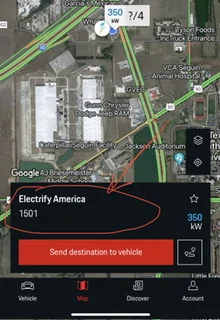
1) Go to My Porsche App and click on a Charging Station (The actual Charger Address, NOT the actual “Send to Vehicle” red button)
Porsche Taycan How to operate Electrify America free charging IMG_1533


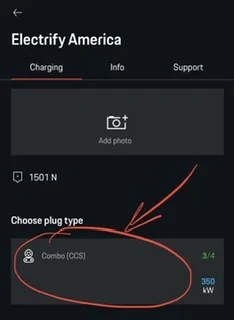
2) Click on the Charger you are plugged into (I would get to this step before actually plugging in the charger so it does not “time out” - then you have to unplug the charger and replug)
Porsche Taycan How to operate Electrify America free charging IMG_1534


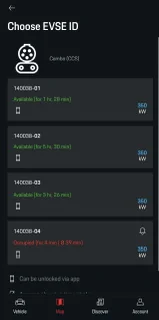
3) Click the charger your Taycan is plugged into
Porsche Taycan How to operate Electrify America free charging IMG_1535


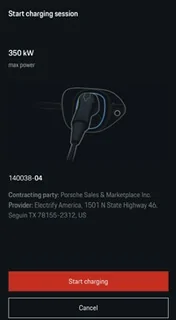
4) It should show “Start Charging.” Tap the red button.
Porsche Taycan How to operate Electrify America free charging IMG_1537


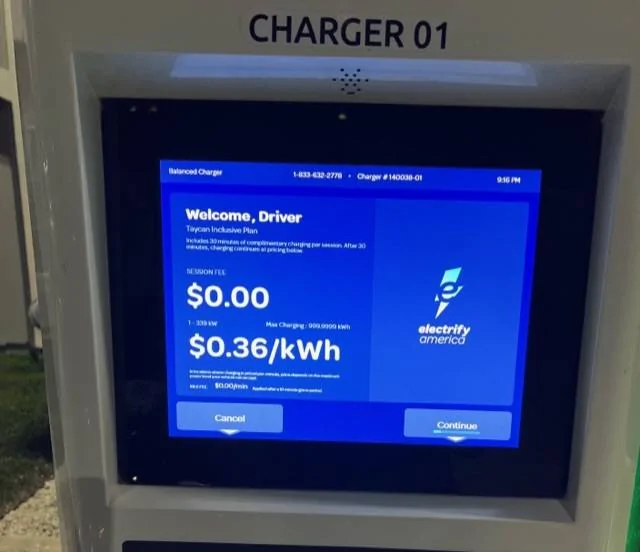
5) It should activate the “Taycan Inclusive Plan” on the EA screen
Porsche Taycan How to operate Electrify America free charging IMG_1540


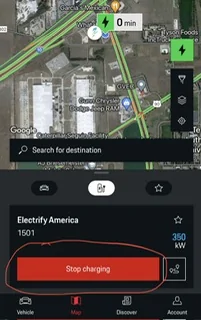
6) It should show “Stop Charging” when you go back to My Porsche App
Porsche Taycan How to operate Electrify America free charging IMG_1541


Then viola! Charing your Taycan. Just be sure to move after 30min.

Hope this helps!
 

metamatt

New Member
First Name
Matt
Joined
Nov 30, 2024
Threads
0
Messages
1
Reaction score
4
Location
San Francisco, CA, USA
Vehicles
2023 Taycan Cross Turismo 4S, 2018 Audi S5
Country flag
I had this problem, and wrestled with it for a while, and was eventually able to get it fixed; I found the info in this thread helpful but also learned of a few new complications not covered here, so I thought I'd document them in case it helps anyone else.

First off, background. I leased a certified pre-owned 2023 Taycan which came with the 3 years free at EA deal, so I'm not the first owner of the car, but I did confirm the remainder of that charging promotion should transfer to me. It did in fact work via the MyPorsche app (if I pull up to an EA charger, and use the app, signed in as me, to locate the exact charging station and charging port, and tell that port to start charging, I could then plug in the cable and it would charge the car). But it did not work via Plug&Charge -- this would always result in an error.

I spent some time with the dealer who leased me the car, and eventually got passed along to level 2 Porsche tech support, and they explained that the 3-year deal is actually 3 separate 1-year deals, so at the end of the first and second year the certificate expires and needs to be reprovisioned as a new certificate, and only certain EA chargers know how to handle this case, so once a year, the first time each year after the previous certificate expires, the owner needs to visit one of these special chargers, which will update the infrastructure and after that it should work anywhere. Porsche actually has a map of EA chargers known to handle this case correctly, indexed by nearest Porsche dealer, so if you tell them a dealership they will tell you the nearest EA charger known to handle this case. They thought this was the explanation for the problem I was having, so they told me to visit a certain charger, reset the PCM, re-activate Plug&Charge, plug into that charger, and it should work. I tried this. It did not work (but I believe that could be helpful in some other case, or maybe I'll need to do it next year).

I then needed to take the car in for service (for what I thought was unrelated issues, but since I was there, I asked them to look into Plug&Charge as well). While they were running their normal diagnostic suite they found an issue with the charging port door, which apparently didn't prevent charging or show any end-user-visible error codes in the app or car itself, but somehow interfered with Plug&Charge. They fixed the problem with the charging port door, and when they returned the car to me, now Plug&Charge works fine.

In summary, if anyone is having problems with Plug&Charge, maybe you have an undiagnosed hardware problem with the car itself, or maybe you're facing the interim certificate expiration issue. I hope this helps someone.
Sponsored


Top