Sponsored

Taycan Instrument Cluster: 3 dial set up?

arijaycomet

Well-Known Member
First Name
Ari
Joined
Dec 24, 2020
Threads
13
Messages
264
Reaction score
270
Location
Cleveland, Ohio USA
Vehicles
2021 Porsche Taycan 4 Cross Turismo
Country flag
Why the sigh? The OP clearly knows how to access the menus from the photo they posted.
No, they do not. They are saying they are clicking the roller wheel button, and only seeing the options within that. They were unaware to scroll up/down first once highlighting the correct zone. So I'd disagree with your comment wholeheartedly.

EDIT: Worded differently, they seem to be aware of how to select the left/middle/right zones, but instead of then scrolling up/down within that zone to choose a different sub menu, they appear to be clicking the wheel, which changes within that menu (eg: reset trip meters, etc) rather than navigating between options (eg: ADAS, G-Meter, Tire Pressures, etc)
Sponsored
 

Hirschaj

Well-Known Member
First Name
Jim
Joined
Sep 5, 2021
Threads
68
Messages
2,223
Reaction score
2,617
Location
Austin TX
Vehicles
2022 Taycan CT4 - Mamba Green, 2022 Challenger
Country flag
No, they do not. They are saying they are clicking the roller wheel button, and only seeing the options within that. They were unaware to scroll up/down first once highlighting the correct zone. So I'd disagree with your comment wholeheartedly.

EDIT: Worded differently, they seem to be aware of how to select the left/middle/right zones, but instead of then scrolling up/down within that zone to choose a different sub menu, they appear to be clicking the wheel, which changes within that menu (eg: reset trip meters, etc) rather than navigating between options (eg: ADAS, G-Meter, Tire Pressures, etc)
Possibly, that's why I added a video showing me scrolling through. They did not specify which button they click. They definitely need to click a button to get to the proper tube first. Then they need to scroll.
 

arijaycomet

Well-Known Member
First Name
Ari
Joined
Dec 24, 2020
Threads
13
Messages
264
Reaction score
270
Location
Cleveland, Ohio USA
Vehicles
2021 Porsche Taycan 4 Cross Turismo
Country flag
Possibly, that's why I added a video showing me scrolling through. They did not specify which button they click. They definitely need to click a button to get to the proper tube first. Then they need to scroll.
Let's be honest your reply was the most constructive one, followed perhaps then by mine. Maybe between your comments and my link too, the OP will figure it out. I did appreciate that your first sentence of your first reply was more or less RTFM without being so direct hahahahaha :cool: ?
 

Hirschaj

Well-Known Member
First Name
Jim
Joined
Sep 5, 2021
Threads
68
Messages
2,223
Reaction score
2,617
Location
Austin TX
Vehicles
2022 Taycan CT4 - Mamba Green, 2022 Challenger
Country flag
Let's be honest your reply was the most constructive one, followed perhaps then by mine. Maybe between your comments and my link too, the OP will figure it out. I did appreciate that your first sentence of your first reply was more or less RTFM without being so direct hahahahaha :cool: ?
? It's funny because RTFM was my first thought. Then I realized that the manual can be pretty confusing at times.

Your answer was quite extensive and I'm sure that OP will get this resolved as a result. That's one of the reasons I love this forum, because so many people jumped in right away to try and assist the OP. If the other posts on this forum are any indication, this thread will now derail and go way off topic (in a good way).
 

MAPC

Well-Known Member
Joined
Nov 21, 2023
Threads
15
Messages
199
Reaction score
190
Location
Darien CT
Vehicles
2020 Taycan 4S, 2023.5 Defender, 2019 X1
Country flag
Sigh... so many replies and yet nobody has actually answered the OPs question.

Screenshot 2024-01-20 at 2.11.04 PM.webp

Here goes actual ANSWERS:

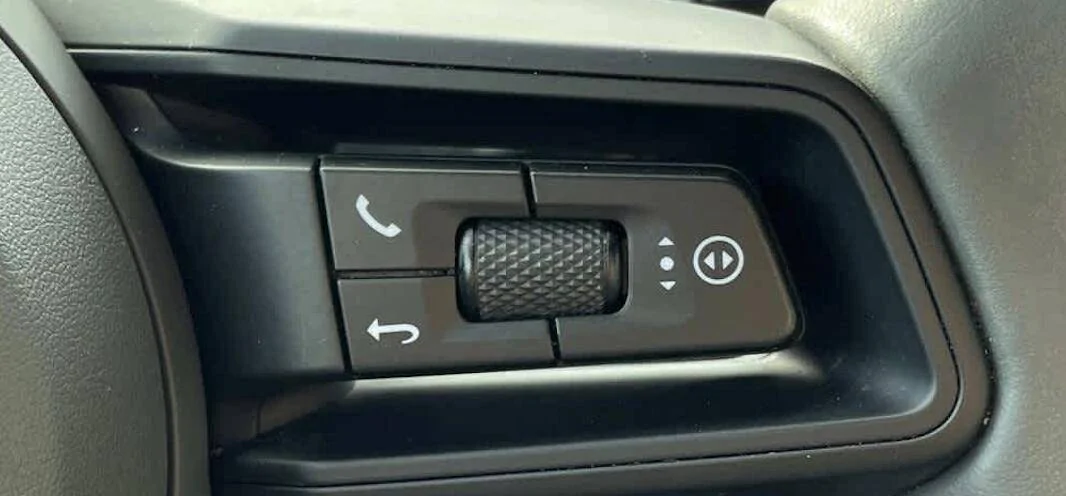
On the RIGHT side of your steering wheel are a total of 3x buttons (4x if you count the roller wheel can be pressed). Top left corner is the phone button which will bring up phone features, but can also be used to answer/hang up on an incoming/current call. Button left corner is the "Back" button, which will come back to. The most important button here that you're "missing out on" is the far right button -- note the right/left triangles with the circle around it. That is what you need to use---

Using that RIGHT most button on the steering wheel (press the area where the circle with the two triangles exist) and watch the instrument cluster. You will see a yellow indicator move from left to right, cycling from left tube, middle tube, right right, and then start again left tube. Once you have selected which tube/zone you want, rotate the right thumb wheel up/down to get to the section you want.

Examples on the LEFT tube can be things like tire pressure, or ADAS features. Examples of what can be in the middle tube is map, larger map, information, or a reduced mode. Examples of the right zone can be things like navigation, trip computer, or information. Note that the information zone on the right can be customized using the center PCM, under Displays -> Instrument Cluster ....

ALSO important to note: within EACH zone, you can click the thumb wheel to bring up deeper options. For example if you use the right most circle button to select the left tube, then rotate up/down to get to tire pressures, then click the wheel to select "deviation" if you want. Or another example is using the right circle to select/highlight the right zone, scroll up/down to get to navigation, and you can click the wheel to then choose compass.

Note: when you are in large map, or reduced display, you cannot see those right/left sections. They are only visible in the "information" (top) or smaller map choices. Hopefully this answers your questions but if not LMK and I can make a quick video --

EDIT -- although 2-years old this video shows precisely what you need to do, to navigate around the instrument cluster, and I bet will answer 99% of your questions -- check it out: (not mine, jsut found on YouTube)
As typical, great response by @arijaycomet


MAPC

Well-Known Member
Joined
Nov 21, 2023
Threads
15
Messages
199
Reaction score
190
Location
Darien CT
Vehicles
2020 Taycan 4S, 2023.5 Defender, 2019 X1
Country flag
My standard set up is, L2R:
Assistance systems (I use ACC a LOT)
Power meter
Trip meter (flip to Navigation when using Nav)
 

2P168S

Well-Known Member
Joined
May 18, 2023
Threads
9
Messages
154
Reaction score
164
Location
Atlanta, GA
Vehicles
2022 Taycan RWD
Country flag
No need to be so condescending. The OP clearly knows how to navigate between the gages as well as find the suboptions by clicking. This is clear from the original post. Hence my answer that the options for each “pod” are accessed by using the scroll wheel prior to clicking.

Sigh... so many replies and yet nobody has actually answered the OPs question.

Screenshot 2024-01-20 at 2.11.04 PM.png

Here goes actual ANSWERS:

On the RIGHT side of your steering wheel are a total of 3x buttons (4x if you count the roller wheel can be pressed). Top left corner is the phone button which will bring up phone features, but can also be used to answer/hang up on an incoming/current call. Button left corner is the "Back" button, which will come back to. The most important button here that you're "missing out on" is the far right button -- note the right/left triangles with the circle around it. That is what you need to use---

Using that RIGHT most button on the steering wheel (press the area where the circle with the two triangles exist) and watch the instrument cluster. You will see a yellow indicator move from left to right, cycling from left tube, middle tube, right right, and then start again left tube. Once you have selected which tube/zone you want, rotate the right thumb wheel up/down to get to the section you want.

Examples on the LEFT tube can be things like tire pressure, or ADAS features. Examples of what can be in the middle tube is map, larger map, information, or a reduced mode. Examples of the right zone can be things like navigation, trip computer, or information. Note that the information zone on the right can be customized using the center PCM, under Displays -> Instrument Cluster ....

ALSO important to note: within EACH zone, you can click the thumb wheel to bring up deeper options. For example if you use the right most circle button to select the left tube, then rotate up/down to get to tire pressures, then click the wheel to select "deviation" if you want. Or another example is using the right circle to select/highlight the right zone, scroll up/down to get to navigation, and you can click the wheel to then choose compass.

Note: when you are in large map, or reduced display, you cannot see those right/left sections. They are only visible in the "information" (top) or smaller map choices. Hopefully this answers your questions but if not LMK and I can make a quick video --

EDIT -- although 2-years old this video shows precisely what you need to do, to navigate around the instrument cluster, and I bet will answer 99% of your questions -- check it out: (not mine, jsut found on YouTube)


OP
OP

BigAndy1234

Member
First Name
Andrew
Joined
Jan 19, 2024
Threads
2
Messages
12
Reaction score
9
Location
California, USA
Vehicles
Taycan 4S
Country flag
I made a quick video for you to show you the options that you probably should see too. This is just so you have a point of reference.


Sigh... so many replies and yet nobody has actually answered the OPs question.

Screenshot 2024-01-20 at 2.11.04 PM.png

Here goes actual ANSWERS:

On the RIGHT side of your steering wheel are a total of 3x buttons (4x if you count the roller wheel can be pressed). Top left corner is the phone button which will bring up phone features, but can also be used to answer/hang up on an incoming/current call. Button left corner is the "Back" button, which will come back to. The most important button here that you're "missing out on" is the far right button -- note the right/left triangles with the circle around it. That is what you need to use---

Using that RIGHT most button on the steering wheel (press the area where the circle with the two triangles exist) and watch the instrument cluster. You will see a yellow indicator move from left to right, cycling from left tube, middle tube, right right, and then start again left tube. Once you have selected which tube/zone you want, rotate the right thumb wheel up/down to get to the section you want.

Examples on the LEFT tube can be things like tire pressure, or ADAS features. Examples of what can be in the middle tube is map, larger map, information, or a reduced mode. Examples of the right zone can be things like navigation, trip computer, or information. Note that the information zone on the right can be customized using the center PCM, under Displays -> Instrument Cluster ....

ALSO important to note: within EACH zone, you can click the thumb wheel to bring up deeper options. For example if you use the right most circle button to select the left tube, then rotate up/down to get to tire pressures, then click the wheel to select "deviation" if you want. Or another example is using the right circle to select/highlight the right zone, scroll up/down to get to navigation, and you can click the wheel to then choose compass.

Note: when you are in large map, or reduced display, you cannot see those right/left sections. They are only visible in the "information" (top) or smaller map choices. Hopefully this answers your questions but if not LMK and I can make a quick video --

EDIT -- although 2-years old this video shows precisely what you need to do, to navigate around the instrument cluster, and I bet will answer 99% of your questions -- check it out: (not mine, jsut found on YouTube)
Yes.That is exactly what I am doing but when I select the left tube (for example) ONLY the tire pressure is an option. There is nothing else if I scroll using the wheel
 

arijaycomet

Well-Known Member
First Name
Ari
Joined
Dec 24, 2020
Threads
13
Messages
264
Reaction score
270
Location
Cleveland, Ohio USA
Vehicles
2021 Porsche Taycan 4 Cross Turismo
Country flag
Yes.That is exactly what I am doing but when I select the left tube (for example) ONLY the tire pressure is an option. There is nothing else if I scroll using the wheel
So you use the right button (circle) to switch between tubes, and then -prior- to clicking the scroll wheel, you roll it up/down -- does it bring up a menu like in this video? but only "Tire Info" is listed? Make sure you're not clicking the scroll wheel first by accident. Out of curiosity, does your right 'tube' have more options, like in the video Hirschaj posted?
 

Hirschaj

Well-Known Member
First Name
Jim
Joined
Sep 5, 2021
Threads
68
Messages
2,223
Reaction score
2,617
Location
Austin TX
Vehicles
2022 Taycan CT4 - Mamba Green, 2022 Challenger
Country flag
Yes.That is exactly what I am doing but when I select the left tube (for example) ONLY the tire pressure is an option. There is nothing else if I scroll using the wheel
I went to my car and checked. From the pictures you shared you have to be clicking the scroll wheel before you try to scroll. Don’t do that. Just scroll.
 

Hirschaj

Well-Known Member
First Name
Jim
Joined
Sep 5, 2021
Threads
68
Messages
2,223
Reaction score
2,617
Location
Austin TX
Vehicles
2022 Taycan CT4 - Mamba Green, 2022 Challenger
Country flag
So you use the right button (circle) to switch between tubes, and then -prior- to clicking the scroll wheel, you roll it up/down -- does it bring up a menu like in this video? but only "Tire Info" is listed? Make sure you're not clicking the scroll wheel first by accident. Out of curiosity, does your right 'tube' have more options, like in the video Hirschaj posted?
I was slower on the reply, but this is exactly correct!
 
OP
OP

BigAndy1234

Member
First Name
Andrew
Joined
Jan 19, 2024
Threads
2
Messages
12
Reaction score
9
Location
California, USA
Vehicles
Taycan 4S
Country flag
Sigh... so many replies and yet nobody has actually answered the OPs question.

Screenshot 2024-01-20 at 2.11.04 PM.png

Here goes actual ANSWERS:

On the RIGHT side of your steering wheel are a total of 3x buttons (4x if you count the roller wheel can be pressed). Top left corner is the phone button which will bring up phone features, but can also be used to answer/hang up on an incoming/current call. Button left corner is the "Back" button, which will come back to. The most important button here that you're "missing out on" is the far right button -- note the right/left triangles with the circle around it. That is what you need to use---

Using that RIGHT most button on the steering wheel (press the area where the circle with the two triangles exist) and watch the instrument cluster. You will see a yellow indicator move from left to right, cycling from left tube, middle tube, right right, and then start again left tube. Once you have selected which tube/zone you want, rotate the right thumb wheel up/down to get to the section you want.

Examples on the LEFT tube can be things like tire pressure, or ADAS features. Examples of what can be in the middle tube is map, larger map, information, or a reduced mode. Examples of the right zone can be things like navigation, trip computer, or information. Note that the information zone on the right can be customized using the center PCM, under Displays -> Instrument Cluster ....

ALSO important to note: within EACH zone, you can click the thumb wheel to bring up deeper options. For example if you use the right most circle button to select the left tube, then rotate up/down to get to tire pressures, then click the wheel to select "deviation" if you want. Or another example is using the right circle to select/highlight the right zone, scroll up/down to get to navigation, and you can click the wheel to then choose compass.

Note: when you are in large map, or reduced display, you cannot see those right/left sections. They are only visible in the "information" (top) or smaller map choices. Hopefully this answers your questions but if not LMK and I can make a quick video --

EDIT -- although 2-years old this video shows precisely what you need to do, to navigate around the instrument cluster, and I bet will answer 99% of your questions -- check it out: (not mine, jsut found on YouTube)
Thanks a lot you and everyone else. Finally worked it out. Was pressing before scrolling :-(


Top