magnitude
Well-Known Member
- First Name
- Heinz
- Joined
- Apr 13, 2023
- Threads
- 13
- Messages
- 326
- Reaction score
- 222
- Location
- North California
- Vehicles
- 2021 Taycan Turbo

- Thread starter
- #1
Noticed this on my drive home yesterday, because it was non-typically stop and go.
First, let me preface that I turned off the setting where InnoDrive automatically honors the speed limit, because it sometimes engaged speed limits that weren't even for me. (I'm not a truck!) However, as you may know, InnoDrive still prompts you (in the HUD at least) when it detects a speed limit. If you want to engage it, pull the cruise control stalk to "Resume". So far so good, nothing surprising.
But did you know that you can actually always set the preset speed to the currently know speed limit by pressing "Resume"? No matter when it was detected, without prompt, and most importantly for me, even if you just turned driving assistance on and it's still set to the super low speed you're currently going?
This was a godsend when I turned on InnoDrive in stop and go. I was doing something like 6 mph due to traffic, and previously I'd always annoyingly push the stalk forward until it's at a more reasonable maximum speed. Now I know I can just push up to "Resume", and I'm good to go.
I don't know if that works with ACC only.
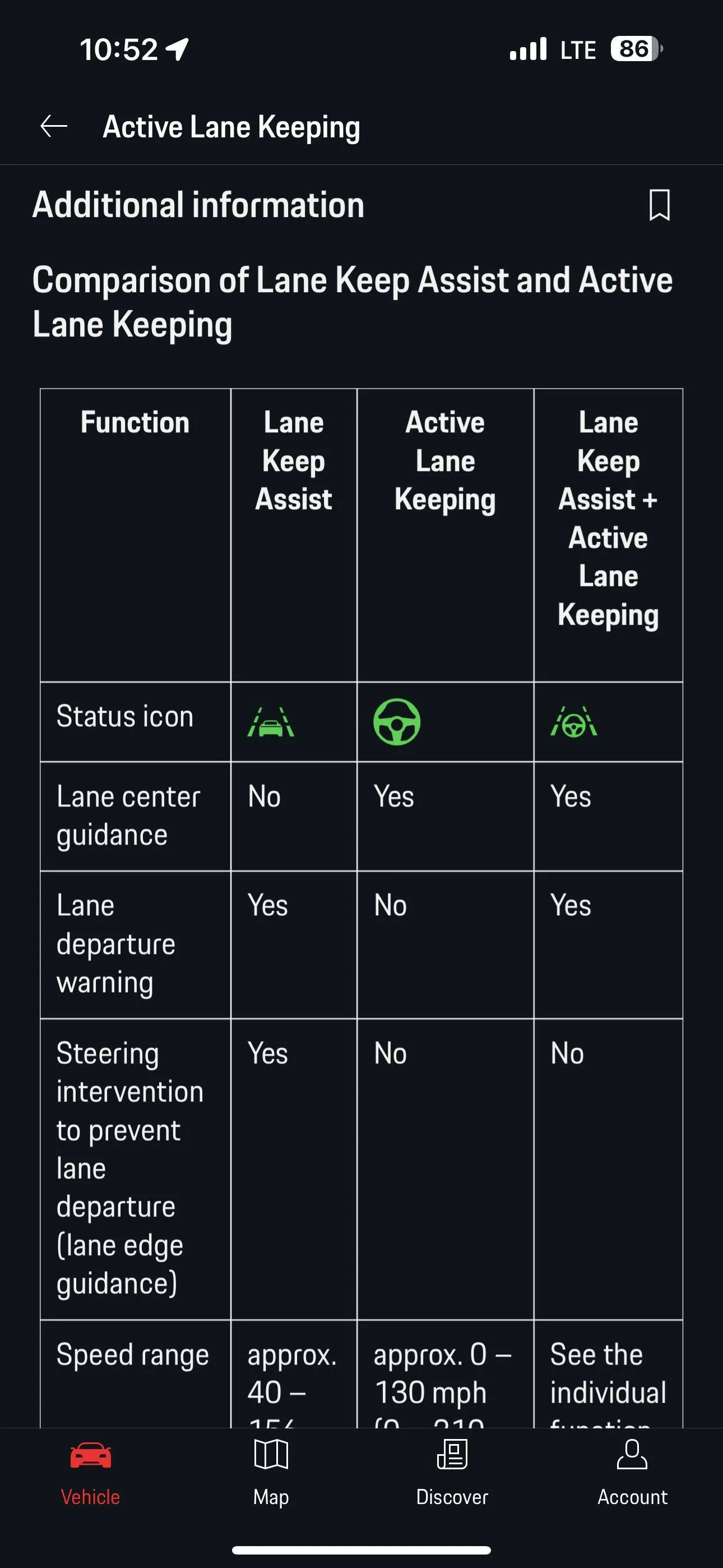
Second, and this is more of a question: On that same trip, I sometimes saw in the HUD, during stop and go, that the lane markers turned gray (from green), but the steering wheel stayed green. And indeed, the car was still steering.
I'm a bit confused what that means. I know that a gray steering wheel means it's not actively steering. And I always had the impression that one or two gray lane markers meant that the car won't actively keep me within the lane marker that's not green. But what does a green steering wheel with gray lane markers mean, especially because it still did steer?
First, let me preface that I turned off the setting where InnoDrive automatically honors the speed limit, because it sometimes engaged speed limits that weren't even for me. (I'm not a truck!) However, as you may know, InnoDrive still prompts you (in the HUD at least) when it detects a speed limit. If you want to engage it, pull the cruise control stalk to "Resume". So far so good, nothing surprising.
But did you know that you can actually always set the preset speed to the currently know speed limit by pressing "Resume"? No matter when it was detected, without prompt, and most importantly for me, even if you just turned driving assistance on and it's still set to the super low speed you're currently going?
This was a godsend when I turned on InnoDrive in stop and go. I was doing something like 6 mph due to traffic, and previously I'd always annoyingly push the stalk forward until it's at a more reasonable maximum speed. Now I know I can just push up to "Resume", and I'm good to go.
I don't know if that works with ACC only.
Second, and this is more of a question: On that same trip, I sometimes saw in the HUD, during stop and go, that the lane markers turned gray (from green), but the steering wheel stayed green. And indeed, the car was still steering.
I'm a bit confused what that means. I know that a gray steering wheel means it's not actively steering. And I always had the impression that one or two gray lane markers meant that the car won't actively keep me within the lane marker that's not green. But what does a green steering wheel with gray lane markers mean, especially because it still did steer?
Sponsored