Sponsored

Wireless apple carplay

nickleeqmh

New Member
First Name
Nick
Joined
Feb 18, 2024
Threads
1
Messages
3
Reaction score
0
Location
HK
Vehicles
Taycan MY23
Country flag
Hi, i am from HK.
Just wanna know if you guys need the phone to be plugged in with a wire to run apple carplay (esp. google maps).
Sponsored
 

hifi239

Well-Known Member
First Name
Will
Joined
Mar 15, 2023
Threads
27
Messages
470
Reaction score
424
Location
Boston
Vehicles
Taycan
Country flag
The Taycan has wireless carplay. For me, it works well with Waze and Apple Maps. I don't use Google Maps for driving. If yours isn't working there are procedures to pair your phone with the car so it connects wirelessly when you get in.
 
OP
OP
nickleeqmh

nickleeqmh

New Member
First Name
Nick
Joined
Feb 18, 2024
Threads
1
Messages
3
Reaction score
0
Location
HK
Vehicles
Taycan MY23
Country flag
I tried pairing my iphone to the car's wifi, but even after its connection, it doesnt seem to work. I reas about 2.5 ghz or 5ghz issue, is that the problem?
Do you have the procedures that you can show me?
 

B61

Well-Known Member
First Name
Bine
Joined
May 31, 2021
Threads
10
Messages
2,722
Reaction score
1,724
Location
SI
Vehicles
4S (8/2025), CT4 (9/2021-8/2025, 65k km)
Country flag
CarPlay is (still) a nightmare. I never know how it will be.
It was even worse before “big” uPdate… but i’m still loosing connection too often for paid money :headbang:
today, I lost it four times in less than 50 minutes; it reconnects back within a minute (or two); after 5th lost connection, i had to reconnect device manually.
overall, it’s a shame for Porsche, but nobody cares:swear:
 

Hirschaj

Well-Known Member
First Name
Jim
Joined
Sep 5, 2021
Threads
68
Messages
2,223
Reaction score
2,617
Location
Austin TX
Vehicles
2022 Taycan CT4 - Mamba Green, 2022 Challenger
Country flag
CarPlay is (still) a nightmare. I never know how it will be.
It was even worse before “big” uPdate… but i’m still loosing connection too often for paid money :headbang:
today, I lost it four times in less than 50 minutes; it reconnects back within a minute (or two); after 5th lost connection, i had to reconnect device manually.
overall, it’s a shame for Porsche, but nobody cares:swear:
As an added data point, this is not a problem for everyone. Wireless CarPlay is perfectly stable for me with my 2022 CT4 and my iPhone 15 Pro. I suspect it's not a widespread problem at all since we don't hear much about it on this forum. Porsche needs to work on portions of their software, but CarPlay seems alright overall.


B61

Well-Known Member
First Name
Bine
Joined
May 31, 2021
Threads
10
Messages
2,722
Reaction score
1,724
Location
SI
Vehicles
4S (8/2025), CT4 (9/2021-8/2025, 65k km)
Country flag
I have iPhone SE and Ct4 2021.
It was working fine in the beginning, when lots of forum members reported problems.
Then it became worse….after uPdate it was quite well….while lately (last few months), it became unreliable again…?‍♂
Maybe it’s related with the latest iOS, i don;t know.
 

Hirschaj

Well-Known Member
First Name
Jim
Joined
Sep 5, 2021
Threads
68
Messages
2,223
Reaction score
2,617
Location
Austin TX
Vehicles
2022 Taycan CT4 - Mamba Green, 2022 Challenger
Country flag
I have iPhone SE and Ct4 2021.
It was working fine in the beginning, when lots of forum members reported problems.
Then it became worse….after uPdate it was quite well….while lately (last few months), it became unreliable again…?‍♂
Maybe it’s related with the latest iOS, i don;t know.
My wireless CarPlay connection was a little flakey when I had an old iPhone XR. After upgrading to my new phone it has been rock solid. Maybe this is a case of Apple's planned obsolescence?
 

BigBob

Well-Known Member
First Name
Rob
Joined
Nov 27, 2021
Threads
46
Messages
1,959
Reaction score
1,533
Location
London
Vehicles
Taycan CT 4S, Range Rover Sport
Country flag
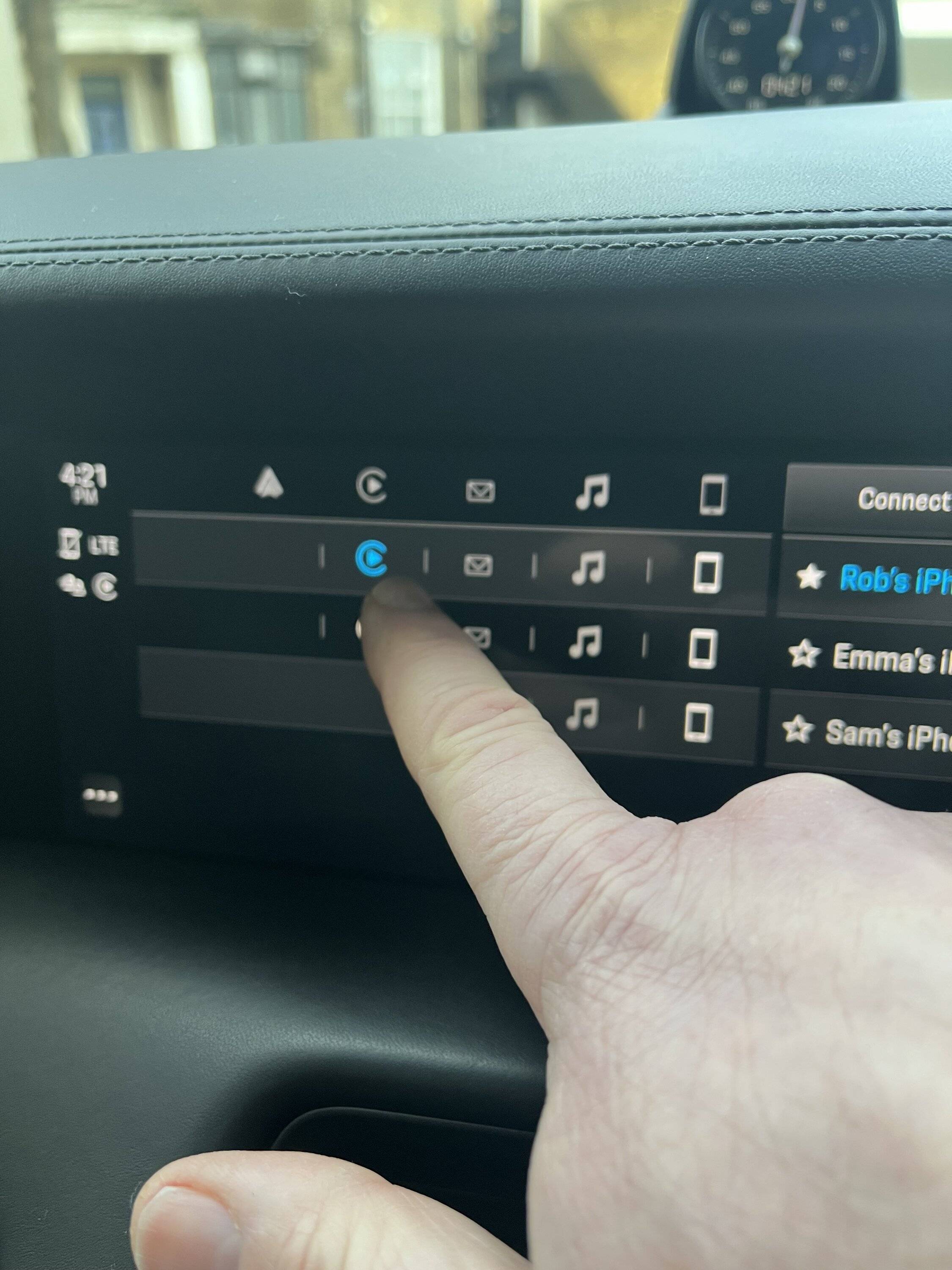
on the devices screen of the PCM, check you can see your phone set up. And then check (or press) the CarPlay logo ( circle with a triangle in it) next to the phone. It should connect then and stay connected.


B61

Well-Known Member
First Name
Bine
Joined
May 31, 2021
Threads
10
Messages
2,722
Reaction score
1,724
Location
SI
Vehicles
4S (8/2025), CT4 (9/2021-8/2025, 65k km)
Country flag
@Hirschaj I don’t know, my SE is less than 3 years old & I like it a lot…?‍♂

@BigBob you mean green CarPlay logo?
It’s not there if phone is not connected.
 

BigBob

Well-Known Member
First Name
Rob
Joined
Nov 27, 2021
Threads
46
Messages
1,959
Reaction score
1,533
Location
London
Vehicles
Taycan CT 4S, Range Rover Sport
Country flag
@Hirschaj I don’t know, my SE is less than 3 years old & I like it a lot…?‍♂

@BigBob you mean green CarPlay logo?
It’s not there if phone is not connected.
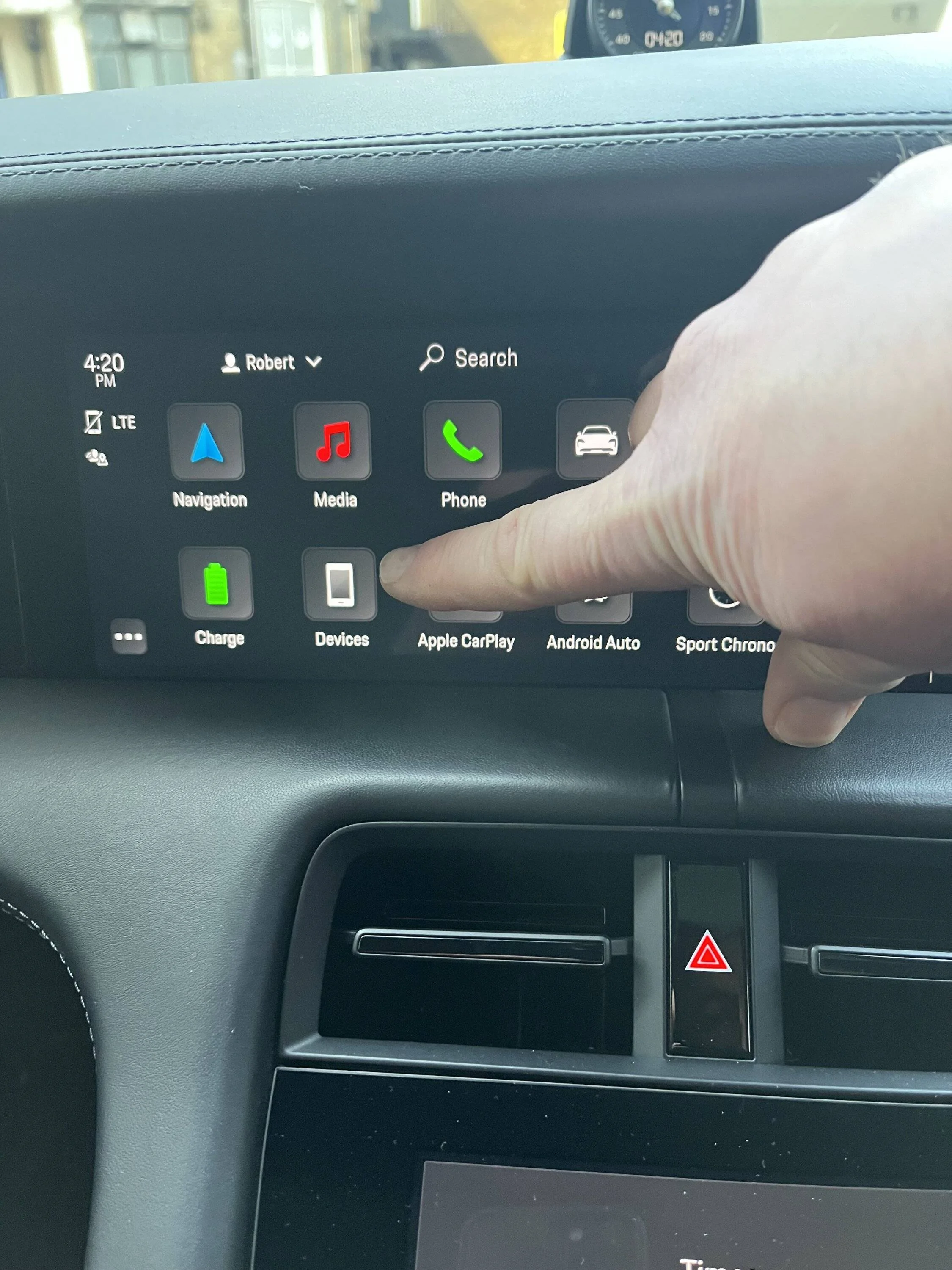
no, press the devices icon (looks like a white iPhone and is next to where my green airplay icon appears in my car) and that takes you to list of phones you've got connected. It offers you chance to then select what you want connected eg bluetooth or airplay.
 

Perry

Well-Known Member
First Name
Daniel
Joined
Mar 26, 2021
Threads
14
Messages
382
Reaction score
672
Location
Sweden
Vehicles
Tesla SP85D, Model P3D, Taycan Turbo S CT
Country flag
You shouldn't manually connect your phone to the car WiFi. How CarPlay works is that the phone will first connect via Bluetooth and then reconnect through WiFi. If you've manually joined the WiFi, the phone will connect, disconnect and then reconnect to the Wifi, making everything much slower and unreliable.

I had this exact problem with CarPlay and after hours of troubleshooting, this is what solved everything. Before it could take minutes before CarPlay would connect (sometimes not at all), but after removing the car WiFi from the phone, everything has been working relatively smoothly since then. Sometimes the car is slow to enable Bluetooth, but otherwise it connect relatively quickly.

Remember that you need to remove the WiFi network altogether, not just disable it. You can do that through Settings -> Wi-Fi -> "i" button next to the WiFi network -> "Forget This Network".

Edit: For clarity, since this post got some attention recently: This was strictly for J1.1. I have not seen the same behaviour for J1.2 MY2025 where CarPlay is much more reliable overall.
 
Last edited:

jcroix

Well-Known Member
First Name
John
Joined
Jul 29, 2021
Threads
3
Messages
63
Reaction score
60
Location
Austin
Vehicles
2022 Porsche Taycan 4S
Country flag
I have a 2022 4S, and I had problems initially setting it up. I had to use a wire to do the first connection, and only then was I able to connect wirelessly. Have had no problems since.
 

B61

Well-Known Member
First Name
Bine
Joined
May 31, 2021
Threads
10
Messages
2,722
Reaction score
1,724
Location
SI
Vehicles
4S (8/2025), CT4 (9/2021-8/2025, 65k km)
Country flag
no, press the devices icon (looks like a white iPhone and is next to where my green airplay icon appears in my car) and that takes you to list of phones you've got connected. It offers you chance to then select what you want connected eg bluetooth or airplay.
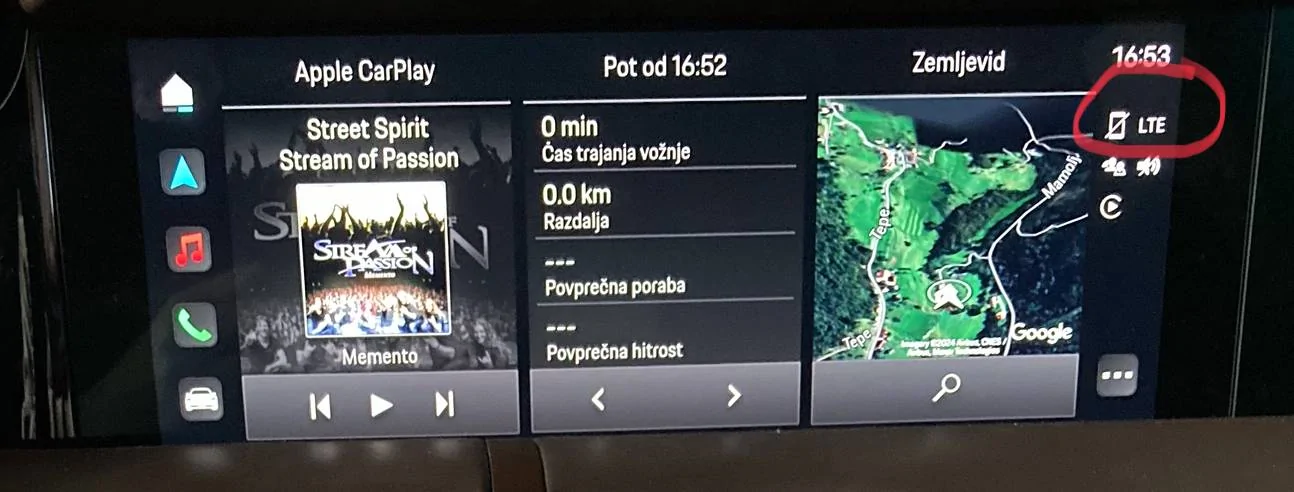
You meant this one?
(Marked red)

i’ll try next time when CarPlay won’t work.

Porsche Taycan Wireless apple carplay IMG_0496
 

B61

Well-Known Member
First Name
Bine
Joined
May 31, 2021
Threads
10
Messages
2,722
Reaction score
1,724
Location
SI
Vehicles
4S (8/2025), CT4 (9/2021-8/2025, 65k km)
Country flag
Your 2nd screen looks the same as mine, if I press on my way ?‍♂
Sponsored


Top