Sponsored

How to change pre-condition timer temperature?

whitex

Well-Known Member
Joined
Jul 30, 2021
Threads
87
Messages
8,198
Reaction score
7,236
Location
WA, USA
Vehicles
2023 Taycan TCT, 2024 Q8 eTron P+
Country flag
Does anyone know how to change the target temperature of the pre-conditioning timer? Two years in, and Porsche UI still eludes me. I can change it for manual pre-conditioning, but for timer, it only shows the target temperature but does not let me change it. Changing it in the manual pre-conditioning tab does not alter the timer's target temperature.
Sponsored
 

SSTaycan

Active Member
First Name
Scott
Joined
Oct 21, 2022
Threads
3
Messages
44
Reaction score
9
Location
US
Vehicles
2021 Taycan 4S, 2019 Audi Q5
Country flag
The only workaround I've found is change it in "Pre-Climate" as they are calling it now, activate it there, for a minute or so, then End "Pre-climate". That will then be the target temperature in the Timer.
Maybe I missed something. But then again this seems rather typical in Porsche EV World.
 

SergeyIndy

Well-Known Member
First Name
Sergey
Joined
Dec 19, 2021
Threads
41
Messages
2,441
Reaction score
1,823
Location
Indianapolis
Vehicles
24 Macan GTS, 23 Taycan Turbo, 20 Cayenne Turbo
Country flag
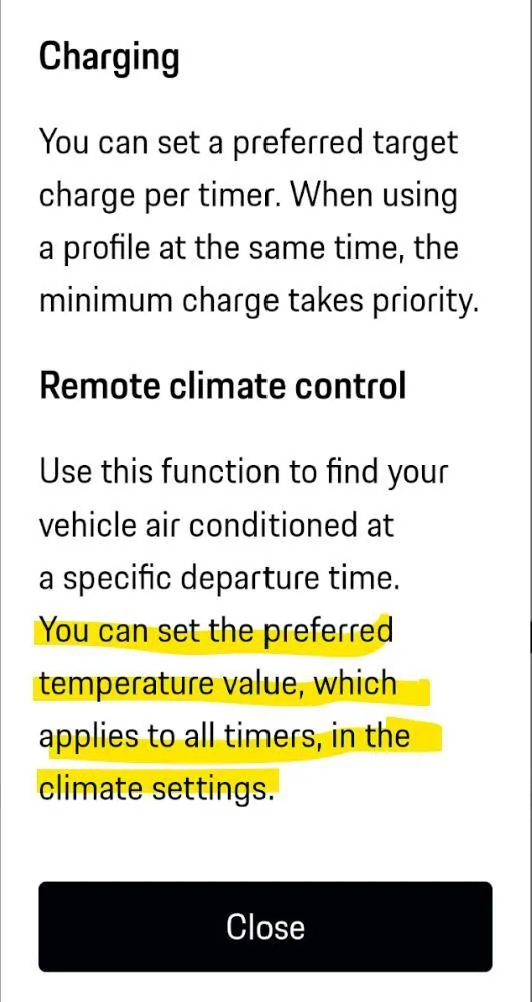
My understanding is that the Timer pre-climate target is what is currently set by the car climate control. Also, this is the help screen for the Timer in the app that seems to support that assumption.

Porsche Taycan How to change pre-condition timer temperature? 1734317232090-4r
 

W1NGE

Well-Known Member
First Name
Adrian
Joined
Jan 11, 2021
Threads
53
Messages
11,015
Reaction score
6,805
Location
Aberdeen, Scotland
Vehicles
992.2, ex GTS ST owner, Macan T
Country flag
The only workaround I've found is change it in "Pre-Climate" as they are calling it now, activate it there, for a minute or so, then End "Pre-climate". That will then be the target temperature in the Timer.
Maybe I missed something. But then again this seems rather typical in Porsche EV World.
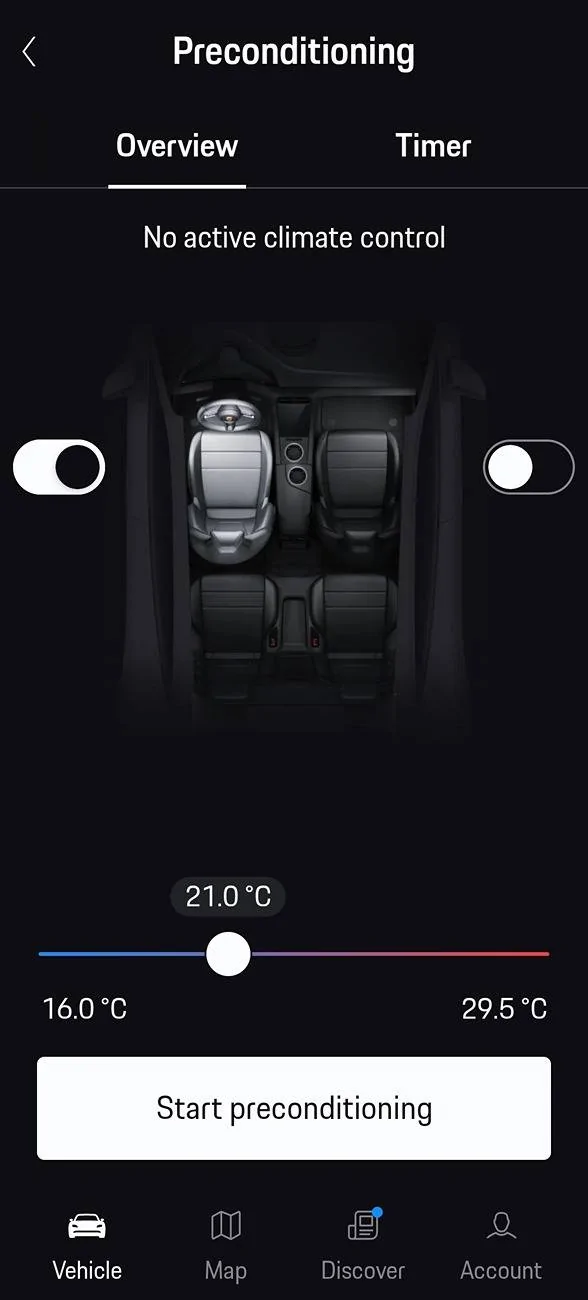
Set the temp in the preconditioning (cabin temp) settings and then program the timer.

Porsche Taycan How to change pre-condition timer temperature? Screenshot_20241216_081302
 
OP
OP
whitex

whitex

Well-Known Member
Joined
Jul 30, 2021
Threads
87
Messages
8,198
Reaction score
7,236
Location
WA, USA
Vehicles
2023 Taycan TCT, 2024 Q8 eTron P+
Country flag
Set the temp in the preconditioning (cabin temp) settings and then program the timer.

Screenshot_20241216_081302.webp
When I set this, then go the Timer tab, the Timer climate temp value does not change. The only thing that kind of works (not 100%, but at least for the driver's side temperature) is what @SSTaycan suggested. I personally would expect to be able to click on the temperature in the Timer and tab, the same as the target SoC, to let me change it, but apparently that's not the German way. Perhaps it makes sense after a bunch of German lagers?

Of course point is moot for now, I no longer need to set timers. My 1.75 year old Taycan has informed me tonight that it has 94 miles of life left (the car refuses to charge from AC tried different chargers, both ports, it doesn't charge from DC either, tried 2 DC chargers). Hopefully it lives long enough for me to drive it to the dealer tomorrow on its own power before it dies or catches on fire. The car is under ARB7 recall, so Porsche claims they are monitoring my battery - doing a bang-up job at it apparently. So much for Porsche marketing about advanced telemetry AI fault predictions. Maybe they should fire all the marketing people and hire some good engineers instead. Tesla managed to scale pretty good with no marketing, just engineering. I bet Porsche and Piech families would love if Porsche had Tesla's market cap.


tophamn

Well-Known Member
First Name
Neil
Joined
Jul 17, 2024
Threads
1
Messages
708
Reaction score
474
Location
Bristol UK
Vehicles
Taycan ST GTS
Country flag
When I set this, then go the Timer tab, the Timer climate temp value does not change.
Same for me.

I also see a LHD car in the app (same as @W1NGE above) but my car's RHD. Anyone know (a) if it's possible to correct this (I've seen other post images from the app showing RHD) and (b) if the app maps heating left/right or driver/passenger as per the image?
 

W1NGE

Well-Known Member
First Name
Adrian
Joined
Jan 11, 2021
Threads
53
Messages
11,015
Reaction score
6,805
Location
Aberdeen, Scotland
Vehicles
992.2, ex GTS ST owner, Macan T
Country flag
When I set this, then go the Timer tab, the Timer climate temp value does not change. The only thing that kind of works (not 100%, but at least for the driver's side temperature) is what @SSTaycan suggested. I personally would expect to be able to click on the temperature in the Timer and tab, the same as the target SoC, to let me change it, but apparently that's not the German way. Perhaps it makes sense after a bunch of German lagers?

Of course point is moot for now, I no longer need to set timers. My 1.75 year old Taycan has informed me tonight that it has 94 miles of life left (the car refuses to charge from AC tried different chargers, both ports, it doesn't charge from DC either, tried 2 DC chargers). Hopefully it lives long enough for me to drive it to the dealer tomorrow on its own power before it dies or catches on fire. The car is under ARB7 recall, so Porsche claims they are monitoring my battery - doing a bang-up job at it apparently. So much for Porsche marketing about advanced telemetry AI fault predictions. Maybe they should fire all the marketing people and hire some good engineers instead. Tesla managed to scale pretty good with no marketing, just engineering. I bet Porsche and Piech families would love if Porsche had Tesla's market cap.
The default is to use the last AC setting in the PCM - so if set to 21C then pre-heat will use this value. This is entirely logical given this will be the common temp the cabin is preferred to be and therefore saves an additional slide and click.

If you want a different temp then changing it in the preheat screen is the only way on the app and then adding the timer will use that value - that's why the timer is available from the preheat screen as well as from the charging screens.

This is all documented in the Owner's Manual and how I've used the feature since 2020.
 
OP
OP
whitex

whitex

Well-Known Member
Joined
Jul 30, 2021
Threads
87
Messages
8,198
Reaction score
7,236
Location
WA, USA
Vehicles
2023 Taycan TCT, 2024 Q8 eTron P+
Country flag
The default is to use the last AC setting in the PCM - so if set to 21C then pre-heat will use this value. This is entirely logical given this will be the common temp the cabin is preferred to be and therefore saves an additional slide and click.

If you want a different temp then changing it in the preheat screen is the only way on the app and then adding the timer will use that value - that's why the timer is available from the preheat screen as well as from the charging screens.

This is all documented in the Owner's Manual and how I've used the feature since 2020.
The Timer tab in Climate menu lets you change target SoC, listed right next to target Temperature. Why is one changeable in Timer tab and not the other (technically the target SoC could also be changed in Charging settings). It would be much more intuitive (and more functional) if you could change either of the parameters listed in the Timer tab. No problem if it defaults to the last used PCM temperature, as long as you can override it, just like the target SoC.
Sponsored


Top