Sponsored

TIM

Well-Known Member
First Name
Philippe
Joined
Mar 10, 2019
Threads
33
Messages
200
Reaction score
293
Location
Switzerland
Vehicles
Yes!
Country flag
I finally find the best way to manage my music on USB

My first tip: don't use File'n'Folder if you have a huge library as you have no "elevator" on the right of the screen, you have to "swipe through" (you'll never listen anymore to ZZ top :CWL:)


Better browse per artist (it's my usual way to listen to music: per artist) as this time you'll have the "elevator" on the right (ZZ Top is back again :rock::rock:)


But there is still a problem: when you select "all" then it play all the 1st song from all album then 2nd and so on. So the workaround is to renumber your track according your taste (see the pdf to see how to do it with https://www.mp3tag.de/en/).

If you want to play music according "Genre" you will have the same problem as before, You can use the same workaround as before or you can generate playlist with https://www.mp3tag.de/en/ I advise when creating them to place the playlist on the root of the USB.
Sponsored


Attachments

Last edited by a moderator:
evanevery

Well-Known Member
First Name
Ed
Joined
Sep 10, 2019
Threads
38
Messages
998
Reaction score
1,143
Location
Wisconsin
Vehicles
2020 Taycan Turbo S, 2019 BMW i8, 2023 BMW iXM60
Country flag
No, there would be very little difference between searching via folder/files and artists if you have a big collection with many artists (and folders).

In any case, we shouldn't have to work for the software. The software should work for us. We shouldn't be forced to try and use some "work around" to get past the stupidity of Porsche's design. The fact that most folks (with serious music libraries) arrange them by artist and album should be enough motivation to give us a method which allows us to search all of the folders effectively.

Porsche COULD have done this if they gave us a simple wheel (or even a slider) on the lower console. But they sacrificed functionality for appearance cause they didn't want any buttons or wheels to clutter up the console. (Makes we wonder how well a "Porsche Design" Toaster would actually make toast...) Still, a vertical slide bar on the lower console could be graphically added and then the further one slid their finger from the center/neutral the faster the list scrolled up or down.

I currently have 165 GB of music in my collection (271 artists, 7000 hi-res files (flac), in 531 albums). I manage these files on my network and continually keep a bunch of 256 GB thumb drives in sync for use in several of my cars. All but my Porsche deal with the library quite efficiently.

For what its worth, I personally loath "playlists". They only serve to overplay individual songs such that you never hear stuff if it doesn't end up on some playlist or another. I like to listen to my music album by album. This way I hear stuff that I would not normally get if I set up a playlist. I also prefer to "browse" my music collection (rather than "search by name") for similar reasons.

...and yes, I've also used the "ZZ Top" analogy in several other threads in the past. ;-)
 

svp6

Well-Known Member
Joined
Oct 6, 2019
Threads
4
Messages
512
Reaction score
598
Location
MN
Vehicles
4S
Country flag
I wish the voice recognition would be able to pick up the song from the library - think Spotify implementation in Tesla (play xx by yy) so you avoid scrolling altogether. SO far I have been successful to get the car to switch to USB with voice commands but not to select a song.

The other thing that drives me nuts is that "shuffle" in the Apple Carplay via Porsche implementation (not via phone) is there for artistic effect, as it does nothing..... Each time I select a playlist and choose shuffle, it rearranges the songs in the exact same order they were in the first place. Now that is one impressive magic trick....
 

evanevery

Well-Known Member
First Name
Ed
Joined
Sep 10, 2019
Threads
38
Messages
998
Reaction score
1,143
Location
Wisconsin
Vehicles
2020 Taycan Turbo S, 2019 BMW i8, 2023 BMW iXM60
Country flag
I wish the voice recognition would be able to pick up the song from the library - think Spotify implementation in Tesla (play xx by yy) so you avoid scrolling altogether. SO far I have been successful to get the car to switch to USB with voice commands but not to select a song.

The other thing that drives me nuts is that "shuffle" in the Apple Carplay via Porsche implementation (not via phone) is there for artistic effect, as it does nothing..... Each time I select a playlist and choose shuffle, it rearranges the songs in the exact same order they were in the first place. Now that is one impressive magic trick....
The other thing to consider is that using "Files and Folders" to locate (or browse) your selected music is actually significantly more efficient than asking to search by "artist"!

Using "Files and Folders" simply relies on the file system on the USB Drive. The software always has to go to the file system first to find anything. But when you ask to search by "Artist" (for example) the software doesn't use the file system it uses the metadata embedded in each individual file. That means that in order for the software to find all songs by a specific "artist", or on a specific "album" it has to open, read, and index each and every song on your USB device. The "metadata" or "tags" which contain that info are embedded into each song/track. So in order for them to be processed, searched, every single song needs to be opened up, read, and the contents of the metadata tags put into a database. ...and the software needs to go to the Files/Folders FIRST before it can even start to open, read, and index any file on the device. Although the Taycan appears to preserve this database to some degree, it will try and recreate it any time it detects a change to the filesystem on the USB device. (Add one song = ReIndex)

When you search by "files and folders" you do not need any metadata info at all. All you need is the file system itself. Once a file or folder is selected, the software can then parse the individual metadata in each song as it is played (album cover, etc).

Typically, the software will be indexing metadata in the background in any case but this can cause the Nav System to refuse to allow you access to any of the associated data until it is done. We have seen situations (when you have more than 3000 files or so), that the Taycan PCM will kick you completely out of USB access an into an unused FM Band as it tries to re-index when the car is restarted. (This has been tested and documented by myself and @louv in a couple other threads if you care to search for them).

How you sort and organize your "files and folders" can effectively achieve much the same results without having to open and index everything on your USB drive. Most folks (I believe) organize their music by artist and then album. If you do this, you already have a method to search by artist and/or album without having to create or maintain a metadata index. (Which the car will ultimately create anyway...)

Some folks I know also add another top level folder such that they have {Genre}/{Artist}/{Album} which also makes it easy to narrow down their browsing based on the type/genre of songs they want to listen to at some specific time. (This gets a little more complicated if an individual artist provides multiple genres of music).

The other thing to consider is the difference between BROWSING and SEARCHING. I prefer to BROWSE for my music as sometimes I come across something I would not normally have SEARCHED for. If all you do is SEARCH for music by name, I don't think you'll end hearing as much diversity as if you just scrolled around until something strikes your fancy.
 

Crater

New Member
First Name
Pavel
Joined
Aug 12, 2023
Threads
0
Messages
1
Reaction score
0
Location
UAE
Vehicles
Taycan 4s
Country flag
I have an additional simple question : how to play folders one by one.
Player finishes last song and stop :(


Sly_North

Well-Known Member
Joined
May 12, 2024
Threads
1
Messages
293
Reaction score
420
Location
Swiss/Zurich
Vehicles
2022 Taycan ST PB+
Country flag
The handling of music from USB stick is a bit poor indeed. Folders aren't that practical.

My favorite approach for now is to create files that save lists of music: a blabla.m3u text file, that for example lists all the music files per genre or per artists or whatever one prefers.
They're just text files listing paths to MP3 files. Like:
Code:
Genre/Artist1/music1.mp3
Genre/Artist1/music2mp3
Genre/Artist2/music1.mp3
Rock/Artist/Album/music1.mp3
Rock/Artist/Album/music2.mp3
If you're on a Unix/Linux/MacOS, they're very easy to generate. Open a terminal, go "cd" to the root of the USB stick, and type something like this if you have a Rock folder:
find Rock/ -type f >> Rock.m3u
Another folder can be appended to the same list: find Iron_Maiden/ -type f >> Rock.m3u

These "*.m3u" list files appear in the music / Lists tab / Playing lists.
 
Last edited:

TXAG

Well-Known Member
First Name
Dan
Joined
Mar 9, 2022
Threads
20
Messages
533
Reaction score
526
Location
Goodyear, Arizona USA
Vehicles
2022 Taycan RWD
Country flag
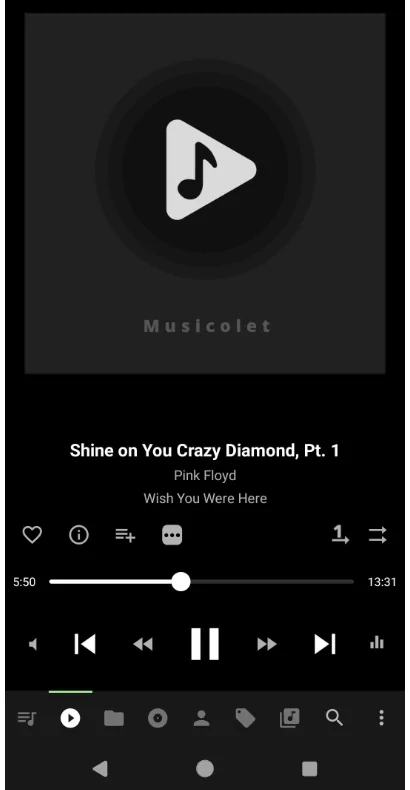
I have over 8,400 songs and 556 hours of music on my phone. When driving I usually play my music via Bluetooth. Sometimes I use Android Auto. After doing some internet searching, I tried the Musicolet app and am very happy with it. It has no problems handling so many songs, and scrolling by artist or album on my phone is much faster than @TIM 's video on the PCM.

Porsche Taycan Tips & tricks for managing audio / music files on USB 1717350365650-3t


Most of my trips around the Phoenix Arizona USA area are under 45 minutes, so I'll play an album or an artist for that. For road trips, I'll take a couple of minutes to create a playlist long enough for the trip and then delete it upon arrival.
 

slothinker

Well-Known Member
First Name
Todd
Joined
Mar 31, 2022
Threads
14
Messages
462
Reaction score
235
Location
San Luis Obispo, CA
Vehicles
Taycan RWD, Toyota MR2, Ioniq6
Country flag
CarPlay works fine for me but using it seems to have boosted my cellular fees by about 20% as I have an economy plan. It turned out not to be difficult to copy about 3,000 .mp4a songs from Mac (my CDs) to iPhone. Now with both wifi & cellular off I'm still able to use Apple CarPlay but from my iPhone (no cellular). Would this approach work with Android phones as well?
 
Last edited:


Murph7355

Well-Known Member
First Name
Andy
Joined
Feb 1, 2022
Threads
25
Messages
1,778
Reaction score
1,553
Location
UK
Vehicles
GTS ST; TVR Griffith 500; Caterham 7; Volvo XC90
Country flag
I have over 8,400 songs and 556 hours of music on my phone. When driving I usually play my music via Bluetooth. Sometimes I use Android Auto. After doing some internet searching, I tried the Musicolet app and am very happy with it. It has no problems handling so many songs, and scrolling by artist or album on my phone is much faster than @TIM 's video on the PCM.

....

Most of my trips around the Phoenix Arizona USA area are under 45 minutes, so I'll play an album or an artist for that. For road trips, I'll take a couple of minutes to create a playlist long enough for the trip and then delete it upon arrival.
You get into pretty hot water if caught using your phone in the UK.

USB implementation is one of my favourite software bug bears in the car. It's so nearly right.

It indexes music quite well and quite quickly (1,000 albums and 16,000 tracks here). They should have options for when it indexes though. No need to do it every time.

The scrolling through artists works OK and is quick when you get the knack, but would be better if:
  1. Voice control worked against the USB library
  2. The steering wheel controls allowed scrolling through lists
(2) almost works already. If you select an album, then having "media" in the right tube and clicking the right steering wheel control wheel brings up a track list you can scroll through, and then clicking on a track plays it. It would be easy to extend this ability to the whole library with minor tweaks.

This and the lack of Android Auto in the driver display/hud are probably my two biggest beefs on the software front. Followed closely by overcomplicated charge programming. Oh, and it's too restrictive on what can be displayed in each tube.
 

f1eng

Well-Known Member
First Name
Frank
Joined
Aug 19, 2021
Threads
48
Messages
4,765
Reaction score
8,335
Location
Oxfordshire, UK
Vehicles
Taycan CT4S, Ferrari 355, Merc 500E, Prius PHV
Country flag
As a music lover who listens 75% of the time to classical music I have always had difficulty getting a useful format for music files.
Apple even calls the tracks "songs" (FFS) and was entirely focussed on pop music from the beginning of iTunes, ie artist/album/song which is worse than useless for classical music, particularly large works where each track may have different performers so every computer based music programme I have tried is useless, they don't even sort the tracks into the same album, never mind in the correct order.

I do use the files and scroll, which works better than any "proper" music software I have experimented with in that my pop and folk music is in the normal artist/album/song format and classical in composer/work format. It is slow but sure...

OTOH the dynamic range of much of the big classical works is way outside the capability of a car audio environment. I sometimes switch the audio off in disappointment/disgust.

Edit:

After using file based music for convenience while working and being on a plane every week and away a lot I have gone back to mainly LPs and CDs for listening at home since retirement.
 

TXAG

Well-Known Member
First Name
Dan
Joined
Mar 9, 2022
Threads
20
Messages
533
Reaction score
526
Location
Goodyear, Arizona USA
Vehicles
2022 Taycan RWD
Country flag
You get into pretty hot water if caught using your phone in the UK.
To clarify - I start playing music while parked. I don't pick up the phone while driving because that's against the law where I live, too. Apologies for the lack of clarity.
PS I'm in awe of your huge music library!
 

Murph7355

Well-Known Member
First Name
Andy
Joined
Feb 1, 2022
Threads
25
Messages
1,778
Reaction score
1,553
Location
UK
Vehicles
GTS ST; TVR Griffith 500; Caterham 7; Volvo XC90
Country flag
To clarify - I start playing music while parked. I don't pick up the phone while driving because that's against the law where I live, too. Apologies for the lack of clarity.
PS I'm in awe of your huge music library!
Much of it was the result of drinking near a Tower Records for several years.... Late nights, alcohol and cheap CDs were a heady mix.
 

bluesky

Well-Known Member
Joined
Sep 4, 2022
Threads
5
Messages
273
Reaction score
299
Location
Palo Alto, CA
Vehicles
BMW F10 M5 Comp, BMW F10 550i
Country flag
I use compact 2 TB USB SSD’s to take my music to cars. The most modern car I have is the 2014 M5, and it can do spotify off my phone controled through I-Drive but I don’t use that, or any phone based apps as the integration requires plugging in and that’s too much bother for me. I like having the SSD available at all times regardless of the phone status. I’m not too fussy, but I’ve been doing this for about 20 years now and I have re-ripped everything that I want to take in the cars to flac with metadata, album art and have the directory file structure setup for convenience and to deal with my cars preferences for directory depth, file counts and album art limitations which are pretty similar across many cars. I generate album art both in the file metadata tags and have them dumped to Folder.jpg files in each album directory (as some cars seem to prefer to only read the Folder.jpg file and not display the art embedded in the files).

So my main ways of using it are that I have it continuously on random play, and I just skip track as needed to get to what I’m in the mood for, or use voice control to call up specific titles or album/artist or resort to doing the same in I-Drive when I can safely look at it. The indexing takes considerable time but is only triggered when it detects something has changed, but it doesn’t give any indication of when it is doing it or is done. Taycan seems similar.

Hopefully, Taycan can do a global random play for USB devices, I know there’s going to be a skip button on the steering wheel now in the refresh, and voice control would be ideal, but the above comments sounds like PCM doesn’t offer voice control for USB sources. That seems like kind of a step backwards, and might provoke me to switch to Carplay and streaming sources if I can’t DJ hand-free using voice.
 

pnw-ev-nerd

Well-Known Member
Joined
Mar 19, 2021
Threads
4
Messages
113
Reaction score
65
Location
Seattle suburbs
Vehicles
Porsche Taycan 4S Cross Turismo
Country flag
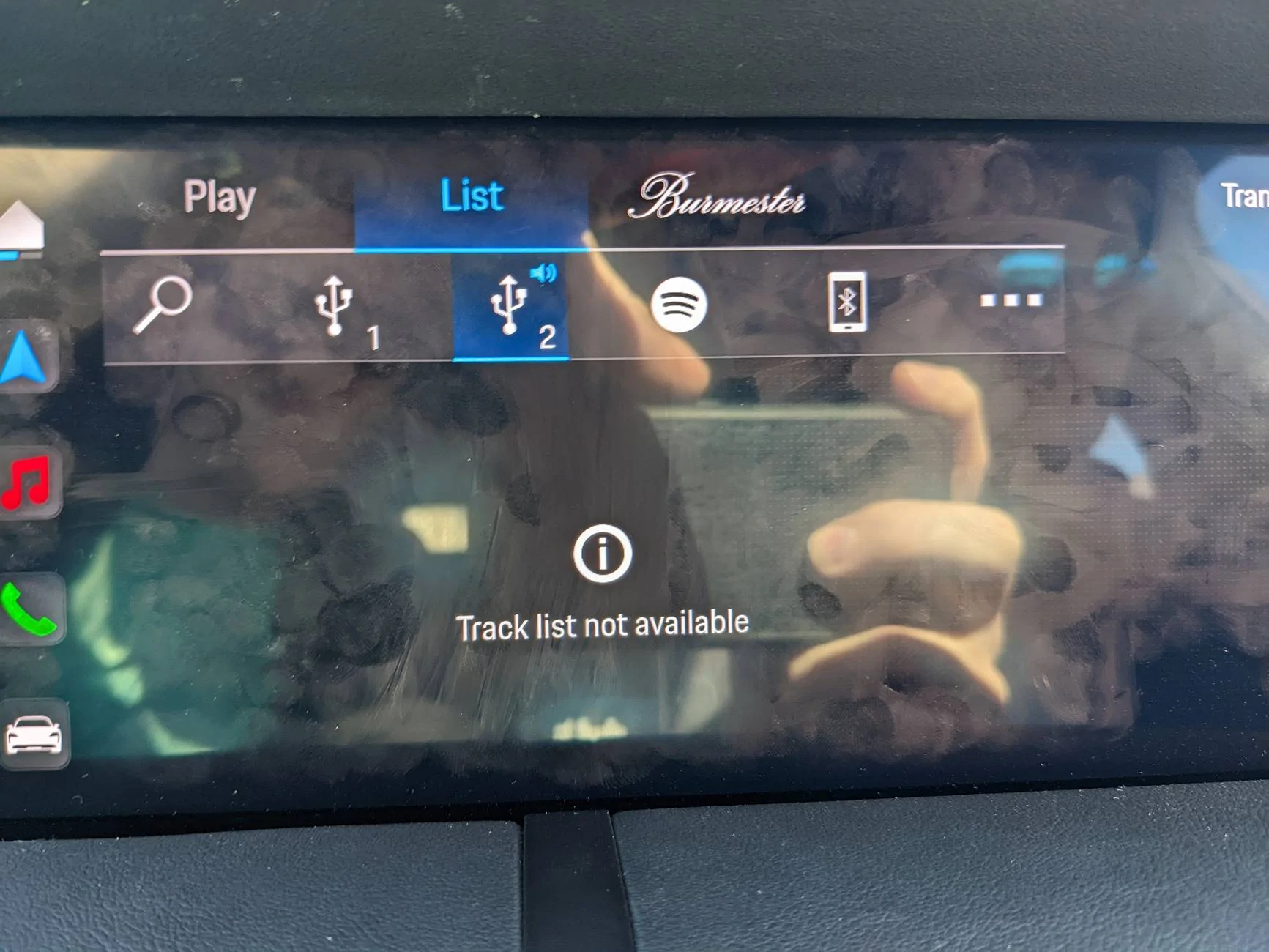
Does anyone else experience this "Track List Not Available" error when trying to list music on a USB drive?

I'm trying for the third time to get Porsche to try to do something about this, it's pretty inexcusable for a $6000 sound system, and I'm REALLY hoping I'm not the only one who has this issue, otherwise I don't have much hope for a fix!


Porsche Taycan Tips & tricks for managing audio / music files on USB usb-2-track-list-not-availabl
Sponsored


Top