Sponsored

Scandinavian

Well-Known Member
First Name
Peter
Joined
Nov 3, 2019
Threads
52
Messages
3,904
Reaction score
3,549
Location
France
Vehicles
Taycan T, Aston Martin DB9, Porsche 996 C4 Cab, i4
Country flag
Is it something specific per region?
If I start Waze in Carplay it stops Porsche NAV
And if I start Porsche NAV, it stops whatever NAV I have in Carplay
That is the same for me. There are members here that successfully are running both at the same time. But I have tried as per instructions they have given us many times and no success. One always switches off.

I use the Porsche nav the same method as @tchavei, plan desired charging stops and iput them in as stopovers (as proper charging stations). By doing that I avoid the Porsche Map Updates messing up my selected chargers. I know the ones I want and prefer and stick to those.

And by jot having CarPlay running at all, I can have Waze on my phone and get all the traffic, hazards warnings, police etc, along the route.

The built in nav is good for major motorways and large national roads. And invaluable for preheating in cold weather especially. Once it gets down to town level navigation, I have found it very inferior and sometimes totally useless. It has taken me down one way streets, not being updated about road closures, long diversions etc. Best case it wants me to take the stairs down close to where I live! It is not a road for car traffic!
Sponsored
 

TDinDC

Well-Known Member
Joined
Jun 25, 2022
Threads
21
Messages
1,066
Reaction score
1,277
Location
Washington, DC, USA
Vehicles
'22 Taycan 4S Cross Turismo, '06 Club Coupe (#48)
Country flag
I believe this is the same in the US i.e. only way you're running two nav systems is independently say on your phone and not using CarPlay but I haven't tested the very latest update for CarPlay and Porsche Nav interactions - others here wiser I'm sure ...

PS: Waze will run in the background re warnings/alerts and speak over the Porsche Nav when active but thats not new.
I can run both in mine. I've posted pictures of it frequently.

I wonder whether it has something to do with the settings on the app or car. For example, if you have audio turned off, that may be the trick as I think it is when a direction comes that it sometimes shuts off the other system (perhaps due to detecting a conflict). I don't know, I just enjoy both working at the same time.
 

Poshfpg

Well-Known Member
Joined
May 31, 2022
Threads
5
Messages
229
Reaction score
266
Location
London
Vehicles
CT4S Smart #3
Country flag
My approach depends on distance being driven. If it's a trip well within the range of the car then it is Waze every time, it is hands down the best and most accurate plus the live updating for traffic and various alerts is incredibly useful.

If I'm doing a long drive, way beyond the range of the car, then it is always the PCM. The preheating of the battery means that even in sub zero temperatures you get max charging speeds every single time. It works out borders, trains, ferries and calculates charging accordingly. Setting the charging filter to 270+ only and a bit of research on chargers on route if in the UK or Ireland makes it very easy to navigate. The fact it's in front of me and on the HUD is also very handy. Waze is still always on the central screen for alerts.

On my recent trip back to London from SW Ireland I found the live traffic on the PCM quite impressive. Approaching Birmingham it was routing me off the ring road but Waze wasn't showing traffic so I ignored it. Turns out the phone signal had dropped so the minute I went past the junction I naturally got 5G back and Waze lit up dark red. Had I followed the PCM I'd have saved a lot of time.

I've experimented with ABRP, Apple, Google and several others but they just don't match the qualities of Waze, especially around London. PCM nav took a bit of getting used to but I think it's excellent for long trips and miles better than the ID3 native Nav or any other I've used including Tesla on a rental Y. The dream scenario would be Waze live data integrated to the PCM nav so you get access to all the screens with alerts on the HUD too.

As an aside, since the latest iPhone update the Carplay take over of the radio has stopped happening. That or they sneaked something into the HV battery update. It's a very welcome improvement, it now just returns to whatever you were last using in the car.
 

Tucson_Jim

Well-Known Member
First Name
Jim
Joined
Feb 2, 2023
Threads
5
Messages
209
Reaction score
180
Location
Tucson, AZ
Vehicles
2021 Taycan turbo
Country flag
My experience with Apple Maps with the integrated battery display feature is that it is highly inaccurate. Dash shows 55% and Apple Maps shows 36% at destination for a ten mile trip. Could be that there’s a hidden feature I’m unaware of to sync the SoC, but for me Apple Maps is the last choice now for navigation .


TDinDC

Well-Known Member
Joined
Jun 25, 2022
Threads
21
Messages
1,066
Reaction score
1,277
Location
Washington, DC, USA
Vehicles
'22 Taycan 4S Cross Turismo, '06 Club Coupe (#48)
Country flag
The built-in nav is the only one that will preheat the battery for charging, making it the only viable option for road trips IMO.
Doesn't that depend on the ambient temperature during one's trip?

Also, can one "trick" the car into preconditioning the battery for non-EA locations?

I just realized that I have had my Taycan CT for over a year and I have not once even attempted to use an EA charger. Sure, I have to pay, but other options are more convenient and faster, so it would be great to precondition for them.
 

DerekS

Well-Known Member
First Name
Derek
Joined
May 25, 2021
Threads
119
Messages
3,223
Reaction score
5,537
Location
Los Gatos, CA
Vehicles
2025 Taycan GTS
Country flag
Doesn't that depend on the ambient temperature during one's trip?
I doubt it. I've seen it heat the battery to over 100F on approach, regardless of outside temps in the 90s.

Also, can one "trick" the car into preconditioning the battery for non-EA locations?
AFAIK as long as it knows that it's a charger site, it will do it. I could be wrong.
 

TDinDC

Well-Known Member
Joined
Jun 25, 2022
Threads
21
Messages
1,066
Reaction score
1,277
Location
Washington, DC, USA
Vehicles
'22 Taycan 4S Cross Turismo, '06 Club Coupe (#48)
Country flag
I doubt it. I've seen it heat the battery to over 100F on approach, regardless of outside temps in the 90s.


AFAIK as long as it knows that it's a charger site, it will do it. I could be wrong.
I’ll rephrase my question. At ambient temps in the 90s, how much of a difference does preconditioning really make when it comes to charging times? I can imagine that it would make a big difference at colder temps (eg 30), but my charge times without preconditioning when ambient temps are 80-90 are so short that I can’t imagine it matters.


DerekS

Well-Known Member
First Name
Derek
Joined
May 25, 2021
Threads
119
Messages
3,223
Reaction score
5,537
Location
Los Gatos, CA
Vehicles
2025 Taycan GTS
Country flag
I’ll rephrase my question. At ambient temps in the 90s, how much of a difference does preconditioning really make when it comes to charging times? I can imagine that it would make a big difference at colder temps (eg 30), but my charge times without preconditioning when ambient temps are 80-90 are so short that I can’t imagine it matters.
¯\_(ツ)_/¯

I just want every advantage I can get when charging.
 

Scandinavian

Well-Known Member
First Name
Peter
Joined
Nov 3, 2019
Threads
52
Messages
3,904
Reaction score
3,549
Location
France
Vehicles
Taycan T, Aston Martin DB9, Porsche 996 C4 Cab, i4
Country flag
Doesn't that depend on the ambient temperature during one's trip?

Also, can one "trick" the car into preconditioning the battery for non-EA locations?

I just realized that I have had my Taycan CT for over a year and I have not once even attempted to use an EA charger. Sure, I have to pay, but other options are more convenient and faster, so it would be great to precondition for them.
Here in Europe you can set a charger as stopover/destination, whether that is Ionity or not. But the charger has to be listed in the PCM. I guess one filter needs to be off, the filter that states “Prioritise Porsche Charging Service’ in order that all chargers with power will be indicated.

I know I have been directed to both Shell and Circle K chargers outside of the Porsche service and the battery has pre heated. If that is the same in all regions is not known.
 

TDinDC

Well-Known Member
Joined
Jun 25, 2022
Threads
21
Messages
1,066
Reaction score
1,277
Location
Washington, DC, USA
Vehicles
'22 Taycan 4S Cross Turismo, '06 Club Coupe (#48)
Country flag
¯\_(ツ)_/¯

I just want every advantage I can get when charging.
Of course, as we all do. I was just trying to get an idea about materiality as it impacts choices, or at least should in a perfect world
 

tchavei

Well-Known Member
Joined
Dec 3, 2022
Threads
33
Messages
1,302
Reaction score
1,369
Location
Portugal
Vehicles
Too many to list. Includes a MY23 Taycan RWD
Country flag
Is it something specific per region?
If I start Waze in Carplay it stops Porsche NAV
And if I start Porsche NAV, it stops whatever NAV I have in Carplay
Android Auto here. Maybe that's the difference? It also doesn't take over my media sources.
 

TDinDC

Well-Known Member
Joined
Jun 25, 2022
Threads
21
Messages
1,066
Reaction score
1,277
Location
Washington, DC, USA
Vehicles
'22 Taycan 4S Cross Turismo, '06 Club Coupe (#48)
Country flag
So, does anyone know whether the search function on the Porsche App reflect the search function on the vehicle?

I went down to the car to try to search, but it is raining here (we desperately need it), but now the car is saying that it doesn't have signal and therefore will not open navigation. ARRGHHH.

So, I went on the Porsche app. When you search on the app in Philadelphia, it only shows EA chargers. Why? I doubt that it is the same as the car, because I think I have seen some EVgo chargers on the native navigation application.

For making such great cars, why has the consumer facing tech in Porsches always been sh@t and 2 steps behind the others . . . and poorly explained in manuals on top of that.
 

Scandinavian

Well-Known Member
First Name
Peter
Joined
Nov 3, 2019
Threads
52
Messages
3,904
Reaction score
3,549
Location
France
Vehicles
Taycan T, Aston Martin DB9, Porsche 996 C4 Cab, i4
Country flag
So, does anyone know whether the search function on the Porsche App reflect the search function on the vehicle?

I went down to the car to try to search, but it is raining here (we desperately need it), but now the car is saying that it doesn't have signal and therefore will not open navigation. ARRGHHH.

So, I went on the Porsche app. When you search on the app in Philadelphia, it only shows EA chargers. Why? I doubt that it is the same as the car, because I think I have seen some EVgo chargers on the native navigation application.

For making such great cars, why has the consumer facing tech in Porsches always been sh@t and 2 steps behind the others . . . and poorly explained in manuals on top of that.
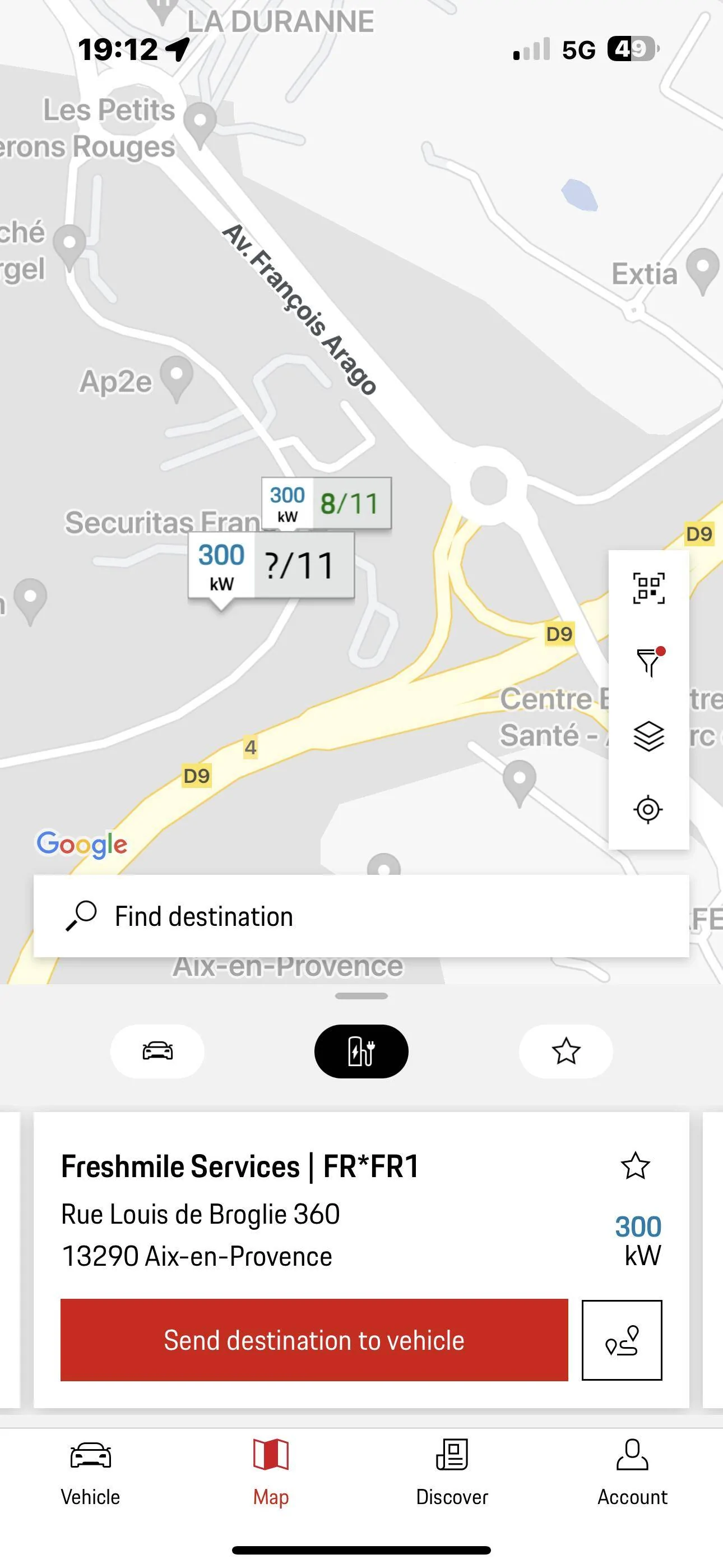
My experience is of course limited to Europe! I have not found the app to be close to reality. It has shown me stations that were not in the Charging services, stations that came up in search and then disappeared. Stations with completely wrong info on charging points. Might be 2 50 kW and 10 11 kW. Stated as 12 x 475 kW! I have had countless phone calls, emails, and tickets with smart mobility but all in vain. You have to look yourself and try them. The app has sent me to many Total and Freshmile services that refused to start. And the help line was very helpful. “”Unfortunately there is nothing we can do!””

Here is one example!

Porsche Taycan Porsche Navigation vs ABRP vs Apple Maps EV Routing -- Pros and Cons IMG_0564

This is one and the same station in reality, but two different locations in the app. And it just refused to acknowledge my Porsche Card.

Ionity, Fastned and most Aral Pulse stations worked fantastic, but you really need to plan your trip!
 
OP
OP

AmpedUp

Well-Known Member
First Name
Ryan
Joined
Mar 24, 2021
Threads
7
Messages
87
Reaction score
74
Location
Mesa, Arizona
Vehicles
Taycan Turbo S, Toyota 4Runner
Country flag
So, does anyone know whether the search function on the Porsche App reflect the search function on the vehicle?

I went down to the car to try to search, but it is raining here (we desperately need it), but now the car is saying that it doesn't have signal and therefore will not open navigation. ARRGHHH.

So, I went on the Porsche app. When you search on the app in Philadelphia, it only shows EA chargers. Why? I doubt that it is the same as the car, because I think I have seen some EVgo chargers on the native navigation application.

For making such great cars, why has the consumer facing tech in Porsches always been sh@t and 2 steps behind the others . . . and poorly explained in manuals on top of that.
Not a tech company... they make great cars, though.

To answer your question, the search in the Porsche app does NOT included non-EA chargers (or at least it won't show any whenever I've tried it), but the nav will include non-EA chargers. So it is clearly not the same search function. I would strictly use the app to enter a destination, and then transfer the destination to the car to do the routing and charging.
Sponsored


Top