Sponsored

Does the iPhone actually get the car's GPS location when using CarPlay?

tigerbalm

Well-Known Member
First Name
Damien
Joined
Oct 11, 2020
Threads
97
Messages
3,538
Reaction score
7,963
Location
Dublin, Ireland
Website
www.targatrips.com
Vehicles
911 Targa 4 GTS, Fiat 500 EV. Sold: Taycan Turbo S, Taycan 4S; Panamera Turbo S
Country flag
This came up while I was working on DriveLine, and I realised I wasn't actually sure what was happening with GPS when my iPhone is connected to the Porsche PCM via CarPlay.

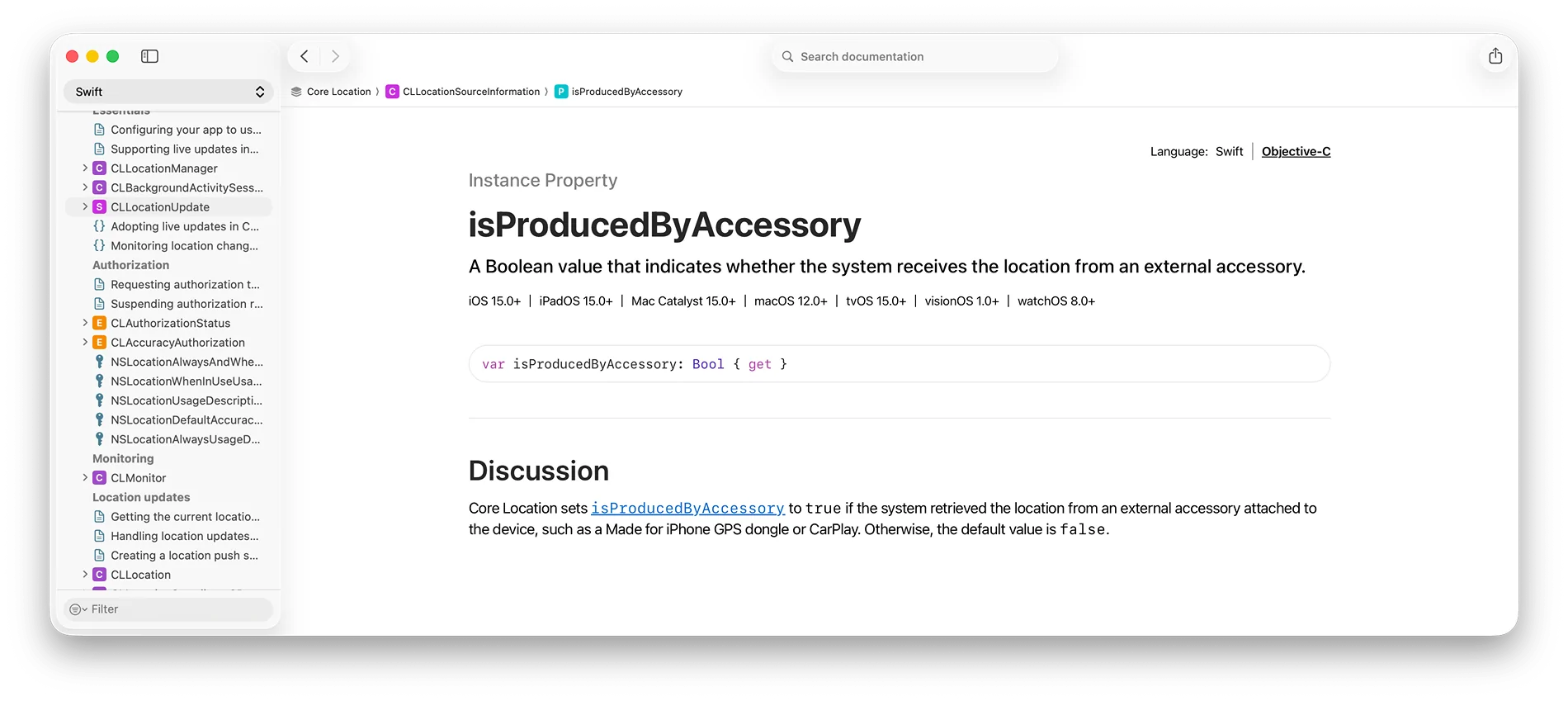
I found an interesting bit of Apple's Core Location documentation which says that CarPlay can provide location information to the iPhone as an external accessory. That's interesting in itself, but I wanted to know whether the PCM in my 911 actually does it.

Porsche Taycan Does the iPhone actually get the car's GPS location when using CarPlay? Apple documentation


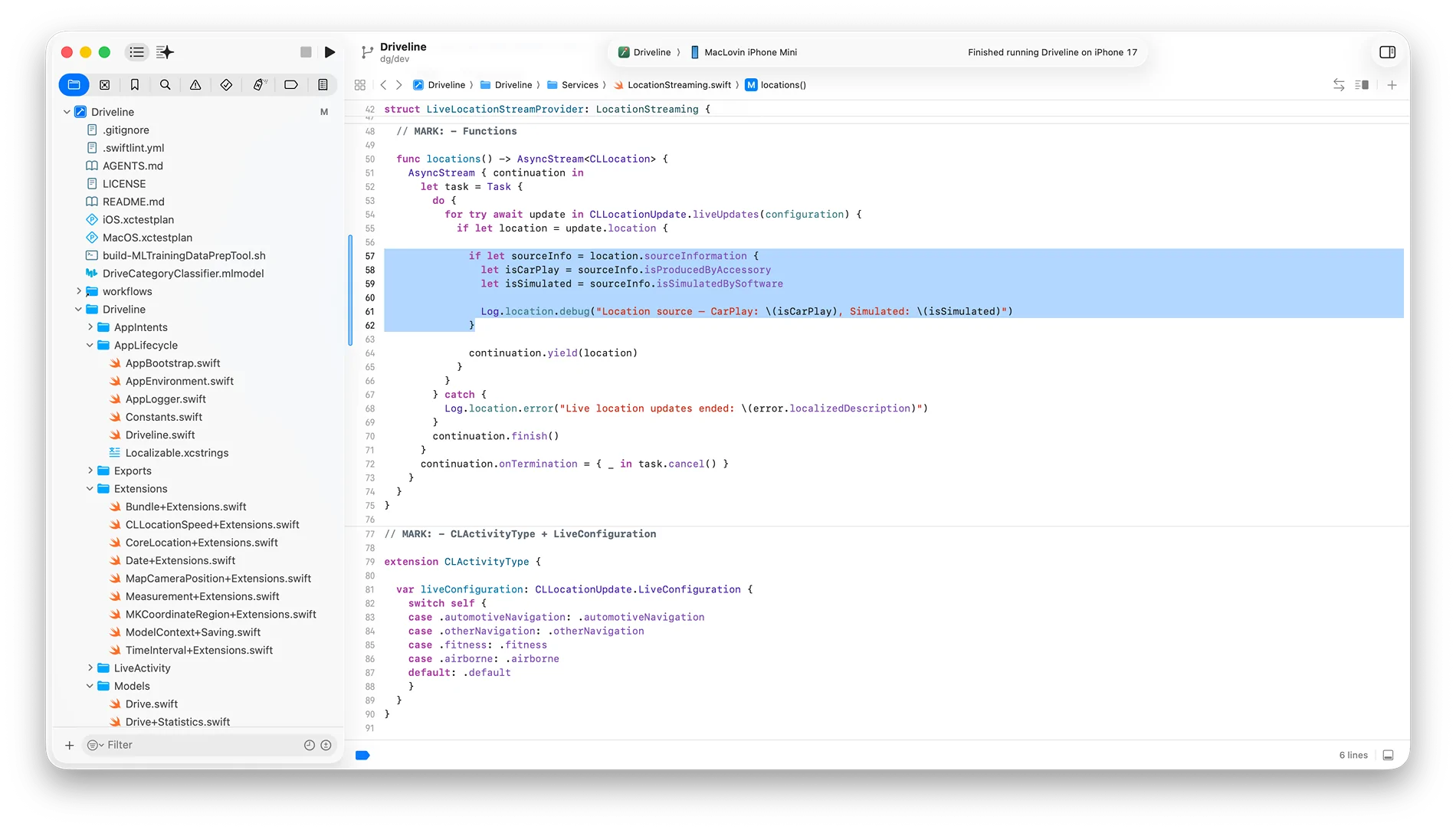
So I made a tiny change to DriveLine to log the source of every location update and took the car out with CarPlay connected.

Porsche Taycan Does the iPhone actually get the car's GPS location when using CarPlay? Temporary code chang


The result was:

Location source - CarPlay: true, Simulated: false

So yes — at least with my PCM 6.0, the iPhone is receiving location information from the car.

There are some interesting implications to this, particularly given where the 911/Taycan's GNSS antenna is located and the fact that the car can use its own vehicle sensors for positioning when satellite reception isn't available.

I went down the rabbit hole a bit further and wrote up what I found, including the Apple documentation, the DriveLine test and a few discussions where people are asking exactly this question:

https://www.targatrips.com/proving-porsche-pcm-6-shares-vehicle-gps-with-carplay/

I thought it was an interesting little detail about how much information actually passes between the car and the iPhone over CarPlay. Though my work was focused on the 911, the PCM architecture and hardware is identical to J1.1/J1.2 Taycan's and will hold up for that too.

Its likely also true of the PCM in Macan and Cayenne but they are a very different architecture and OS, so would need to be tested to be sure.
Sponsored

 
Last edited:
apmissione

Member
First Name
Alan
Joined
Feb 4, 2025
Threads
0
Messages
10
Reaction score
3
Location
Atlanta, GA
Vehicles
2020 Taycan Turbo S
Country flag
Interesting! I’m also working on a CarPlay app so have been investigating the same things.
I didn’t find evidence of much info coming through via CarPlay. I was looking for metrics like speed. Maybe more would come on CarPlay ultra cars but not older ones. Which car and year do you have ?
 

apmissione

Member
First Name
Alan
Joined
Feb 4, 2025
Threads
0
Messages
10
Reaction score
3
Location
Atlanta, GA
Vehicles
2020 Taycan Turbo S
Country flag
I checked out DriveLine. Is the idea just to record interesting drive routes you’ve done? I didn’t know that was common, though I have been using Porsche’s Roads app which is actually pretty cool for finding good drives.


OP
OP
tigerbalm

tigerbalm

Well-Known Member
First Name
Damien
Joined
Oct 11, 2020
Threads
97
Messages
3,538
Reaction score
7,963
Location
Dublin, Ireland
Website
www.targatrips.com
Vehicles
911 Targa 4 GTS, Fiat 500 EV. Sold: Taycan Turbo S, Taycan 4S; Panamera Turbo S
Country flag
I checked out DriveLine. Is the idea just to record interesting drive routes you’ve done? I didn’t know that was common, though I have been using Porsche’s Roads app which is actually pretty cool for finding good drives.
Yeah, its just a background recorder. My main motivation is to produce highly accurate maps of the actual route driven for my Porsche travel blog. An example of me using Google Maps that I want to swap out for this:: https://www.targatrips.com/trips-arctic-lapland-winter-2026-day-11-narvik-norway-mosjoen-norway/

Porsche Roads is pretty good for finding interesting routes, though I find the "Mapbox" based maps a bit lacking. The app used to record your actual route – i.e. same as what Driveline does – but they removed that functionality.

I published a few routes on my road trips when this was still an option – here is a random example: https://roads.porsche.com/content/en/routes/the-koelnbreinsperre

No clue why they removed what I considered one of the best features of the app at the time.

But you can still do something there with the help of Driveline. My app will allow you to record a route and export it as a GPX file. Porsche Roads still allows you to create a publish new routes with the GPX file as the input. So you can use them in combination quite successfully.

Now that I mention it, it is something I will do on our next road trip in the alps in September.
 
Last edited:
OP
OP
tigerbalm

tigerbalm

Well-Known Member
First Name
Damien
Joined
Oct 11, 2020
Threads
97
Messages
3,538
Reaction score
7,963
Location
Dublin, Ireland
Website
www.targatrips.com
Vehicles
911 Targa 4 GTS, Fiat 500 EV. Sold: Taycan Turbo S, Taycan 4S; Panamera Turbo S
Country flag
Interesting! I’m also working on a CarPlay app so have been investigating the same things.
I didn’t find evidence of much info coming through via CarPlay. I was looking for metrics like speed. Maybe more would come on CarPlay ultra cars but not older ones.
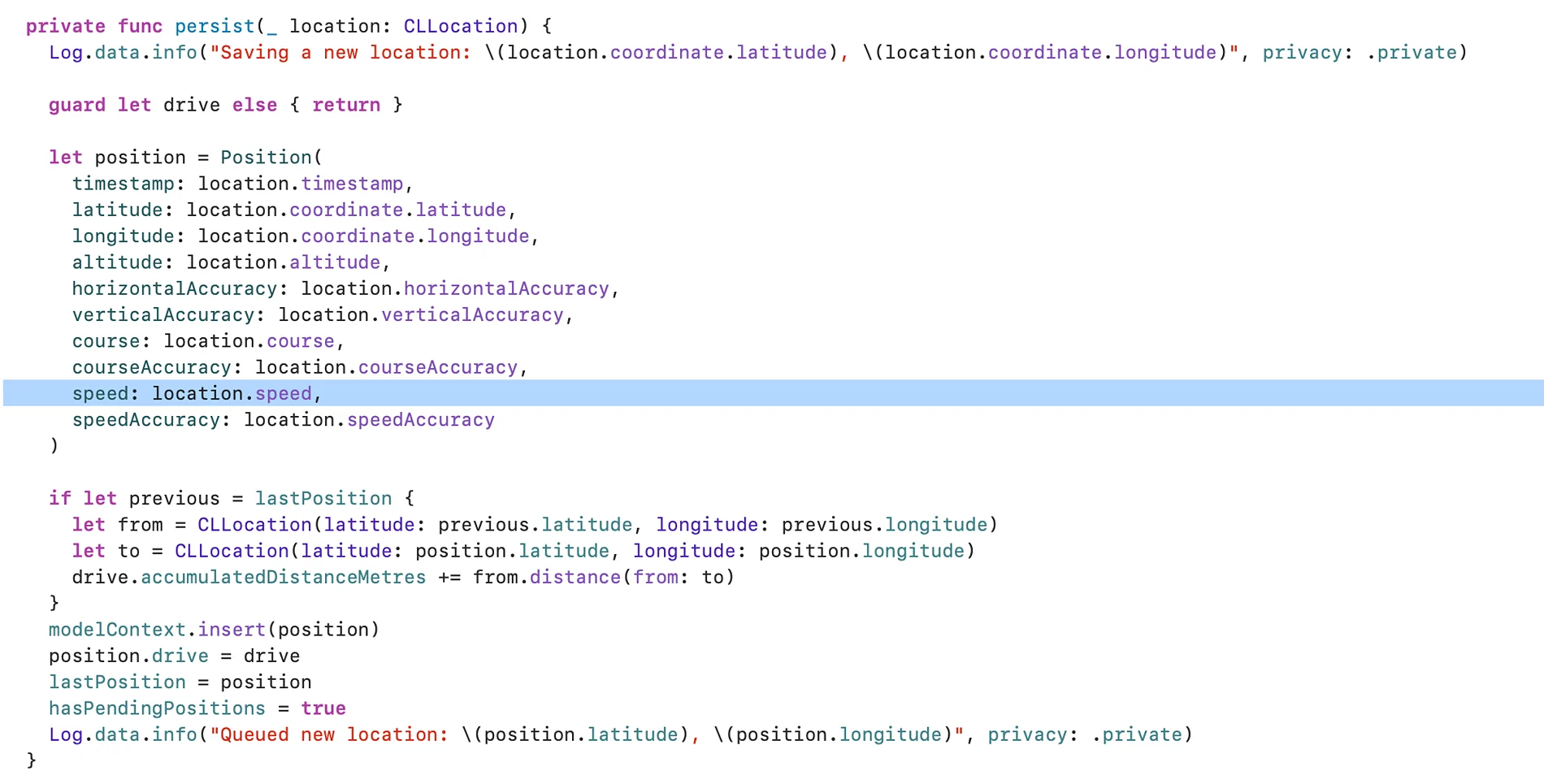
I am certainly getting speed from CarPlay:

Porsche Taycan Does the iPhone actually get the car's GPS location when using CarPlay? Screenshot 2026-08-10 at 19.37.25


Which car and year do you have ?
Currently a 2024 911 Targa 4 GTS.
 

anonymouse

Well-Known Member
Joined
May 12, 2023
Threads
45
Messages
782
Reaction score
926
Location
Oxfordshire UK
Vehicles
Taycan Turbo Sport Turismo J1.2
Country flag
I have been using Porsche’s Roads app which is actually pretty cool for finding good drives.
maybe it is better in your region, but wherever I have looked the Roads library is absolutely RUBBISH.

It appears to be an unmoderated community site where “My house to Fred’s” gets the same weight as “Porsche Experience Black Forest Run” (not real examples). Many of the routes are completely useless.

There are much better libraries which properly curate their routes. For example I use myRoute-app where before a route goes into the library it is reviewed by a RouteXpert who has significant experience and has passed some stringent accreditation criteria. I have used their routes in the UK, France, Spain, and the US and all have been excellent. The only downside is that it is primarily a biker community so they occasionally take some routes or make some stops that are tricky in a car.


OP
OP
tigerbalm

tigerbalm

Well-Known Member
First Name
Damien
Joined
Oct 11, 2020
Threads
97
Messages
3,538
Reaction score
7,963
Location
Dublin, Ireland
Website
www.targatrips.com
Vehicles
911 Targa 4 GTS, Fiat 500 EV. Sold: Taycan Turbo S, Taycan 4S; Panamera Turbo S
Country flag
maybe it is better in your region, but wherever I have looked the Roads library is absolutely RUBBISH.
I agree – though I did try and put good quality routes with accompanying stories in. Maybe that is why they dropped being able to record your own routes!

But they have this "generate a random route" nearby that you can control the preferences of: like lots of curves or hill climbs or generate a circuit and it does an okay job – depending on the area.

The app had a lot of potential at one time!
 

apmissione

Member
First Name
Alan
Joined
Feb 4, 2025
Threads
0
Messages
10
Reaction score
3
Location
Atlanta, GA
Vehicles
2020 Taycan Turbo S
Country flag
Thanks for the answers! About to log some CarPlay data! If it has SPEED derived from CAN and not GPS that will be epic for my app….
 
OP
OP
tigerbalm

tigerbalm

Well-Known Member
First Name
Damien
Joined
Oct 11, 2020
Threads
97
Messages
3,538
Reaction score
7,963
Location
Dublin, Ireland
Website
www.targatrips.com
Vehicles
911 Targa 4 GTS, Fiat 500 EV. Sold: Taycan Turbo S, Taycan 4S; Panamera Turbo S
Country flag

apmissione

Member
First Name
Alan
Joined
Feb 4, 2025
Threads
0
Messages
10
Reaction score
3
Location
Atlanta, GA
Vehicles
2020 Taycan Turbo S
Country flag
I am certainly getting speed from CarPlay:

Screenshot 2026-08-10 at 19.37.25.webp


Currently a 2024 911 Targa 4 GTS.

Thanks for the answers! Hmm after looking at this on my computer instead of phone, CLLocation is part of "CoreLocation" not CarPlay.

I think you are right that CoreLocation can use the Car's GPS receiver (better antenna) while connected to CarPlay (b/c I get `sourceInformation.isProducedByAccessory =true`), but the *speed* still seems to comes from GPS calculations, not from the car's computer system (it's not constantly updated like it would be if it were from the car).
Sponsored


Top