Sponsored

How to stop a charge (@home) from the application?

Blu

Member
First Name
Olive
Joined
Jun 17, 2025
Threads
1
Messages
6
Reaction score
1
Location
Switzerland
Vehicles
Taycan4S 2023
Country flag
Since the latest application update on my phone, the Porsche application is a bit different regarding the charging point of view. Anyway, between the profiles and the timers, it is not that simple for everyone to understand…especially when I cannot reproduce a behavior. I have disabled everything, but I still don’t have a clue on how I can stop a current charging process from the app. The only solution is to manually press the button near the plug and remove the wire. 😓
Sponsored


targa666

Well-Known Member
First Name
Lies
Joined
Mar 13, 2026
Threads
9
Messages
194
Reaction score
176
Location
the Netherlands
Vehicles
‘22 Taycan 4S sedan frozenberry, H-D sportster 883 low
Country flag
Without timers and profiles the charging will by default charge up to 100% in direct charging mode. you overrule this with programming

This is how I do it:
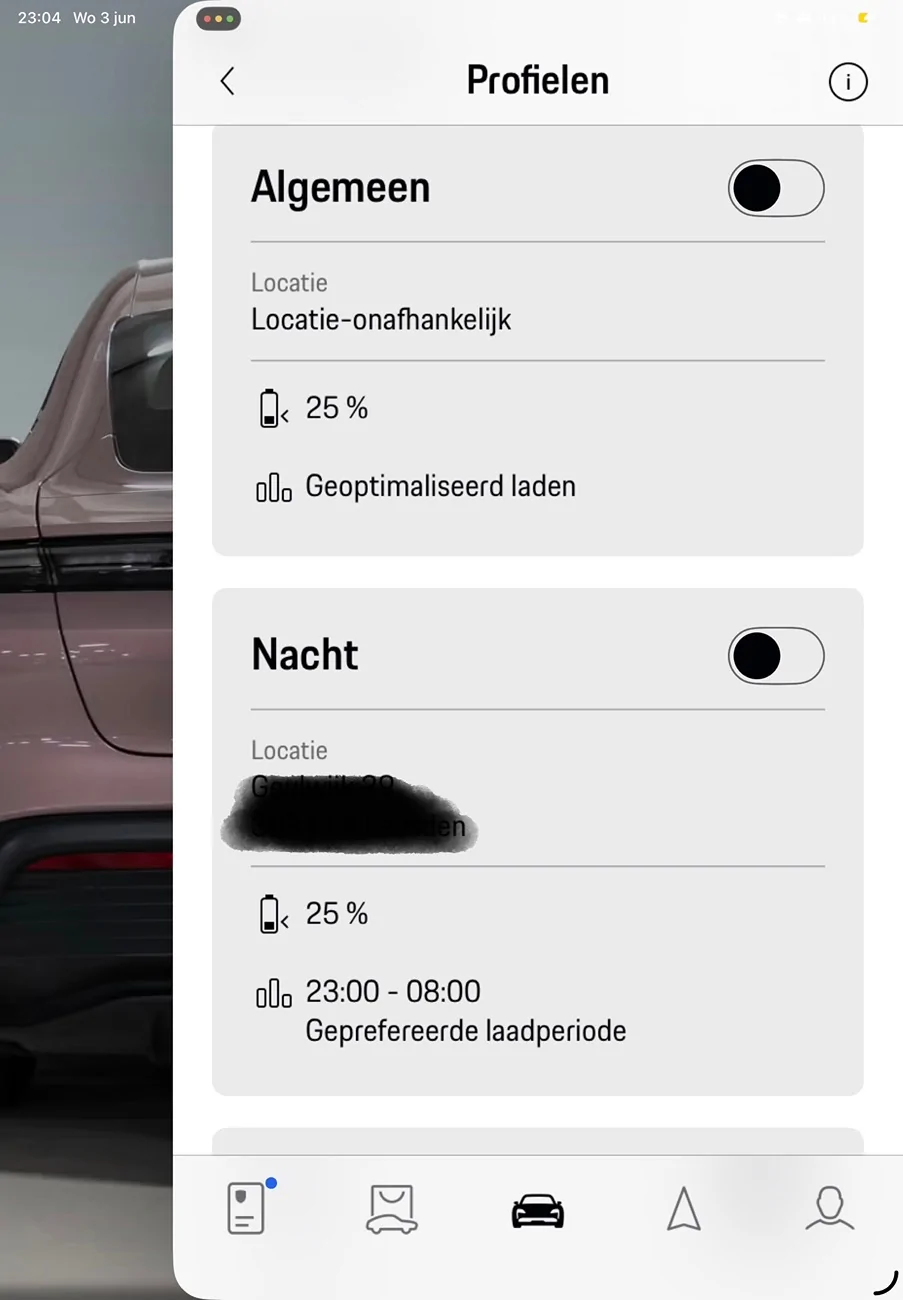
I have 3 profiles: 1 general, 1 for charging night hours and 1 for charging day hours. It’s set on minimum 25% so that is always the immediate target. At 25% the timers kick in
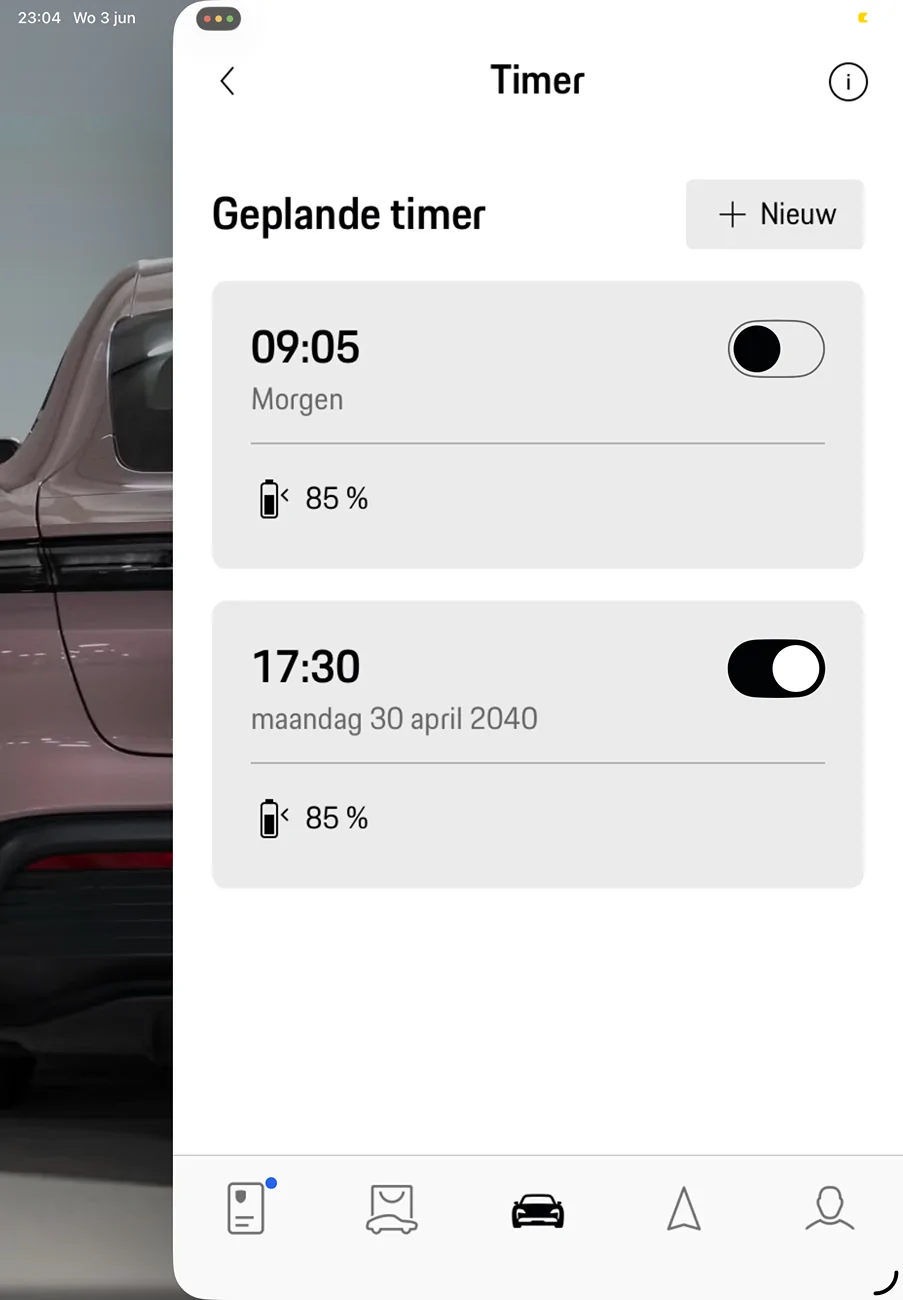
I have 2 timers: the first one is always “tomorrow” but I change the day and time to my needs everytime I start a charge. It’s set to 85%. The second timer is set for a date in 2040 And is on all the time. Any future moment will do here, it just prevents the charging going back to default; which is charge up to 100%.
The pics might help clarify.

o, I manually program every time and then activate the appropiate profile, that’s why you see them off in the pics.
since I don’t have a day job my needs vary a lot.


hope this helps!
Porsche Taycan How to stop a charge (@home)  from the application? IMG_0028

Porsche Taycan How to stop a charge (@home)  from the application? IMG_0027
 
Last edited:
  • Love
Reactions: Blu
OP
OP
Blu

Blu

Member
First Name
Olive
Joined
Jun 17, 2025
Threads
1
Messages
6
Reaction score
1
Location
Switzerland
Vehicles
Taycan4S 2023
Country flag
Thank you, I will try it again within these settings. I understand now that a default value will be 100% 😉
 

snstevens

Well-Known Member
First Name
Sam
Joined
Jul 10, 2020
Threads
31
Messages
1,340
Reaction score
1,744
Location
Kirkland, WA United States
Vehicles
Taycan 4S
Country flag
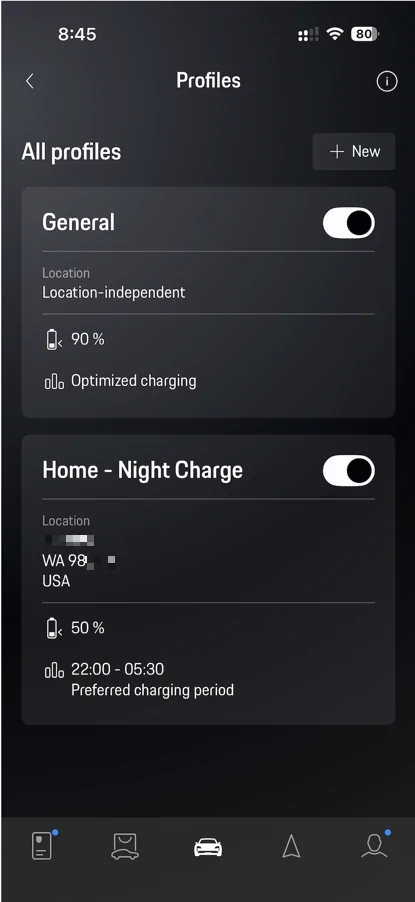
My approach utilizes the location dependent behavior of Profiles to allow for two different scenarios, and I don't enable or disable anything - the Timer and 2 Profiles are always ON.

My goal is to help the local Puget Sound Energy (PSE) Utility out by doing almost all of my charging after 11:00 pm in the evening, and prior to 5:00 am when I"m at home.

Here is my use case --
  • At Home Charging-- Plug in immediately after pulling into the garage.
    • Car will start charging but stop at 50%. While this could be set lower, I want to always get to 50% right away in case I need to run out.
    • The Profile has a Location Setting set to my address. This Profile only works when at Home.
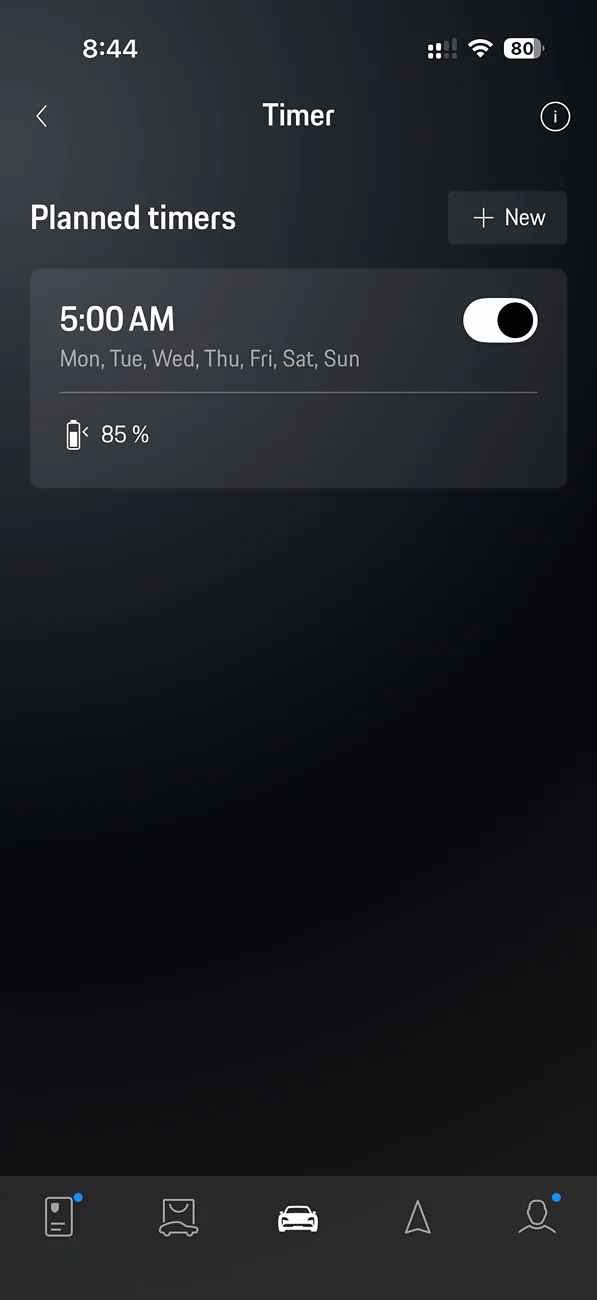
    • The car will not start charging again until sometime after 11 pm. The start time is determined by the amount of charging to be done to reach 85% SOC by 5:00 am the next day. If I only need 10% then it starts close to 4:00 am. I don't care when it starts - only that it is at 85% at 5:00 am.
  • AC Charging at a Hotel -- When at a hotel I want to start charging and go to 90% as quickly as possible. This allows me to be courteous and disengage from the hotel's charger so someone else can use it.
  • DC Fast Charging -- The Timer & Profiles don't come into play.
These two screen shots from My Porsche App show the settings for the Timer and two Profiles I'm using.
Porsche Taycan How to stop a charge (@home)  from the application? IMG_1679

Porsche Taycan How to stop a charge (@home)  from the application? 1780631916956-f7
 

W1NGE

Well-Known Member
First Name
Adrian
Joined
Jan 11, 2021
Threads
53
Messages
11,016
Reaction score
6,805
Location
Aberdeen, Scotland
Vehicles
992.2, ex GTS ST owner, Macan T
Country flag
Since the latest application update on my phone, the Porsche application is a bit different regarding the charging point of view. Anyway, between the profiles and the timers, it is not that simple for everyone to understand…especially when I cannot reproduce a behavior. I have disabled everything, but I still don’t have a clue on how I can stop a current charging process from the app. The only solution is to manually press the button near the plug and remove the wire. 😓
You need a recurring (daily) timer to control the end of charging process.

I set a daily recurring timer along with a location based profile but it is the timer which controls when to stop.

With a recurring timer the charging process looks for the next event sfter a charging session and so pauses until that time. Charging only occurs if you connect to your EVSE / charger and so no need to constantly change.

Many folk can manage with a profile only which has preferred charging times set. I have tried this several times but this approach never worked for me.

The concept of profiles was dropped for J1.2 (facelift) Taycans.
Sponsored


Top