Sponsored

Please explain this mystery in PCM behavior

4thPcar

Well-Known Member
First Name
Ian
Joined
Aug 11, 2021
Threads
74
Messages
909
Reaction score
837
Location
Del Mar CA
Vehicles
Previously: 914, 944 and 997 911S. Now Taycan
Country flag
See pic. I've not had too many major glitches with the PCM. Occasionally CarPlay doesn't activate, that's about it. But I've noticed the phone icon in the upper right corner is almost always showing a diagonal line, and I'm unable to connect the phone manually via bluetooth. There HAVE been times I've seen it without the diagonal line, but I don't know the significance of either status. The pic shows I am clearly connected to my phone so….what's up with that icon?

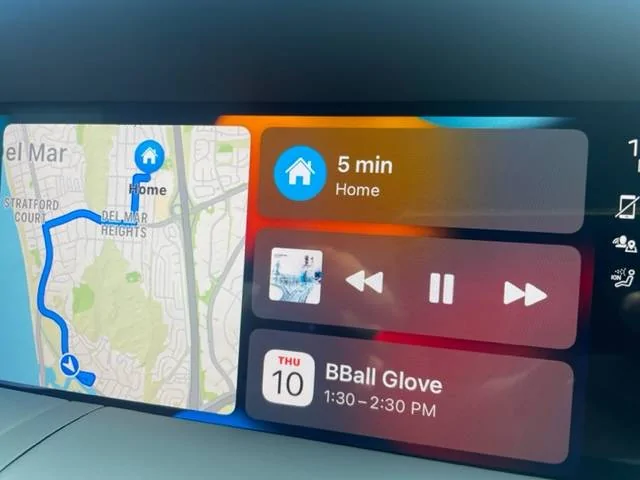
Porsche Taycan Please explain this mystery in PCM behavior IMG_4447
Sponsored


Jhenson29

Well-Known Member
First Name
Jeremy
Joined
Feb 9, 2021
Threads
37
Messages
3,014
Reaction score
4,650
Location
St. Louis, MO
Vehicles
2022 Macan S; 2021 Taycan 4S
Country flag
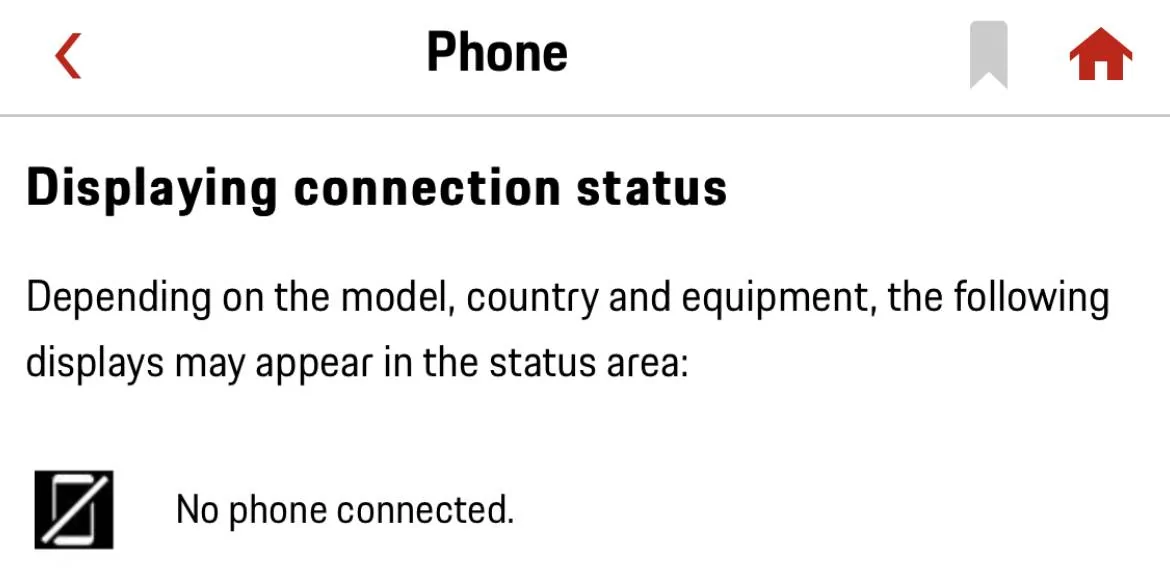
Are you wired or wireless?

From GTK:
Porsche Taycan Please explain this mystery in PCM behavior 25AB93BF-556A-4B18-AC8C-340879066A17


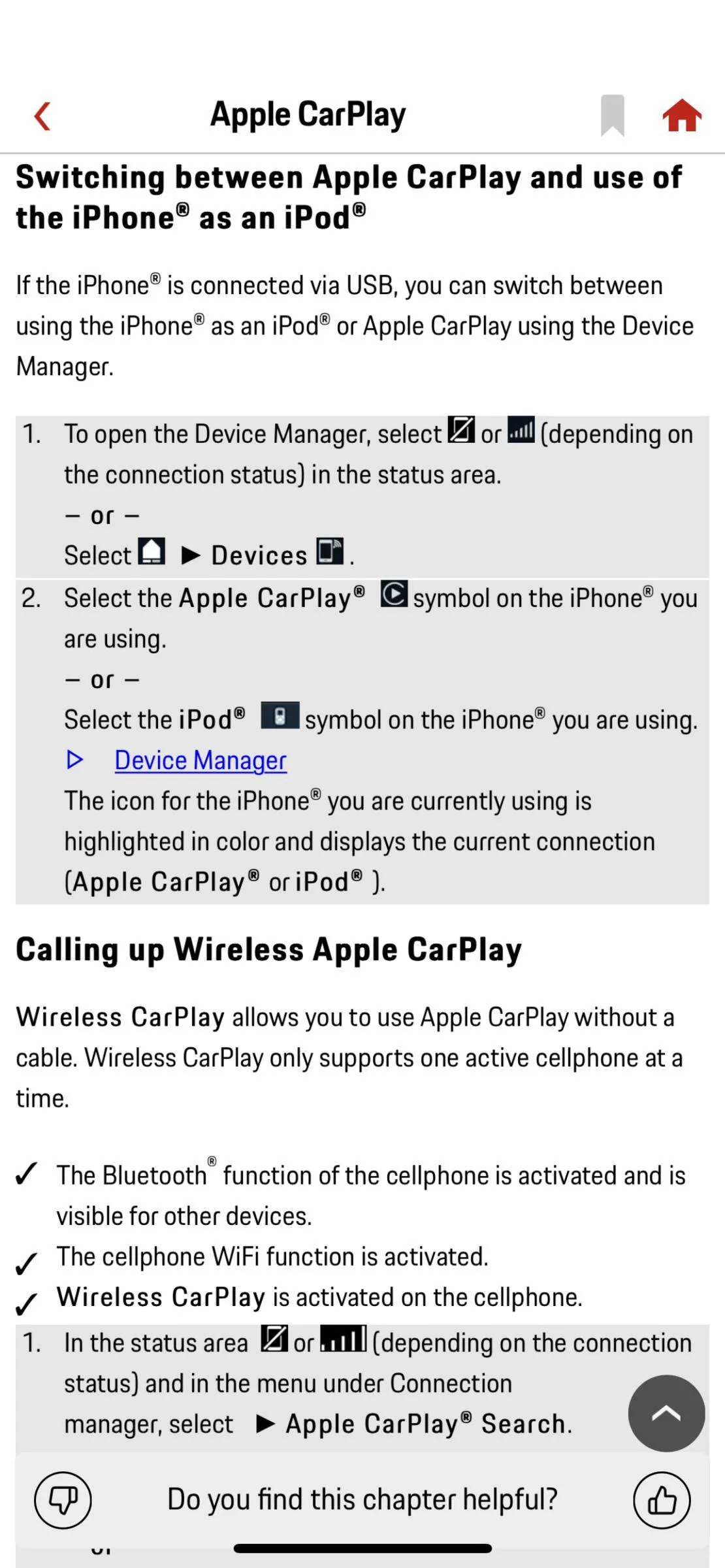
And here’s some from the CarPlay section, but it’s still not clear to me.
Porsche Taycan Please explain this mystery in PCM behavior 9BF03EBD-ECDF-4D18-9F38-A3D3E8AB0C95
 
OP
OP
4thPcar

4thPcar

Well-Known Member
First Name
Ian
Joined
Aug 11, 2021
Threads
74
Messages
909
Reaction score
837
Location
Del Mar CA
Vehicles
Previously: 914, 944 and 997 911S. Now Taycan
Country flag
Are you wired or wireless?

From GTK:
25AB93BF-556A-4B18-AC8C-340879066A17.jpeg


And here’s some from the CarPlay section, but it’s still not clear to me.
9BF03EBD-ECDF-4D18-9F38-A3D3E8AB0C95.png
Wow - why does it feel this could be explained better? But I think I get it. I am wireless (why would you be anything but since you can charge the phone in the armrest?) and so that is why it shows the line through the phone. The only time we've used a charger is to charge a passenger's phone in one of the C-ports. Thanks for clarifying!
 

tigerbalm

Well-Known Member
First Name
Damien
Joined
Oct 11, 2020
Threads
94
Messages
3,514
Reaction score
7,912
Location
Dublin, Ireland
Website
www.targatrips.com
Vehicles
911 Targa 4 GTS, Fiat 500 EV. Sold: Taycan Turbo S, Taycan 4S; Panamera Turbo S
Country flag
Your iPhone can connect to the car either via Bluetooth or CarPlay (doesn't matter if its wired or wireless) but not both at the same time.

When your iPhone is connected via Bluetooth, CarPlay will be inactive and the "phone icon" you mentioned will show up with both a phone without a line through it and also a little signal bars display to show the signal strength of your phone at the current time.

If you connect via CarPlay (wired or wireless) then the Bluetooth connection is inactive/disconnected – and the PCM will show the phone icon with a line through it.

You can choose which way you want to connect your phone to the PCM: Bluetooth or CarPlay.

Additionally, if you are using your iPhone via Bluetooth and you have it plugged in to the USB – you have the option to have the PCM treat your iPhone as a iPod and play music that way. This is a legacy connection option – perfectly functional – that predates iPhone or CarPlay. Amazingly, Apple iOS still support presenting the iPhone as a iPod to interfaces that expect it.

This iPod mode obviously only works with iPhones and not any other make/brand.
 

Windpower

Well-Known Member
First Name
Ken
Joined
Jul 19, 2021
Threads
1
Messages
557
Reaction score
470
Location
Long Island, NY
Vehicles
Tesla Model Y, BMW X3, Taycan RWD Coffee
Country flag
Your iPhone can connect to the car either via Bluetooth or CarPlay (doesn't matter if its wired or wireless) but not both at the same time.
Since I’ve been experiencing CarPlay connection issues, this topic is interesting to me. I don’t understand what’s meant by “connect to the car via … CarPlay”?

Wireless is Bluetooth, cell network or WiFi. I don’t use the USB connection. I always keep WiFi, cell and Bluetooth turned on on my iPhone. So what is a CarPlay connection? Do I need to disconnect the Bluetooth connection to the car in order to get CarPlay to work reliably?

I checked on my iPhone 12 and in settings -> general -> CarPlay, the Taycan is listed.
 
Last edited:


B61

Well-Known Member
First Name
Bine
Joined
May 31, 2021
Threads
10
Messages
2,723
Reaction score
1,724
Location
SI
Vehicles
4S (8/2025), CT4 (9/2021-8/2025, 65k km)
Country flag
No need to disconnect bluetooth, just select CarPlay and that’s it.
 

Windpower

Well-Known Member
First Name
Ken
Joined
Jul 19, 2021
Threads
1
Messages
557
Reaction score
470
Location
Long Island, NY
Vehicles
Tesla Model Y, BMW X3, Taycan RWD Coffee
Country flag
Occasionally CarPlay doesn't activate
just select CarPlay and that’s it.
On my iPhone 12, in the Settings menu CarPlay has the Taycan listed. And I also have a Bluetooth connection to the Taycan. But the connection between my car and my iPhone is not 100% reliable: it connects maybe 2 out of 3 times I drive. When it connects its great. When it doesn't, very odd things happen:
- a message appears 'No device connected'. Yet sometimes I can play 'iPod' music immediately. Sometimes not.
- CarPlay shows up but I can't select music (its like CarPlay is stuck)
- CarPlay shows up and I can select music and see the time line moving but no sound comes from the speakers. Sometimes I can go to FM radio and back to CarPlay to 'kickstart' the audio. Sometimes not.

I have a service appointment next week for the WNA5 software update. There is one person at the dealer who is pretty good with the Taycan setup and I'll ask him.
 
OP
OP
4thPcar

4thPcar

Well-Known Member
First Name
Ian
Joined
Aug 11, 2021
Threads
74
Messages
909
Reaction score
837
Location
Del Mar CA
Vehicles
Previously: 914, 944 and 997 911S. Now Taycan
Country flag
On my iPhone 12, in the Settings menu CarPlay has the Taycan listed. And I also have a Bluetooth connection to the Taycan. But the connection between my car and my iPhone is not 100% reliable: it connects maybe 2 out of 3 times I drive. When it connects its great. When it doesn't, very odd things happen:
- a message appears 'No device connected'. Yet sometimes I can play 'iPod' music immediately. Sometimes not.
- CarPlay shows up but I can't select music (its like CarPlay is stuck)
- CarPlay shows up and I can select music and see the time line moving but no sound comes from the speakers. Sometimes I can go to FM radio and back to CarPlay to 'kickstart' the audio. Sometimes not.

I have a service appointment next week for the WNA5 software update. There is one person at the dealer who is pretty good with the Taycan setup and I'll ask him.
if there is a "best practice" that you find, please share it!


B61

Well-Known Member
First Name
Bine
Joined
May 31, 2021
Threads
10
Messages
2,723
Reaction score
1,724
Location
SI
Vehicles
4S (8/2025), CT4 (9/2021-8/2025, 65k km)
Country flag
I have iPhone 2020SE and carplay works quite well…compared with all complains on the forum.
it worked even better before the latest upgrade of iOS.
 

Windpower

Well-Known Member
First Name
Ken
Joined
Jul 19, 2021
Threads
1
Messages
557
Reaction score
470
Location
Long Island, NY
Vehicles
Tesla Model Y, BMW X3, Taycan RWD Coffee
Country flag
if there is a "best practice" that you find, please share it!
I will. This is perplexing!
I'm 75% sure that there is something I'm doing wrong since so many other people have no problems with CarPlay. But there's a 25% chance that there really is something wrong with either my car, the PCM or CarPlay.
 

B61

Well-Known Member
First Name
Bine
Joined
May 31, 2021
Threads
10
Messages
2,723
Reaction score
1,724
Location
SI
Vehicles
4S (8/2025), CT4 (9/2021-8/2025, 65k km)
Country flag
Yesterday, after almost six months (hm, weird, isn't it?), I lost CarPlay too.
It never happened before that It didn't come back after a minute... or two.
I can see Taycan under Settings/General/CarPlay, but it doesn't appear on a dashboard.

I'll see what they are going to say tomorrow, when I have a meeting (replacing winter tires and performing some other "recalls", like internal sensor(s), etc...).
 

B61

Well-Known Member
First Name
Bine
Joined
May 31, 2021
Threads
10
Messages
2,723
Reaction score
1,724
Location
SI
Vehicles
4S (8/2025), CT4 (9/2021-8/2025, 65k km)
Country flag
Update.
Yesterday, my dealer told me that restarting phone might help...but it didn't.

During the night, iOS has been upgraded to 15.4.
When I sit in the car, I noticed two wi-fi networks:
a) Taycan_number (as usual)
b) Taycan_number_5GHz... (new)

I selected 5GHz, and CarPlay came back... (to be continued ...)
 

W1NGE

Well-Known Member
First Name
Adrian
Joined
Jan 11, 2021
Threads
53
Messages
11,017
Reaction score
6,805
Location
Aberdeen, Scotland
Vehicles
992.2, ex GTS ST & 4S owner, Macan T
Country flag
Update.
Yesterday, my dealer told me that restarting phone might help...but it didn't.

During the night, iOS has been upgraded to 15.4.
When I sit in the car, I noticed two wi-fi networks:
a) Taycan_number (as usual)
b) Taycan_number_5GHz... (new)

I selected 5GHz, and CarPlay came back... (to be continued ...)
Taycan has always had the 5Ghz option for phone to PCM connectivity but potentially this has been hidden from view on your PCM?
 

B61

Well-Known Member
First Name
Bine
Joined
May 31, 2021
Threads
10
Messages
2,723
Reaction score
1,724
Location
SI
Vehicles
4S (8/2025), CT4 (9/2021-8/2025, 65k km)
Country flag
I'm not talking the view on PCM, I noticed that on my phone (under Settings/wi-fi...).
 

W1NGE

Well-Known Member
First Name
Adrian
Joined
Jan 11, 2021
Threads
53
Messages
11,017
Reaction score
6,805
Location
Aberdeen, Scotland
Vehicles
992.2, ex GTS ST & 4S owner, Macan T
Country flag
I'm not talking the view on PCM, I noticed that on my phone (under Settings/wi-fi...).
Yes but the SSIDs that you are seeing are transmitted via your PCM - Bluetooth and WiFi (visible in Connection Assistant). You can optionally rename these to something more meaningful if needed.
Sponsored


Top