Sponsored

Timer/charging profile and SoC after uPdate

Scandinavian

Well-Known Member
First Name
Peter
Joined
Nov 3, 2019
Threads
52
Messages
3,904
Reaction score
3,549
Location
France
Vehicles
Taycan T, Aston Martin DB9, Porsche 996 C4 Cab, i4
Country flag
Last paragraph.
CE36DFEF-FECB-4554-9305-7F4AE1DD80BD.jpeg
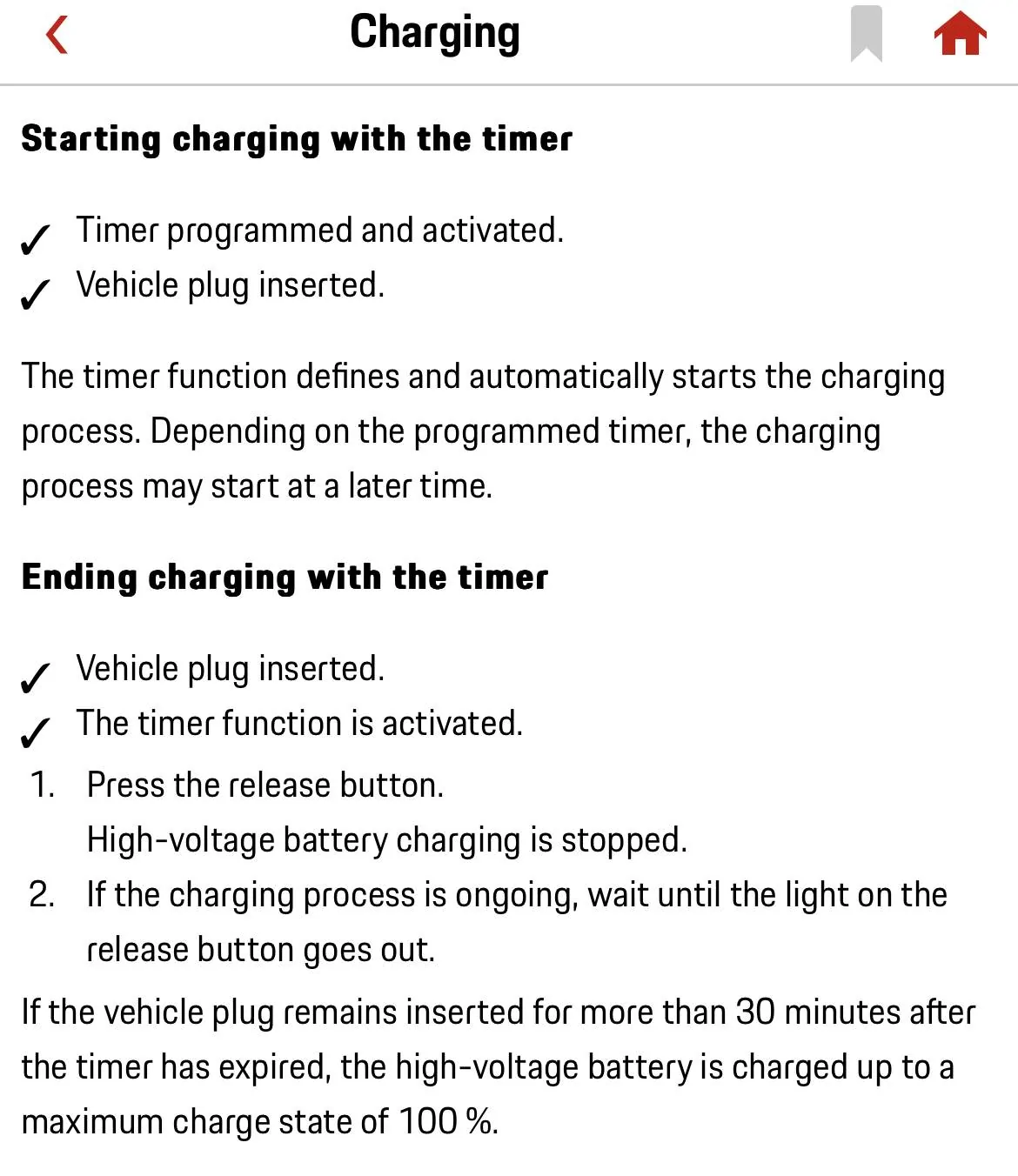
Interesting to see your explanation. I have not experienced this since I normally have a repeat programmed. I also can not see the last paragraph mentioned in my manual at all ( starting with “If the vehicle plug….”). It is not in my printed manual (not updated since 2020), nor in the manual in MyPorsche app after the uPdate. Could that be Region or MY dependent?? Even the video clip shows how to programme a timer for just one day and no mention of the above.

When I read the statement I had concluded at first that the charge would continue ONLY after you have pressed the button to stop the charge and not disconnected the cable at that stage. Then it would start again and charge to 100%?

Seems strange to have achieved the desired charge level and if you do nothing at that stage the car will continue to charge to 100%??? I mean you could get delayed at work before going home at the planned time?? OR you have programmed the Timer to utilise cheap off-peak electricity, but you are not leaving at that hour?! Has anybody really verified this in real life.

I struggle to see the logic from Porsche in such case. But there are some weird engineering programming in the car in other aspects, so who knows.

Still would like to hear from anybody who really has verified this though.
Sponsored

 

Jhenson29

Well-Known Member
First Name
Jeremy
Joined
Feb 9, 2021
Threads
37
Messages
3,014
Reaction score
4,650
Location
St. Louis, MO
Vehicles
2022 Macan S; 2021 Taycan 4S
Country flag
Still would like to hear from anybody who really has verified this though.
Well you’re in luck because you heard from me and I have verified it.

This discussion has come up last year and I verified it at that time.
 
Last edited:

Jhenson29

Well-Known Member
First Name
Jeremy
Joined
Feb 9, 2021
Threads
37
Messages
3,014
Reaction score
4,650
Location
St. Louis, MO
Vehicles
2022 Macan S; 2021 Taycan 4S
Country flag

Scandinavian

Well-Known Member
First Name
Peter
Joined
Nov 3, 2019
Threads
52
Messages
3,904
Reaction score
3,549
Location
France
Vehicles
Taycan T, Aston Martin DB9, Porsche 996 C4 Cab, i4
Country flag
Well you’re in luck because you heard from me and I have verified it.

This discussion has come up last year and I verified it at that time.
Thanks! Missed that.

I have just set my car on charge using only a single timer and nothing else, no profile, no repeat, no other timers on other days. So will try this out.

Still wonder if this is how it should be though. Does not make any sense to me at all. Especially not if there are different off peak schemes available? We shall see how it works out for me.
 

AndiL

Well-Known Member
First Name
Andreas
Joined
Apr 14, 2021
Threads
0
Messages
262
Reaction score
217
Location
Germany
Vehicles
Taycan 4S, ID. 3
Country flag
If no profiles are active, then the car will charge until it is disconnected with no SoC Limit. Having no profile active and adding a non-repeating timer, it will charge according to the timer. If the cable is still connected for some 30 minutes, the same behavior as with no profile and no timer will become active again and it will charge until disconnected.

If you want to have it stop after the timer and NOT continue, you may want to have a profile active (for that location) or use repeating timers.

This is my understanding.

Updated with info from @Jhenson29 about non-/repeating timers.
 
Last edited:


Jhenson29

Well-Known Member
First Name
Jeremy
Joined
Feb 9, 2021
Threads
37
Messages
3,014
Reaction score
4,650
Location
St. Louis, MO
Vehicles
2022 Macan S; 2021 Taycan 4S
Country flag
If no profiles are active, then the car will charge until it is disconnected with no SoC Limit. Having no profile active and adding a timer, it will charge according to the timer. If the cable is still connected for some 30 minutes, the same behavior as with no profile and no timer will become active again and it will charge until disconnected.

If you want to have it stop after the timer and NOT continue, you may want to have a profile active (for that location).

This is my understanding.
Only if the timer is non-repeating. If the timer is repeating, then you don’t need the profile to avoid this behavior.

I have verified that to be true.

There are also lots of members who only use a repeating timer with no profile and do not observe the behavior.
 

Scandinavian

Well-Known Member
First Name
Peter
Joined
Nov 3, 2019
Threads
52
Messages
3,904
Reaction score
3,549
Location
France
Vehicles
Taycan T, Aston Martin DB9, Porsche 996 C4 Cab, i4
Country flag
Only if the timer is non-repeating. If the timer is repeating, then you don’t need the profile to avoid this behavior.

I have verified that to be true.

There are also lots of members who only use a repeating timer with no profile and do not observe the behavior.
I verified the same behaviour today as well. Non repeat charge will star all over again and charge to 100%.

I wonder what the logic there is. Must be a brain freeze from a developer?

Thansk for highlighting this.
 

Jhenson29

Well-Known Member
First Name
Jeremy
Joined
Feb 9, 2021
Threads
37
Messages
3,014
Reaction score
4,650
Location
St. Louis, MO
Vehicles
2022 Macan S; 2021 Taycan 4S
Country flag
I wonder what the logic there is. Must be a brain freeze from a developer?
I feel like it makes sense per my previous explanation to @Hirschaj regarding “no further instructions” and reverting to its default behavior.
Sponsored


Top