Sponsored

White LED on ChargePoint, What Does It Mean?

gryphon99

Well-Known Member
Joined
Mar 21, 2023
Threads
18
Messages
166
Reaction score
118
Location
North Carolina
Vehicles
2008 CRV, 2020 Highlander, 2023 Taycan 4s incoming
Country flag
Hi folks. I've noticed that during the day it seems my Chargepoint LED is green, but perhaps at night it's turning white. Does anyone know what this means? My car is on a 3 month delay so I don't have it yet and it's not charging anything. Can't find anything in the manual about it either.

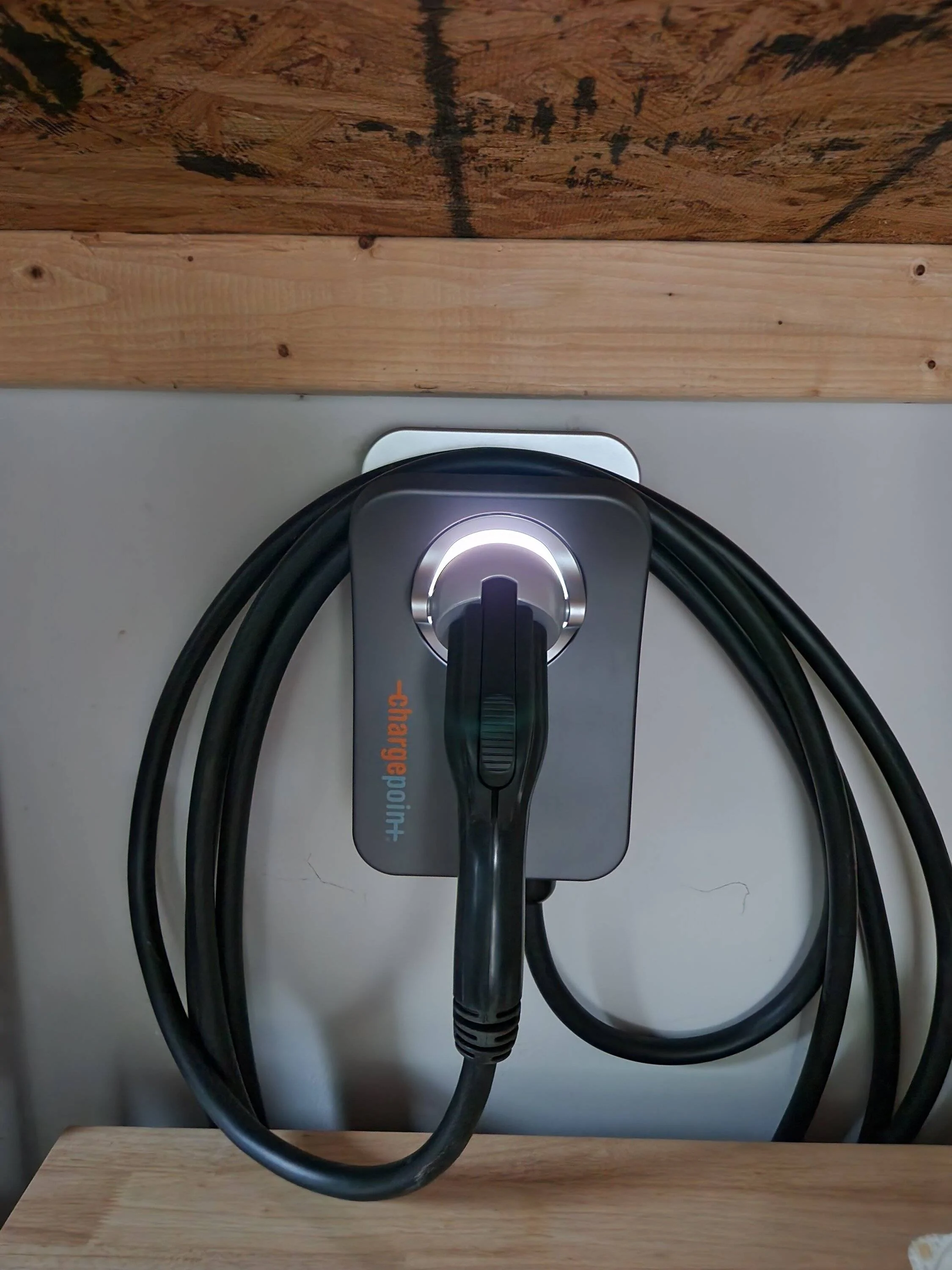
Porsche Taycan White LED on ChargePoint, What Does It Mean? 20230610_202722
Sponsored


_Brian_

Well-Known Member
First Name
Brian
Joined
Jan 2, 2022
Threads
3
Messages
87
Reaction score
67
Location
Northern Virginia
Vehicles
Boxster GTS 4.0, Audi S5 & Taycan 4s (sold)
Country flag
If you did have a green light, then you need to re-configure & re-connect it to your home network. Approach the charger with your iPhone that has your Chargepoint app and follow the instructions. This is similar to the procedure you used when you initially installed the charger. Good luck.
 
OP
OP

gryphon99

Well-Known Member
Joined
Mar 21, 2023
Threads
18
Messages
166
Reaction score
118
Location
North Carolina
Vehicles
2008 CRV, 2020 Highlander, 2023 Taycan 4s incoming
Country flag
If you did have a green light, then you need to re-configure & re-connect it to your home network. Approach the charger with your iPhone that has your Chargepoint app and follow the instructions. This is similar to the procedure you used when you initially installed the charger. Good luck.
Ahh, you were right! I opened the app when it was white and it showed not connected. I reconnected it via the app and it turned green again.

The weird thing is sometimes it's connected and sometimes it isn't. I wonder if it has issues with my Deco wifi mesh. It's only connected at 2.4ghz. Most of my other devices are at 5.0ghz.
 

_Brian_

Well-Known Member
First Name
Brian
Joined
Jan 2, 2022
Threads
3
Messages
87
Reaction score
67
Location
Northern Virginia
Vehicles
Boxster GTS 4.0, Audi S5 & Taycan 4s (sold)
Country flag
It's both 2.4 & 5Ghz. Here's the product sheet. https://chargepoint.ent.box.com/v/CPH50-HomeFlex-DS-EN-US .

I have a strong, stable signal in my garage and it's disconnected once in a year. I suspect it did an a software/firmware upgrade and got lost with the new software/firmware. If the problem persists, you might consider checking the signal strength at your charger by looking at your phone's WiFi connection while you are standing next to it. If it's strong, Its either an instability in the mesh system or the WiFi on your charger. Either way, the charger should re-connect after the loss of connection. If it doesn't reliably reconnect, I would raise the issue with Chargepoint.

Good luck
 
OP
OP

gryphon99

Well-Known Member
Joined
Mar 21, 2023
Threads
18
Messages
166
Reaction score
118
Location
North Carolina
Vehicles
2008 CRV, 2020 Highlander, 2023 Taycan 4s incoming
Country flag
It's both 2.4 & 5Ghz. Here's the product sheet. https://chargepoint.ent.box.com/v/CPH50-HomeFlex-DS-EN-US .

I have a strong, stable signal in my garage and it's disconnected once in a year. I suspect it did an a software/firmware upgrade and got lost with the new software/firmware. If the problem persists, you might consider checking the signal strength at your charger by looking at your phone's WiFi connection while you are standing next to it. If it's strong, Its either an instability in the mesh system or the WiFi on your charger. Either way, the charger should re-connect after the loss of connection. If it doesn't reliably reconnect, I would raise the issue with Chargepoint.

Good luck
Thank you sir! This is very helpful. I will keep an eye on it and check the signal. One of the mesh devices is in the room almost directly above it, so I'd be shocked if it were a low signal issue. In the mesh app, it shows as having "fair" strength, which is better than "weak". I'll periodically check this week to see if disabling the mesh roaming helped. Maybe it was trying to connect to the furthest mesh device, which happens to be the primary one. I'll report back what I find.


OP
OP

gryphon99

Well-Known Member
Joined
Mar 21, 2023
Threads
18
Messages
166
Reaction score
118
Location
North Carolina
Vehicles
2008 CRV, 2020 Highlander, 2023 Taycan 4s incoming
Country flag
Quick update... I checked this morning after I ran an update to my mesh network and it's white again :(

I'm not sure why though. I know I have internet going to it. The mesh network shows it connected with data flowing in and out of it. The ChargePoint app shows it online and ready to charge. Also, I tested the connection by changing the brightness of the LED via the app. That worked perfectly and only took seconds to register. Even after all of that, it's still white.

I tried rebooting ChargePoint via the app and that worked. Once it reconnected, it showed up initially as white, but then after about 10 seconds it turned green. I guess I need to call ChargePoint. Maybe it's something on their end with my account? Clearly it has internet, but I wonder if it has trouble with their services.
 
OP
OP

gryphon99

Well-Known Member
Joined
Mar 21, 2023
Threads
18
Messages
166
Reaction score
118
Location
North Carolina
Vehicles
2008 CRV, 2020 Highlander, 2023 Taycan 4s incoming
Country flag
Well, I guess I don't have proof it has internet. It's connecting fine to my wifi, that I can prove. If the app only works locally via the wifi network and doesn't need to reach out externally then that would make sense why I can still communicate with it while it's white. I'll see what ChargePoint says... this is weird...
 

jkoya

Well-Known Member
First Name
Jason
Joined
Oct 27, 2021
Threads
8
Messages
427
Reaction score
313
Location
No CA
Vehicles
22 Taycan CT4, 23 Mini Cooper SE on order
Country flag
I tried rebooting ChargePoint via the app and that worked. Once it reconnected, it showed up initially as white, but then after about 10 seconds it turned green. I guess I need to call ChargePoint. Maybe it's something on their end with my account? Clearly it has internet, but I wonder if it has trouble with their services.

Hi - Sorry to hear about your issues with the ChargePoint HomeFlex EVSE. I had the same issues as you are currently having. Mine was rock solid for maybe 10 months and then would intermittently disconnect from my network and the indicator light would go from Green to White. Similar to your case, I had an Orbi WiFi6 mesh satellite within 5 feet of the ChargePoint unit. I then connected the satellite directly to the router with an ethernet cable. Internet access was strong and I was connecting at close to 1.1 Gbps. Still, the ChargePoint HomeFlex EVSE would still randomly disconnect.

Finally opened a case with ChargePoint and after going back and forth with them for two days, they finally agreed the WiFi module of my unit was defective and agreed to replace the unit. ChargePoint Tech support would have me constantly re-booting the unit in order to try and get it to re-connect.....Unfortunately, they had no replacement units and I had to wait over 2 months to get a replacement. In the meantime, I purchased an Autel unit that connects to the internet with WiFi and/or ethernet cable. A few weeks after installing the Autel unit, a replacement ChargePoint unit arrived.

During the troubleshooting, ChargePoint remotely reset my unit back to factory default settings. Of course, since you need access to their app for an install and my WiFi module was dead....I could not re-install the unit in the app. When this happens, the unit will default to 12 A and no higher. This was according to ChargePoint Tech support.

Good luck and keep us posted..
Sponsored


Top