Sponsored

How to set to profile to only charge to 85%

Rainforest

Well-Known Member
Joined
Apr 19, 2021
Threads
1
Messages
245
Reaction score
104
Location
Canada
Vehicles
Tesla Model X, Tesla Model 3 LR
Country flag
I don’t know why Porsche makes it so confusing. What do I do if I want to keep the car always charged to 50%, and then bump it up to 80% on a day that I do want to drive the car? In a Tesla it’s simple: move the limit bar over.
Sponsored

 

W1NGE

Well-Known Member
First Name
Adrian
Joined
Jan 11, 2021
Threads
53
Messages
11,017
Reaction score
6,805
Location
Aberdeen, Scotland
Vehicles
992.2, ex GTS ST & 4S owner, Macan T
Country flag
I don’t know why Porsche makes it so confusing. What do I do if I want to keep the car always charged to 50%, and then bump it up to 80% on a day that I do want to drive the car? In a Tesla it’s simple: move the limit bar over.
Simple on Porsche too.

Use a timer for daily 50% charging.

On days you want more either modify the existing timer or have a separate one for this purpose or enable Direct Charge and manually disable when at desired charge level.
 

Jhenson29

Well-Known Member
First Name
Jeremy
Joined
Feb 9, 2021
Threads
37
Messages
3,014
Reaction score
4,650
Location
St. Louis, MO
Vehicles
2022 Macan S; 2021 Taycan 4S
Country flag
I don’t know why Porsche makes it so confusing. What do I do if I want to keep the car always charged to 50%, and then bump it up to 80% on a day that I do want to drive the car? In a Tesla it’s simple: move the limit bar over.
The simplest way is to use a profile by itself with the min set to 50% and use optimized charging. Then slide the min charge value to 80% when you want 80%. Sounds the same to me.
 

W1NGE

Well-Known Member
First Name
Adrian
Joined
Jan 11, 2021
Threads
53
Messages
11,017
Reaction score
6,805
Location
Aberdeen, Scotland
Vehicles
992.2, ex GTS ST & 4S owner, Macan T
Country flag
The simplest way is to use a profile by itself with the min set to 50% and use optimized charging. Then slide the min charge value to 80% when you want 80%. Sounds the same to me.
Optimised charging only relates to a HEM environment where solar / mains come into play. It doesn't do anything else.

For my use case I must use both timers and profiles.
 

Jhenson29

Well-Known Member
First Name
Jeremy
Joined
Feb 9, 2021
Threads
37
Messages
3,014
Reaction score
4,650
Location
St. Louis, MO
Vehicles
2022 Macan S; 2021 Taycan 4S
Country flag
Optimised charging only relates to a HEM environment where solar / mains come into play. It doesn't do anything else.

For my use case I must use both timers and profiles.
I know it doesn’t do anything else. That’s the point…the question wasn’t about it doing anything else. Just setting it to charge to a certain amount.

It also wasn’t asking about your use case, so also not relevant.


Rainforest

Well-Known Member
Joined
Apr 19, 2021
Threads
1
Messages
245
Reaction score
104
Location
Canada
Vehicles
Tesla Model X, Tesla Model 3 LR
Country flag
The simplest way is to use a profile by itself with the min set to 50% and use optimized charging. Then slide the min charge value to 80% when you want 80%. Sounds the same to me.
I've read in several places though that the car does NOT stop charging at the minimum charge once it reaches it. When the battery is below the minimum charge, this triggers the car to start charging and it will keep going to 100%.

Others have said what you said. That's why I find it so confusing!
 

Rainforest

Well-Known Member
Joined
Apr 19, 2021
Threads
1
Messages
245
Reaction score
104
Location
Canada
Vehicles
Tesla Model X, Tesla Model 3 LR
Country flag
Simple on Porsche too.

Use a timer for daily 50% charging.

On days you want more either modify the existing timer or have a separate one for this purpose or enable Direct Charge and manually disable when at desired charge level.
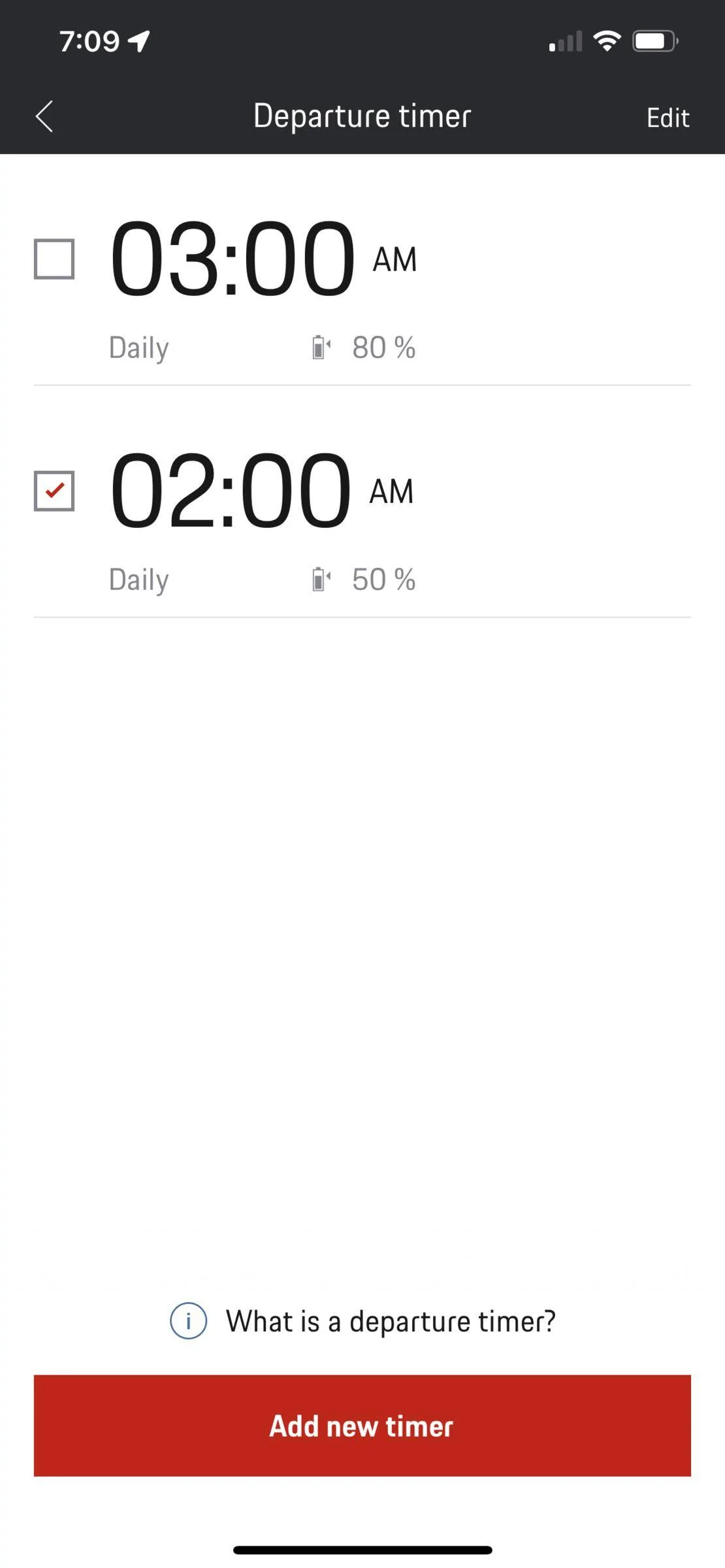
OK, that is what I have gathered. So I've set my timers as per the below screenshot (haven't tried it yet though). I leave the 50% timer on all the time, and the day I decide to drive, I turn on the 80% timer. But technically I don't want to depart at 2:00am - the only reason why I set it that way is in case I come home late, I want it to start charging as soon as possible. What I REALLY want is for the car to start charging immediately like in a Tesla, but Porsche is forcing me to use a timer! In my city, electricity is the same price around the clock so I don't care about charging during certain periods.

Is there any way to get the car to charge to a certain limit immediately, and on days that I choose to drive, have the car charge to a higher level?

Porsche Taycan How to set to profile to only charge to 85% IMG_2604
 

Jhenson29

Well-Known Member
First Name
Jeremy
Joined
Feb 9, 2021
Threads
37
Messages
3,014
Reaction score
4,650
Location
St. Louis, MO
Vehicles
2022 Macan S; 2021 Taycan 4S
Country flag
I've read in several places though that the car does NOT stop charging at the minimum charge once it reaches it.
If you use optimized charging and no timers, it stops at the minimum.
Is there any way to get the car to charge to a certain limit immediately, and on days that I choose to drive, have the car charge to a higher level?
Yes, use the profile as I described.


Scandinavian

Well-Known Member
First Name
Peter
Joined
Nov 3, 2019
Threads
52
Messages
3,904
Reaction score
3,549
Location
France
Vehicles
Taycan T, Aston Martin DB9, Porsche 996 C4 Cab, i4
Country flag
OK, that is what I have gathered. So I've set my timers as per the below screenshot (haven't tried it yet though). I leave the 50% timer on all the time, and the day I decide to drive, I turn on the 80% timer. But technically I don't want to depart at 2:00am - the only reason why I set it that way is in case I come home late, I want it to start charging as soon as possible. What I REALLY want is for the car to start charging immediately like in a Tesla, but Porsche is forcing me to use a timer!
I have not understood why you have set any timer at all, if what you write above is your prefferred way.

my advice is to set two profiles only and no timer whatsoever. Assuming you are charging with AC and not DC.

one profile with minimum 50% and one profile with minimum 80%. Forget all timers. etc,
Then just choose the SOC you are aiming at.

The car will then start charging when you plug it in and achieve 50% or 80% and stop. This could be in the middle of the night or the next morning depending on your charge rate as well as the staring SOC.

Porsche‘s implementation in this area is not the most intuitiv one but it works well once you set it up correctly.
 

W1NGE

Well-Known Member
First Name
Adrian
Joined
Jan 11, 2021
Threads
53
Messages
11,017
Reaction score
6,805
Location
Aberdeen, Scotland
Vehicles
992.2, ex GTS ST & 4S owner, Macan T
Country flag
I've read in several places though that the car does NOT stop charging at the minimum charge once it reaches it. When the battery is below the minimum charge, this triggers the car to start charging and it will keep going to 100%.

Others have said what you said. That's why I find it so confusing!
That's why I recommend using a timer as this controls when to stop and if you establish a weekly schedule it will never over charge when plugged in and any charging event which passes when not plugged in is skipped. As there is logically always a next timer even the EVSE go into Pause mode if the car is left connected waiting for the next timer event. Could not be simpler.
 

W1NGE

Well-Known Member
First Name
Adrian
Joined
Jan 11, 2021
Threads
53
Messages
11,017
Reaction score
6,805
Location
Aberdeen, Scotland
Vehicles
992.2, ex GTS ST & 4S owner, Macan T
Country flag
OK, that is what I have gathered. So I've set my timers as per the below screenshot (haven't tried it yet though). I leave the 50% timer on all the time, and the day I decide to drive, I turn on the 80% timer. But technically I don't want to depart at 2:00am - the only reason why I set it that way is in case I come home late, I want it to start charging as soon as possible. What I REALLY want is for the car to start charging immediately like in a Tesla, but Porsche is forcing me to use a timer! In my city, electricity is the same price around the clock so I don't care about charging during certain periods.

Is there any way to get the car to charge to a certain limit immediately, and on days that I choose to drive, have the car charge to a higher level?

IMG_2604.PNG
Use the minimum charge feature in your profile to set a pre-defined "please charge immediately to this percent when I plug you in". If set at 25% and you have > 25% battery left then no charging session will start until the timer (if active) takes over. If you set to 50% and you have 30% battery then charging will commence immediately and then pause at 50% waiting on the timer event. Therefore you can do what you need using both in tandem.

If rates are the same at any time of day then set the timer to end at a more sensible time e.g. 07:00 (or whatever) and use the profile minimum charge to be what you need.

Profiles are really handy as they are location based and if you have multiple AC charge locations you use regularly e.g. home and 2nd home then the car will automatically detect which one to activate using the stored co-ordinates meaning that you can have different charge and timer settings at each location.
 

Scandinavian

Well-Known Member
First Name
Peter
Joined
Nov 3, 2019
Threads
52
Messages
3,904
Reaction score
3,549
Location
France
Vehicles
Taycan T, Aston Martin DB9, Porsche 996 C4 Cab, i4
Country flag
Use the minimum charge feature in your profile to set a pre-defined "please charge immediately to this percent when I plug you in". If set at 25% and you have > 25% battery left then no charging session will start until the timer (if active) takes over. If you set to 50% and you have 30% battery then charging will commence immediately and then pause at 50% waiting on the timer event. Therefore you can do what you need using both in tandem.

If rates are the same at any time of day then set the timer to end at a more sensible time e.g. 07:00 (or whatever) and use the profile minimum charge to be what you need.

Profiles are really handy as they are location based and if you have multiple AC charge locations you use regularly e.g. home and 2nd home then the car will automatically detect which one to activate using the stored co-ordinates meaning that you can have different charge and timer settings at each location.
I do not understand why you want to complicate this with a timer? Unless there is some kind of SW bug in your car.

I can set a profile with minimum charge level, plug in and the car charges to that level. Handy if I am staying at a hotel, or in a garage with chargers. Depending on charging power I have experienced times from a few hours (11kW) for 5 to 80% up to around 24 hours with a low power charger (3.2 kW). All worked just fine.
 

W1NGE

Well-Known Member
First Name
Adrian
Joined
Jan 11, 2021
Threads
53
Messages
11,017
Reaction score
6,805
Location
Aberdeen, Scotland
Vehicles
992.2, ex GTS ST & 4S owner, Macan T
Country flag
I do not understand why you want to complicate this with a timer? Unless there is some kind of SW bug in your car.

I can set a profile with minimum charge level, plug in and the car charges to that level. Handy if I am staying at a hotel, or in a garage with chargers. Depending on charging power I have experienced times from a few hours (11kW) for 5 to 80% up to around 24 hours with a low power charger (3.2 kW). All worked just fine.
It's not that I 'want to' but I have to (for my use case).

I have an off-peak period between 00:00 and 07:00 and generally charge to 85%. My SOC is rarely below my minimum charge (25%) and so most charging sessions immediately go on 'pause' waiting for the timer event.

I need to control the precise end time and optionally pre-heat (pre-cool is never needed in my climate).

My experience(s) with a profile alone were mixed / inconsistent and in the end I got precisely what I needed using both 100% of the time.

I believe the software in my car is no different from the rest - riddled with bugs and poorly thought out logic but, it is what it is.
 

Scandinavian

Well-Known Member
First Name
Peter
Joined
Nov 3, 2019
Threads
52
Messages
3,904
Reaction score
3,549
Location
France
Vehicles
Taycan T, Aston Martin DB9, Porsche 996 C4 Cab, i4
Country flag
@Rainforest, have you watched and taken note of this video? I think it explains a lot of options very well.

enjoy
 

Rainforest

Well-Known Member
Joined
Apr 19, 2021
Threads
1
Messages
245
Reaction score
104
Location
Canada
Vehicles
Tesla Model X, Tesla Model 3 LR
Country flag
I have not understood why you have set any timer at all, if what you write above is your prefferred way.

my advice is to set two profiles only and no timer whatsoever. Assuming you are charging with AC and not DC.

one profile with minimum 50% and one profile with minimum 80%. Forget all timers. etc,
Then just choose the SOC you are aiming at.

The car will then start charging when you plug it in and achieve 50% or 80% and stop. This could be in the middle of the night or the next morning depending on your charge rate as well as the staring SOC.

Porsche‘s implementation in this area is not the most intuitiv one but it works well once you set it up correctly.
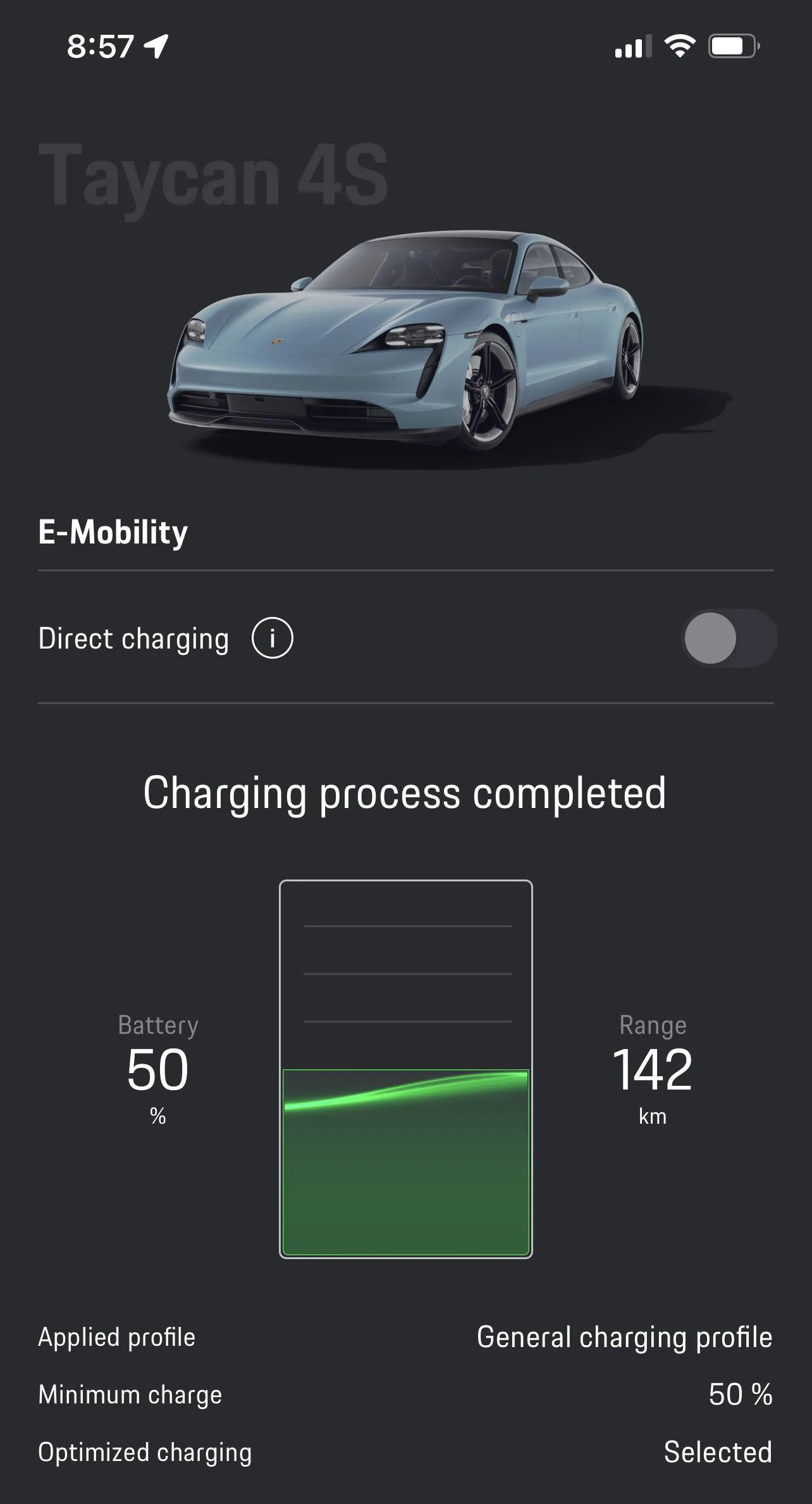
You were right. I set the general profile and it stopped at 50%. This is opposite of what some people have said where profiles only start charging below the minimum charge but do NOT stop until it hits 100%. But why does the battery continue to show the wavy animation even though it has stopped charging? See screenshot.

Porsche Taycan How to set to profile to only charge to 85% E45A6428-F535-4F79-8D8C-9E32D7CC2894
Sponsored


Top