Sponsored

Homelink Shortcuts Not Available When Using Backup Camera

Mr. 2021 Taycan

Well-Known Member
Joined
Feb 1, 2021
Threads
11
Messages
159
Reaction score
194
Location
Florida
Vehicles
2021 Taycan 4S
Country flag
I set up a Homelink shortcut to open and close my garage door.

I back out of the garage and the Homelink icon does not appear until the backup camera screen closes.

This seems like an over sight. The Homelink icon should appear as soon as I am out of the garage, regardless of the displayed function on the PCM.

As designed, I have to manually close the backup camera screen to activate the Homelink icon to close the garage door, then manually turn on the backup camera to complete backing out of my driveway.

Anyone find a way to overcome this issue? Seems like a no brainer usability issue Porsche can easily address.
Sponsored

 

Hirschaj

Well-Known Member
First Name
Jim
Joined
Sep 5, 2021
Threads
68
Messages
2,223
Reaction score
2,617
Location
Austin TX
Vehicles
2022 Taycan CT4 - Mamba Green, 2022 Challenger
Country flag
I set up a Homelink shortcut to open and close my garage door.

I back out of the garage and the Homelink icon does not appear until the backup camera screen closes.

This seems like an over sight. The Homelink icon should appear as soon as I am out of the garage, regardless of the displayed function on the PCM.

As designed, I have to manually close the backup camera screen to activate the Homelink icon to close the garage door, then manually turn on the backup camera to complete backing out of my driveway.

Anyone find a way to overcome this issue? Seems like a no brainer usability issue Porsche can easily address.
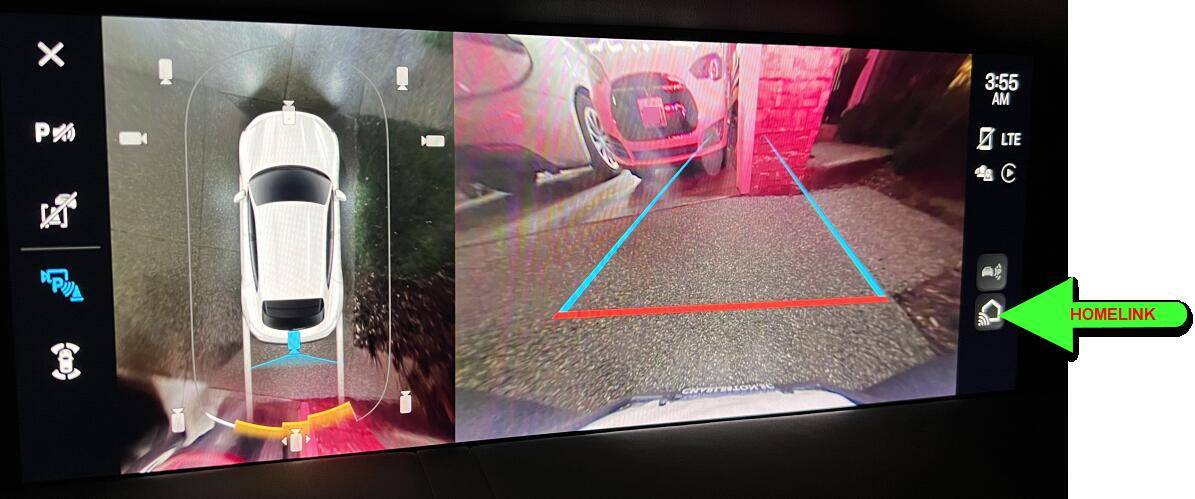
I only have 1 garage door programmed into Homelink. The button is in the bottom right corner of the screen when the backup camera is on. Can you post a photo of what your screen looks like when the camera is on? I just press and hold the icon and my garage door closes.

Edit: this requires the uPdated software with the color icons.
 

bluegrassvroom

Well-Known Member
First Name
Neil
Joined
Jan 18, 2022
Threads
24
Messages
151
Reaction score
108
Location
Kentucky, USA
Vehicles
2021 taycan 4s
Country flag
i think this is a design issue and decision. They don't want ANYTHING else on the screen when backup camera is on -

i have overhead camera and homelink as my two star shortcuts (diamond shortcuts) - and do what you say- but using the shortcut diamonds makes it quick and painless
 
OP
OP
Mr. 2021 Taycan

Mr. 2021 Taycan

Well-Known Member
Joined
Feb 1, 2021
Threads
11
Messages
159
Reaction score
194
Location
Florida
Vehicles
2021 Taycan 4S
Country flag
I only have 1 garage door programmed into Homelink. The button is in the bottom right corner of the screen when the backup camera is on. Can you post a photo of what your screen looks like when the camera is on? I just press and hold the icon and my garage door closes.

Edit: this requires the uPdated software with the color icons.
Homelink shortcut is not on my PCM screen when backup camera is active. Video attached.


whitex

Well-Known Member
Joined
Jul 30, 2021
Threads
87
Messages
8,210
Reaction score
7,248
Location
WA, USA
Vehicles
2023 Taycan TCT, 2024 Q8 eTron P+
Country flag
Homelink shortcut is not on my PCM screen when backup camera is active. Video attached.

On my screen there is a homelink button showing while backing up, on the very right of the screen (the part of the screen your video cuts off), towards the bottom. IIRC, you can also define either of the diamond buttons (steering wheel or instrument cluster) to be homelink.

Porsche Taycan Homelink Shortcuts Not Available When Using Backup Camera 1696927379793
 
Last edited:


Hirschaj

Well-Known Member
First Name
Jim
Joined
Sep 5, 2021
Threads
68
Messages
2,223
Reaction score
2,617
Location
Austin TX
Vehicles
2022 Taycan CT4 - Mamba Green, 2022 Challenger
Country flag
Homelink shortcut is not on my PCM screen when backup camera is active. Video attached.

It’s the icon in the bottom right corner that looks like a house. Press and hold.

I’m trying to watch the video on a phone screen on a plane so I might be mistaking that icon in your video. If the right icon is not there then you should take it into service because it should be.

Edit: I think the icon shows up about 15 seconds into the video.
 

Jayyvr890

Well-Known Member
Joined
Dec 13, 2021
Threads
30
Messages
496
Reaction score
372
Location
Canada
Vehicles
Taycan 4S
Country flag
I have not experienced this issue as I usually back into my garage lol

Although I do notice a lot of my NA neighbours never back into garages/parking spots where most expats do
 

Artman

Well-Known Member
First Name
Art
Joined
May 15, 2021
Threads
11
Messages
269
Reaction score
198
Location
Maryland/Florida
Vehicles
2022 4S Cross Turismo
Country flag
Yeah. It's a bit frustrating.

1. Your driveway doesn't look terribly long. Why not back out all the way onto the street, put it in drive, then hit home link. I'm pretty sure you'll still have to switch out of back-up view but it would save one press.

2. If you can live with only 1 homelink button, program a physical shortcut button for Homelink as mentioned above.


Crick

Well-Known Member
First Name
Crick
Joined
Jan 30, 2021
Threads
6
Messages
183
Reaction score
152
Location
Palo Alto, CA
Vehicles
2018 Volt, 2009 BMW X5D, 2021 Taycan Turbo S
Country flag
this requires the uPdated software with the color icons.
That is correct. Before I got the color icon software update, the same irritating absence of Homelink button occurred. One had to back out, kill the reverse camera, then close the garage door.

Since still in the update; however, there is a Homelink button, even when the reverse camera is on.
 
OP
OP
Mr. 2021 Taycan

Mr. 2021 Taycan

Well-Known Member
Joined
Feb 1, 2021
Threads
11
Messages
159
Reaction score
194
Location
Florida
Vehicles
2021 Taycan 4S
Country flag
Homelink shortcut is not on my PCM screen when backup camera is active. Video attached.

Thank-you for pointing out the Homelink icon. That icon does appear when I exit the garage but, as I have two Homelink controls, when I tap the icon the PCM reverts to the main screen where the two Homelink controls appear at the bottom left. The same result is seen when I set a diamond button for Homelink. So, I'm out of luck on this admittedly small detail.
 

JAGMAN

Well-Known Member
Joined
Jun 13, 2022
Threads
3
Messages
216
Reaction score
159
Location
RI, USA
Vehicles
‘22 CT4
Country flag
I had the same frustrating experience with the homelink buttons being unavailable with the reverse camera on the display. In order to get the house icon to actuate the door, only one opener can be programmed. That was the best solution for my use case. (I can’t remember if I had to delete both openers and then re-add one of them to get it to work with the house icon)
 

Hirschaj

Well-Known Member
First Name
Jim
Joined
Sep 5, 2021
Threads
68
Messages
2,223
Reaction score
2,617
Location
Austin TX
Vehicles
2022 Taycan CT4 - Mamba Green, 2022 Challenger
Country flag
Thank-you for pointing out the Homelink icon. That icon does appear when I exit the garage but, as I have two Homelink controls, when I tap the icon the PCM reverts to the main screen where the two Homelink controls appear at the bottom left. The same result is seen when I set a diamond button for Homelink. So, I'm out of luck on this admittedly small detail.
It's a major oversight by Porsche that could easily be corrected via software. Maybe with the next major update but who knows if that will ever happen given the snails pace that Porsche seems to operate at in regards to software.
Sponsored


Top