Sponsored

Problem on first use of an OBDLink MX+

Dr Bob

Well-Known Member
First Name
Andy
Joined
Sep 16, 2023
Threads
6
Messages
123
Reaction score
174
Location
Falkirk
Vehicles
Taycan Turbo
Country flag
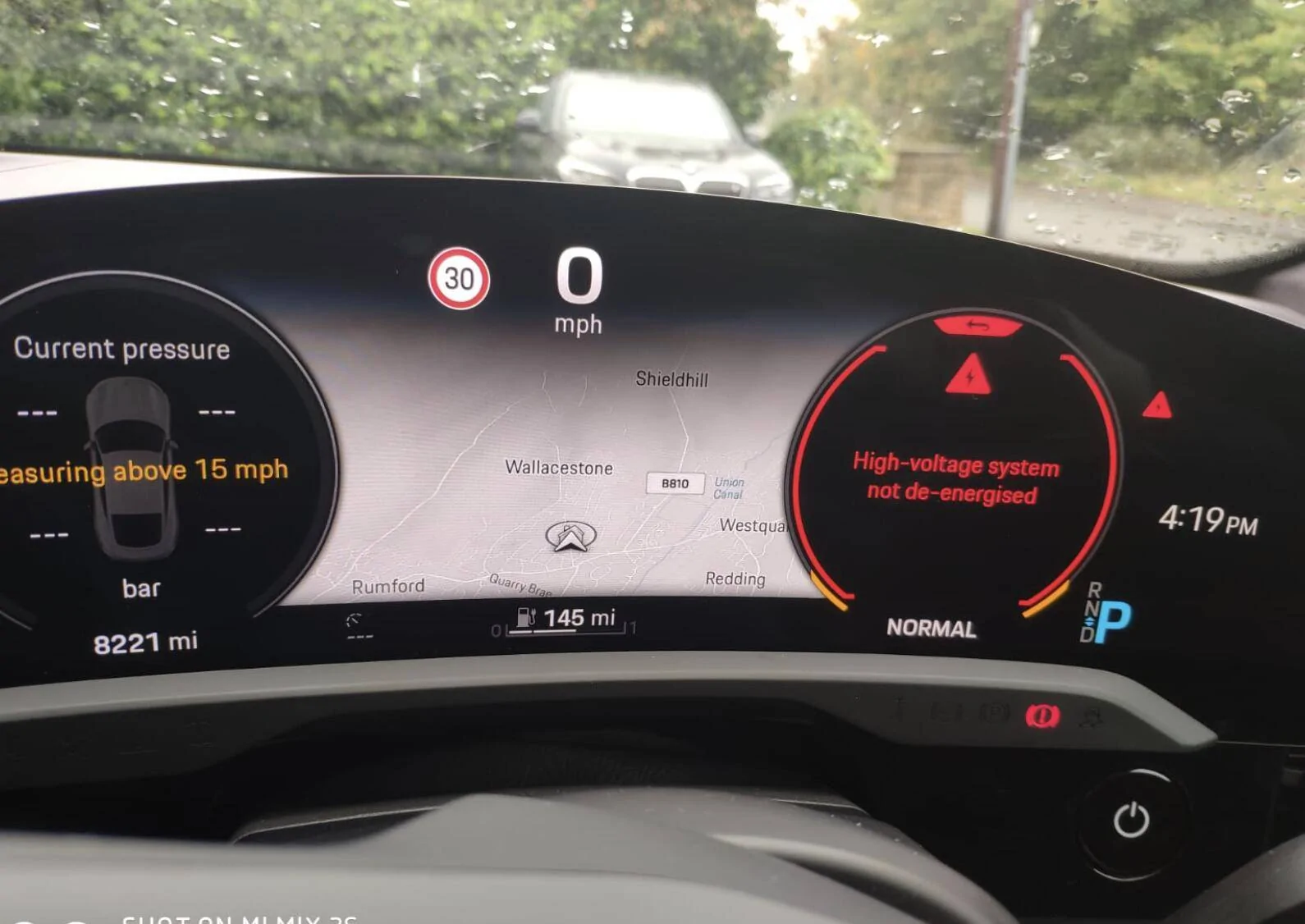
Installed a new OBDLink MX+ in my Taycan today and linked it to an Iphone using Car Scanner. It connected no problem and seems to be operating Ok with the data available on the app. I'll have some questions later on how to see various data but the problem was on the car dashboard display. See pic.

Porsche Taycan Problem on first use of an OBDLink MX+ Screenshot 2023-10-08 at 17.43.25


Bit concerned over the 'High voltage system....' warning.
It went away by pressing the selection button on the stalk (that changes that display) but it kept coming back - when in Park. There were warning triangles to the top right and bottom left as well. It did not seem to affect the car driving (short trip round the block).
The message disappeared when I took the OBDLink dongle out.
I tried the dongle with the OBDLink app but the warning again came on before I even linked to the phone so that suggests it is the dongle at work.
Any ideas?
Sponsored

 

tchavei

Well-Known Member
Joined
Dec 3, 2022
Threads
33
Messages
1,302
Reaction score
1,369
Location
Portugal
Vehicles
Too many to list. Includes a MY23 Taycan RWD
Country flag
Perfectly normal

If it continues after disconnecting car scanner app from the dongle, you'll have to pull the dongle. Some dongles will go to sleep so never have to be unplugged.
 
OP
OP
Dr Bob

Dr Bob

Well-Known Member
First Name
Andy
Joined
Sep 16, 2023
Threads
6
Messages
123
Reaction score
174
Location
Falkirk
Vehicles
Taycan Turbo
Country flag
Perfectly normal

If it continues after disconnecting car scanner app from the dongle, you'll have to pull the dongle. Some dongles will go to sleep so never have to be unplugged.
Thanks tchavei.
I was intending to use the dongle connected when driving the car and collecting data on long runs. Is this warning ok on a long run?

.....and that leads me to another question.
which tags do I choose to measure speed, energy remaining in the battery and distance and get a graph out at the end of a long run. Is it the app that records the data or is the data for the long run in the car and collected by the dongle. Keen also to monitor battery temp and exterior temp.

I will need to have a play with the dongle but was put off today by the Hv warning.
 

DougFrisk

Well-Known Member
First Name
Doug
Joined
Oct 24, 2022
Threads
4
Messages
380
Reaction score
588
Location
Duluth MN
Vehicles
No longer awaiting a 4CT
Country flag
Installed a new OBDLink MX+ in my Taycan today and linked it to an Iphone using Car Scanner. It connected no problem and seems to be operating Ok with the data available on the app. I'll have some questions later on how to see various data but the problem was on the car dashboard display. See pic.

Screenshot 2023-10-08 at 17.43.25.webp


Bit concerned over the 'High voltage system....' warning.
It went away by pressing the selection button on the stalk (that changes that display) but it kept coming back - when in Park. There were warning triangles to the top right and bottom left as well. It did not seem to affect the car driving (short trip round the block).
The message disappeared when I took the OBDLink dongle out.
I tried the dongle with the OBDLink app but the warning again came on before I even linked to the phone so that suggests it is the dongle at work.
Any ideas?
You just connected a diagnostic tool to the car. It thinks you are about to perform some service task. It's just letting you, as the service technician, know that if you mess with the orange wires you will have a bad day.
 
Last edited:
OP
OP
Dr Bob

Dr Bob

Well-Known Member
First Name
Andy
Joined
Sep 16, 2023
Threads
6
Messages
123
Reaction score
174
Location
Falkirk
Vehicles
Taycan Turbo
Country flag
You just connected a diagnostic tool to the car it thinks you are about to perform some service task. It's just letting you, as the service technician, know that if you mess with the orange wires you will have a bad day.
Thanks Doug,
that makes sense.
I'll have a longer play with it this week.


tchavei

Well-Known Member
Joined
Dec 3, 2022
Threads
33
Messages
1,302
Reaction score
1,369
Location
Portugal
Vehicles
Too many to list. Includes a MY23 Taycan RWD
Country flag
Thanks tchavei.
I was intending to use the dongle connected when driving the car and collecting data on long runs. Is this warning ok on a long run?
It shouldn't be a problem. Just annoying. I hate seeing the red triangle (after the warning is dismissed) but I've recorded 15 min sessions while driving with no ill effect.

.....and that leads me to another question.
which tags do I choose to measure speed, energy remaining in the battery and distance and get a graph out at the end of a long run. Is it the app that records the data or is the data for the long run in the car and collected by the dongle. Keen also to monitor battery temp and exterior temp.

I will need to have a play with the dongle but was put off today by the Hv warning.
It's the app that does the recording, not the dongle. I just leave it plugged in all the time because I'm lazy and like I said, if the app isn't actively using the dongle, mine goes to sleep and no warnings in the dash. Actually, I just checked earlier and the warning only pops up the moment the app establishes a connection to the dongle and vanishes 3 seconds after you press disconnect on the app.
 
OP
OP
Dr Bob

Dr Bob

Well-Known Member
First Name
Andy
Joined
Sep 16, 2023
Threads
6
Messages
123
Reaction score
174
Location
Falkirk
Vehicles
Taycan Turbo
Country flag
Actually, I just checked earlier and the warning only pops up the moment the app establishes a connection to the dongle and vanishes 3 seconds after you press disconnect on the app.
Yep, that's what I found today when I tried it. Thanks for the heads up.

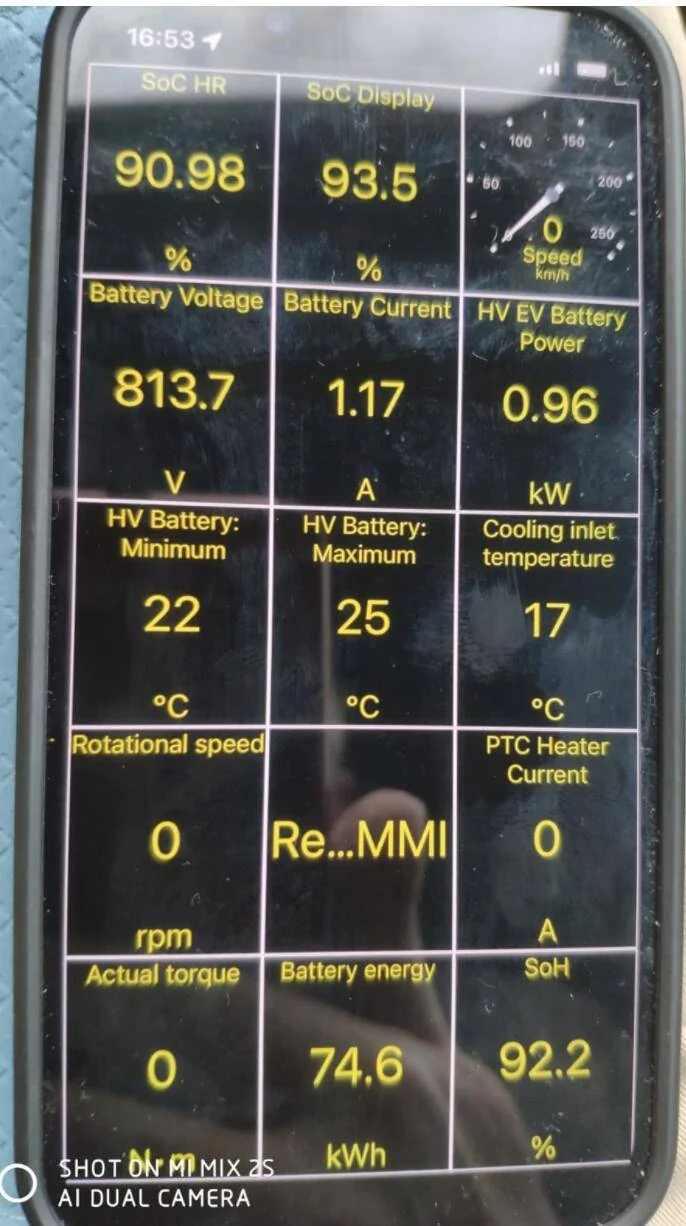
So now I am getting to grips with car scanner but not sure what the app is telling me. One thing I want to be able to measure is how many kWh are being put into the batteries on a charge. One of the screens show the following

Porsche Taycan Problem on first use of an OBDLink MX+ Screenshot 2023-10-09 at 18.49.18


So I am looking for the number of kWh in the battery which I assume is middle bottom ie 74.6kWh. Is this correct?
The problem is that the battery bank is 93.4kWh * 92.2% SoH * 93% SoC = 80kWh rather than 74.6kWh. Even using the lower SoC value of 90.98% (top left), you still end up with >78kWh. What am I doing wrong?
Also still trying to work out how to save data to a file and export it. Any useful tips?
 

tchavei

Well-Known Member
Joined
Dec 3, 2022
Threads
33
Messages
1,302
Reaction score
1,369
Location
Portugal
Vehicles
Too many to list. Includes a MY23 Taycan RWD
Country flag
Yep, that's what I found today when I tried it. Thanks for the heads up.

So now I am getting to grips with car scanner but not sure what the app is telling me. One thing I want to be able to measure is how many kWh are being put into the batteries on a charge. One of the screens show the following

Screenshot 2023-10-09 at 18.49.18.webp


So I am looking for the number of kWh in the battery which I assume is middle bottom ie 74.6kWh. Is this correct?
The problem is that the battery bank is 93.4kWh * 92.2% SoH * 93% SoC = 80kWh rather than 74.6kWh. Even using the lower SoC value of 90.98% (top left), you still end up with >78kWh. What am I doing wrong?
Also still trying to work out how to save data to a file and export it. Any useful tips?
Thing is the car doesn't have access to the full 93kwh. There's a upper and lower reserve that Porsche has locked away to probably unlock later on as the car's battery age to meet the 70% in 8 years requirement.


OP
OP
Dr Bob

Dr Bob

Well-Known Member
First Name
Andy
Joined
Sep 16, 2023
Threads
6
Messages
123
Reaction score
174
Location
Falkirk
Vehicles
Taycan Turbo
Country flag
Thanks tchavei

Yes, that figures. I am interested in knowing the exact power the BMS thinks the battery has because of the way I charge. I spend probably half our time at a marina - living on a boat - so I charge off one of the commando sockets which has no power metering. The marina owners were happy as on my previous car, a tesla, I could give them a print out of power used from TeslaFI so accurately determining how much to pay. With the Taycan, the only option I seem to have is to record the SoC before and after and multiply 93.4KWh by the % added.
Its going to cost me at least 10% less if I use the exact power put back in which will be the difference in SoC times a smaller battery capacity.
I am guessing the Battery Energy in my screenshot of 74.6kWh is the actual power in the battery when the shot was taken - or should I be looking somewhere else?
 

kurand

Well-Known Member
Joined
Sep 9, 2022
Threads
3
Messages
187
Reaction score
144
Location
nowhere
Vehicles
None
You’ll be missing the cable and charger losses if you use battery state of charge delta. These losses could be up to 15%
 

f1eng

Well-Known Member
First Name
Frank
Joined
Aug 19, 2021
Threads
48
Messages
4,765
Reaction score
8,335
Location
Oxfordshire, UK
Vehicles
Taycan CT4S, Ferrari 355, Merc 500E, Prius PHV
Country flag
You’ll be missing the cable and charger losses if you use battery state of charge delta. These losses could be up to 15%
Yes, at home I can monitor the power supplied to the car from the socket and look at the display of power into the battery in the car.
It is always around 500 watts difference, so I presume that is the charging overhead in terms of losses due to pumps etc.
That means the losses are around 7.5% charging via my Andersen wall box and around 24% if using a 13A socket - so emergency use only! I was hoping my daughter would fit a commando socket since there are only 50kW chargers on the island where she lives and not close but so far no...
 
OP
OP
Dr Bob

Dr Bob

Well-Known Member
First Name
Andy
Joined
Sep 16, 2023
Threads
6
Messages
123
Reaction score
174
Location
Falkirk
Vehicles
Taycan Turbo
Country flag
You’ll be missing the cable and charger losses if you use battery state of charge delta. These losses could be up to 15%
Thanks Nick, I had not thought of that. That then likelly balances out the benefit from 'apparent' smaller battery size.
 
OP
OP
Dr Bob

Dr Bob

Well-Known Member
First Name
Andy
Joined
Sep 16, 2023
Threads
6
Messages
123
Reaction score
174
Location
Falkirk
Vehicles
Taycan Turbo
Country flag
Yes, at home I can monitor the power supplied to the car from the socket and look at the display of power into the battery in the car.
It is always around 500 watts difference, so I presume that is the charging overhead in terms of losses due to pumps etc.
Frank,
you say look at the display of power into the battery - is that just the increase in SoC times the 93.4kWh - or are you using the dongle to report power?
I am thinking that the SoH is 90% ish, and the true capacity is lower than 93.4kWh, then the actual power put in is quite a bit less - but then that is offset by Nick's losses in the wires etc.

The loss you are reporting with a 13a plug is quite significant!! The wire did heat up a lot when I charged this way on the Tesla (not very often).
 

f1eng

Well-Known Member
First Name
Frank
Joined
Aug 19, 2021
Threads
48
Messages
4,765
Reaction score
8,335
Location
Oxfordshire, UK
Vehicles
Taycan CT4S, Ferrari 355, Merc 500E, Prius PHV
Country flag
Frank,
you say look at the display of power into the battery - is that just the increase in SoC times the 93.4kWh - or are you using the dongle to report power?
I am thinking that the SoH is 90% ish, and the true capacity is lower than 93.4kWh, then the actual power put in is quite a bit less - but then that is offset by Nick's losses in the wires etc.

The loss you are reporting with a 13a plug is quite significant!! The wire did heat up a lot when I charged this way on the Tesla (not very often).
For standard 13A plugs I have one of those adapters which plugs into the socket which you then plug the appliance you are interested in which can show power being used.
If I plug in a normal charger, either the Porsche mobile charger plus which came with the car or the Toyota one which came with our PHEV Prius, and it shows 2.6kW being supplied whilst the display in the car shows charging at 2.1 kW.

If I look at the app for my Andersen dispenser it shows 7.2kW being supplied whilst the car shows 6.7kW going into the battery.

It is probably only accurate to the nearest 100W but I certainly only consider a 13A socket as a terribly wasteful emergency only solution as well as taking days.

I only look at the % SOH of the battery infrequently using a dongle and never consider its capacity in kWH at all ever.

Range is “enough” and I don’t consider it any more often than I did with my petrol cars, which is almost never.
 
Last edited:

WasserGKuehlt

Well-Known Member
Joined
Sep 7, 2022
Threads
5
Messages
2,066
Reaction score
2,456
Location
WA
Vehicles
4CT, 996C2, MacanS
Country flag
Yes, that figures. I am interested in knowing the exact power the BMS thinks the battery has because of the way I charge. I spend probably half our time at a marina - living on a boat - so I charge off one of the commando sockets which has no power metering. The marina owners were happy as on my previous car, a tesla, I could give them a print out of power used from TeslaFI so accurately determining how much to pay. With the Taycan, the only option I seem to have is to record the SoC before and after and multiply 93.4KWh by the % added.
Its going to cost me at least 10% less if I use the exact power put back in which will be the difference in SoC times a smaller battery capacity.
I am guessing the Battery Energy in my screenshot of 74.6kWh is the actual power in the battery when the shot was taken - or should I be looking somewhere else?
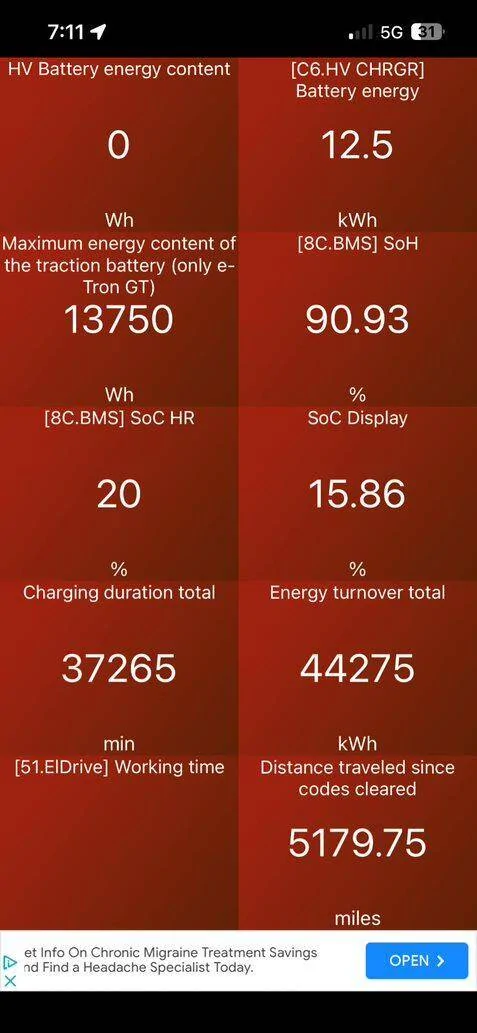
This screen in the CarScanner app shows two fields that may be better 'proxies' for your actual consumption (from the outlet):

Porsche Taycan Problem on first use of an OBDLink MX+ 1697136584807

Charging duration total is tricky - it simply shows the amount of time spent plugged in, not the actual time spent effectively charging. If you control that, then it's a good upper limit of energy drawn (ignoring fluctuations in power).

Energy turnover is a good measure of total 'stored' power (it's a "mileage" counter for energy ingested). You can use this as the lower limit of consumption (and if you only charge at the marina, or are disciplined enough to make these readings before/after all charging sessions everywhere).

But seems to me you could make a 'subscription'-like agreement with them, where you demonstrate an average consumption and just pay a mutually agreeable monthly fee? Sure, you could engineer the hell out of this and only pay exactly what you consume, but it doesn't seem to be worthwhile except - as said engineering challenge.
Sponsored


Top