Sponsored

Befuddled by Carplay & Apple Music

Torv

Well-Known Member
First Name
Torv
Joined
Dec 8, 2020
Threads
70
Messages
917
Reaction score
1,191
Location
Marin County, California
Vehicles
Taycan 4S
Country flag
I suppose these issues can be attributed to second week growing pains, but I am completely mystified by how the Taycan deploys and recognizes Apple Carplay and Apple Music.

Not only have I correctly registered by Apple Music account via My Page on my Porsche.com, I have scanned the QR code multiple times and logged into Apple Music that way as well.

I have also done the USB connection from my iPhone 12 Pro to establish Carplay and as I understand it, do not have to continue to plugin to activate Carplay after that. Oh, and when I do plug in my iPhone to charge after that initial setup, it wants to begin the process all over again.

My problems are that both services are intermittent when I enter the car. Sometimes they're there, other times they're not and I have to begin the process all over again. Sometimes I see the Carplay app on the PCM, most of the time I don't. Sometimes Apple Music is red, other times it's greyed out.

So, all you experienced Taycan wizards, what's the secret of consistent and reliable connectivity of Apple Music and Carplay because right now they're hit and mostly miss?
Sponsored
 

KensingtonPark

Well-Known Member
Joined
Jul 1, 2019
Threads
21
Messages
893
Reaction score
710
Location
New York, NY
Vehicles
2020 Porsche Taycan 4S; 2023 Audi eTron S Sportbck
Country flag
I can only comment on the CarPlay portion of your issue, as I use Apple Music through my phone, not the PCM app.

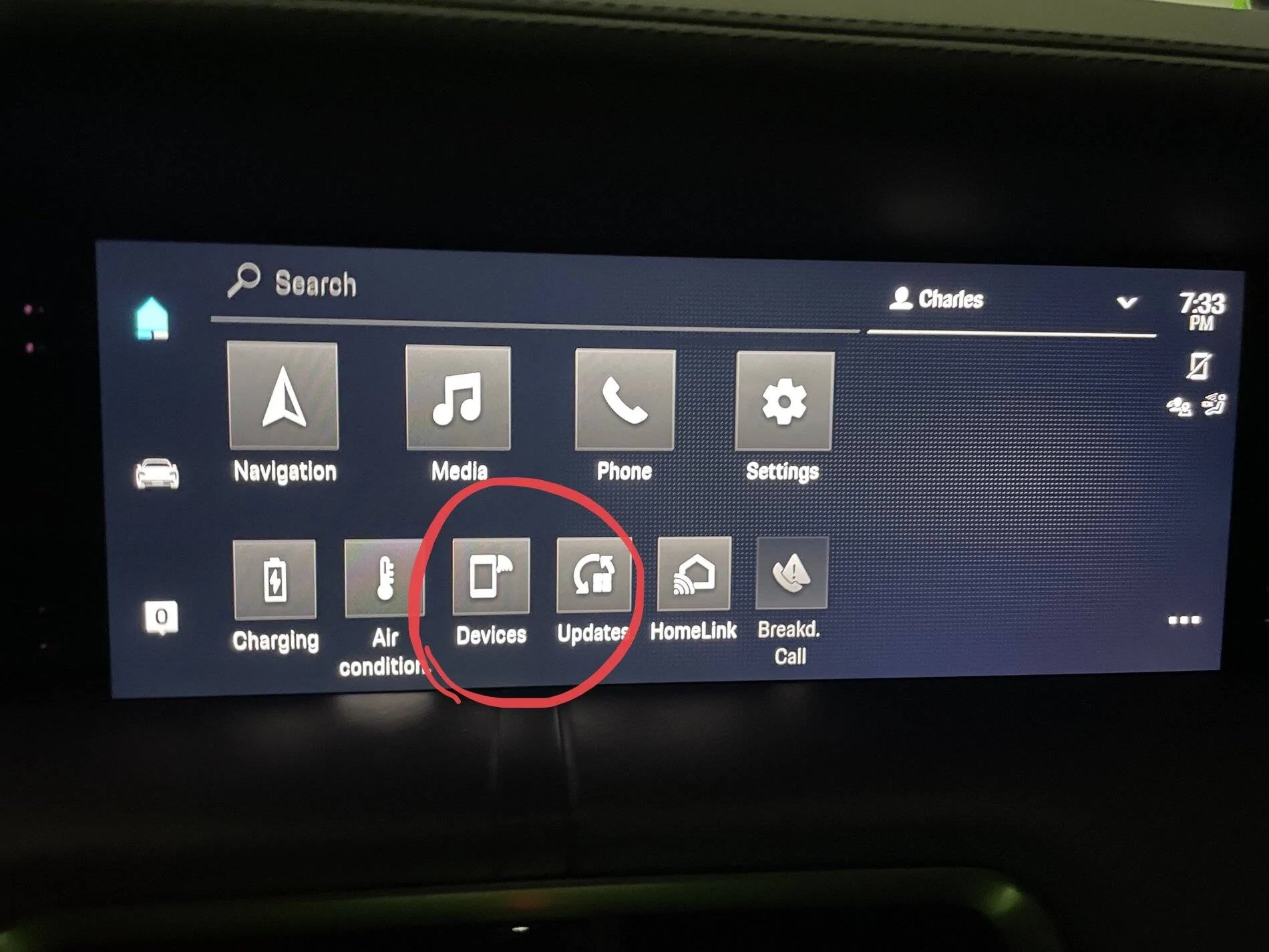
Step 1: In the main PCM screen, select “Devices”.
Porsche Taycan Befuddled by Carplay & Apple Music F3ADD56F-B88E-49C1-8B62-3DAFF4A120E8


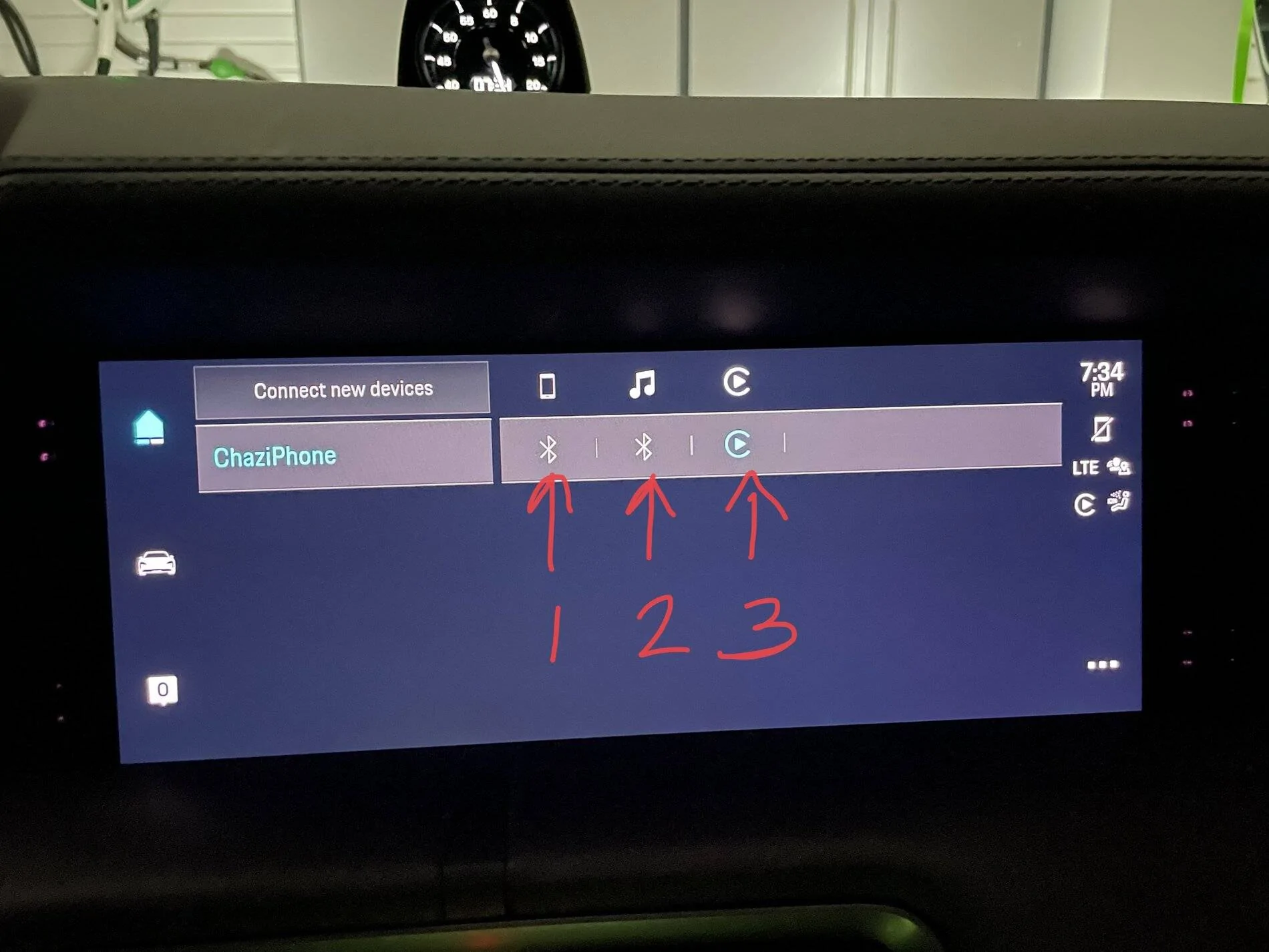
Step 2: In the subsequent screen, the entry for your phone. The row on the phone should contain a number of indicators, as shown below:

Porsche Taycan Befuddled by Carplay & Apple Music E98262E7-B3B4-40AF-9830-4670AF356E9D


Entry 1 means that the phone has been connected for use using Bluetooth (In the traditional manner for cars without CarPlay).
Entry 2 means that the phone can use Bluetooth audio (in the tradtional manner for cars without CarPlay).
Entry 3 means that the phone is also available for CarPlay.

Step 3. If you have a grayed out entry under #3, but you have 1 and 2, tap on #3. The system will then attempt to connect to your phone. I would suggest that you do this once before you drive more than five minutes. For me, it started working the next time I started the car.

If you see something different than 1 and 2 being available, then I would suggest placing your phone in airplane mode, deleting your phone, and then starting over:

  1. After deleting your phone, turn Airplane Mode off.
  2. Connect your phone to Bluetooth using “Connect New Devices” on the screen above.
  3. Confirm that you successfully connected.
  4. Then connect your phone to CarPlay using the cable.
  5. Confirm that CarPlay works.
  6. Turn off your car.
  7. Disconnect the cable from the phone.
  8. Leave and lock the car.
  9. Next time you are in the car, wait 5 minutes for the PCM to boot up
  10. If CarPlay does not become available then, do Step 3 above again.
That’s what I did. Let us know if it works!
 

NormF

Well-Known Member
First Name
Norm
Joined
Sep 30, 2020
Threads
9
Messages
117
Reaction score
66
Location
Vancouver, CA
Vehicles
Taycan Turbo, 911 Targa 4S, MachE
Country flag
I have similar issues with Apple Music and Podcast. I link my accounts, and it works for a few days, but then drops the link and presents the QR code again. Very flakey implementation. I have re-linked many times, both from the car and from the Connect App.

In addition, even when the account is linked, Apple Music and Podcasts will not be active due to the cell coverage provided by the vehicle.

I can understand the cell coverage issue, however I have asked my dealer‘s service dept to ask head office why the linking keeps dropping.
 
OP
OP
Torv

Torv

Well-Known Member
First Name
Torv
Joined
Dec 8, 2020
Threads
70
Messages
917
Reaction score
1,191
Location
Marin County, California
Vehicles
Taycan 4S
Country flag
I have similar issues with Apple Music and Podcast. I link my accounts, and it works for a few days, but then drops the link and presents the QR code again. Very flakey implementation. I have re-linked many times, both from the car and from the Connect App.

In addition, even when the account is linked, Apple Music and Podcasts will not be active due to the cell coverage provided by the vehicle.

I can understand the cell coverage issue, however I have asked my dealer‘s service dept to ask head office why the linking keeps dropping.
Would you please keep us posted as to the response. Some of these issues, like Homelink and Carplay and Apple Music can easily be addressed by software improvements. I'll be writing Porsche NA and Porsche HQ in Germany with some critiques and observations.


XLR82XS

Well-Known Member
First Name
LXA
Joined
Mar 31, 2021
Threads
9
Messages
2,003
Reaction score
1,406
Location
SW FL | Vegas
Vehicles
DMC & rotation of other fine vehicles
Another tip: if charging your phone while using wireless carplay, use the rear seat plugs. If you connect via the center console USB it may cause operational issues with wireless carplay.

I tried using wireless charging in the console with a iphone 12 and the phone overheated within a ~20 minute drive.
 

hshm

Well-Known Member
Joined
Feb 13, 2021
Threads
8
Messages
182
Reaction score
214
Location
California
Vehicles
Taycan 4S
Country flag
Is there a reason why you would need to activate Apple Music in the PCM when you are using CarPlay?

As I understand, you only need to use Apple Music in PCM if you're not using CarPlay. It's an alternative way to play Apple Music.
 

JimBoBel

Member
First Name
Jean-Marc
Joined
Jan 24, 2021
Threads
1
Messages
13
Reaction score
4
Location
Belgium
Vehicles
Taycan 4S
Country flag
Is there a reason why you would need to activate Apple Music in the PCM when you are using CarPlay?

As I understand, you only need to use Apple Music in PCM if you're not using CarPlay. It's an alternative way to play Apple Music.
I was convinced that (maybe wrongly) that using Apple Music in the PCM uses the car data conection while going through CarPlay uses your phone data connection


hshm

Well-Known Member
Joined
Feb 13, 2021
Threads
8
Messages
182
Reaction score
214
Location
California
Vehicles
Taycan 4S
Country flag
I was convinced that (maybe wrongly) that using Apple Music in the PCM uses the car data conection while going through CarPlay uses your phone data connection
That sounds right. That would be a good reason to play via PCM versus CarPlay.
 

struther

Well-Known Member
First Name
Brad
Joined
Jan 16, 2020
Threads
8
Messages
408
Reaction score
461
Location
Toronto
Vehicles
Nissan GTR, Nissan 350z
Country flag
Is there a reason why you would need to activate Apple Music in the PCM when you are using CarPlay?

As I understand, you only need to use Apple Music in PCM if you're not using CarPlay. It's an alternative way to play Apple Music.
I go back and forth between the two seemingly randomly. Even I don’t understand my logic!!
 

submatrix

Well-Known Member
Joined
May 14, 2021
Threads
19
Messages
609
Reaction score
436
Location
California
Vehicles
2021 Taycan
Country flag
I was convinced that (maybe wrongly) that using Apple Music in the PCM uses the car data conection while going through CarPlay uses your phone data connection
Good point. Do we get unlimited data streaming in the Taycan? I never bothered to look it up since I figured I'd just use Carplay for anything data related, but you bring up an interesting alternative which would save my mobile data usage.
 

amazing

Well-Known Member
First Name
Matthew
Joined
Mar 31, 2021
Threads
10
Messages
71
Reaction score
52
Location
Asheville, NC
Vehicles
2003 M5, 20 Merc Sprinter 4x4, 21 Taycan 4S, 22 Rivian R1T, 24 Ineos Grenadier
Country flag
To me the apple music has been totally useless because it always connects to carplay anyone (e.g. even if it's playing "apple music" it's pulled all my playlists, etc from the phone). I'm wondering if anyone has been using the lossless feature on apple music with carplay and experienced buffer under runs, drops, etc when driving through areas with poor cell reception.
 
OP
OP
Torv

Torv

Well-Known Member
First Name
Torv
Joined
Dec 8, 2020
Threads
70
Messages
917
Reaction score
1,191
Location
Marin County, California
Vehicles
Taycan 4S
Country flag
To me the apple music has been totally useless because it always connects to carplay anyone (e.g. even if it's playing "apple music" it's pulled all my playlists, etc from the phone). I'm wondering if anyone has been using the lossless feature on apple music with carplay and experienced buffer under runs, drops, etc when driving through areas with poor cell reception.
All the time. The cell phone coverage in Marin County is barely third world (too many fucking NIMBYs) and spotty at best.
 

andrewket

Well-Known Member
First Name
Andrew
Joined
Jan 31, 2021
Threads
13
Messages
576
Reaction score
434
Location
Vienna, VA
Vehicles
21 Taycan Turbo, Tesla Y*2; Prev S,X,3,996TT
Country flag
I use Apple Music via PCM more than I do via CarPlay in part so my passenger can control the music via the passenger display.
 

amazing

Well-Known Member
First Name
Matthew
Joined
Mar 31, 2021
Threads
10
Messages
71
Reaction score
52
Location
Asheville, NC
Vehicles
2003 M5, 20 Merc Sprinter 4x4, 21 Taycan 4S, 22 Rivian R1T, 24 Ineos Grenadier
Country flag
I use Apple Music via PCM more than I do via CarPlay in part so my passenger can control the music via the passenger display.
I don't have passenger display but how do you ensure that the Apple Music plays via PCM and doesn't default to CarPlay ?
Sponsored


Top