tigerbalm
Well-Known Member
- First Name
- Damien
- Joined
- Oct 11, 2020
- Threads
- 94
- Messages
- 3,514
- Reaction score
- 7,912
- Location
- Dublin, Ireland
- Website
- www.targatrips.com
- Vehicles
- 911 Targa 4 GTS, Fiat 500 EV. Sold: Taycan Turbo S, Taycan 4S; Panamera Turbo S

- Thread starter
- #1
I recently had the Porsche Dashcam installed by Porsche Centre Dublin into my 911. Because it is a Targa, only the front-facing camera is supported. The car did come from the factory with the pre-wiring option, but as I wasn't involved with the install, I have no sense of how much easier or neater that made things.
The official OE Porsche Dashcam was far from my first choice when it comes to cameras. I had pretty good experience with the FitcamX in both my Taycan 4S and Turbo S. I guess I didn't find those camera's amazing and they had iffy 4K resolution – but the physical install is so neat, I forgive it any of its shortcomings.
However, I had a reasonably tricky relationship with Porsche in terms of warranty and a "unsupported" camera install wired into the rain sensor. Everyone knew it wasn't a problem, but Porsche AG made it clear that it violated the terms of the "New Car" warranty with a specific clause about the installation of unapproved hardware.
Once or twice where I had 22kW AC charger failures – sometimes abroad on a road-trip – and I certainly didn't want to give Porsche any reason to deny cover. So I used to carry an "emergency" uninstall kit with me – and used it on a number of occasions. And anybody who has installed the FitcamX will know – that while it is doable – it is a pain.
The last time I had an issue – I was driving across the country on Christmas Eve to head to my childhood home – and the 12 volt battery was low and refusing to top up. I was worried I'd need to call for a tow truck and defo didn't want the camera installed with any concerns about the 12 volt circuit. Out it came adding an hour to an already long winter journey.
I just didn't want to get into all that with my 911 and decided I'd get the official camera installed instead. One motivation for the camera is to document our road trips – as much as it is for security and insurance assistance.

The camera is much more prominent compared to the FitcamX. However, it is not terrible. I am finding myself able to live with it. I think having a right-hand drive vehicle actually does help. The camera naturally "wraps" around the rear-view mirror more so than if the wheel was on the other side.
I could imagine tucking it up a little more towards the roof line – but the installation instructions from Porsche insist on placing it where mine is. I think the main reasons for that are:
The camera is happy to connect to the in-car wifi network. Meaning that instead of acting as a standalone wifi hub, it is just a device on the network. You can even see its internal IP address if you go to the PCM –> Connectivity -> Wifi Hotspot Devices.
In practice, this means that if you want to change something on the camera, download a video to your phone or stream the live view, you can just open the Porsche Dashcam app on your mobile and use it. You do not need to join the camera's own wifi network – in fact in this mode, that will be disabled. Therefore, wireless Carplay and the Dashcam play happily together without fighting each other and your phone just needs to stay on the in-car wifi network that it probably already connects to. More Dashcam's should support this!
I haven't used it – but the Porsche Track Precision app – that records your drives with tons of driving dynamics telemetry – is also Porsche Dashcam aware and will use it to record video of your drives alongside the route map and telemetry. Pretty neat for some spirited driving moments. The does expect the camera to be connected to the in-car wifi network for all this to work.
I am not currently recording audio – though its an option – because when the microphone is on – there is a promonent "red" LED light on the unit itself to warn people that they are being recorded. I find this distracting enough during the day – and it would be right in my eye line at night – and would drive me nuts. For now the microphone stays off and there is then no distracting lights on camera.
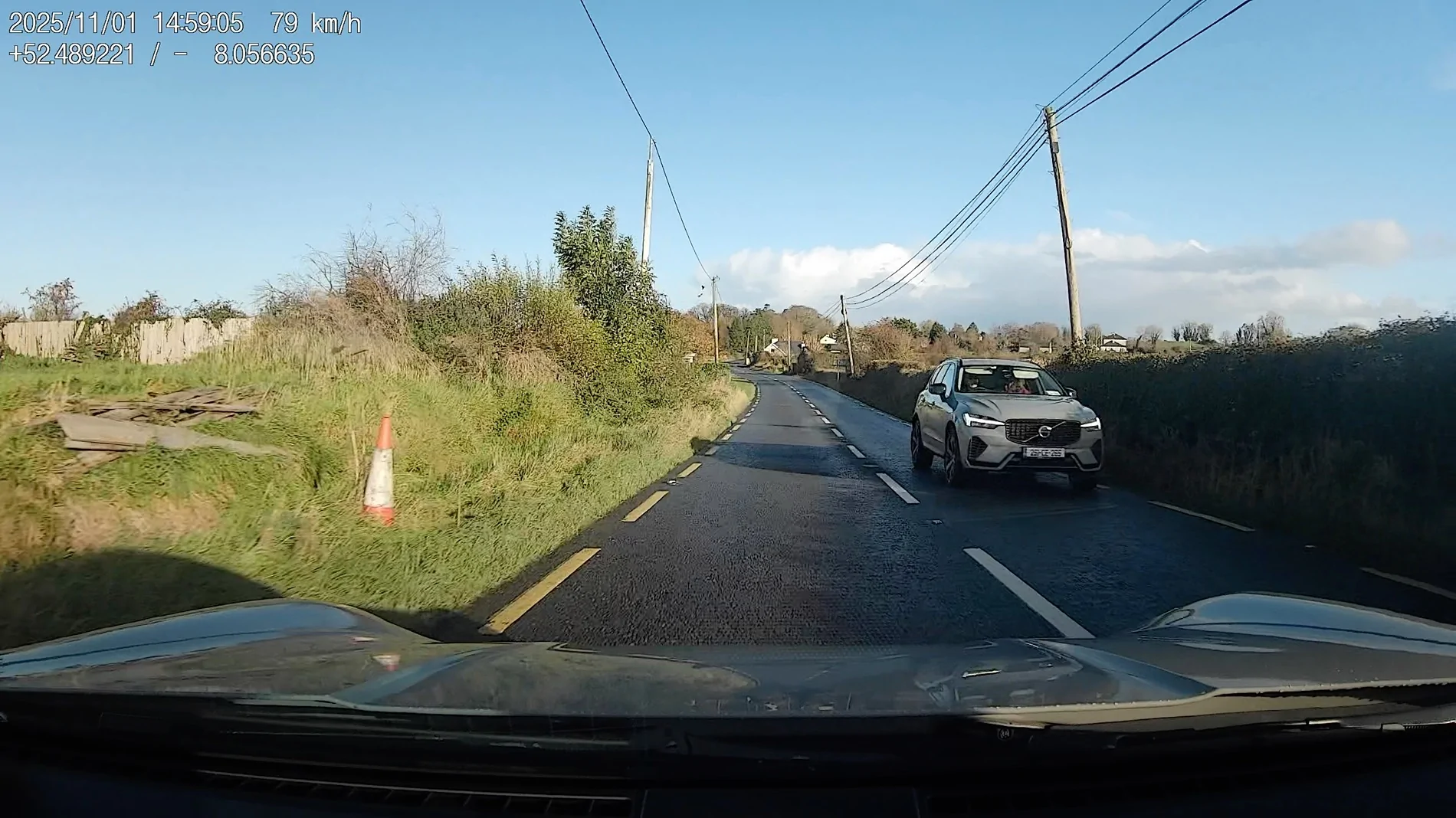
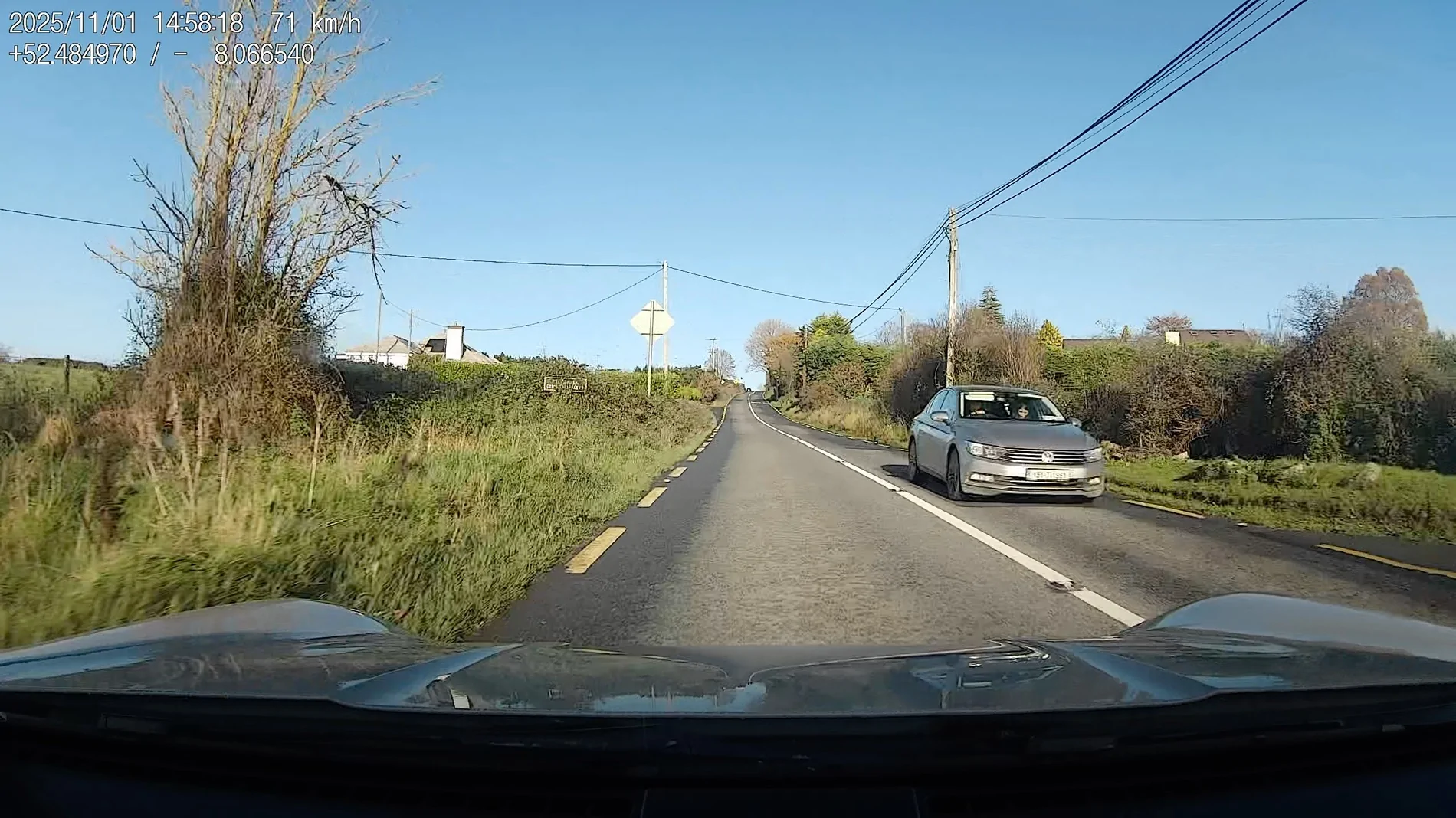
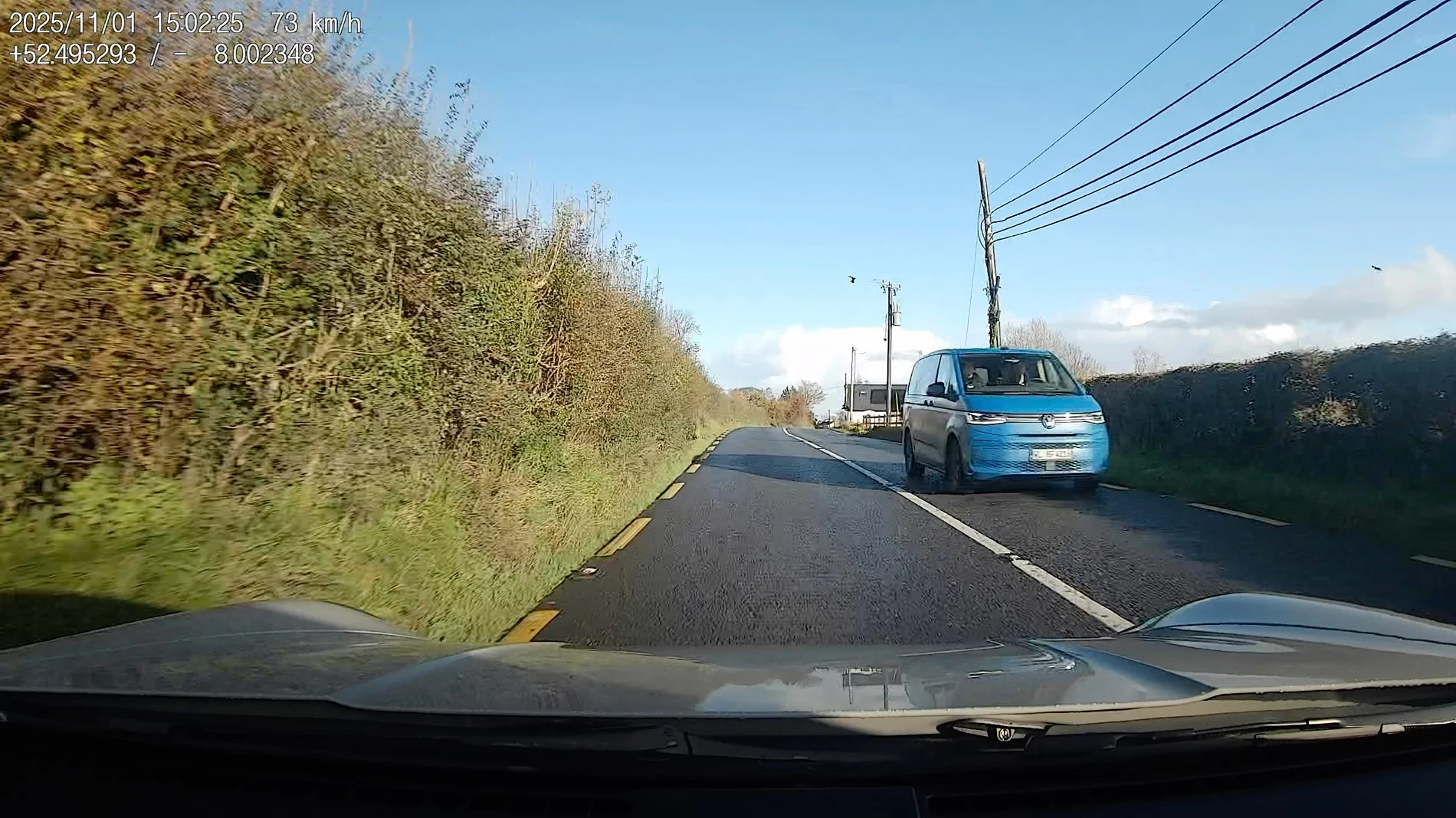
The quality seems okay – nothing amazing – but certainly useable and there is the option to write both your current GPS location and speed into the video output. Many dashcam's support this, but I mention it because the Fitcam X only support timestamps. You can control via the app – exactly what is written into the video.
The camera is identical regardless of what Porsche vehicle you have in – though each model (911, Macan, Taycan, etc) have their own wiring harnesses and depending on model and options a rear facing camera is also installed.
Here is a sample video from a drive to a hiking trail head I took at the weekend.
Parking mode is also fully supported with a number of options:
Radar mode is only supported if your vehicle as a Li-Ion based 12 volt battery – which my 911 does – and all Taycan's do. But if you only have a lead-acid/AGM battery than you will have less parking mode options.
The camera came with a Porsche branded 32GB microSD card, but I immediately replaced it with a "high-endurance" dashcam orientated card from SanDisc at 128GB which is working well.
https://www.amazon.ie/SanDisk-ENDURANCE-Monitoring-microSDXC-Endurance/dp/B084CJ9T2R/ref=sr_1_5
In conclusion, the camera is fine, it works. Maybe even go so far as to suggest it works well. I've accepted its physical packaging and bulk. The biggest advantage is being able to head into servicing or a warranty repair with confidence.
Some day – in the distant future – when the sun is a little bit closer to consuming the earth – Porsche will roll out a more integrated solution. Probably, when Audi get around to it themselves and give it to them – as they did with this camera.
The official OE Porsche Dashcam was far from my first choice when it comes to cameras. I had pretty good experience with the FitcamX in both my Taycan 4S and Turbo S. I guess I didn't find those camera's amazing and they had iffy 4K resolution – but the physical install is so neat, I forgive it any of its shortcomings.
However, I had a reasonably tricky relationship with Porsche in terms of warranty and a "unsupported" camera install wired into the rain sensor. Everyone knew it wasn't a problem, but Porsche AG made it clear that it violated the terms of the "New Car" warranty with a specific clause about the installation of unapproved hardware.
Once or twice where I had 22kW AC charger failures – sometimes abroad on a road-trip – and I certainly didn't want to give Porsche any reason to deny cover. So I used to carry an "emergency" uninstall kit with me – and used it on a number of occasions. And anybody who has installed the FitcamX will know – that while it is doable – it is a pain.
The last time I had an issue – I was driving across the country on Christmas Eve to head to my childhood home – and the 12 volt battery was low and refusing to top up. I was worried I'd need to call for a tow truck and defo didn't want the camera installed with any concerns about the 12 volt circuit. Out it came adding an hour to an already long winter journey.
I just didn't want to get into all that with my 911 and decided I'd get the official camera installed instead. One motivation for the camera is to document our road trips – as much as it is for security and insurance assistance.
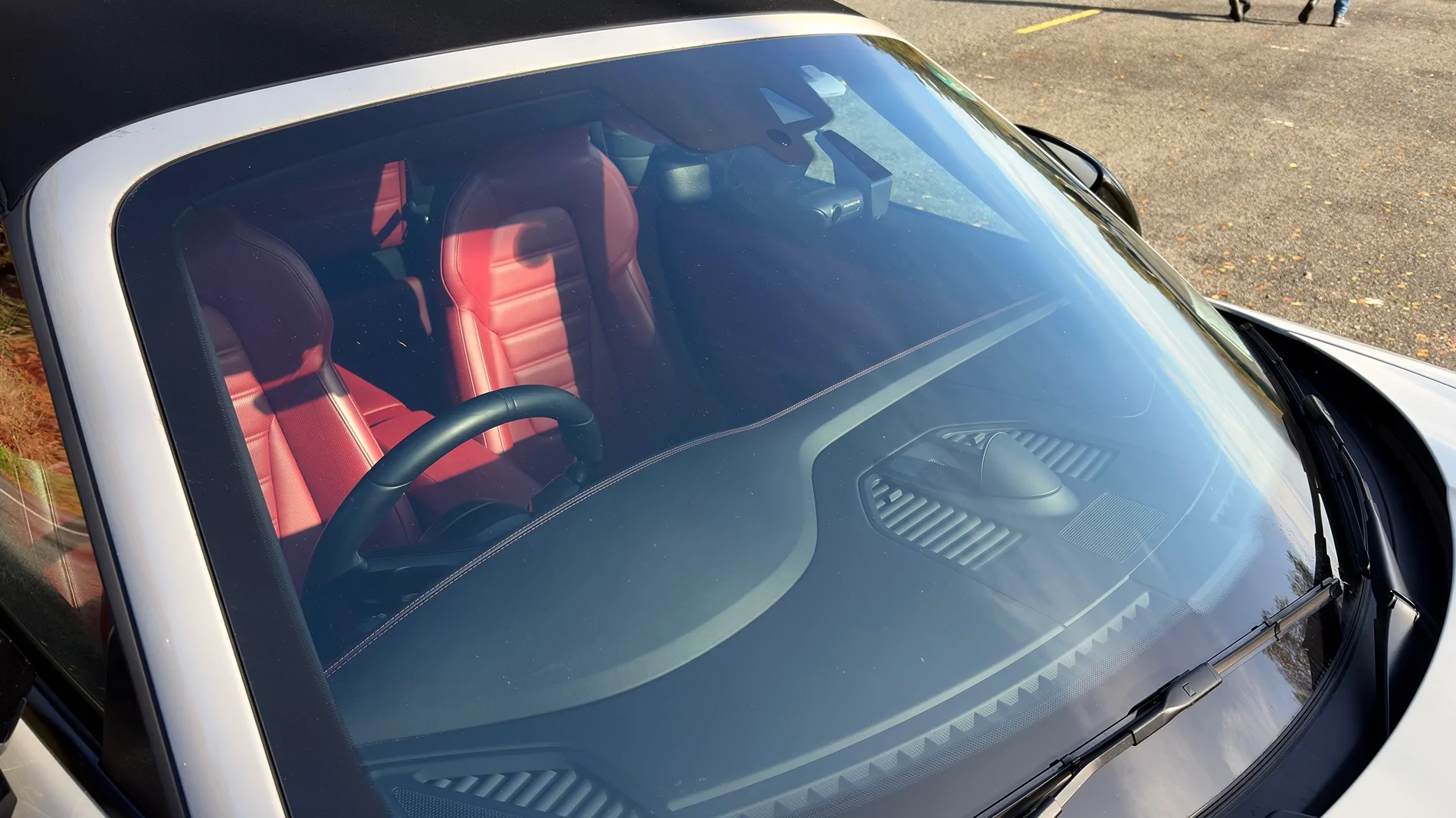
The camera is much more prominent compared to the FitcamX. However, it is not terrible. I am finding myself able to live with it. I think having a right-hand drive vehicle actually does help. The camera naturally "wraps" around the rear-view mirror more so than if the wheel was on the other side.
I could imagine tucking it up a little more towards the roof line – but the installation instructions from Porsche insist on placing it where mine is. I think the main reasons for that are:
- The black part against the glass houses a GPS receiver and they want it a clear view of the sky.
- The front facing part houses a radar to enable remote parking cover.
- They want the lens to be in the centre of the car as much as possible.
The camera is happy to connect to the in-car wifi network. Meaning that instead of acting as a standalone wifi hub, it is just a device on the network. You can even see its internal IP address if you go to the PCM –> Connectivity -> Wifi Hotspot Devices.
In practice, this means that if you want to change something on the camera, download a video to your phone or stream the live view, you can just open the Porsche Dashcam app on your mobile and use it. You do not need to join the camera's own wifi network – in fact in this mode, that will be disabled. Therefore, wireless Carplay and the Dashcam play happily together without fighting each other and your phone just needs to stay on the in-car wifi network that it probably already connects to. More Dashcam's should support this!
I haven't used it – but the Porsche Track Precision app – that records your drives with tons of driving dynamics telemetry – is also Porsche Dashcam aware and will use it to record video of your drives alongside the route map and telemetry. Pretty neat for some spirited driving moments. The does expect the camera to be connected to the in-car wifi network for all this to work.
I am not currently recording audio – though its an option – because when the microphone is on – there is a promonent "red" LED light on the unit itself to warn people that they are being recorded. I find this distracting enough during the day – and it would be right in my eye line at night – and would drive me nuts. For now the microphone stays off and there is then no distracting lights on camera.
The quality seems okay – nothing amazing – but certainly useable and there is the option to write both your current GPS location and speed into the video output. Many dashcam's support this, but I mention it because the Fitcam X only support timestamps. You can control via the app – exactly what is written into the video.
The camera is identical regardless of what Porsche vehicle you have in – though each model (911, Macan, Taycan, etc) have their own wiring harnesses and depending on model and options a rear facing camera is also installed.
Here is a sample video from a drive to a hiking trail head I took at the weekend.
Parking mode is also fully supported with a number of options:
- Radar
- Impact
- Video analysis
- Combinations of the options
Radar mode is only supported if your vehicle as a Li-Ion based 12 volt battery – which my 911 does – and all Taycan's do. But if you only have a lead-acid/AGM battery than you will have less parking mode options.
The camera came with a Porsche branded 32GB microSD card, but I immediately replaced it with a "high-endurance" dashcam orientated card from SanDisc at 128GB which is working well.
https://www.amazon.ie/SanDisk-ENDURANCE-Monitoring-microSDXC-Endurance/dp/B084CJ9T2R/ref=sr_1_5
In conclusion, the camera is fine, it works. Maybe even go so far as to suggest it works well. I've accepted its physical packaging and bulk. The biggest advantage is being able to head into servicing or a warranty repair with confidence.
Some day – in the distant future – when the sun is a little bit closer to consuming the earth – Porsche will roll out a more integrated solution. Probably, when Audi get around to it themselves and give it to them – as they did with this camera.
Sponsored
Last edited: