Sponsored

How-to: Disconnect 12v battery

caslca

Well-Known Member
Joined
Aug 11, 2021
Threads
7
Messages
132
Reaction score
115
Location
WA, USA
Vehicles
TTS
Country flag
This helped my issue with no vehicle-to-cloud data connection.

There are different suggestions as to how long is long enough. I left mine off for ~10min, but I've seen recommendations not to go over 5min. I believe the issue here is that there is an emergency power reserve used for the SOS function, which my manual says should be good for ~1hr or so. I suspect you don't want to exhaust that since you may require the dealer to recalibrate your SOS before any other connected services would work.

Here is the procedure as I did it:
Tools needed:
- 10mm socket

Before you begin:
Until you're happy that your 12v power has been fully reconnected, you should leave the frunk and driver door open at all times. If you have to close the driver door, you can leave your windows down so that you can reach-in and pull the door handles to open the doors. In case you lock yourself out of the frunk, you will need a 12v external source hooked to the fuse box (there are how-tos on this already)

Steps:
1. Open the frunk and driver door. Leave both open until the end!
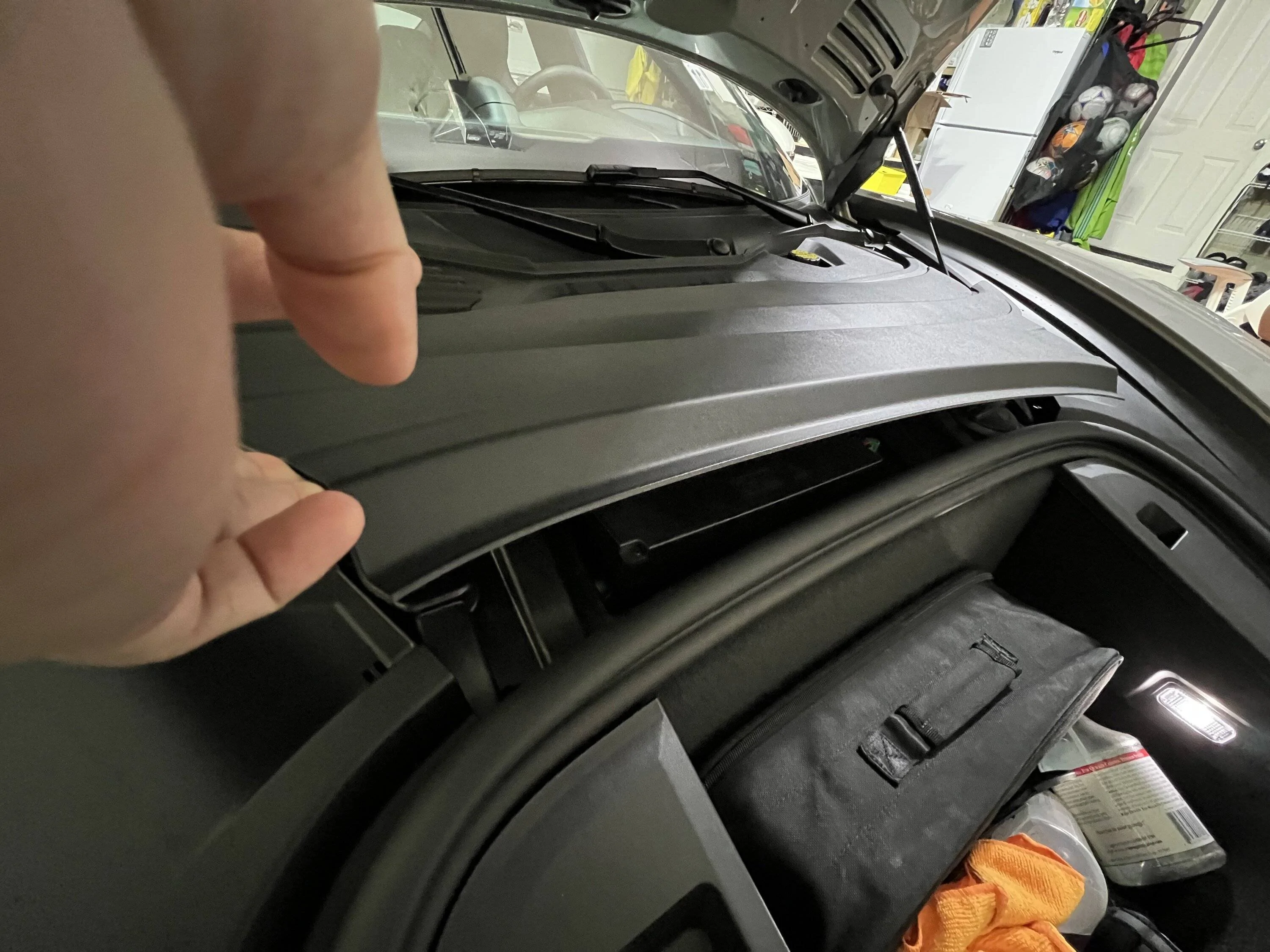
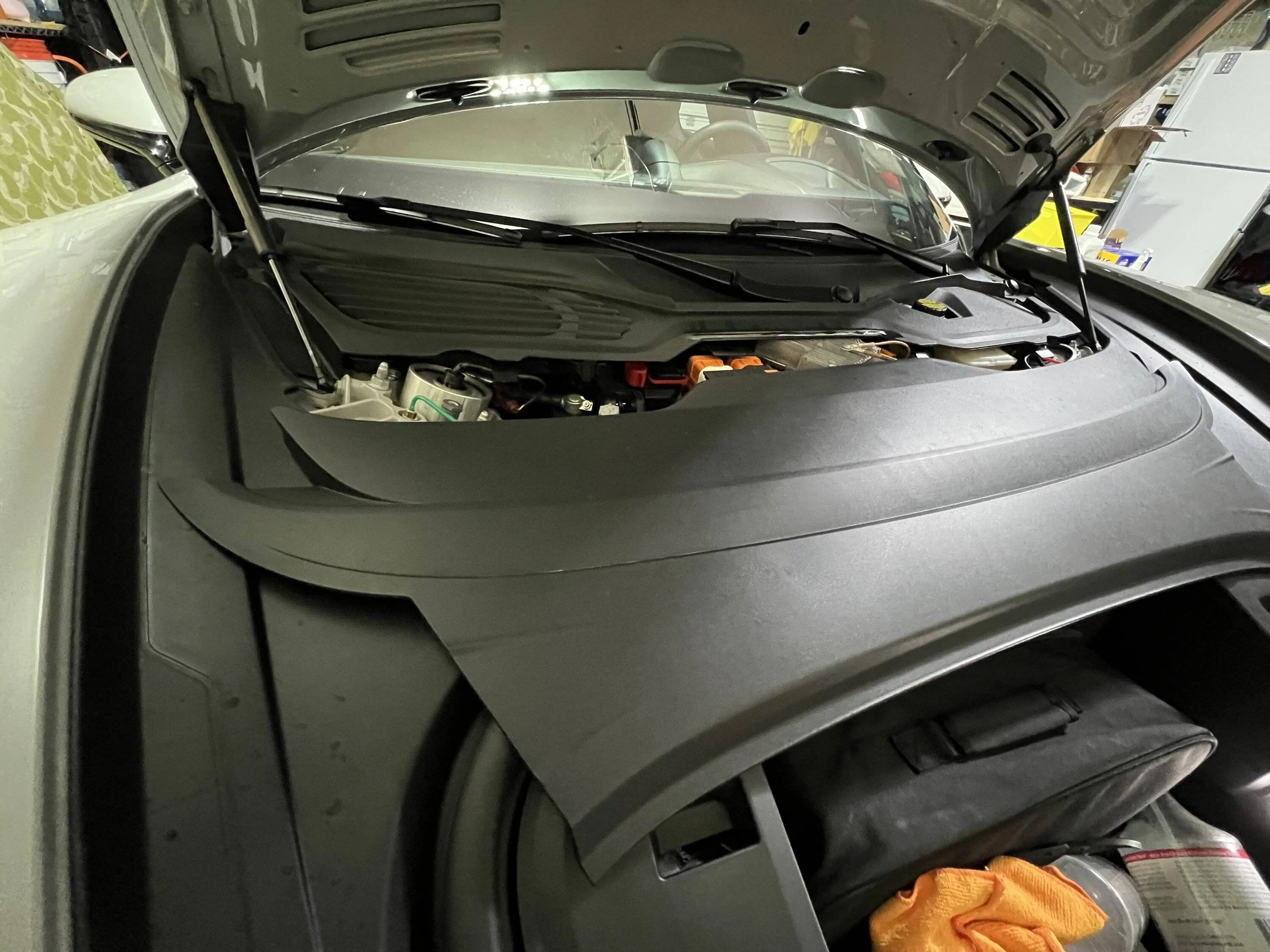
2. remove the plastic trim cover between the storage space and windshield.
2.1 pop the cover from the storage end
2.2 slide the plastic piece towards the front of car
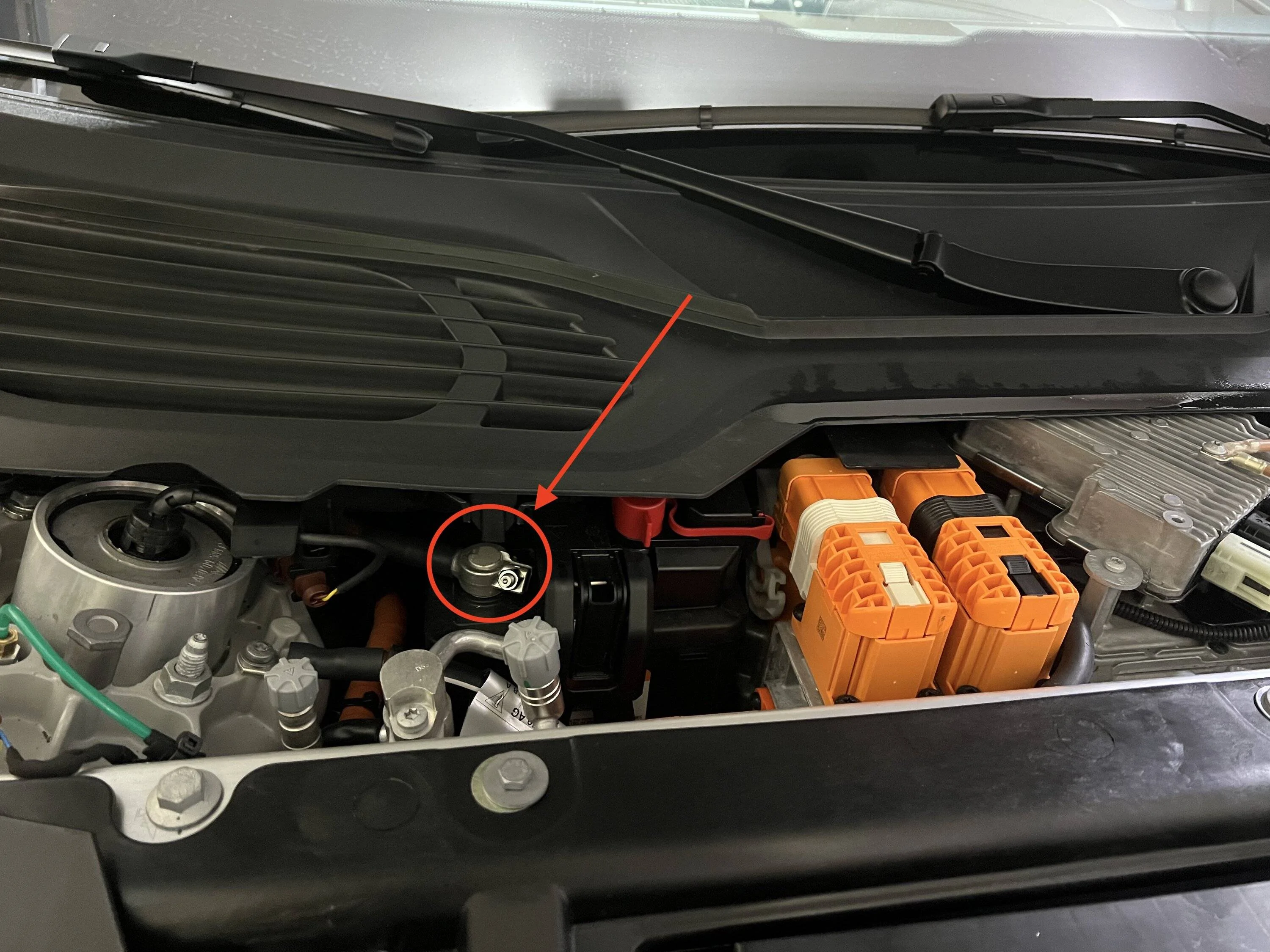
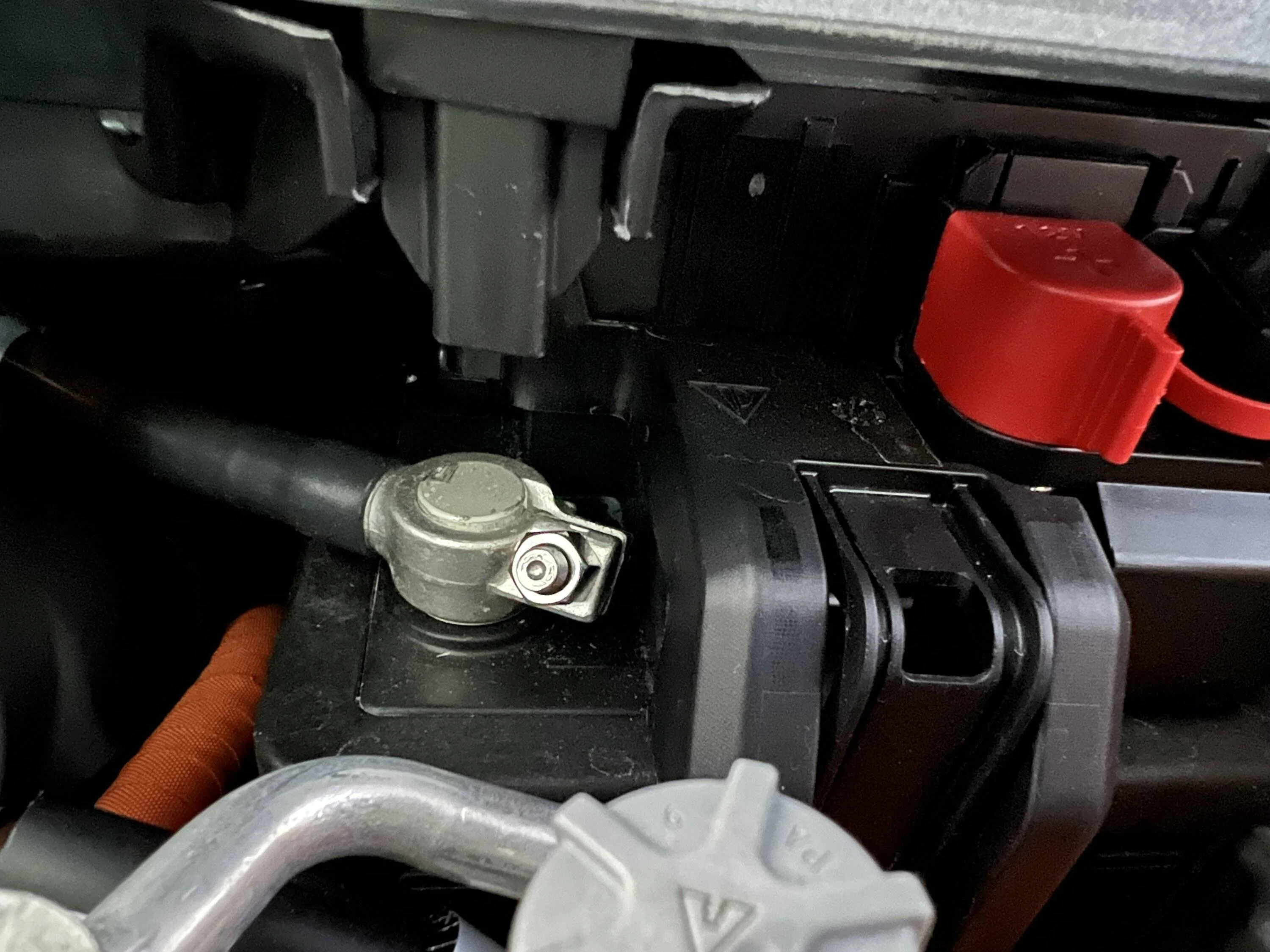
3 You should now have access to the negative battery terminal.
4. Use a 10mm socket to loosen the bolt
5. The clamp has a conical shape and the space is a bit tight to work in. Wiggle left-right while applying upward force and it will come off
6 You might see some normal side-effects, especially if you stumble like me a bit on removal and can't cleanly detach the terminal
- driver window goes down 1/2 way
- powered charging flaps self-calibrate by doing an open/close cycle
- some smalls sparks are visible
7. Wrap the now loose connector in a rag and leave the car for 2-3min.

Reverse the steps above to reconnect. In my case, i had to also:
- recalibrate the windows and the powered charging flaps(open/close all of them).
- The car also told me via a PCM message that it required a brake calibration which basically meant holding the brake pedal until the PCM said it was calibrated.
- A short drive was needed to re-initialize the TPM

Porsche Taycan How-to: Disconnect 12v battery IMG_1310
Porsche Taycan How-to: Disconnect 12v battery IMG_1311
Porsche Taycan How-to: Disconnect 12v battery IMG_1312
Porsche Taycan How-to: Disconnect 12v battery IMG_1313
Porsche Taycan How-to: Disconnect 12v battery IMG_1314
Porsche Taycan How-to: Disconnect 12v battery IMG_1315
Porsche Taycan How-to: Disconnect 12v battery IMG_1316
Sponsored


shelt

Well-Known Member
First Name
Rich
Joined
Aug 8, 2021
Threads
5
Messages
69
Reaction score
76
Location
Marin County, California
Vehicles
'22 Taycan 4S; '18 Tesla Model 3
Country flag
Thanks for posting these photos. I reset my PCM a while back, and even though there are instructions available, it seemed like there should have been easier access and I thought I was missing something (I wasn't). I finally got a socket in there to loosen the terminal lug and remove it and did a 5-minute reset...
 

Fish Fingers

Well-Known Member
Joined
Feb 20, 2021
Threads
50
Messages
2,533
Reaction score
3,284
Location
UK
Vehicles
Sold
Country flag
Thanks to W1NGE for posting this.
It has sorted out my app issues and all seems to be working fine now.

The only thing I would say is that removing the negative terminal was a bit more difficult than I hoped.

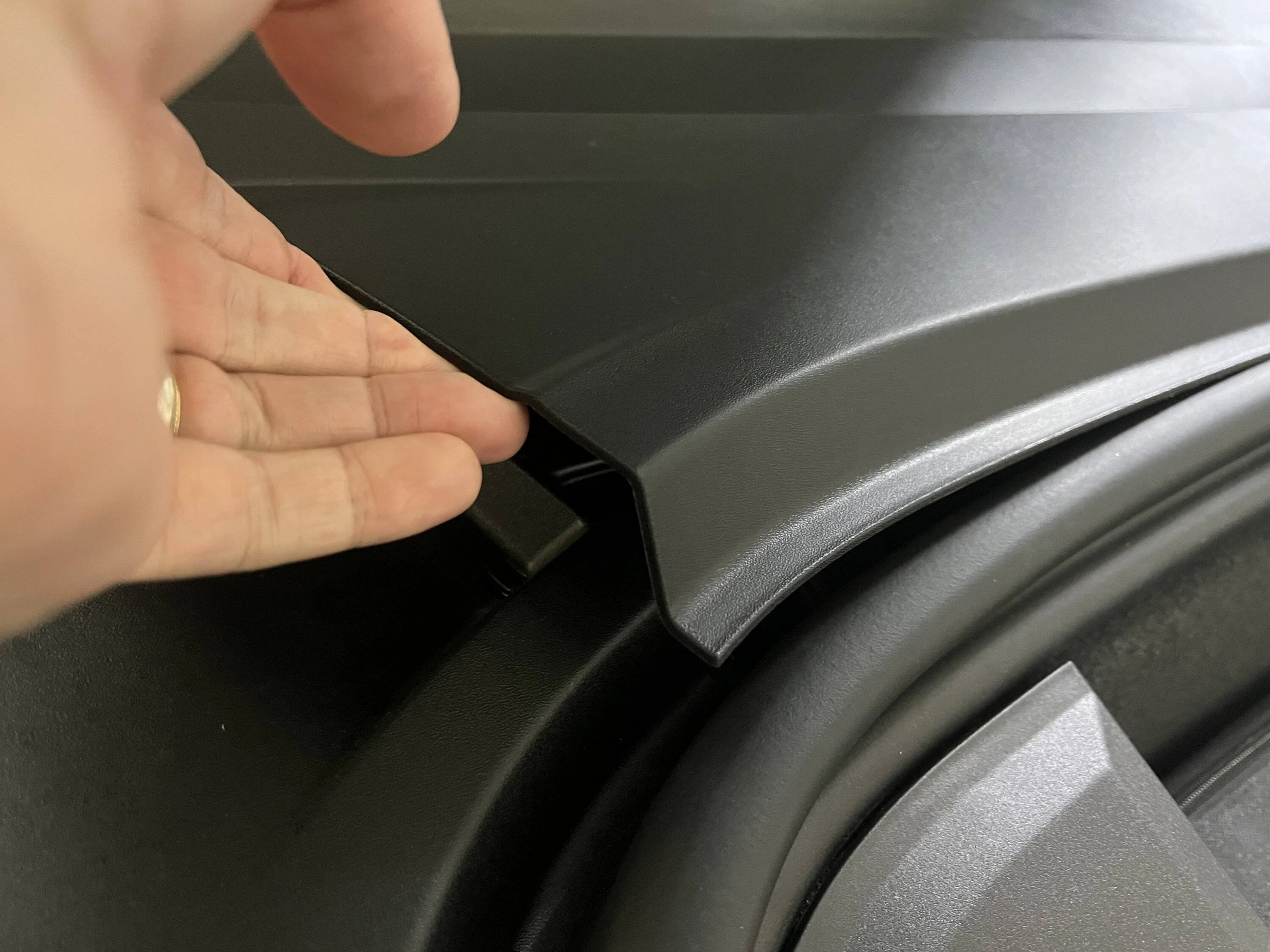
The plastic casing above it didn't quite leave enough room to pull the terminal upwards without it snagging it (by a mm or 2).
In the end I approached it from the front of the car and pushed the plastic casing inwards with my thumb, whilst easing the connection off with my other hand.
 

Harrica

Member
First Name
Richard
Joined
Jul 3, 2021
Threads
0
Messages
10
Reaction score
3
Location
Gloucester, MA
Vehicles
Taycan 2021 CT
Country flag
yesterday I had the dreaded buzz and loss of HUD, I have also been having trouble with connecting to my iPhone for wireless CarPlay. I decided to start with fixing the buzz and loss of HUD by pulling the 5 amp fuse on the left side of the car waiting a while and plugging it back in. This works a treat for the buzz and HUD but it also seemed to help the connecting problem. I'll post back if it's true or just a quirk.


W1NGE

Well-Known Member
First Name
Adrian
Joined
Jan 11, 2021
Threads
53
Messages
11,016
Reaction score
6,805
Location
Aberdeen, Scotland
Vehicles
992.2, ex GTS ST owner, Macan T
Country flag
This helped my issue with no vehicle-to-cloud data connection.

There are different suggestions as to how long is long enough. I left mine off for ~10min, but I've seen recommendations not to go over 5min. I believe the issue here is that there is an emergency power reserve used for the SOS function, which my manual says should be good for ~1hr or so. I suspect you don't want to exhaust that since you may require the dealer to recalibrate your SOS before any other connected services would work.

Here is the procedure as I did it:
Tools needed:
- 10mm socket

Before you begin:
Until you're happy that your 12v power has been fully reconnected, you should leave the frunk and driver door open at all times. If you have to close the driver door, you can leave your windows down so that you can reach-in and pull the door handles to open the doors. In case you lock yourself out of the frunk, you will need a 12v external source hooked to the fuse box (there are how-tos on this already)

Steps:
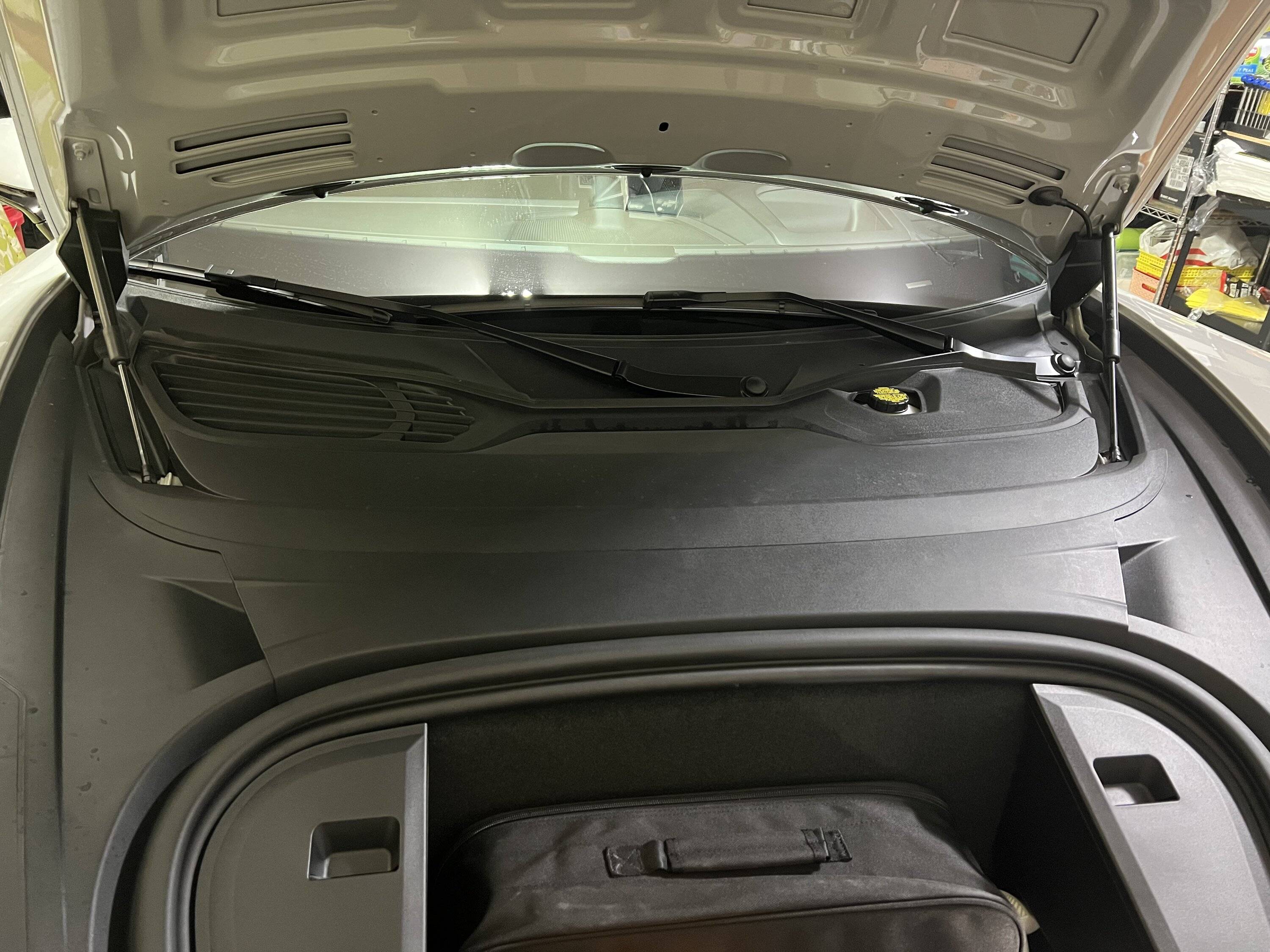
1. Open the frunk and driver door. Leave both open until the end!
2. remove the plastic trim cover between the storage space and windshield.
2.1 pop the cover from the storage end
2.2 slide the plastic piece towards the front of car
3 You should now have access to the negative battery terminal.
4. Use a 10mm socket to loosen the bolt
5. The clamp has a conical shape and the space is a bit tight to work in. Wiggle left-right while applying upward force and it will come off
6 You might see some normal side-effects, especially if you stumble like me a bit on removal and can't cleanly detach the terminal
- driver window goes down 1/2 way
- powered charging flaps self-calibrate by doing an open/close cycle
- some smalls sparks are visible
7. Wrap the now loose connector in a rag and leave the car for 2-3min.

Reverse the steps above to reconnect. In my case, i had to also:
- recalibrate the windows and the powered charging flaps(open/close all of them).
- The car also told me via a PCM message that it required a brake calibration which basically meant holding the brake pedal until the PCM said it was calibrated.
- A short drive was needed to re-initialize the TPM
IMG_1310.jpg
IMG_1311.jpg
IMG_1312.jpg
IMG_1313.jpg
IMG_1314.jpg
IMG_1315.jpg
IMG_1316.jpg
Excellent piece of 'how to' - very well done!
 

travisfickle

Active Member
Joined
Jan 28, 2021
Threads
2
Messages
25
Reaction score
17
Location
UK
Vehicles
Taycan 4S
Country flag
Thanks for the very clear and user-friendly guide.

I followed this and disconnected the negative terminal of the 12v battery for 5 minutes. The lead was completely off the battery all that time and the vehicle powered off.

But I still have the same PCM connection issues (no updated vehicle status/battery level in the charging app, no Apple Music etc). I have also tried a soft reset using the two-finger approach on the main display screen but with no luck.

Is anyone else in the same boat?

Is the battery disconnection supposed to work each time?

I can probably wait a few weeks (when the Taycan goes in for various safety recall issues) but I like to get to the bottom of this sooner if possible.

Sorry to hijack the thread if that is what this is.


JAGMAN

Well-Known Member
Joined
Jun 13, 2022
Threads
3
Messages
216
Reaction score
159
Location
RI, USA
Vehicles
‘22 CT4
Country flag
I could not get Apple Music to work (or Spotify, podcasts, etc), ALL other functions of the PCM were working normally. I called Porsche, and they had to reset the Apple music with the "Development Team," it took about a week and now all of the PCM music services are working normally.
 

W1NGE

Well-Known Member
First Name
Adrian
Joined
Jan 11, 2021
Threads
53
Messages
11,016
Reaction score
6,805
Location
Aberdeen, Scotland
Vehicles
992.2, ex GTS ST owner, Macan T
Country flag
Thanks for the very clear and user-friendly guide.

I followed this and disconnected the negative terminal of the 12v battery for 5 minutes. The lead was completely off the battery all that time and the vehicle powered off.

But I still have the same PCM connection issues (no updated vehicle status/battery level in the charging app, no Apple Music etc). I have also tried a soft reset using the two-finger approach on the main display screen but with no luck.

Is anyone else in the same boat?

Is the battery disconnection supposed to work each time?

I can probably wait a few weeks (when the Taycan goes in for various safety recall issues) but I like to get to the bottom of this sooner if possible.

Sorry to hijack the thread if that is what this is.
Not guaranteed to work every time.
 

travisfickle

Active Member
Joined
Jan 28, 2021
Threads
2
Messages
25
Reaction score
17
Location
UK
Vehicles
Taycan 4S
Country flag
Thanks, W1NGE and JAGMAN. The issue seems to have resolved itself this evening, in that the app now shows my current battery/timer settings. I do not think this is as a result of anything I did. I will see if Apple Music is working after I log in again tomorrow.

It is a shame that there are these technical gremlins but I think I have been mostly fortunate until now. Fingers crossed Porsche get their act together quickly, because I know others have had a lot more bad luck
 

W1NGE

Well-Known Member
First Name
Adrian
Joined
Jan 11, 2021
Threads
53
Messages
11,016
Reaction score
6,805
Location
Aberdeen, Scotland
Vehicles
992.2, ex GTS ST owner, Macan T
Country flag
Thanks, W1NGE and JAGMAN. The issue seems to have resolved itself this evening, in that the app now shows my current battery/timer settings. I do not think this is as a result of anything I did. I will see if Apple Music is working after I log in again tomorrow.

It is a shame that there are these technical gremlins but I think I have been mostly fortunate until now. Fingers crossed Porsche get their act together quickly, because I know others have had a lot more bad luck
Good to hear.

Alas these ar not gremlins but 'features' since 2020 and show little or no sign of being 100% addressed.
 

Adam33

Member
First Name
Adam
Joined
Apr 21, 2022
Threads
0
Messages
15
Reaction score
9
Location
USA
Vehicles
Porsche Taycan Turbo
Country flag
I just reset my battery for 7 minutes and thanks to the info above it was extremely easy. Anyone can do it. I checked the LTE after and it still has a line through it and is not working. But like the OP mentioned, his came back after and hour or 2. So I will check on that later but not holding out much hope. I have a feeling I am going to need to take it to the dealership.
 

slothinker

Well-Known Member
First Name
Todd
Joined
Mar 31, 2022
Threads
14
Messages
462
Reaction score
235
Location
San Luis Obispo, CA
Vehicles
Taycan RWD, Toyota MR2, Ioniq6
Country flag
Me too re: inexplicable loss of HUD after driving in the rain. I found it easy to get at the negative terminal of the 12V battery but it looked like a bit of trouble to actually temporarily remove the clamp off the post. So ... after disconnecting the battery very briefly (3 seconds a couple of times ... a few sparks) I retested and found that the HUD came back to life. Tightened up the clamp. Adjusted the HUD to my liking.

At this point one of my windows doesn't automatically open/close but I know there's a technique to fix that. Everything else seems to work but I haven't done a comprehensive inventory.

Harrica mentioned removing a fuse temporarily. However I found three or four 5amp fuses on the left (driver's) side panel and didn't think wise to start experimenting with removing them wholesale.
 

darth_maul_80

Well-Known Member
Joined
Aug 28, 2021
Threads
9
Messages
317
Reaction score
272
Location
London, ??
Vehicles
Taycan CT4 , Taycan GTS
Country flag
Had to do this today as second remote option didn’t work for me and our other Taycan had LTE. I’ll be honest I wasn’t looking forward to doing this as I’m not very good with this kind of thing especially on an electric car.

I decided I would do it and followed the instructions (which are superb!) and voila LTE is back. Thank you to @caslca for the in depth step by step instructions
Sponsored


Top