Sponsored

Taycan Charging Calculator [save/load/delete app state]

OP
OP
Jhenson29

Jhenson29

Well-Known Member
First Name
Jeremy
Joined
Feb 9, 2021
Threads
37
Messages
3,014
Reaction score
4,650
Location
St. Louis, MO
Vehicles
2022 Macan S; 2021 Taycan 4S
Country flag
Do you differentiate between 400v and 800v chargers?
No. I don’t know why it would make a differnce, but as I’ve no experience there, I’m happy to learn.

My assumption is that the charge profile is the same in either case with the max rate limited by station capacity and on-board charger.

I wouldn’t expect a difference between a 150kW 800VDC station and a 150kW 400VDC station (for cars equipped with the 150kW 400VDC charger) other than possibly lower efficiency, but I don’t have any efficiency modeled for DC charging as I figured my margin of error is already larger than the error from efficiency. But maybe I’m wrong.
Sponsored


 
OP
OP
Jhenson29

Jhenson29

Well-Known Member
First Name
Jeremy
Joined
Feb 9, 2021
Threads
37
Messages
3,014
Reaction score
4,650
Location
St. Louis, MO
Vehicles
2022 Macan S; 2021 Taycan 4S
Country flag
@JimBob Never mind. I think I understand. You’re point is that I don’t have a setting for the on-board charger type. I didn’t consider it really. If I add it, I also have to add the voltage selection for the station, but I think the results are the same without the settings and adjusting the station power. Unless it’s not for some reason?
 

JimBob

Well-Known Member
First Name
James
Joined
Jan 26, 2021
Threads
75
Messages
950
Reaction score
1,109
Location
Toronto Canada
Vehicles
Taycan 4S
Country flag
I think its supposed to be about charging speeds which would affect the x-axis on your graph which appears time dependent.

This from a Porsche quote "If the charger provides 800V and a minimum of 300A, the Taycan can charge from five to 80 per cent in 22.5 minutes. 400V chargers typically provide 50kW only. The same charging capacity would need 90 minutes,” said Otmar Bitsche, director of e-mobility at Porsche. "

It's really quite fascinating that as soon you as attempt to model this, all the details suddenly come to the surface.
 
OP
OP
Jhenson29

Jhenson29

Well-Known Member
First Name
Jeremy
Joined
Feb 9, 2021
Threads
37
Messages
3,014
Reaction score
4,650
Location
St. Louis, MO
Vehicles
2022 Macan S; 2021 Taycan 4S
Country flag
I think its supposed to be about charging speeds which would affect the x-axis on your graph which appears time dependent.
Yes but the charging speed should be the kW. So I’m still not sure I see the difference right now. 50kW is 50kW.

Yes, x-axis is time.

As it is, my model shows 80min for 5-85% on the 50kW setting. Shy of the 90 min suggested above. I also noticed that I used the wrong battery size for the 5-85% in 23 min. So, I think I still have some work to do to make it closer.
 

MohCT4

Well-Known Member
Joined
Apr 23, 2021
Threads
4
Messages
146
Reaction score
148
Location
Chicago, IL
Vehicles
Taycan 4 Cross Turismo
Country flag
@MohCT4 The 2.6kW hour has a +1, which means an extra day. Sorry, I don't think I ever explained that very well (or at all?). It's possible to generate charge times that are extremely long, so I display all of the times (absolute or spans) with additional days shown as a plus number at the end.

So, the 9.6kW takes 8 hours and 49 minutes, while the 2.6kW takes 8 hours and 3 minutes...plus a day (24 hours), so around 32 hours total.

Maybe that's not the best way and for time spans, I should just show the hours. I'm open to suggestions. Thanks.
That makes sense. No apology needed, this tool is great!!


OP
OP
Jhenson29

Jhenson29

Well-Known Member
First Name
Jeremy
Joined
Feb 9, 2021
Threads
37
Messages
3,014
Reaction score
4,650
Location
St. Louis, MO
Vehicles
2022 Macan S; 2021 Taycan 4S
Country flag
New updates pushed this morning for the following changes:
  • Added
    • Pricing inputs and calculation for DC and AC charging (@JimBob)
      • Pricing is off be default. Enable pricing calculations in the app config (gear icon at top right)
      • DC pricing has entries for "per kWh" and "per minute".
      • AC pricing ahs an entry for "per kWh" and an optional entry for preferred times pricing.
      • Enter the currency symbol in the app config.
    • Menus can be now be set to "toggle" open instead of the default of "open one at a time". See app config.
  • Changed
    • Consumption calculations are now optional. They are on be default, but can be turned off in the app config.
  • Fixed
    • Fixed profile preferred time calculation to move preferred time charging to end of preferred time during timer charging.
AC pricing currently only supports a base price per kWh and an optional preferred time price per kWh where the preferred times are set by the profile preferred times. This does not cover more complex use cases where there are more than two times. I'd like to add a more complex time/price UI that will be optional to the simple version (the simple version is better if that's all you need).

I started making some items optional because I felt it was getting too cluttered if you didn't want to use those options.

There are also enough settings now which may want to be retained between sessions that I'm going to look at adding an option to save to local storage so you don't have to re-enter every setting each time.

It'll probably be a week before I push anymore updates as I only work on this in the mornings on my days off.
 

JimBob

Well-Known Member
First Name
James
Joined
Jan 26, 2021
Threads
75
Messages
950
Reaction score
1,109
Location
Toronto Canada
Vehicles
Taycan 4S
Country flag
I have the PB+ battery so did a little experimenting with this. Your model is sophisticated enough so you can fiddle with the inputs to make it close to real world.

First, you are quoting gross battery capacity, but the user only can use net. Is the model using net or gross for its calculations?

The next thing I wanted to do was to try and calibrate the model, so I fiddled with your energy consumption slider and found to generate a 300 mile range under optimum conditions, I needed to set it at 27.8 kWh/100 miles for 0 to 100% SOC.

Next up I wanted to calculate how much it costs me to charge my car at home from 10% SOC to 80% SOC on a 240V 40 amp circuit. Great little slider for this. My cost of electricity in Ontario is $.082 Cdn per kWh off peak or $.065 in US dollars so my cost to charge was $6.18 Cdn or $4.88 US at home.

Next I wanted to compare it to what it would cost me to do the same charging at Electrify Canada. From their website, they charge $.57 Cdn or $.453 US per min or on a 350 kW 800V charger. Will skip the idle fees and the free Porsche charging. So my cost to charge would be $40.29 Cdn or $31.83 US.

Do these look like they make sense? I think they look ok, but am not really confident on the EC figures.

Got me wondering as to who has the lowest electricity costs in the world. My money is on somebody from Quebec and for the highest. Got to be someone in Europe, or maybe an island like Hawaii.
 
OP
OP
Jhenson29

Jhenson29

Well-Known Member
First Name
Jeremy
Joined
Feb 9, 2021
Threads
37
Messages
3,014
Reaction score
4,650
Location
St. Louis, MO
Vehicles
2022 Macan S; 2021 Taycan 4S
Country flag
@JimBob thanks for your feedback.


Is the model using net or gross for its calculations?
Net. It talks about only using 90% in the battery size help. You can also verify by comparing the kWh to the percents in the results table.


Do these look like they make sense?
Just glancing at it, I think the AC looks correct. Note that for AC, I’m using kWh at the EVSE, which takes the charging efficiency into account.

DC looks high. I get $22.93 if I plug in $0.57/min and $0/kWh. It says it charges for 40 min. Does yours say 40 min? Did you clear out cost/kWh?
 
Last edited:


JimBob

Well-Known Member
First Name
James
Joined
Jan 26, 2021
Threads
75
Messages
950
Reaction score
1,109
Location
Toronto Canada
Vehicles
Taycan 4S
Country flag
Ok. When I retried I get this for the DC charging. Set the pricing per kWh to $0 and the cost per minute to $.57

EC cost to charge per minute $.57 Cdn
Starting SOC 10%
Ending SOC 80%
Starting Range 30 mi
Ending Range 240 mi
Time to Charge 19 minutes
Cost to charge $11.00 Cdn or $8.69 US

I guess your energy consumption slider affects the range number.

Anecdotally, I understand that DC fast charging is about 3x as expensive as home charging. So this undershoots now.

Interesting comparison is cost of gas to drive 210 miles. In my area, a liter of gas costs about $1.65 or $3.78 per US gallon. Assuming you get 20 miles per gallon, to drive that 210 miles would cost about $39.69 Cdn or $31.36 US GST excluded.
 
OP
OP
Jhenson29

Jhenson29

Well-Known Member
First Name
Jeremy
Joined
Feb 9, 2021
Threads
37
Messages
3,014
Reaction score
4,650
Location
St. Louis, MO
Vehicles
2022 Macan S; 2021 Taycan 4S
Country flag
I guess your energy consumption slider affects the range number.
Yes, energy consumption just affects the miles/km (range) display.
Anecdotally, I understand that DC fast charging is about 3x as expensive as home charging. So this undershoots now.
If your costs are tgat low per min with not charge per energy, then yes, higher power DC costs will come down a lot.


In my area, a liter of gas costs about $1.65 or $3.78 per US gallon.
I think I recently calculated what I could save if I swapped out my Macan to a BEV and it was around $4-5k/year or something. I have an 80 mile round trip for work, plus other driving. So, I was really really thinking about it.
 

ejcintr

Well-Known Member
First Name
Ed
Joined
Nov 23, 2020
Threads
11
Messages
196
Reaction score
174
Location
Bay Area
Vehicles
taycan 4s, F150
Country flag
New updates pushed this morning for the following features (hope I didn't break anything...):
  • New App Config to select metric units. (access with 'gear' icon at top right).
  • New setting for kWh/100mi (or km based on units)
  • Added "miles" to results tables (or km based on units)
  • Added 'total time' display to results table (just below summary).
  • New setting to adjust the charging efficiency for AC charging from the default of 94%.
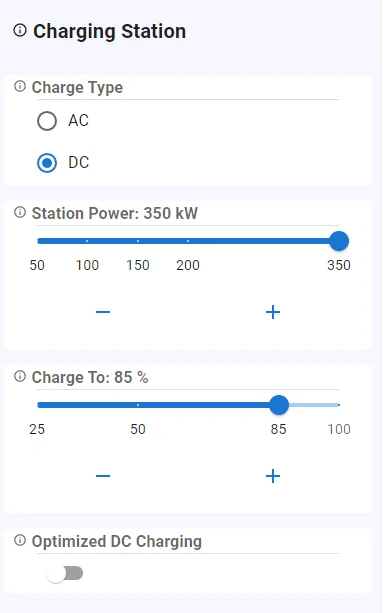
  • Added DC charging calculation
    • New setting to select AC or DC
    • New settings for max station power (DC)
    • New setting for target charge percent (DC)
    • New setting for 200kW limited optimized charging (DC)
  • Model comparison improvements
    • Compare up to 4 models
    • First model can now be deleted if there is more than one model.
    • Models retain original color when other models are deleted
    • Better feedback on model selection using model colors on tab buttons

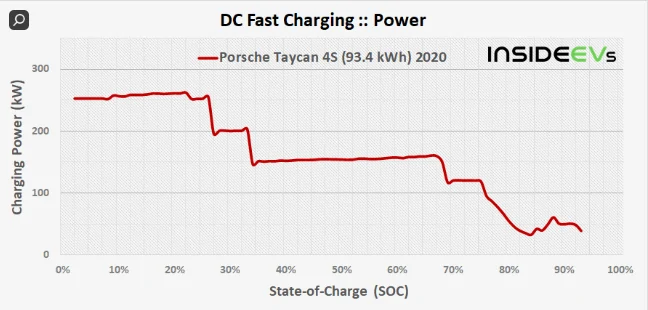
The DC Charging calculation is based (roughly) on the below model:
1650111625582.png


https://insideevs.com/news/512344/porsche-taycan-fast-charging-analysis/

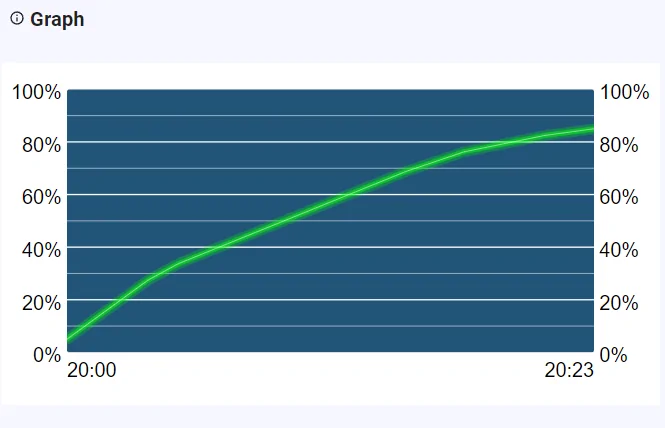
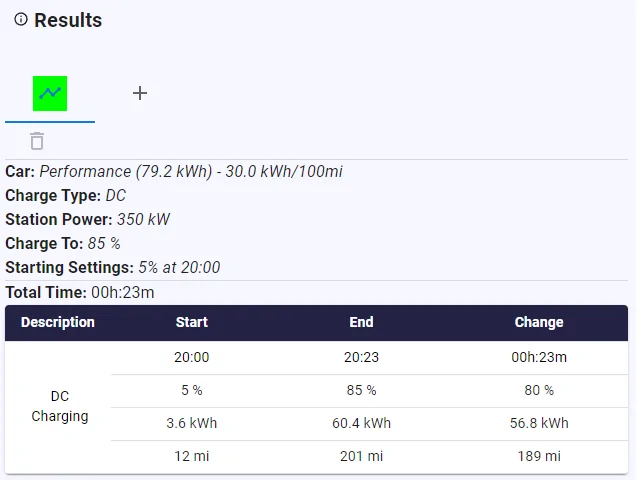
I think I've read elsewhere in the forum that this model is not completely accurate and some people see higher power deeper into their SoC. I wouldn't know since I never DC charge. However, I tend to think the actual time difference is quite minimal. I'm also using a somewhat simplified model right now that uses constant power within the steps instead of it changing based on battery voltage. it should still be relatively close. I'll consider it more and listen to suggestions for additional changes. It does calculate 23 min for 5%-85% (I don't do seconds).


1650112259033.png


1650112268935.png


1650112289167.png


@JimBob I didn't get to any cost related updates as I only had a couple of hours this morning and worked on the above updates instead.
Awesome tool and based upon my observed results compared to your model- very accurate... thanks so much!!
 

Midlifecrisis

Well-Known Member
First Name
Ian
Joined
Jul 1, 2021
Threads
38
Messages
1,238
Reaction score
869
Location
Worcestershire
Vehicles
Taycan Turbo, Taycan 4S (sold). Macan SD (sold)
Country flag
Wondered what the point of this was until I had a play with it. Nice little app. Is there a way of using cookies so that it remembers the things I put in for next time I use it? Sorry if that’s a daft question - I know nothing about how websites work.
 
OP
OP
Jhenson29

Jhenson29

Well-Known Member
First Name
Jeremy
Joined
Feb 9, 2021
Threads
37
Messages
3,014
Reaction score
4,650
Location
St. Louis, MO
Vehicles
2022 Macan S; 2021 Taycan 4S
Country flag
Is there a way of using cookies so that it remembers the things I put in for next time I use it? Sorry if that’s a daft question - I know nothing about how websites work.
I’m going to add an option to save/load/delete the app state to local browser storage (I’ve done this for other work-related utility apps that I didn’t want to build a backend for). It will also check for saved state when it first loads and offer to load from the saved state. I realized this would be necessary once I started adding more and more features the last two days. I won’t get to it until next weekend though. I’ll post when it’s ready.
 
Last edited:
OP
OP
Jhenson29

Jhenson29

Well-Known Member
First Name
Jeremy
Joined
Feb 9, 2021
Threads
37
Messages
3,014
Reaction score
4,650
Location
St. Louis, MO
Vehicles
2022 Macan S; 2021 Taycan 4S
Country flag
Awesome tool and based upon my observed results compared to your model- very accurate...
Thanks for the feedback. It’s nice to hear some positive validation of the models.
 
OP
OP
Jhenson29

Jhenson29

Well-Known Member
First Name
Jeremy
Joined
Feb 9, 2021
Threads
37
Messages
3,014
Reaction score
4,650
Location
St. Louis, MO
Vehicles
2022 Macan S; 2021 Taycan 4S
Country flag
Minor updates:
  • Changed
    • App config button will close app config if open (acts as a toggle now)
  • Fixed
    • Fixed bug that crashed program if there were no charge results
Sponsored


Top