Sponsored

Taycan Timer

W1NGE

Well-Known Member
First Name
Adrian
Joined
Jan 11, 2021
Threads
53
Messages
11,015
Reaction score
6,805
Location
Aberdeen, Scotland
Vehicles
992.2, ex GTS ST owner, Macan T
Country flag
Based on your statement I want to understand what I should do in my case.
I connect my car at work every morning and I don’t want it to charge to 100% (I want to set to 85% and stop by 5pm) for battery health reasons.
What timer and profile settings should I use?
Simple.

Profile 25%

Timer set to daily.for the times you need.

If you can't leave your car connected all day then alter your profile min charge to a higher value.
Sponsored
 
OP
OP
WindsurfUS1111

WindsurfUS1111

Well-Known Member
First Name
Gary
Joined
Jan 28, 2023
Threads
10
Messages
98
Reaction score
34
Location
Chevy Chase MD
Vehicles
2024 Tesla Model S; 2023 Rivian R1S
Country flag
I've had my Taycan for six weeks and still struggling with timers/charging. They haven't worked for me.

I set the TIMER function for 8AM, 7 days a week, with an 85% SOC.
Under profiles, Home based, with 25% minimum charge, with a preferred charging period of 12 AM - 8AM.
I get a message in the AM saying - "UNABLE TO REACH THE SET TARGET CHARGE" - any ideas about what I am doing incorrectly?

Porsche Dealer has run a diagnostic and finds no faults....

I have a Chargepoint charger that is WiFi enabled and has no problem giving a direct charge - but unable to reach set target using timers.

Any ideas would be greatly appreciated.
 

WasserGKuehlt

Well-Known Member
Joined
Sep 7, 2022
Threads
5
Messages
2,066
Reaction score
2,456
Location
WA
Vehicles
4CT, 996C2, MacanS
Country flag
Sorry to hear you're having troubles.. :(

I set the TIMER function for 8AM, 7 days a week, with an 85% SOC.
Under profiles, Home based, with 25% minimum charge, with a preferred charging period of 12 AM - 8AM.
I get a message in the AM saying - "UNABLE TO REACH THE SET TARGET CHARGE" - any ideas about what I am doing incorrectly?

I have a Chargepoint charger that is WiFi enabled and has no problem giving a direct charge - but unable to reach set target using timers.
I'd suggest the following:
- take a screenshot of the Timers page in the phone app
- take a screenshot of the Profile
- take a photo of the center console display while the car is actively charging - it should show the battery charge level, the charging speed and status

Feel free to include as many other details as you have - like starting charging level, the ending level after a full night, whether you're seeing the car actively charging at the error time or if it's on hold etc.

The simplest explanation may be that the charger is set to a lower amperage, and the preferred interval is simply too short to reach the desired charge status. There could be other causes, but so far we don't have enough info to diagnose.
 

Tesla2Taycan

Well-Known Member
Joined
Jan 5, 2022
Threads
4
Messages
123
Reaction score
54
Location
Silicon Valley, CA
Vehicles
Tesla Model S P85 + Taycan GTS
Country flag
Simple.

Profile 25%

Timer set to daily.for the times you need.

If you can't leave your car connected all day then alter your profile min charge to a higher value.
Thank you! So I can set the timer to 85% and it should stop charging when it reaches that value?
 

WasserGKuehlt

Well-Known Member
Joined
Sep 7, 2022
Threads
5
Messages
2,066
Reaction score
2,456
Location
WA
Vehicles
4CT, 996C2, MacanS
Country flag
Thank you! So I can set the timer to 85% and it should stop charging when it reaches that value?
A timer's purpose is to get the car charged to the target charge level by the predefined time (when the timer "fires"); the charge level here is a maximum. A profile's purpose is to reach the target charge level as soon as the car is plugged in - without delay; in this case, the charge level is a minimum. (The profile also allows specifying a preferred interval, or optimized charging, which supports the timer functionality.)

You can use both concepts, or either on its own. The key difference is that one is modeling a "what to do on arrival" directive (and allows location-based behaviors), whereas the other is "when do you want to leave".


W1NGE

Well-Known Member
First Name
Adrian
Joined
Jan 11, 2021
Threads
53
Messages
11,015
Reaction score
6,805
Location
Aberdeen, Scotland
Vehicles
992.2, ex GTS ST owner, Macan T
Country flag
I've had my Taycan for six weeks and still struggling with timers/charging. They haven't worked for me.

I set the TIMER function for 8AM, 7 days a week, with an 85% SOC.
Under profiles, Home based, with 25% minimum charge, with a preferred charging period of 12 AM - 8AM.
I get a message in the AM saying - "UNABLE TO REACH THE SET TARGET CHARGE" - any ideas about what I am doing incorrectly?

Porsche Dealer has run a diagnostic and finds no faults....

I have a Chargepoint charger that is WiFi enabled and has no problem giving a direct charge - but unable to reach set target using timers.

Any ideas would be greatly appreciated.
This is a normal periodic issue and will likely self clear. Your dealer will likely be unable to do anything.

What charge level do you achieve?
 

Jhenson29

Well-Known Member
First Name
Jeremy
Joined
Feb 9, 2021
Threads
37
Messages
3,014
Reaction score
4,650
Location
St. Louis, MO
Vehicles
2022 Macan S; 2021 Taycan 4S
Country flag
I set the TIMER function for 8AM, 7 days a week, with an 85% SOC.
Under profiles, Home based, with 25% minimum charge, with a preferred charging period of 12 AM - 8AM.
I get a message in the AM saying - "UNABLE TO REACH THE SET TARGET CHARGE" - any ideas about what I am doing incorrectly?
First, you don’t need a profile in this case.
Only the timer.

The car will always charge to a 25% min in all cases and the timer will control the start time. Because your profile min is 25% and the preferred time ends at the timer departure time, the profile has no effect. You would use preferred time if the window was different than your departure time to force it charge to the timers target charge earlier than the timer would otherwise select.

One possible cause is the detected EVSE power is not sufficient for the timer.

Please list:
  • Starting charge when plugging in
  • Plug in time
  • Expected EVSE power
  • Actual displayed power when charging
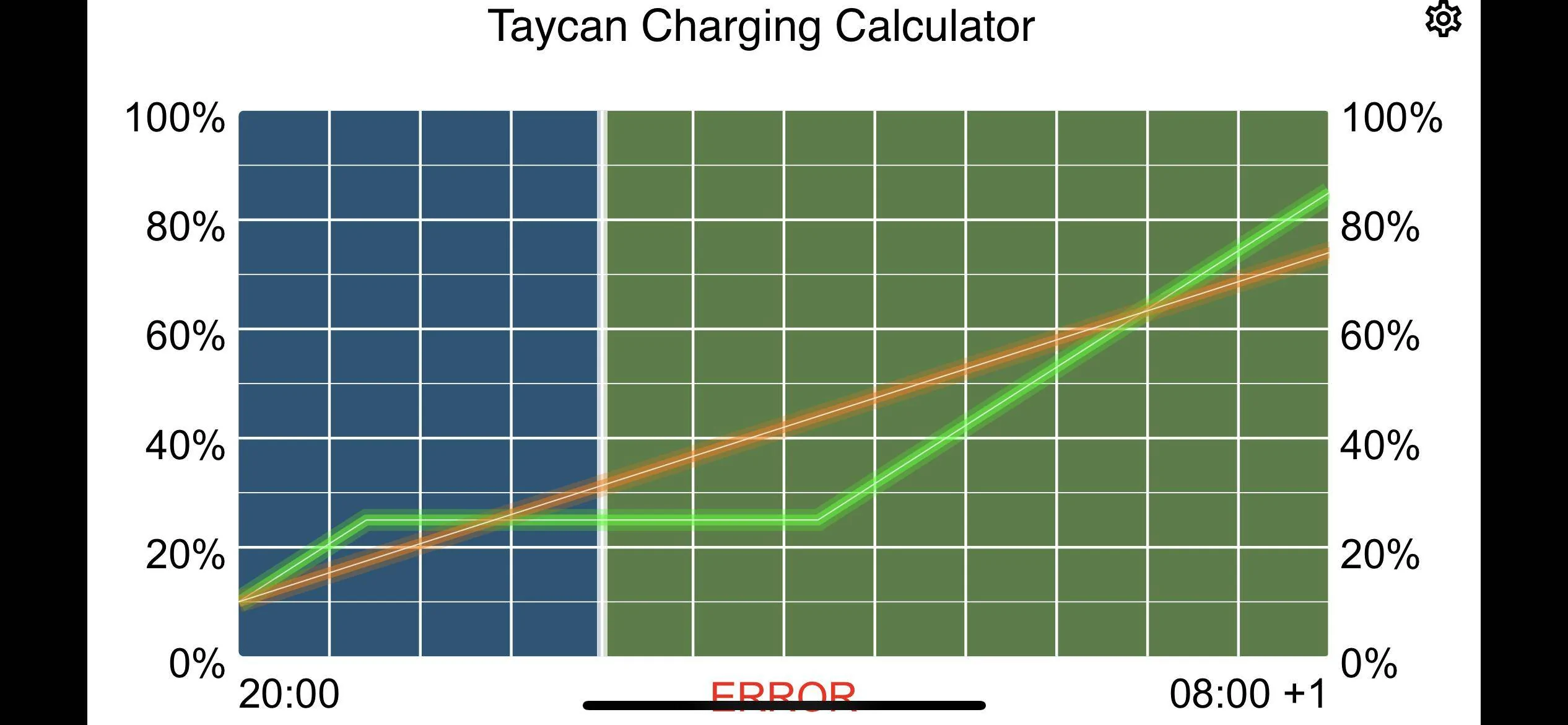
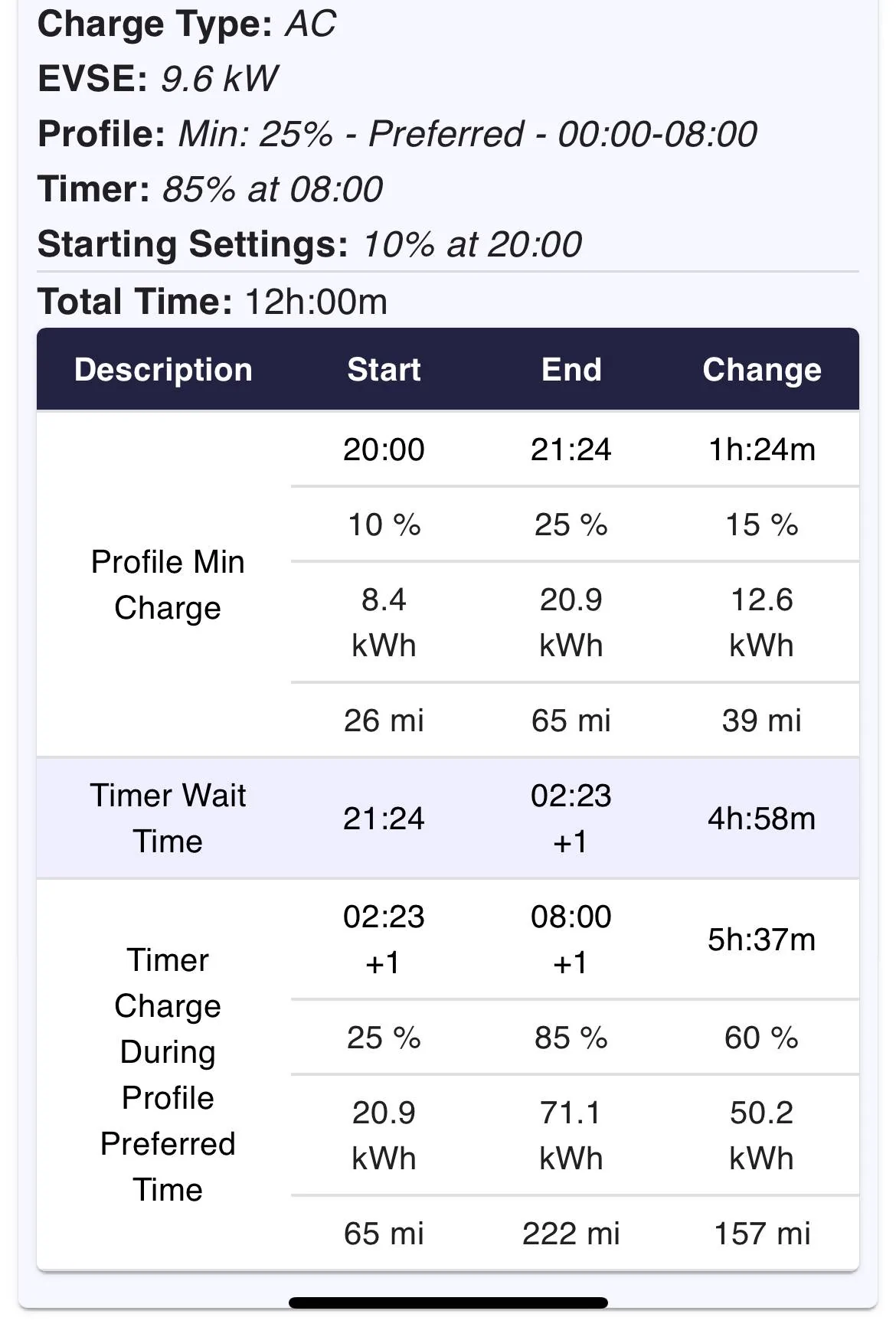
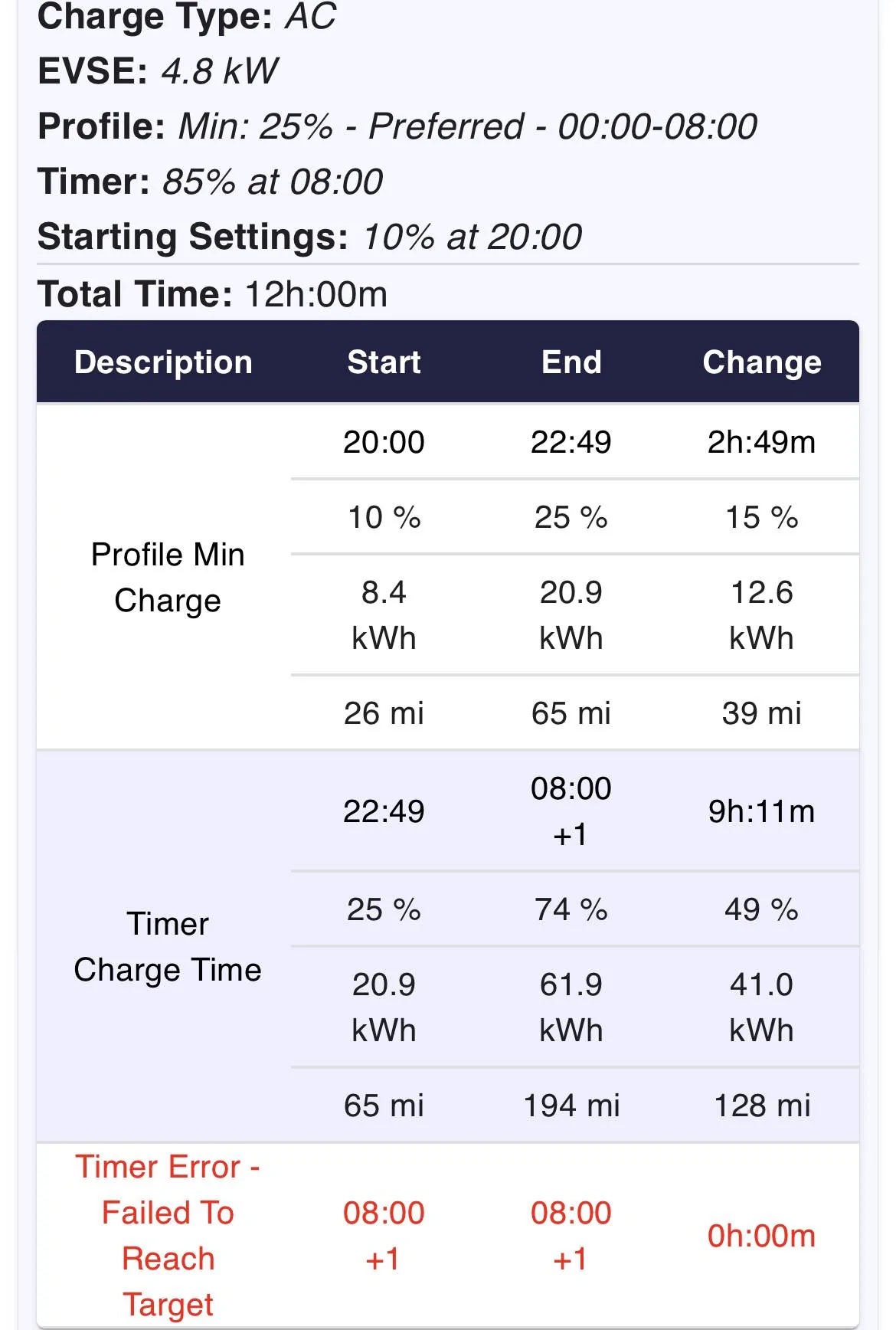
As an example, the below graph shows plugging in at 10% at 8pm using your settings with two different EVSE units. The green is 9.6kW and the orange is 4.8kW.

The green doesn’t start charging past 25% until almost 2:30am, well within the preferred times. The orange just charges the entire time without reaching the target. The shaded area is the preferred time from the profile.

Porsche Taycan Taycan Timer 4F4E7F44-DE5B-4D2B-8752-C6CF2D2D73A8


Green charge info:
Porsche Taycan Taycan Timer 94FA68BD-E87A-4FB5-A22F-D70DA2509D14


Orange charge info.
Porsche Taycan Taycan Timer E090AF4F-2663-4489-B5A1-3F61D20492A1


sbarker108

Well-Known Member
First Name
Stuart
Joined
May 9, 2022
Threads
12
Messages
99
Reaction score
116
Location
South Yorkshire
Website
www.cqe.co.uk
Vehicles
Taycan TTS, EX30 Twin Motor
Country flag
What are you (not) seeing? Is the timer activated (checked box in the Timer list)?

The algorithm is roughly this (upon plugging in):
- if direct charging/DC - charge, exit
- find an active profile: that means enabled, and matching current geo location if specified
- if found: while SoC < profile min charge then charge, exit
- find an active timer: that means enabled/scheduled
- if timer found: calculate when timer fires (T0), calculate the delta SoC, query the charge rate from EVSE, calculate time needed to reach the target SoC (dt). Start charging at max(Now, T0 - dt).

If T0-dt < Now, you'll get a warning that charging won't complete in time.

Again, note that creating the timer doesn't enable it - that's a separate click (whether in the app or on the PCM screen).
Do you work in IT? Closing in on pseudo code there!
 

kempez

Well-Known Member
First Name
Matt
Joined
Mar 24, 2022
Threads
26
Messages
935
Reaction score
1,059
Location
Hampshire, UK
Vehicles
Hyundai Ionic 5N, Renault R5 electric, 911 997.1 C2 Manual
Country flag
This is expected functionality if you've tried to give it a (relatively). large charge and the EVSE cannot supply enough power to complete within the set limit. If you set a profile with a preferred charging time, plus a timer to complete a set charge at a set time, the car will charge in that window and stop at the timer end. I get this message often and that works for me so my car uses the cheaper tariff to charge and stops at the end of that period. This is as per guidance both on the forum and on the Porsche YouTube video about profiles and timers.
 

Tesla2Taycan

Well-Known Member
Joined
Jan 5, 2022
Threads
4
Messages
123
Reaction score
54
Location
Silicon Valley, CA
Vehicles
Tesla Model S P85 + Taycan GTS
Country flag
A timer's purpose is to get the car charged to the target charge level by the predefined time (when the timer "fires"); the charge level here is a maximum. A profile's purpose is to reach the target charge level as soon as the car is plugged in - without delay; in this case, the charge level is a minimum. (The profile also allows specifying a preferred interval, or optimized charging, which supports the timer functionality.)

You can use both concepts, or either on its own. The key difference is that one is modeling a "what to do on arrival" directive (and allows location-based behaviors), whereas the other is "when do you want to leave".
That’s SUPER helpful. Thank you!
So when does the timer “fire” or what triggers the charging process with only a timer?

I panicked the first time when the car didn’t charge for a few hours and I gave up on the timer.

So with just a timer (no profile) the car knows when to start charging based on the connected power source to attain the desired target charge for the the target departure time. Thus it might not start charging for even a few hours. Which is what happened to me.
 
Last edited:

W1NGE

Well-Known Member
First Name
Adrian
Joined
Jan 11, 2021
Threads
53
Messages
11,015
Reaction score
6,805
Location
Aberdeen, Scotland
Vehicles
992.2, ex GTS ST owner, Macan T
Country flag
That’s SUPER helpful. Thank you!
So when does the timer “fire” or what triggers the charging process with only a timer?

I panicked the first time when the car didn’t charge for a few hours and I gave up on the timer.

So with just a timer (no profile) the car knows when to start charging based on the connected power source to attain the desired target charge for the the target departure time. Thus it might not start charging for even a few hours. Which is what happened to me.
The clue here is that it is called a "Departure Timer" which means "ready by" and so the car automatically calculates when the session needs to start in order to reach the set charge level by the departure time. Until the start time is reached the session is paused indicated by a blue flashing light rather than green.
 

laua

Well-Known Member
First Name
M
Joined
Apr 23, 2022
Threads
4
Messages
174
Reaction score
217
Location
USA
Vehicles
XC90, V60, CT4S incoming
Country flag
Hi all - I recently charged my 4S for the first time using a Tesla wall connector (with j1772 plug). What I wanted to do is to tell the car to charge immediately but stop at 80%.

I wasn’t sure that was possible but based on what I read on the forum, I set a timer to charge to 80% by 9:30AM; and indeed I saw it was 80% per the app at ~9:30. I only got around to unplug it around 11am-11:30am. However by the time I got in the car at 3pm; I see the car was charged to 100%. Is that normal behavior? I saw the blinking blue light when I set the timer so I know the timer was active. I also saw a blinking green light before I unplugged it so I presume it was still charging after reaching 80%?

Per an earlier post; should I just set the profile to 80%? I thought the profile starts charging when you are below the threshold, not that it stops at the threshold? (Ie it charges when below x% set in profile but proceeds to charge to 100%)
 

W1NGE

Well-Known Member
First Name
Adrian
Joined
Jan 11, 2021
Threads
53
Messages
11,015
Reaction score
6,805
Location
Aberdeen, Scotland
Vehicles
992.2, ex GTS ST owner, Macan T
Country flag
Hi all - I recently charged my 4S for the first time using a Tesla wall connector (with j1772 plug). What I wanted to do is to tell the car to charge immediately but stop at 80%.

I wasn’t sure that was possible but based on what I read on the forum, I set a timer to charge to 80% by 9:30AM; and indeed I saw it was 80% per the app at ~9:30. I only got around to unplug it around 11am-11:30am. However by the time I got in the car at 3pm; I see the car was charged to 100%. Is that normal behavior? I saw the blinking blue light when I set the timer so I know the timer was active. I also saw a blinking green light before I unplugged it so I presume it was still charging after reaching 80%?

Per an earlier post; should I just set the profile to 80%? I thought the profile starts charging when you are below the threshold, not that it stops at the threshold? (Ie it charges when below x% set in profile but proceeds to charge to 100%)
You need a profile and timer - profiles on their own don't stop charging when the minimum level has been set in my experience and you can't control start and stop times (others have had more success with profile only charging).

Setting the minimum charge to 80% would lead to immediate charging with a solitary profile.

To control the end time / hard stop then a timer is used.

Flashing blue = charging paused
Flashing green = charging in progress.

Make your timer recurring / repeat if you want a regular charging plan.
Sponsored


Top