Sponsored

Using iPhone as a key?

daveo4EV

Well-Known Member
First Name
David
Joined
Jan 28, 2019
Threads
192
Messages
7,006
Reaction score
10,478
Location
Santa Cruz
Vehicles
Cayenne Hybrid, 911(s) GT3/Convertable
Country flag
the phone as key concept (regardess of NFC or blutooth) works slick for "dead dropping" a car say for example at the airport or mechanic.

Person "A" drive vehicle to airport - catches their flight - leave car in short term parking
Person "B" goes to airport to retrieve the car - using their phone - unlocks & starts car out short term parking

with no need to manage physical FOB/Key logistics - anyone with a paired phone can access/start the vehicle.

it turns EVERY phone (litterially billions of devices) in the world into a potential and really really secure FOB clone - so you no longer need to actually give people "keys" to your car - you can "grant" them access to your car using a device they already own and will have with them - their phone.

it's better than a FOB, it's more secure than a FOB (can't be cloned via people near by), and it works great (Tesla implementation I've never lived with the BMW).
Sponsored
 
OP
OP
IrwinJ

IrwinJ

Well-Known Member
First Name
Irwin
Joined
Apr 17, 2022
Threads
43
Messages
197
Reaction score
71
Location
Asheville NC
Vehicles
Mercedes SL550
Country flag
Am I a luddite as I am happy with the key in my pocket and being able to unlock the door simply by touching? What am I missing?
Yes I believe you are. Do you wear an Apple Watch? If so, imagine like me whose watch never leaves my wrist except to go to bed can simply walk up to his car and it unlocks without having to fish his key out of his pocket only to find it fell out of his pocket. But if you're happy with a key in your pocket, more power to you!
 

daveo4EV

Well-Known Member
First Name
David
Joined
Jan 28, 2019
Threads
192
Messages
7,006
Reaction score
10,478
Location
Santa Cruz
Vehicles
Cayenne Hybrid, 911(s) GT3/Convertable
Country flag
Just as FYI – it doesn't have to be just NFC – Bluetooth is supported.

https://developer.apple.com/documentation/passkit/pkaddcarkeypassconfiguration

This class has an attribute "supportedRadioTechnologies" which is a struct named "PKRadioTechnology" which has two values "NFC" and "Bluetooth".

https://developer.apple.com/documentation/passkit/pkradiotechnology

So at least Apple anticipates bluetooth implementations of CarKey in the future.

Edit: seems like this might already be used by BMW https://www.theverge.com/2021/1/14/...key-plus-iphone-unlock-u1-chip-ultra-wideband
thanks - I didn't review the current spec - so it can be NFC or BluTooth - awesome!!! It will just get better over time.
 

daveo4EV

Well-Known Member
First Name
David
Joined
Jan 28, 2019
Threads
192
Messages
7,006
Reaction score
10,478
Location
Santa Cruz
Vehicles
Cayenne Hybrid, 911(s) GT3/Convertable
Country flag
Yes I believe you are. Do you wear an Apple Watch? If so, imagine like me whose watch never leaves my wrist except to go to bed can simply walk up to his car and it unlocks without having to fish his key out of his pocket only to find it fell out of his pocket. But if you're happy with a key in your pocket, more power to you!
OMG - yes the watch - I'd forgotten the watch - again a device you probably have with you anyways - no FOB required - secure, personal, ubiquitous, and easy to use.

FOB's need to die
they are insecure
they are bulky
and they are something you have to carry in addition to your watch/phone (which you most likely have with you anyways).
 

KensingtonPark

Well-Known Member
Joined
Jul 1, 2019
Threads
21
Messages
893
Reaction score
710
Location
New York, NY
Vehicles
2020 Porsche Taycan 4S; 2023 Audi eTron S Sportbck
Country flag
the Tesla "phone as key" implementation works exactly like a FOB - it's proximity based - and does not require the phone to be "presented" to the car - once it's with in blutooth range you can unlock/start the car - no interaction is required - just have your phone with you - I've found it works similar to FOB's in terms of range - this implementation requires the phone's blutooth so it requires the phone to have power…

the Tesla RFID card is considered the backup or 2nd'ary access system (like the physical key in our FOB's) and is not the primary use case, but the RFID cards are secure, thin, and light and easy to have with you as a backup…and are more secure than _ANY_ existing FOB implmentation.
Whoa. Since it was my Dad's Tesla, I was not aware that this is how the phone system worked. Wow. I am down for that if any car offered that.

I would pay a lot of money to add that to my Taycan...


daveo4EV

Well-Known Member
First Name
David
Joined
Jan 28, 2019
Threads
192
Messages
7,006
Reaction score
10,478
Location
Santa Cruz
Vehicles
Cayenne Hybrid, 911(s) GT3/Convertable
Country flag
the people who "lost" access to their Tesla's when Tesla's servers/services had an outage were blissfully and seamlessly using the Tesla app to access and start their vehicles - for what ever reason they never "paired" their phones with the vehicle - and didn't realize they could (again for whatever reason).

since this has occured (the Tesla server/service outage)

Tesla has pushed an OTA update to the vehicle - if someone is in the vehicle and used the app to unlock/start the car - the Car's main console will now prompt you to "complete the pairing" process with an explanation as to the advantages of this - so that Tesla is now making sure people "know" about the phone pairing feature and it's improved use case…

Tesla did this shortly after the server/service outage to make sure more of their owners were not stranded in the future…

I note this while I await my first ever OTA update from Porsche for my 2 year old Taycan…I'll look forward to dropping off my Taycan with my dealership, getting an underpowered loaner Macan, while the technicians spend 2 days with my Taycan hooked up to a reliable external 12V power supply so they can apply Porsche's OTA software update…and then my Taycan will receive a "map update" with no release notes telling me what is changed…Porsche has a long ways to go with regards to OTA updates…mean while Tesla continues to rock this particular area of technology mastery.
 
Last edited:

daveo4EV

Well-Known Member
First Name
David
Joined
Jan 28, 2019
Threads
192
Messages
7,006
Reaction score
10,478
Location
Santa Cruz
Vehicles
Cayenne Hybrid, 911(s) GT3/Convertable
Country flag
Whoa. Since it was my Dad's Tesla, I was not aware that this is how the phone system worked. Wow. I am down for that if any car offered that.

I would pay a lot of money to add that to my Taycan...
have your dad add you as an additional user via the Tesla website.
setup the Tesla app on your phone
and go through the steps inside the vehicle to "add" your phone to the approved "keys" list
your phone will be a FOB for your Dad's Tesla

it's super slick
it works well

I use it a few times a month with my Son's Model Y - it "just works" once setup.
 

daveo4EV

Well-Known Member
First Name
David
Joined
Jan 28, 2019
Threads
192
Messages
7,006
Reaction score
10,478
Location
Santa Cruz
Vehicles
Cayenne Hybrid, 911(s) GT3/Convertable
Country flag
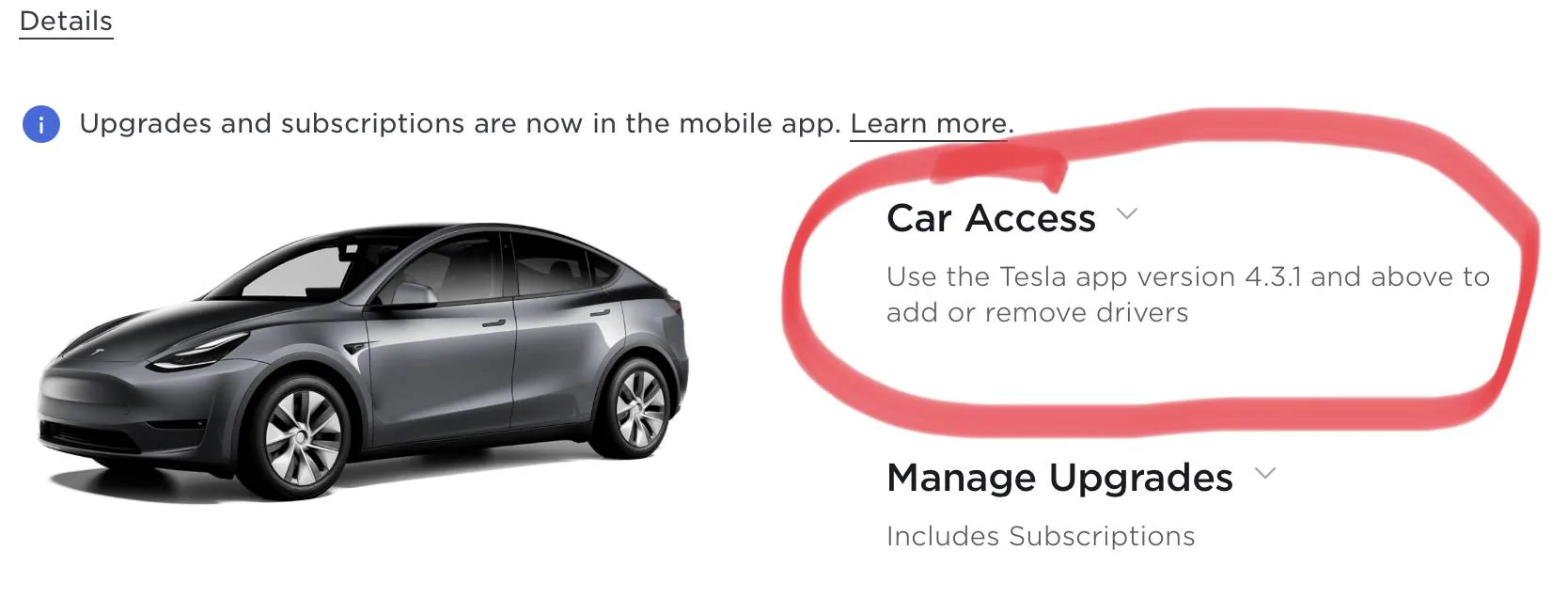
here ya go - apparently you can do this via the App now - when I did it in december for my son's car it was still via the web…Tesla rocks at providing constant and meaningful updates nearly every month and makes things better on a continuous basis - their phone as key implementation is industry leading and super convenient and real step forward…

Porsche Taycan Using iPhone as a key? A2CB7B16-E1F7-4645-BF2F-0FC3EC0F43AF


daveo4EV

Well-Known Member
First Name
David
Joined
Jan 28, 2019
Threads
192
Messages
7,006
Reaction score
10,478
Location
Santa Cruz
Vehicles
Cayenne Hybrid, 911(s) GT3/Convertable
Country flag
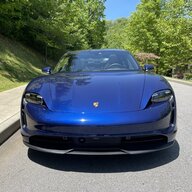
here is the app configuration…your dad can add you in "manage drivers" and you then choose Setup Phone as Key while sitting in the car with an RFID card to authorize the pairing

once you are added and paired - your Phone is the key/FOB

Porsche Taycan Using iPhone as a key? 10EDCCC7-5145-4021-8213-6A8C5A6139A7
 

daveo4EV

Well-Known Member
First Name
David
Joined
Jan 28, 2019
Threads
192
Messages
7,006
Reaction score
10,478
Location
Santa Cruz
Vehicles
Cayenne Hybrid, 911(s) GT3/Convertable
Country flag
also - the Tesla "app" will eventually be useful to non-Tesla EV owners - since the app is the mechanism by which you "activate" a charge session at Tesla supercharger - all Tesla's are "plug&Charge" style - always have been - but other EV's don't have access to Tesla's plug&charge protocols - so you need to plug-in and then use the Tesla App to start the charging session

once you have this App installed and setup - you can con your friends and family to give you access to their Tesla's via the "additional drivers" features, and you can pair your phone if you have physical access to the Tesla and an authorized RIFD card…

NOTE: the "pairing" of the phone is ONLY required if you want the phone to operate like a FOB - if you simply want occasional access to the Tesla - you only need to be added as "an additional driver" - and you can use the app to unlock/start the car - but that requires cell-coverage/internet/servers - but honestly is all you need 95% of the time - especially for a vehicle you infrequently access.

so there are two levels of access and owner can grant for a Tesla
  1. "additional driver" access - can unlock/start/control the Tesla - but requires you to take out your phone and use the app to control the vehicle
  2. FOB like functionality - this requires access level #1 noted above - and then a one time addtional "pairing" step so the phone can be a "FOB"
#1 requires app + internet
#2 works just like a FOB
 

daveo4EV

Well-Known Member
First Name
David
Joined
Jan 28, 2019
Threads
192
Messages
7,006
Reaction score
10,478
Location
Santa Cruz
Vehicles
Cayenne Hybrid, 911(s) GT3/Convertable
Country flag
BTW: along with best in industry phone as FOB support - Tesla has done as awesome job of pairing "driver" memory settings (seat, phone, media favorites, drive train settings, etc…) with phone/RFID card

all Tesla's have driver memory settings and with few taps on the screen you can "pair" a driver memory settings (and all it's related "settings" more than just seat position) to the particular phone/RFID card

so not only does your phone work as a FOB - by they time you land in the driver's seat all your personal preferences are also setup in the vehicle…it is again super slick and "just works"

walk up - get in- and by the time you're butt's in the seat the vehicle settings are all the same settings from last time you were in the car - and I mean EVERYTHING - way way way more than just seat/mirror positions…

I find it superior to the FOB pairing for driver settings that Porsche offers - mostly because it scales to more than just 2 drivers/FOBs - and also phones are personal, FOB's are not - and while you can rigorously associate a FOB with a person - it all falls down when my wife accidentally grabs the wrong FOB…and then spends the day away from home constantly getting my memory settings…with a phone as your "vehicle FOB" this is seamless and instantly personal, and she's not going to accidentally grab my phone…so it all just works better.

the phone-FOB pairing combined with driver preference settings tied to the phone-FOB is simply best in industry for this type of functionality.

physically and mechanically I prefer the Porsche
technology I vastly prefer the Tesla

if I could combine the two we'd have a vehicle to rule the world - and to the "luddites" out there -once you got used to it - you'd love the Tesla's tech - it's the Porsche of vehicle software/tech -and leave the interior/phyical-build-quality/brakes/suspension/steering-rack to the german's - the phone-as-fob technology and OTA updates to the silly-con-valley crowd…
 
Last edited:

KensingtonPark

Well-Known Member
Joined
Jul 1, 2019
Threads
21
Messages
893
Reaction score
710
Location
New York, NY
Vehicles
2020 Porsche Taycan 4S; 2023 Audi eTron S Sportbck
Country flag
I only drove my father's car briefly; now I wish I had explored it more. He lives far from me (CA vs. NY), so I am looking forward to trying all of this when I see him again.

One question: Are these features limited to certain model years/generations of the the Tesla Model S? Or do they all have this functionality?
 

daveo4EV

Well-Known Member
First Name
David
Joined
Jan 28, 2019
Threads
192
Messages
7,006
Reaction score
10,478
Location
Santa Cruz
Vehicles
Cayenne Hybrid, 911(s) GT3/Convertable
Country flag
I only drove my father's car briefly; now I wish I had explored it more. He lives far from me (CA vs. NY), so I am looking forward to trying all of this when I see him again.

One question: Are these features limited to certain model years/generations of the the Tesla Model S? Or do they all have this functionality?
all Model 3/Y fully support this feature set - no model year restrictions - orginally the Model S and X don't have the necessary hardware for phone-as-FOB (that was true as of 2018) - I do not know if the 2021/2022 S/X have "caught up" to the 3/Y in this regard…

my 2013/2014 Model S - remote app support - no phone-as-fob - physical FOB's - no RFID cards
my 2016/2017 Model X - remote app support - no phone-as-fob - physical FOB's - no RFID cards

all Teslas have the "additioal driver" support - since that is cell/internet/app based - that's purely software - no hardware changes on the vehicle required.

so any tesla owner can "add" a driver for app access to any Tesla (2012 Model S or later) - but the phone-as-FOB/Key support is only 2017/2018 Model 3/Y or later - again I'm not sure if they have "back ported" similar functionality to the S/X's…if they have it would be 2019 or later S/X's

but all 3/Y have this feature set

its a really really nice feature set for a 55k vehicle and class leading for it's price point.

if also makes a LOT of sense if you view it from the "lens" of Elon/Tesla's assertions around "car sharing" - you need this sort of vehicle access model (fluid, cloud based, remote, lack of physical token) _IF_ you're going to have car sharing and/or loaning - they have built their entire vehicle hardware/software platform with this very advanced view of who has access to the vehicle is based on granting privledges - not on physcial token possession (FOB)

now I don't agree with Elon's vision in this space and they are by no means "done" in this space - but as a software guy I can see where they are going…

something like this would be awesome for "fleet" usage - picture delivery VAN's where the driver's don't get the same delivery VAN each day - but they have a 'app' that grants them access to the van and it's load both their personal driving profile and work-day-list onto the van's vehicle computer for their daily usage - access control and asset allocatoin (who drive's which van) becomes a much easier problem and removes the need to manage physical vehicle keys…it would be huge for business usage models…

but we're not there yet - but i can see the foundations being built.
 
Last edited:

f1eng

Well-Known Member
First Name
Frank
Joined
Aug 19, 2021
Threads
48
Messages
4,765
Reaction score
8,335
Location
Oxfordshire, UK
Vehicles
Taycan CT4S, Ferrari 355, Merc 500E, Prius PHV
Country flag
My wife still hasn’t got used to comfort access and still locks and unlocks her car with the buttons on the key never by just opening it and letting the electronics unlock. She doesn’t use her phone much so it would be lost/battery flat/ left at home hence useless for unlocking her car.

I quite like it and have been using it for over 10 years but didn’t think it worth paying extra for on the Taycan so didn’t select the option.

I was perfectly happy with the pneumatic central locking and tiny key on my Merc 500E and often think the gains aren’t worth the bulk of the key.
 

RCorsa

Well-Known Member
Joined
Dec 12, 2020
Threads
11
Messages
378
Reaction score
609
Location
Mercer Island, WA
Vehicles
Taycan TTS, F8, Urus S , Raptor R, X5, Tesla M3P
Country flag
the apple BMW "phone as key" you have to present the phone to the "vehicle" in a similar manner as when you pay at a point of sale - this is because it's based on NFC radio communication - so you are correct - it requires you to remove the phone from your pocket and present once to unlock the vehicle - and again in a spot inside the vehicle to start it…

the Apple/BMW phone-as-key will work with a dead phone for some time after the phone dies -the NFC chips on the phone have some residual power and use very little power


the Tesla "phone as key" implementation works exactly like a FOB - it's proximity based - and does not require the phone to be "presented" to the car - once it's with in blutooth range you can unlock/start the car - no interaction is required - just have your phone with you - I've found it works similar to FOB's in terms of range - this implementation requires the phone's blutooth so it requires the phone to have power…

the Tesla RFID card is considered the backup or 2nd'ary access system (like the physical key in our FOB's) and is not the primary use case, but the RFID cards are secure, thin, and light and easy to have with you as a backup…and are more secure than _ANY_ existing FOB implmentation.

the RFID cars can also be handed to someone to grant them temporary access to the vehicle (assuming they give it back) and are a physical token you can give friends, family, valets to allow vehicle access (like a fob).

I have no issue with RFID cars when they used as intended and are very very simillar to handing someone your FOB - but they are not purely proximity based and require you to "show" them to the b-pillar to unlock the vehilce, and the center console to start the key. I find this to be no big deal since it's done infrequently.

both the BMW and Tesla implmentation are way way way way more secure than existing auto FOB's designs and can not be "cloned" like thieves can with all the existing FOB's on the market, which lead to vehicle thefts.

also the BMW implementation requires no cell/internet/server service - it's a local phone to car proximity secure radio implementation

the Tesla phone as a FOB requires no cell/internet/server service - and simply requires your phone near by…

both BMW & Tesla offer RFID cards as "backup" systems should the phone approach not function - no different than the physical key option inside our FOB's.

having lived with the Tesla implementation since 2018 - it works as well as FOB's, as often as FOB's and is a real advantage in that it only requires one to have a phone with them - which you often times do (99.9% of the time) - so it's one less thing to remember or need…you have your phone, you are good to go.

this is one area Tesla has gotten right (like supercharging) they win here, they've done an excellent job, don't try and deride their implementation - it's unambiguously a "win" and everyone else is playing catch up - and it works every day and in all the same ways a FOB does - just you no longer need a FOB - you need what you're going to have with you anyways - which is your phone…

Tesla has a lot of room for improvement on in a lot of areas, but Superchargers, plug&charge, OTA updates, and phone as a key is rock solid, industry leading, resilient, and well done - leave them alone on these topics just like Porsche brakes are the best in the industry (no question).
Actually Dave you are not correct on the bmw front. Sorry I know you are quite knowledgeable but I have a 2022 x5. In order to authenticate the nfc handshake you have you phone charged but actually have to authenticate the handshake with Face ID or the phones password. No way to do this with a dead phone. If they advertise it the way you say it doesn’t work in reality.
Sponsored


Top