Sponsored

Trying to prove that Planning a long Road Trip in a Taycan is very easy

WasserGKuehlt

Well-Known Member
Joined
Sep 7, 2022
Threads
5
Messages
2,066
Reaction score
2,456
Location
WA
Vehicles
4CT, 996C2, MacanS
Country flag
[...]They have added a lot of chargers into its database now – and because its algorithm isn't very smart – that is causing it to pick more and more inappropriate charging stops.

[...]
The thing that drives us crazy on a road-trip is that as you drive – or get map updates – it keeps changing your stops. No normal person is going to be happy with that.
I have to say that in my case – I find the PCM/built-in consumption estimates very accurate to one or two percentage points – if I drive calmly and to speed limits. Outside of battery pre-condition – its the other feature that has me using the PCM over Carplay apps. I've learnt to really trust the consumption estimates.
To clarify my earlier statement, that is what I was trying to say - the _charge planning_ aspect (car and app) is very poor, and its estimates are off - by a lot. As an example, Seattle to Whistler is ~220 miles with a good chunk of it in the mountains, and it thinks somehow that all it takes is 1 stop of 1 minute! Furthermore, as it tries to plan a longer route, it rushes to present _some_ options and you end up seeing - while driving - weird stops far from the main route. It settles as it backtracks, but the settling takes a while (the order of minutes) and that's disconcerting, to say the least.

The range estimation, on the other hand, I do agree is very good. If you give it a destination that doesn't require charging/a stopover, it's absolutely spot-on both wrt range and arrival SoC. So I've learned to do my (charge) planning on the side, and use the PCM nav mainly to keep track of my consumption; I'll ignore its stop suggestions, or manually override with my own.
Sponsored
 

RonJBr

Member
First Name
Ron
Joined
Jan 7, 2022
Threads
1
Messages
6
Reaction score
18
Location
Eindhoven area
Vehicles
Porsche Taycan 4S MY21
Country flag
The charging planner indeed needs a lot of improvements. Today a trip back from Lausanne to Netherlands. The PRIM planner would make me arrive one hour later home compared to ABRP!

One surprise I noticed that when you open the ABRP app and have it open to navigate. It wipes the route from PRIM. Perhaps because I had carplay open with Spotify in parallel. But weird interference between the 2 platforms. Unless I made a misstake somewhere of course.
 
OP
OP
Scandinavian

Scandinavian

Well-Known Member
First Name
Peter
Joined
Nov 3, 2019
Threads
52
Messages
3,904
Reaction score
3,549
Location
France
Vehicles
Taycan T, Aston Martin DB9, Porsche 996 C4 Cab, i4
Country flag
The charging planner indeed needs a lot of improvements. Today a trip back from Lausanne to Netherlands. The PRIM planner would make me arrive one hour later home compared to ABRP!

One surprise I noticed that when you open the ABRP app and have it open to navigate. It wipes the route from PRIM. Perhaps because I had carplay open with Spotify in parallel. But weird interference between the 2 platforms. Unless I made a misstake somewhere of course.
If you have any other navigation app active via CarPlay (or also Android Suto I guess) it will not keep the PCM navigator active. Using ABRP in such case means the car will not preheat automatically either.

Recommend to plan the charging stops with ABRP and the put these stations as destinations ( make sure they are chargers) into the PCM. And then just ignore the antics from the PCM.
 

Crazymind

Well-Known Member
First Name
Mattia
Joined
Feb 12, 2023
Threads
23
Messages
459
Reaction score
490
Location
Glasgow
Vehicles
Taycan CT 4S
Country flag
After 3 years of electrical motoring in UK I bought a diesel car for long distances :)
The only way I could enjoy EV will be when retired and with no children.
I admire pioneers travelling up and down the Country and I like to read their adventures.
 
Last edited:

Gru

Well-Known Member
First Name
Damien
Joined
Aug 21, 2022
Threads
13
Messages
413
Reaction score
549
Location
Belgium
Vehicles
Taycan Sport Turismo - 20"
Country flag
If you have any other navigation app active via CarPlay (or also Android Suto I guess) it will not keep the PCM navigator active. Using ABRP in such case means the car will not preheat automatically either.

Recommend to plan the charging stops with ABRP and the put these stations as destinations ( make sure they are chargers) into the PCM. And then just ignore the antics from the PCM.
exact, same behaviour with Android Auto.

I often travel more than 700km a day without problem. it just require planning as you very well explained:
- compute the road with ABRP / double check with Waze for traffic or work issues
- enter the Ionity stations as favorite in PCM navigator, and your final destination
- specify in PCM navigator the final destination, then starting from the last, the charging stops (so to get preheat)
- disconnect your phone from the car (??‍♂). I do it by disabling bluetooth and using a VPN.
- launch Waze on your phone. in case of re-routing and/or radar ….
- … and drive !


McgR

Well-Known Member
Joined
Sep 27, 2021
Threads
37
Messages
1,740
Reaction score
1,603
Location
Belgium
Vehicles
Taycan CT 4
Country flag
If you have any other navigation app active via CarPlay (or also Android Suto I guess) it will not keep the PCM navigator active. Using ABRP in such case means the car will not preheat automatically either.

Recommend to plan the charging stops with ABRP and the put these stations as destinations ( make sure they are chargers) into the PCM. And then just ignore the antics from the PCM.
The only navigation app I can run in CarPlay and keep PCM is Tom Tom. All others (ABRP, Waze, Google,…) deactivate PCM navigation

If I use Tom Tom in CarPlay I can still see PCM navigation in my right Tube and HUD. They are not connected and can show different routes. If I follow PCM, TT will change the route however.
 
OP
OP
Scandinavian

Scandinavian

Well-Known Member
First Name
Peter
Joined
Nov 3, 2019
Threads
52
Messages
3,904
Reaction score
3,549
Location
France
Vehicles
Taycan T, Aston Martin DB9, Porsche 996 C4 Cab, i4
Country flag
The only navigation app I can run in CarPlay and keep PCM is Tom Tom. All others (ABRP, Waze, Google,…) deactivate PCM navigation

If I use Tom Tom in CarPlay I can still see PCM navigation in my right Tube and HUD. They are not connected and can show different routes. If I follow PCM, TT will change the route however.
Good to know! I have not used TomTom gor many years now so was not aware of this use case
 

Gru

Well-Known Member
First Name
Damien
Joined
Aug 21, 2022
Threads
13
Messages
413
Reaction score
549
Location
Belgium
Vehicles
Taycan Sport Turismo - 20"
Country flag
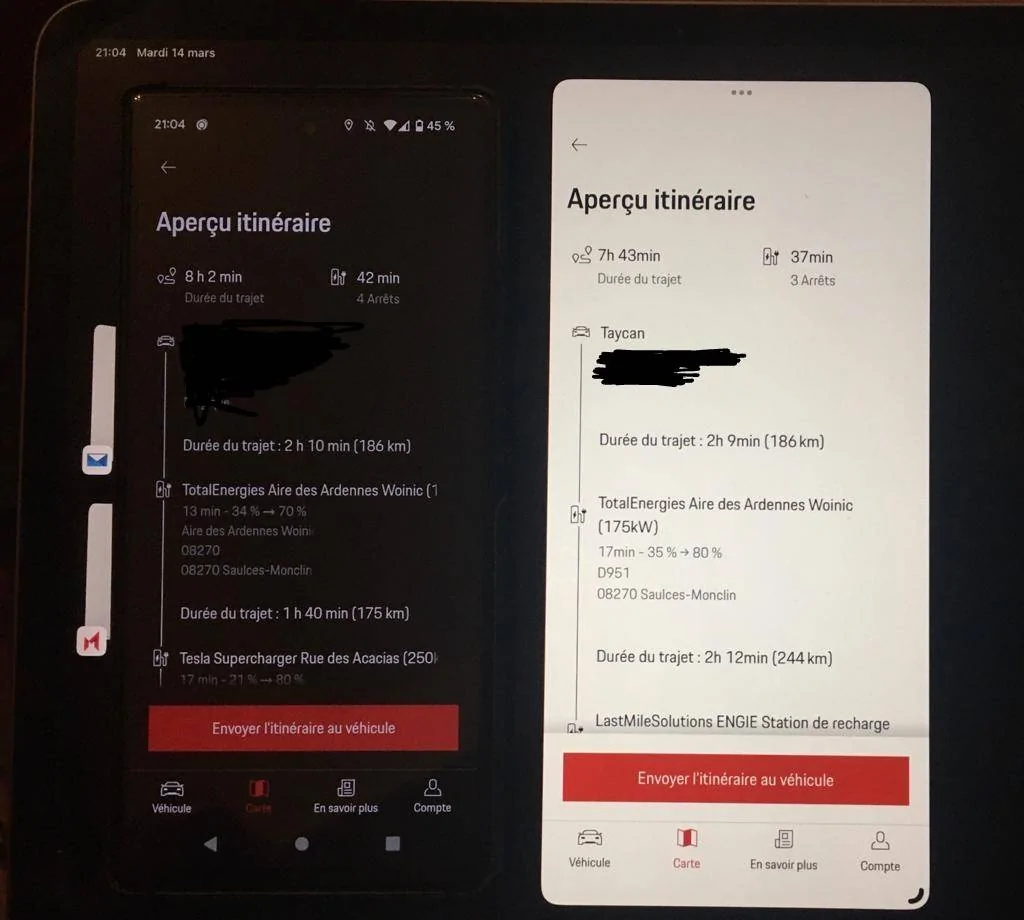
used My Porsche on IOS and Android versions to plan the same itinerary.
all parameters identical .... but results are different ??
Porsche Taycan Trying to prove that Planning a long Road Trip in a Taycan is very easy IMG-20230314-WA0010~2


feye

Well-Known Member
Joined
Sep 16, 2019
Threads
17
Messages
2,411
Reaction score
1,871
Location
Shenzhen, Munich
Vehicles
Porsche Taycan 4S+ 2020
Country flag
So, did I manage to convince my friends about how easily you can make a trip in an EV through Europe?

NO, I have to give that a FAIL!!

They were quite amused with the complexity and need for different charge cards or dongles? They simply did not understand why you could not just use a normal Credit Card as you do at a fuel station.

I have to admit I did not convince any of them to join the EV community in the near future even if they absolutely enjoyed the short trips in the Taycan. But it wasn’t for them.

Missed opportunity!
Yes. The fact, that there is not a charger on every exit, every rest area on all highways is a big miss.

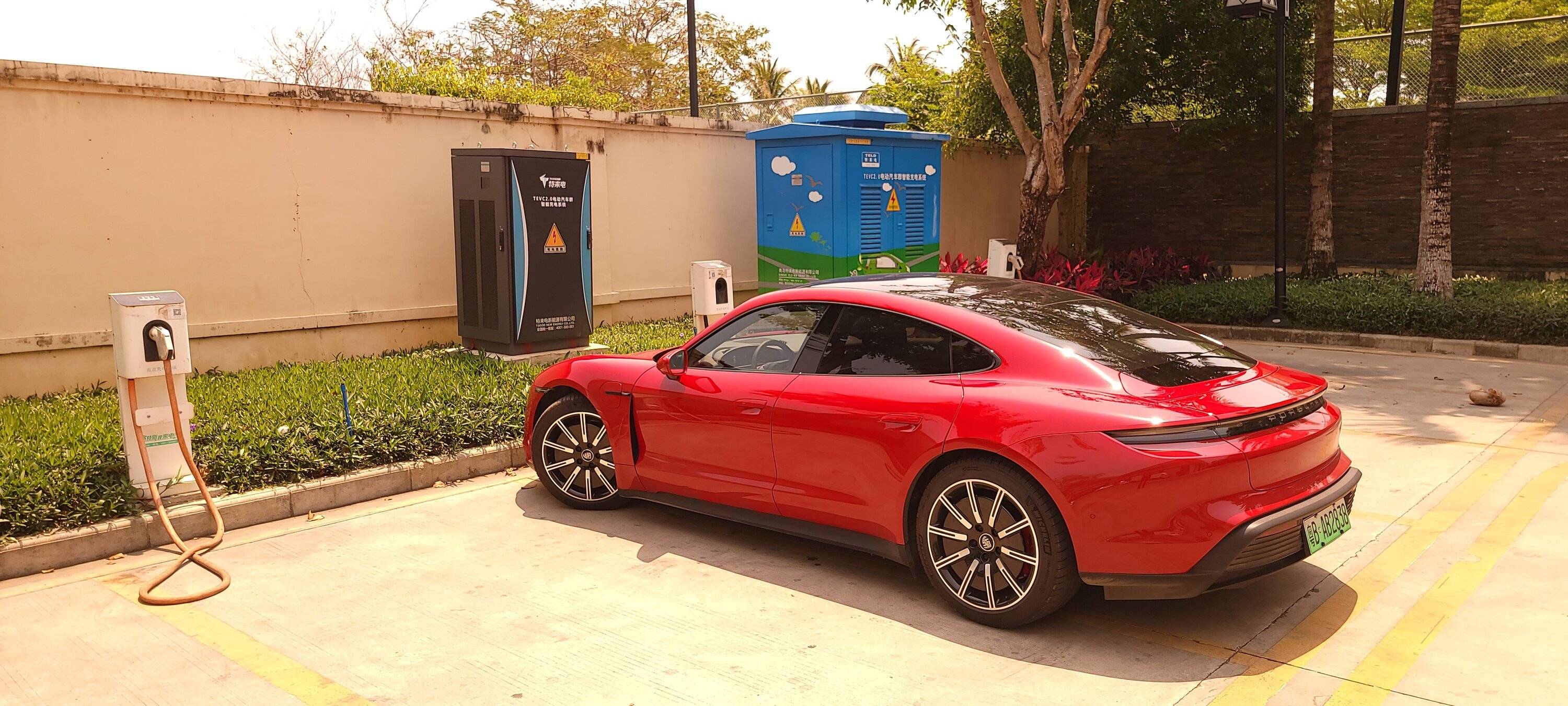
Here in China this is the case. When they build a highway, they build a rest area with a gas station, with just one single pump, but they build 15 EV charging piles at the same time. I've seen this north of Beijing, half way to Mongolia in 2021. Very desolate place.

Old highways have EV charging piles on every resting area. So even if you run low and the charger is full/faulty, you just keep driving and stop at the next one. There is no planing required!

When you drive in remote little towns you find chargers like this:

Porsche Taycan Trying to prove that Planning a long Road Trip in a Taycan is very easy 20210328_124111

March 2021
 

Charlie

Well-Known Member
First Name
Charlie
Joined
Jul 10, 2020
Threads
10
Messages
121
Reaction score
82
Location
Los Angeles
Vehicles
Taycan
Country flag
The only navigation app I can run in CarPlay and keep PCM is Tom Tom. All others (ABRP, Waze, Google,…) deactivate PCM navigation

If I use Tom Tom in CarPlay I can still see PCM navigation in my right Tube and HUD. They are not connected and can show different routes. If I follow PCM, TT will change the route however.
Hi, You mean you can use TomTom Go with Car play and put a destination into both TomTom Go and in the PCM navigation and keep them both working at the same time? If so, I'll subscribe right away
 

Mr Bill

Well-Known Member
Joined
Nov 15, 2021
Threads
2
Messages
49
Reaction score
49
Location
Netherlands
Vehicles
Tesla Model S (going), Taycan RWD (incoming)
Country flag
Recommend to plan the charging stops with ABRP and the put these stations as destinations ( make sure they are chargers) into the PCM. And then just ignore the antics from the PCM.
That is the way to go for me as well. I did the same during my years with a Tesla. BTW, thanks to the OP for the interesting exercise!

About 'ignoring the PCM antics': it has happened a few times that after entering the charge destination as suggested by ABRP in the PCM (for preheating), the PCM automatically inserts an additional charging stop if 'it' thinks that is safer from a consumption perspective. While that is annoying, you can disable this extra stop by fiddling with the PCM (can't recall exactly how I did that though - pushing some icon will display separately the destination, plus the route with the extra stop which you then can disable).

Anyone else experienced that the ABRP (standard) consumption settings/predictions for the Taycan are too optimistic? I know you can tweak those, but never needed to that in my Tesla days.
 
Last edited:

McgR

Well-Known Member
Joined
Sep 27, 2021
Threads
37
Messages
1,740
Reaction score
1,603
Location
Belgium
Vehicles
Taycan CT 4
Country flag
Hi, You mean you can use TomTom Go with Car play and put a destination into both TomTom Go and in the PCM navigation and keep them both working at the same time? If so, I'll subscribe right away
Yes that is my experience.
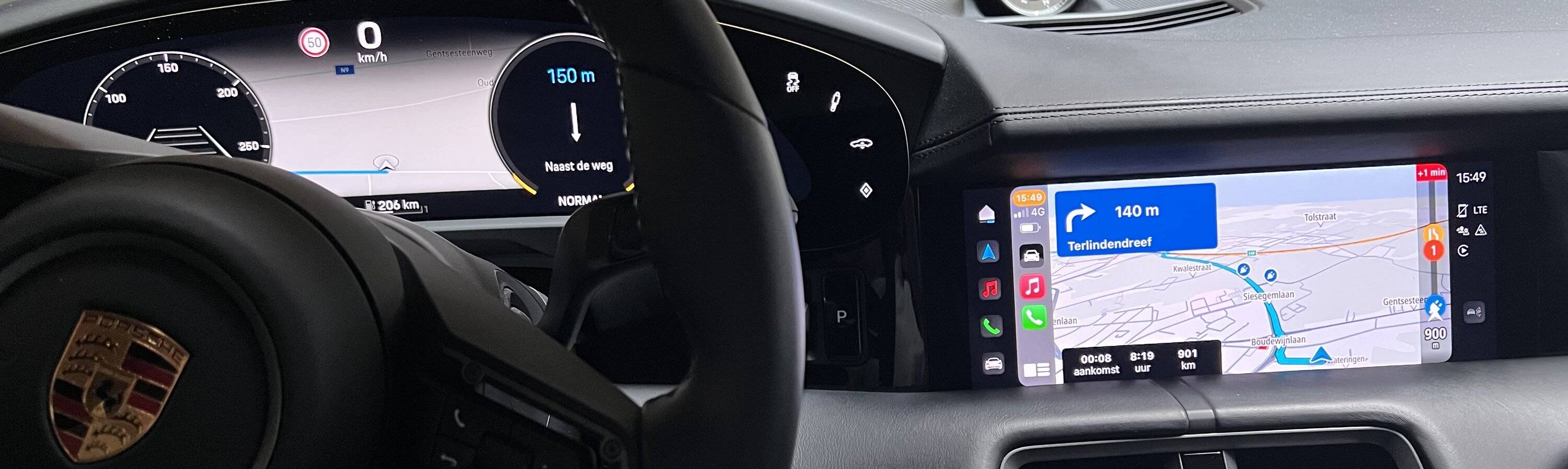
I connect my phone in CarPlay mode. Open TT and enter a destination. It will first disconnect PCM navigation. Then I push the blue arrow, it shows PCM navigation again andenter the same destination as I entered in Tom Tom. Both navigate to the same destination but not necessarily the same route.You can now switch between TT and PCM navigation on the centre screen with the buttons on the touchpad center console and both remain active active. PCM will always show on the head up, right tube en central in the dashboard. My picture shows active TT navigation on the central display and PCM in the dashboard

if you follow TT navigation PCM will change the route along the way and usually end with the same

Porsche Taycan Trying to prove that Planning a long Road Trip in a Taycan is very easy 827604B9-99E5-4638-A67C-5ADD0D3F67F4
 

McgR

Well-Known Member
Joined
Sep 27, 2021
Threads
37
Messages
1,740
Reaction score
1,603
Location
Belgium
Vehicles
Taycan CT 4
Country flag
exact, same behaviour with Android Auto.

I often travel more than 700km a day without problem. it just require planning as you very well explained:
- compute the road with ABRP / double check with Waze for traffic or work issues
- enter the Ionity stations as favorite in PCM navigator, and your final destination
- specify in PCM navigator the final destination, then starting from the last, the charging stops (so to get preheat)
- disconnect your phone from the car (??‍♂). I do it by disabling bluetooth and using a VPN.
- launch Waze on your phone. in case of re-routing and/or radar ….
- … and drive !
You can also switch between PCM and CarPlay connection mode with the phone button on the central display. You can still receive calls but Waze won’t switch off PCM navigation and will only be active on your phone
 

Charlie

Well-Known Member
First Name
Charlie
Joined
Jul 10, 2020
Threads
10
Messages
121
Reaction score
82
Location
Los Angeles
Vehicles
Taycan
Country flag
Yes that is my experience.
I connect my phone in CarPlay mode. Open TT and enter a destination. It will first disconnect PCM navigation. Then I push the blue arrow, it shows PCM navigation again andenter the same destination as I entered in Tom Tom. Both navigate to the same destination but not necessarily the same route.You can now switch between TT and PCM navigation on the centre screen with the buttons on the touchpad center console and both remain active active. PCM will always show on the head up, right tube en central in the dashboard. My picture shows active TT navigation on the central display and PCM in the dashboard

if you follow TT navigation PCM will change the route along the way and usually end with the same

827604B9-99E5-4638-A67C-5ADD0D3F67F4.jpeg
Thanks so much. I'll subscribe to TomTomGO here in the USA and try this with my Audi Q7 on my 1700 mile trip back home to see my Taycan
 

McgR

Well-Known Member
Joined
Sep 27, 2021
Threads
37
Messages
1,740
Reaction score
1,603
Location
Belgium
Vehicles
Taycan CT 4
Country flag
Thanks so much. I'll subscribe to TomTomGO here in the USA and try this with my Audi Q7 on my 1700 mile trip back home to see my Taycan
It also worked like this in my X5 so I presume it should also function in the Q7.
Sponsored


Top