Sponsored

Recommendations for downloading historical trip data

VTaycan

Active Member
Joined
Apr 18, 2022
Threads
5
Messages
41
Reaction score
17
Location
Columbus, OH
Vehicles
Taycan RWD, Audi S5, Volvo XC90
Country flag
I'm coming up on one year with my Taycan and was curious if anyone knows how to download the trip data from the Porsche app (mi/kWh, average speed, etc)? My understanding is that the app deletes the data after a year and would be interesting to see how some of those metrics change over time as the car ages. Basically just looking to pull it in a CSV type format so I can use Excel to look at it. Any guidance appreciated. Thanks.
Sponsored

 

ciaranob

Well-Known Member
Joined
Jul 3, 2021
Threads
83
Messages
3,547
Reaction score
2,639
Location
Houston, TX
Vehicles
CT4S 2022 Mini Cooper S 2024 Electric in 2025/6
Country flag
I downloaded these data from the web site as opposed to messing with the App - lot more straight forward - the export does not do a great job with the tab delimited/CSV formatting etc but not a major deal to reorganize esp for anyone competent with Excel or Numbers etc.

Shared a number of graphs spread through various threads over the last year plus including every single AC/DC charge to my car :)

Here is a rather old example with some different ways to plot the data:

#21

And actually throughout this same thread you'll find more - the most up to date version of the charge history plot is continuously updated in post #1 in this thread along with member SoH data:

#1

or
https://www.taycanforum.com/forum/threads/baseline-for-hv-battery-soh-performance.12815/
 
Last edited:
OP
OP
VTaycan

VTaycan

Active Member
Joined
Apr 18, 2022
Threads
5
Messages
41
Reaction score
17
Location
Columbus, OH
Vehicles
Taycan RWD, Audi S5, Volvo XC90
Country flag
Thanks for the idea. Much easier to pull the data from the website.
 

Scandinavian

Well-Known Member
First Name
Peter
Joined
Nov 3, 2019
Threads
52
Messages
3,904
Reaction score
3,549
Location
France
Vehicles
Taycan T, Aston Martin DB9, Porsche 996 C4 Cab, i4
Country flag
I downloaded these data from the web site as opposed to messing with the App - lot more straight forward - the export does not do a great job with the tab delimited/CSV formatting etc but not a major deal to reorganize esp for anyone competent with Excel or Numbers etc.

Shared a number of graphs spread through various threads over the last year plus including every single AC/DC charge to my car :)

Here is a rather old example with some different ways to plot the data:

#21

And actually throughout this same thread you'll find more - the most up to date version of the charge history plot is continuously updated in post #1 in this thread along with member SoH data:

#1

or
https://www.taycanforum.com/forum/threads/baseline-for-hv-battery-soh-performance.12815/
How did you manage to download the data from the website?
 

ciaranob

Well-Known Member
Joined
Jul 3, 2021
Threads
83
Messages
3,547
Reaction score
2,639
Location
Houston, TX
Vehicles
CT4S 2022 Mini Cooper S 2024 Electric in 2025/6
Country flag
How did you manage to download the data from the website?
So long ago now I’d need to go back and look but there was a pop -up toggle button there I believe to export … If someone else doesn’t answer bef I do I’ll post later on.


ciaranob

Well-Known Member
Joined
Jul 3, 2021
Threads
83
Messages
3,547
Reaction score
2,639
Location
Houston, TX
Vehicles
CT4S 2022 Mini Cooper S 2024 Electric in 2025/6
Country flag
How did you manage to download the data from the website?
OK - I see that the trip data on the web site now only displays in 4 lines at a time(!) and I do not see an obvious export option (csv or other) - curious, as was fairly certain that was an option a year or so ago.

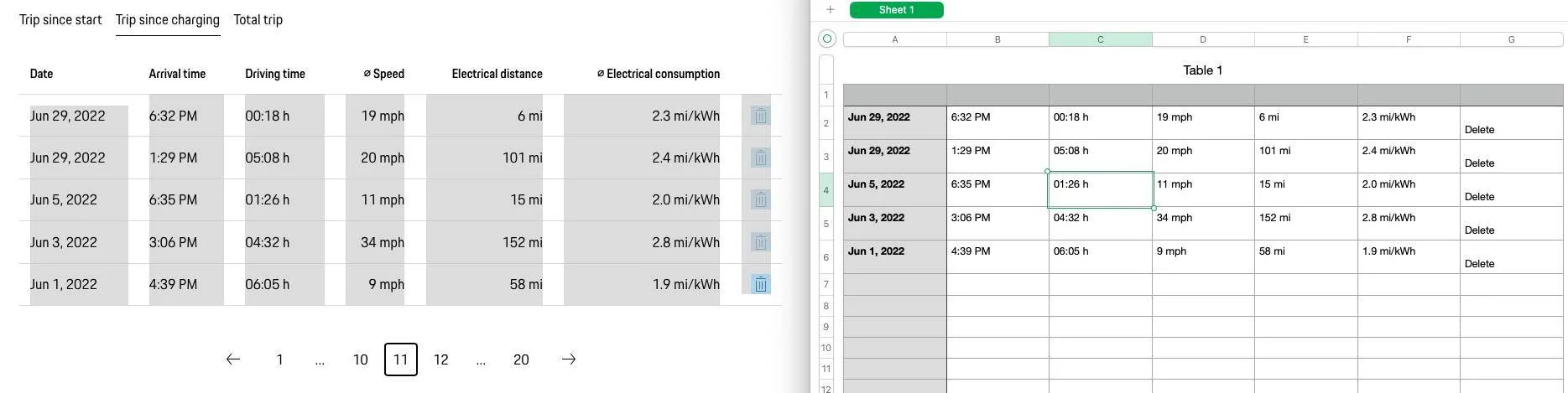
Anyway, no worries - you can simply drag your cursor over the data you want to capture (I know bloody tedious to have to do for all 20 pages in my example!) but a one time task, and use the 'Paste and Match Style' option for example in Numbers on Mac OSX or equivalent Paste option in Excel on Windows:

Here I have selected everything that is greyed out from the web site page on my trip data and pasted with matching style into Mac OSX Numbers app on right and all data has its own tab delimited cell so ready to reformat or use as desired:

Porsche Taycan Recommendations for downloading historical trip data Screenshot 2023-06-04 at 3.08.37 PM
 

Scandinavian

Well-Known Member
First Name
Peter
Joined
Nov 3, 2019
Threads
52
Messages
3,904
Reaction score
3,549
Location
France
Vehicles
Taycan T, Aston Martin DB9, Porsche 996 C4 Cab, i4
Country flag
I did come across this as well, but I have 66 pages to download . Since I also have used several other networks, Tesla, Fastned and Circle K, I will just give this a miss.
I found that I could download some data in CSV format about consumption, but that was only for the last 12 months now/ ?
 

Hirschaj

Well-Known Member
First Name
Jim
Joined
Sep 5, 2021
Threads
68
Messages
2,223
Reaction score
2,617
Location
Austin TX
Vehicles
2022 Taycan CT4 - Mamba Green, 2022 Challenger
Country flag
I believe you can download this data via API call. I inspected the website and I see the API call you are looking for. There is a python library called pyporscheconnectapi and you would want to use the tripshortterm argument to get all the trip data since start. I don’t have the time to try it out myself right now.


OP
OP
VTaycan

VTaycan

Active Member
Joined
Apr 18, 2022
Threads
5
Messages
41
Reaction score
17
Location
Columbus, OH
Vehicles
Taycan RWD, Audi S5, Volvo XC90
Country flag
I just copied the data for charge intervals and pasted into excel - couldn't keep the formats.
 

tigerbalm

Well-Known Member
First Name
Damien
Joined
Oct 11, 2020
Threads
94
Messages
3,514
Reaction score
7,912
Location
Dublin, Ireland
Website
www.targatrips.com
Vehicles
911 Targa 4 GTS, Fiat 500 EV. Sold: Taycan Turbo S, Taycan 4S; Panamera Turbo S
Country flag
I believe you can download this data via API call. I inspected the website and I see the API call you are looking for. There is a python library called pyporscheconnectapi and you would want to use the tripshortterm argument to get all the trip data since start. I don’t have the time to try it out myself right now.
Or similar library in swift: https://github.com/driven-app/porsche-connect#vehicle-trips which also has a command-line tool: https://github.com/driven-app/porsche-connect#command-line-tool

If there was interest in the command-line tool producing CSV data – that is something I could look to provide.
 

tchavei

Well-Known Member
Joined
Dec 3, 2022
Threads
33
Messages
1,302
Reaction score
1,369
Location
Portugal
Vehicles
Too many to list. Includes a MY23 Taycan RWD
Country flag
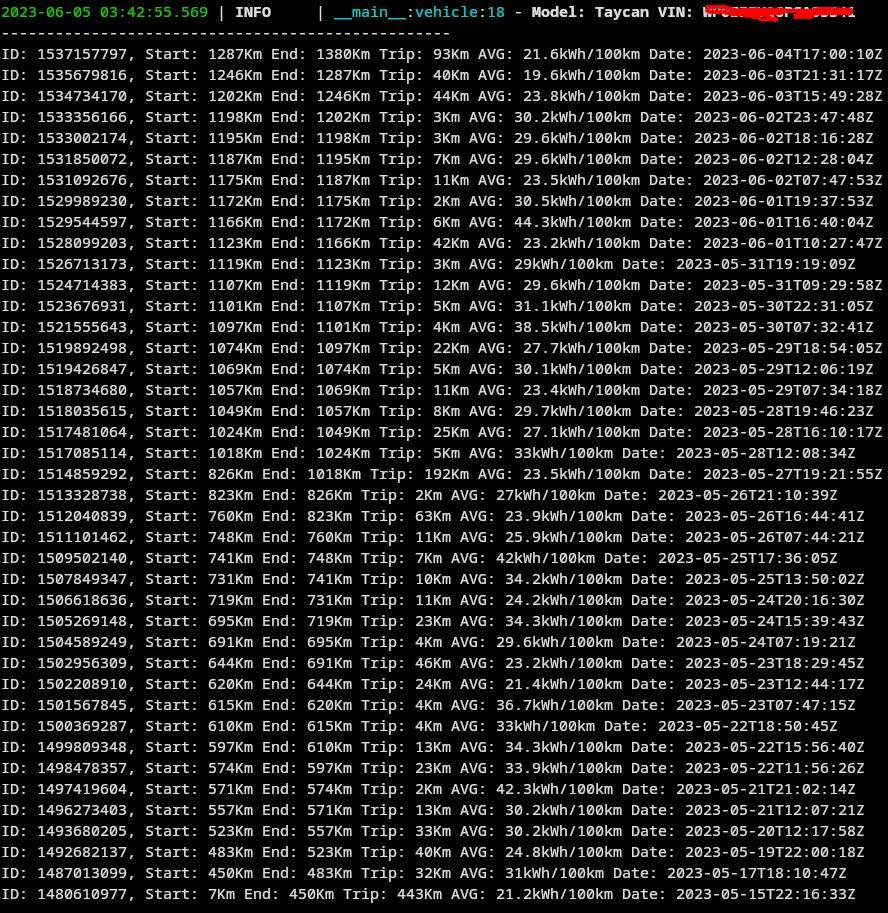
I just played a little with the python library and can confirm you can pull lots of data, including trip data. The trick is to pull short trip data to get them all.

I didn't spend time formatting the stuff (basically just pulled specific elements I wanted) as proof of concept.

Porsche Taycan Recommendations for downloading historical trip data 1685933234813


It works

Now what are we supposed to do with that data?... No clue. There's nothing I didn't know about and since I charge with any card that is the cheapest at the time (1 in 9 always is), I have barely any control or centralized place where I can pull data except the invoices I'll get at the end of the month... I think... No clue really. I haven't been billed for may yet... Hmm.... I haven't paid a single charge yet... I mean, I will have to pay my charges some day... I guess.
 

Scandinavian

Well-Known Member
First Name
Peter
Joined
Nov 3, 2019
Threads
52
Messages
3,904
Reaction score
3,549
Location
France
Vehicles
Taycan T, Aston Martin DB9, Porsche 996 C4 Cab, i4
Country flag
I believe you can download this data via API call. I inspected the website and I see the API call you are looking for. There is a python library called pyporscheconnectapi and you would want to use the tripshortterm argument to get all the trip data since start. I don’t have the time to try it out myself right now.
Thanks!
I am not an it guy, so it is above my pay grade. Way above?
???
 

tchavei

Well-Known Member
Joined
Dec 3, 2022
Threads
33
Messages
1,302
Reaction score
1,369
Location
Portugal
Vehicles
Too many to list. Includes a MY23 Taycan RWD
Country flag
Thanks!
I am not an it guy, so it is above my pay grade. Way above?
???

Well, I can't give you a fast python course but I can try to help.

I assume you're using windows, right? (Linux would be easier but that's fine)

1 - Install python from: https://www.python.org/downloads/release/python-3113/

2 - Open a windows terminal and type: pip install pyporscheconnectapi (to install the library)

3 - create a text document and paste the following code in it:

Python:
import asyncio
from pyporscheconnectapi.connection import Connection
from pyporscheconnectapi.client import Client

email = "Your@Email"
password = "YourSuperSecretMyPorschePassword"

async def vehicle():
    conn = Connection(email, password)
    client = Client(conn)

    vehicles = await client.getVehicles()

    for car in vehicles:
        print("--------------------------------------------------")
        trip = await client.getTripShortTerm(car['vin'])
        for element in trip:
            print(f"ID: {element['id']}, Start: {element['startMileage']['value']}Km End: {element['endMileage']['value']}Km Trip: {element['tripMileage']['value']}Km AVG: {element['averageElectricEngineConsumption']['value']}kWh/100km Date: {element['timestamp']}")
        print("--------------------------------------------------")
    await conn.close()


asyncio.run(vehicle())
4 - Change the email and password to your porsche credentials

5 - Save the file as mydata.py for example. The important part is that the file extension is "py" and not "txt"

6. Open a terminal in the same folder where you saved mydata.py and type: python mydata.py

Profit.

I simplified the script as much as I could to not use other libraries. It will just pull the trip data.

Good Luck ;)
 

Scandinavian

Well-Known Member
First Name
Peter
Joined
Nov 3, 2019
Threads
52
Messages
3,904
Reaction score
3,549
Location
France
Vehicles
Taycan T, Aston Martin DB9, Porsche 996 C4 Cab, i4
Country flag
Well, I can't give you a fast python course but I can try to help.

I assume you're using windows, right? (Linux would be easier but that's fine)

1 - Install python from: https://www.python.org/downloads/release/python-3113/

2 - Open a windows terminal and type: pip install pyporscheconnectapi (to install the library)

3 - create a text document and paste the following code in it:

Python:
import asyncio
from pyporscheconnectapi.connection import Connection
from pyporscheconnectapi.client import Client

email = "Your@Email"
password = "YourSuperSecretMyPorschePassword"

async def vehicle():
    conn = Connection(email, password)
    client = Client(conn)

    vehicles = await client.getVehicles()

    for car in vehicles:
        print("--------------------------------------------------")
        trip = await client.getTripShortTerm(car['vin'])
        for element in trip:
            print(f"ID: {element['id']}, Start: {element['startMileage']['value']}Km End: {element['endMileage']['value']}Km Trip: {element['tripMileage']['value']}Km AVG: {element['averageElectricEngineConsumption']['value']}kWh/100km Date: {element['timestamp']}")
        print("--------------------------------------------------")
    await conn.close()


asyncio.run(vehicle())
4 - Change the email and password to your porsche credentials

5 - Save the file as mydata.py for example. The important part is that the file extension is "py" and not "txt"

6. Open a terminal in the same folder where you saved mydata.py and type: python mydata.py

Profit.

I simplified the script as much as I could to not use other libraries. It will just pull the trip data.

Good Luck ;)
Thanks a lot!
I will try this later today.
Very appreciated!
 

WasserGKuehlt

Well-Known Member
Joined
Sep 7, 2022
Threads
5
Messages
2,066
Reaction score
2,456
Location
WA
Vehicles
4CT, 996C2, MacanS
Country flag
Now what are we supposed to do with that data?... No clue. There's nothing I didn't know about and since I charge with any card that is the cheapest at the time (1 in 9 always is), I have barely any control or centralized place where I can pull data except the invoices I'll get at the end of the month... I think... No clue really.
I've been lazy and so I'm copying and pasting trip data on a weekly basis into a spreadsheet. It's quite rich as it has time of day, avg speed and so my goal is to try and figure out (as a purely useless exercise out of curiosity) the optimal speed/consumption ratio. Eventually I wanted to join the trip data with the charging info from my home EVSE (and maybe to find a way to pull charging ino from the car/Porsche.com). But yeah, overall it's just ways to waste time/tinker (until the snow returns).
Sponsored


Top