Sponsored

Can't update Mobile Porsche Charger Connect beyond version 2925

AndiL

Well-Known Member
First Name
Andreas
Joined
Apr 14, 2021
Threads
0
Messages
262
Reaction score
217
Location
Germany
Vehicles
Taycan 4S, ID. 3
Country flag
The serial number shown in the web interface always has an additional leading zero which won't work in the web interface. The serial number shown on the back of the device, has the correrct one without the leading additional zero.
Sponsored

 

D00notD00d

Well-Known Member
First Name
D00notD00d
Joined
May 17, 2023
Threads
4
Messages
979
Reaction score
605
Location
Newcastle
Vehicles
L461 Range Rover Sport. Gone: Taycan 4s, Cayenne, 911 C4S.
Country flag
@AndiL @W1NGE - thanks both, now downloaded.

Today i also didnt get the '‘download link is invalid or has expired' error with my 7 digit serial number. Maybe the download server had the weekend off.

It may be a few days before I can try the install. I'll let you know how it goes. I've noted the point earlier about renaming the file.

(Using a 7 digit serial number on the UAE site mentioned above also found my device, i must have used an 8 digit number there previously).
 
Last edited:

D00notD00d

Well-Known Member
First Name
D00notD00d
Joined
May 17, 2023
Threads
4
Messages
979
Reaction score
605
Location
Newcastle
Vehicles
L461 Range Rover Sport. Gone: Taycan 4s, Cayenne, 911 C4S.
Country flag
@W1NGE @AndiL @chun

I couldnt let it lie!

Upgrading from PMCC v2925 to v2934 resolved the no internet access/‘restricted operation - server authentication error ‘.

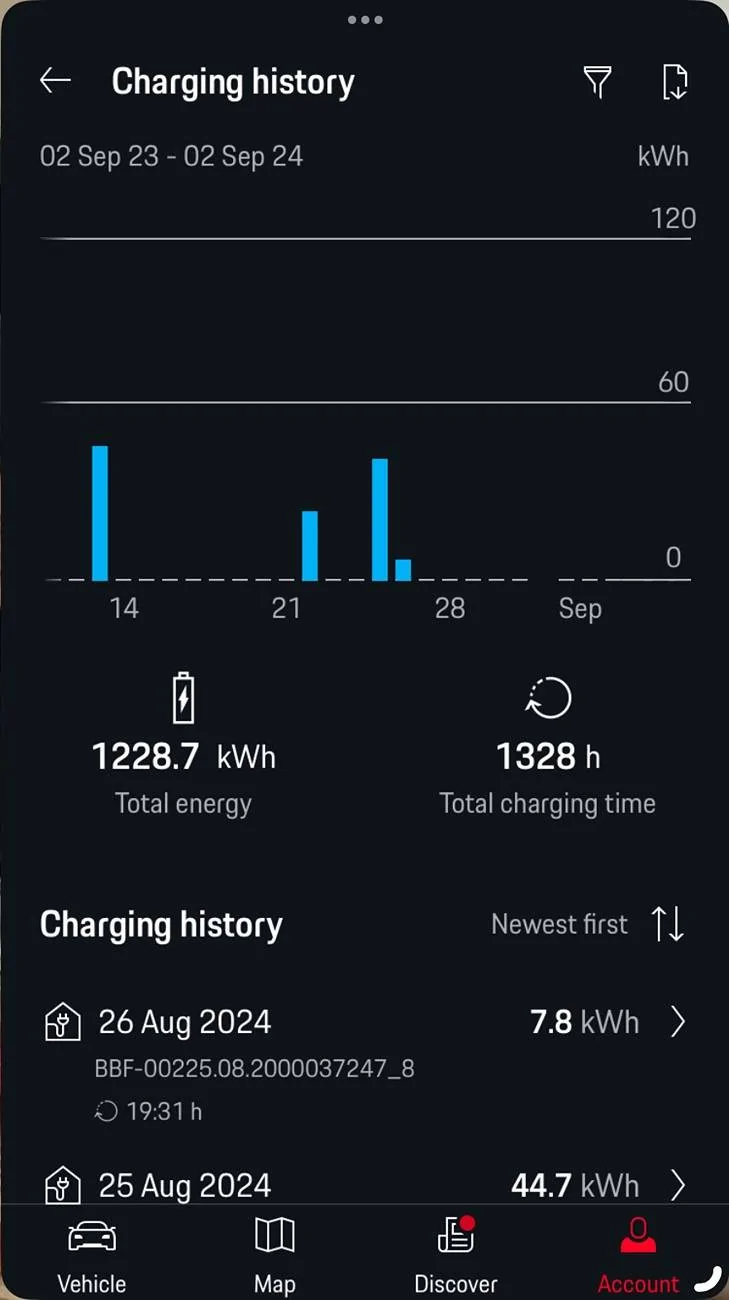
I can now see PMCC charging history in the MyPorsche\Vehicle Details.

Steps:
  1. Using the PMCC 7 digit serial number (minus a leading zero) I downloaded v2934 from https://contact.porsche.com/international/accessoriesandservice/porscheservice/software-update/
  2. I renamed the downloaded file to update.bz2
  3. I pointed a browser at the PMCC local IP address obtained from the PMCC settings network information and logged on using the Web Home User password quoted on the sheet from the envelope that came with the charger bag of bits.
  4. I used Maintenance in the browser app to do a manual software update from v2925 to v2934, quoting the location of the update.bz2 file.
  5. The v2934 installation resulted in internet access from the PMCC and completion of server authentication. Without intervention PMCC immediately downloaded and installed v3030.
  6. The PMCC settings User Profile row became enabled, presenting a QR code. I pointed my phone camera at this. The QR code URL allowed input of Porsche ID logon credentials and associated the PMCC with the MyPorsche app Vehicle Details Charging History (I had to close and reopen the app to make this visible). See pics

    Two different Porsche dealers couldn’t fix this. The first said they had. The second said that the feature had been withdrawn. Perhaps that was true at that time, or they didnt understand the function, or they didnt want to replace the device under warranty. To be fair the solution here isn’t robust enough for the real world and staff may not have the training/materials/knowledge to support it. The same is true for other design aspects such as the HV battery, the panoramic roof and battery protection. It would seem more straightforward for the vehicle to log charging history and make that available to the MyPorsche app rather than build and support a bespoke charger to do this.

    I assume v2925 must have worked for some hardware versions. Or the problem may have been fixed as a by product of a new installation rather than the new sw version.

    I wonder how/if Porsche collects feedback in order to improve/simplify all of this for future EV models/generations. Particularly if dealer staff don't have the understanding to know when something is wrong/how to fix it.

Porsche Taycan Can't update Mobile Porsche Charger Connect beyond version 2925 IMG_1052
Porsche Taycan Can't update Mobile Porsche Charger Connect beyond version 2925 IMG_3628
 
Last edited:

D00notD00d

Well-Known Member
First Name
D00notD00d
Joined
May 17, 2023
Threads
4
Messages
979
Reaction score
605
Location
Newcastle
Vehicles
L461 Range Rover Sport. Gone: Taycan 4s, Cayenne, 911 C4S.
Country flag
It would seem more straightforward for the vehicle to log charging history and make that available to the MyPorsche app rather than build and support a bespoke charger to do this.
The MyPorsche charging history doesn’t just include my Porsche. It includes the dealer loaners I’ve had. That shouldn’t be attributed to my vehicle details.

Unnecessarily complex design.
 

W1NGE

Well-Known Member
First Name
Adrian
Joined
Jan 11, 2021
Threads
53
Messages
11,015
Reaction score
6,805
Location
Aberdeen, Scotland
Vehicles
992.2, ex GTS ST owner, Macan T
Country flag
@W1NGE @AndiL @chun

I couldnt let it lie!

Upgrading from PMCC v2925 to v2934 resolved the no internet access/‘restricted operation - server authentication error ‘.

I can now see PMCC charging history in the MyPorsche\Vehicle Details.

Steps:
  1. Using the PMCC 7 digit serial number (minus a leading zero) I downloaded v2934 from https://contact.porsche.com/international/accessoriesandservice/porscheservice/software-update/
  2. I renamed the downloaded file to update.bz2
  3. I pointed a browser at the PMCC local IP address obtained from the PMCC settings network information and logged on using the Web Home User password quoted on the sheet from the envelope that came with the charger bag of bits.
  4. I used Maintenance in the browser app to do a manual software update from v2925 to v2934, quoting the location of the update.bz2 file.
  5. The v2934 installation resulted in internet access from the PMCC and completion of server authentication. Without intervention PMCC immediately downloaded and installed v3030.
  6. The PMCC settings User Profile row became enabled, presenting a QR code. I pointed my phone camera at this. The QR code URL allowed input of Porsche ID logon credentials and associated the PMCC with the MyPorsche app Vehicle Details Charging History (I had to close and reopen the app to make this visible). See pics

    Two different Porsche dealers couldn’t fix this. The first said they had. The second said that the feature had been withdrawn. Perhaps that was true at that time, or they didnt understand the function, or they didnt want to replace the device under warranty. To be fair the solution here isn’t robust enough for the real world and staff may not have the training/materials/knowledge to support it. The same is true for other design aspects such as the HV battery, the panoramic roof and battery protection. It would seem more straightforward for the vehicle to log charging history and make that available to the MyPorsche app rather than build and support a bespoke charger to do this.

    I assume v2925 must have worked for some hardware versions. Or the problem may have been fixed as a by product of a new installation rather than the new sw version.

    I wonder how/if Porsche collects feedback in order to improve/simplify all of this for future EV models/generations. Particularly if dealer staff don't have the understanding to know when something is wrong/how to fix it.

IMG_1052.jpeg
IMG_3628.jpeg
Glad we can all rest easy now!

The one remaining nag I have is why the problem existed in the first place. It could be hardware dependent - I have the 22kW version (part number determines this) - as mine has never not worked or updated requiring zero manual intervention since I commissioned it in Nov'20.

Well documented on this forum that dealers just do not invest the time nor are they good at problem solving when it comes to the Taycan in particular. As it happens the PMCC could be used for Porsche hybrid models but suspect not many do.

PMCC is no more these days and replaced with something else - the basic PMC+ is no longer provided as part of the new car package and so folk will be inclined to source alternative (cheaper) EVSEs than stump up for any Porsche branded offering.


W1NGE

Well-Known Member
First Name
Adrian
Joined
Jan 11, 2021
Threads
53
Messages
11,015
Reaction score
6,805
Location
Aberdeen, Scotland
Vehicles
992.2, ex GTS ST owner, Macan T
Country flag
The MyPorsche charging history doesn’t just include my Porsche. It includes the dealer loaners I’ve had. That shouldn’t be attributed to my vehicle details.

Unnecessarily complex design.
Did you charge these other vehicles with your Taycan RFID card or charge them at home - charging details are associated with your Porsche ID remember?
 

D00notD00d

Well-Known Member
First Name
D00notD00d
Joined
May 17, 2023
Threads
4
Messages
979
Reaction score
605
Location
Newcastle
Vehicles
L461 Range Rover Sport. Gone: Taycan 4s, Cayenne, 911 C4S.
Country flag
@W1NGE @AndiL @chun

I couldnt let it lie!

Upgrading from PMCC v2925 to v2934 resolved the no internet access/‘restricted operation - server authentication error ‘.

I can now see PMCC charging history in the MyPorsche\Vehicle Details.

Steps:
  1. Using the PMCC 7 digit serial number (minus a leading zero) I downloaded v2934 from https://contact.porsche.com/international/accessoriesandservice/porscheservice/software-update/
  2. I renamed the downloaded file to update.bz2
  3. I pointed a browser at the PMCC local IP address obtained from the PMCC settings network information and logged on using the Web Home User password quoted on the sheet from the envelope that came with the charger bag of bits.
  4. I used Maintenance in the browser app to do a manual software update from v2925 to v2934, quoting the location of the update.bz2 file.
  5. The v2934 installation resulted in internet access from the PMCC and completion of server authentication. Without intervention PMCC immediately downloaded and installed v3030.
  6. The PMCC settings User Profile row became enabled, presenting a QR code. I pointed my phone camera at this. The QR code URL allowed input of Porsche ID logon credentials and associated the PMCC with the MyPorsche app Vehicle Details Charging History (I had to close and reopen the app to make this visible). See pics

    Two different Porsche dealers couldn’t fix this. The first said they had. The second said that the feature had been withdrawn. Perhaps that was true at that time, or they didnt understand the function, or they didnt want to replace the device under warranty. To be fair the solution here isn’t robust enough for the real world and staff may not have the training/materials/knowledge to support it. The same is true for other design aspects such as the HV battery, the panoramic roof and battery protection. It would seem more straightforward for the vehicle to log charging history and make that available to the MyPorsche app rather than build and support a bespoke charger to do this.

    I assume v2925 must have worked for some hardware versions. Or the problem may have been fixed as a by product of a new installation rather than the new sw version.

    I wonder how/if Porsche collects feedback in order to improve/simplify all of this for future EV models/generations. Particularly if dealer staff don't have the understanding to know when something is wrong/how to fix it.

IMG_1052.webp
IMG_3628.webp
Did you charge these other vehicles with your Taycan RFID card or charge them at home - charging details are associated with your Porsche ID remember?
charged at home with the same PMCC device.
I have not yet plugged the car in. There may be a chance that will associate the VIN with the charger and results are then filtered. TBC.
 

W1NGE

Well-Known Member
First Name
Adrian
Joined
Jan 11, 2021
Threads
53
Messages
11,015
Reaction score
6,805
Location
Aberdeen, Scotland
Vehicles
992.2, ex GTS ST owner, Macan T
Country flag
charged at home with the same PMCC device.
I have not yet plugged the car in. There may be a chance that will associate the VIN with the charger and results are then filtered. TBC.
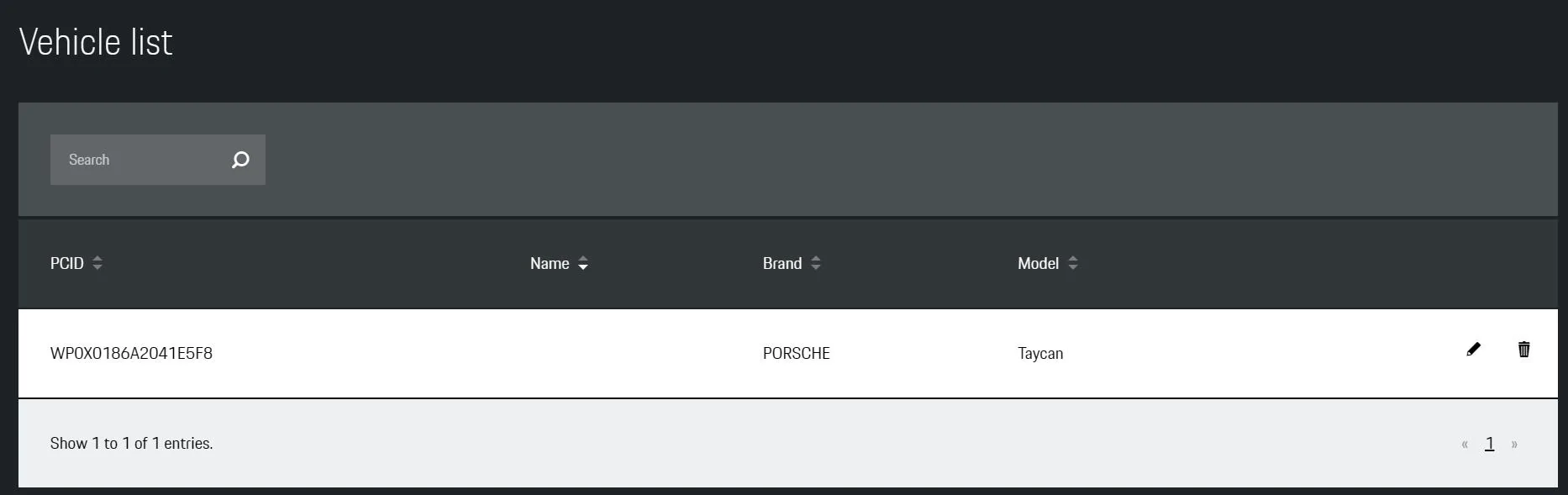
Tried that a few years back - no VIN - but a number which resembles a VIN called PCID and equates to simply 'Taycan'

Porsche Taycan Can't update Mobile Porsche Charger Connect beyond version 2925 1725362524592-nn


I've had 2 Taycans now and one PMCC. The PMCC shows the history for both cars (2 unique PCIDs) which is what I'd expect. Logically, if other authorised vehicles (loaners), different brands etc use your PMCC then their data will be stored also. Exporting to Excel then filtering of course is an option. but not sure that you can delete specific entries from the PMCC itself.


D00notD00d

Well-Known Member
First Name
D00notD00d
Joined
May 17, 2023
Threads
4
Messages
979
Reaction score
605
Location
Newcastle
Vehicles
L461 Range Rover Sport. Gone: Taycan 4s, Cayenne, 911 C4S.
Country flag
It seems illogical for My Porsche Vehicle Details charging history to show all vehicles that have ever used the Charger.
IMO, Charging history in the app should be specific to the car and a Porsche ID account start & end date.
Additionally making all charging history for the vehicle visible may be evidence of battery care.
 
Last edited:

AndiL

Well-Known Member
First Name
Andreas
Joined
Apr 14, 2021
Threads
0
Messages
262
Reaction score
217
Location
Germany
Vehicles
Taycan 4S, ID. 3
Country flag
Here are the release notes for version 3030:

Software update 3030 improves the function of your Porsche Mobile Charger Connect. The following modifications are being made:

  • Improvements to warning displays on the user interface.
  • Optimization and robustness measures for the installed software
  • Adjustments within the “Last mode on” function after restart
Software version 3030 is compatible with all previous versions and can be installed directly. The update does not affect data protection, your product’s certification or content from third-party providers.
 

Valentin

Member
First Name
Valentin
Joined
Apr 20, 2025
Threads
0
Messages
10
Reaction score
1
Location
Denmark
Vehicles
Taycan Turbo S
Country flag
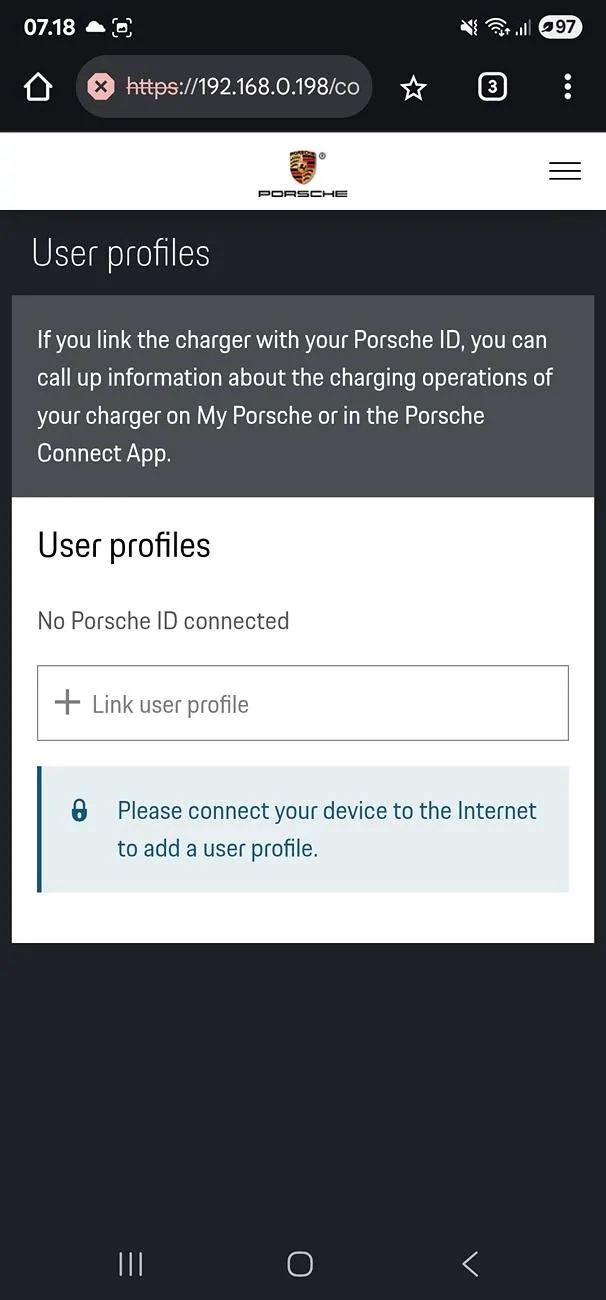
My third-hand Taycan came with the PMCC with firmware 2925, unable to connect to the internet. After I saw this thread, I thought an firmware update was the right thing to do. Through the build-in webserver I've managed to update to latest version 3031, but still no internet? Wifi connection is fine, router, gateway and firewall all set ok. What is wrong with my PMCC?? Without internet, I can't create a profile nor charge my car? Under wifi connection it clearly state: Internet access: No

Any ideas out there?

Porsche Taycan Can't update Mobile Porsche Charger Connect beyond version 2925 no_internet_why


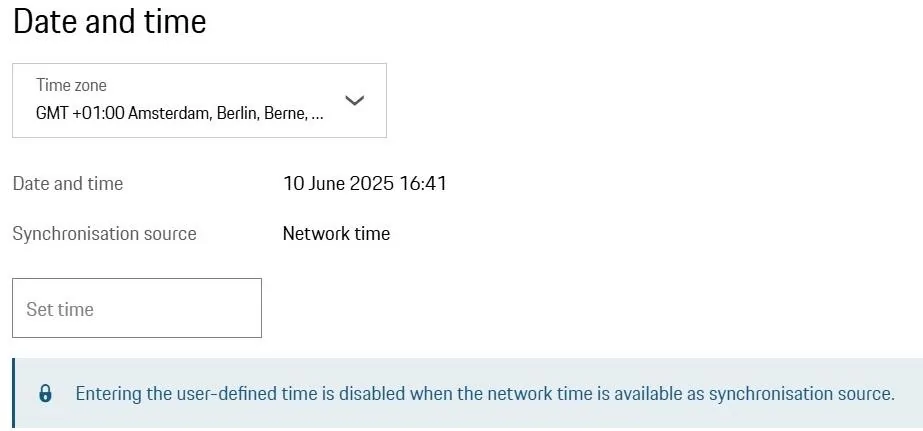
But connects fine to a 'time server' at the internet

Porsche Taycan Can't update Mobile Porsche Charger Connect beyond version 2925 1749567267394-b5
 
Last edited:

D00notD00d

Well-Known Member
First Name
D00notD00d
Joined
May 17, 2023
Threads
4
Messages
979
Reaction score
605
Location
Newcastle
Vehicles
L461 Range Rover Sport. Gone: Taycan 4s, Cayenne, 911 C4S.
Country flag
Defiantly worth a try. You think the firmware updates are cumulative. Now I need to find the 2924 firmware. Does Porsche hold the old version ..or where to find those?
You said earlier that you stated with v2925?
As step 6 in my post, is User Profile enabled on your PMCC?
 

Valentin

Member
First Name
Valentin
Joined
Apr 20, 2025
Threads
0
Messages
10
Reaction score
1
Location
Denmark
Vehicles
Taycan Turbo S
Country flag
You said earlier that you stated with v2925?
As step 6 in my post, is User Profile enabled on your PMCC?
Yes, started with v2925 and jumped directly to v3031. Do you think i need the v.2934 update before v.3031 (too late now)

No, it is not possible to create any 'profile' nor 'vehicle'. Those options are faded out. I don't have the 'cloud' icon next to wifi icon at start page either.
Sponsored


Top