Sponsored

Anyone with PIWIS?

mystermykee

Well-Known Member
Joined
Mar 30, 2022
Threads
6
Messages
641
Reaction score
442
Location
Bay Area
Vehicles
9j1, 9y0 hybrid, 992.1
Country flag
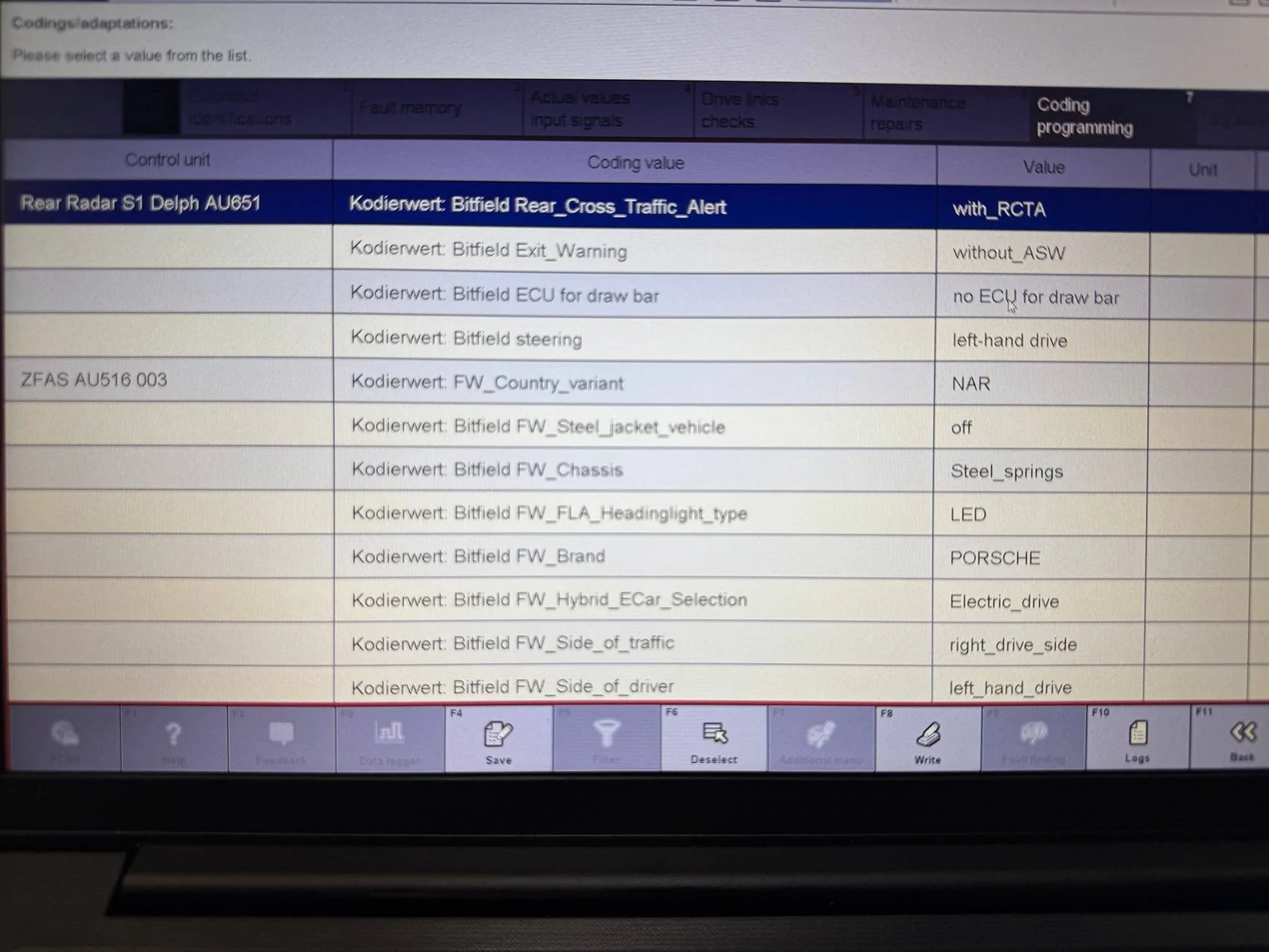
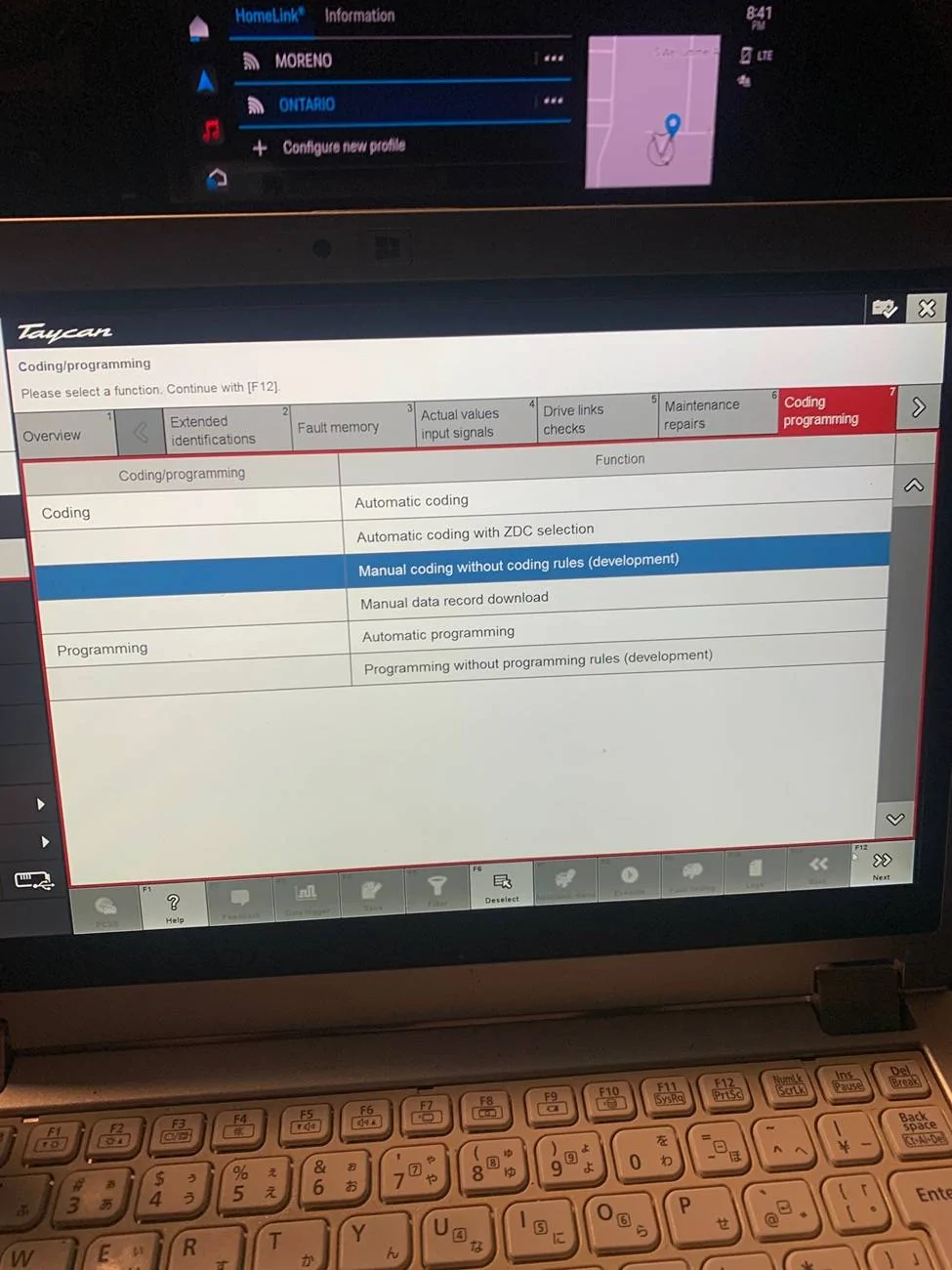
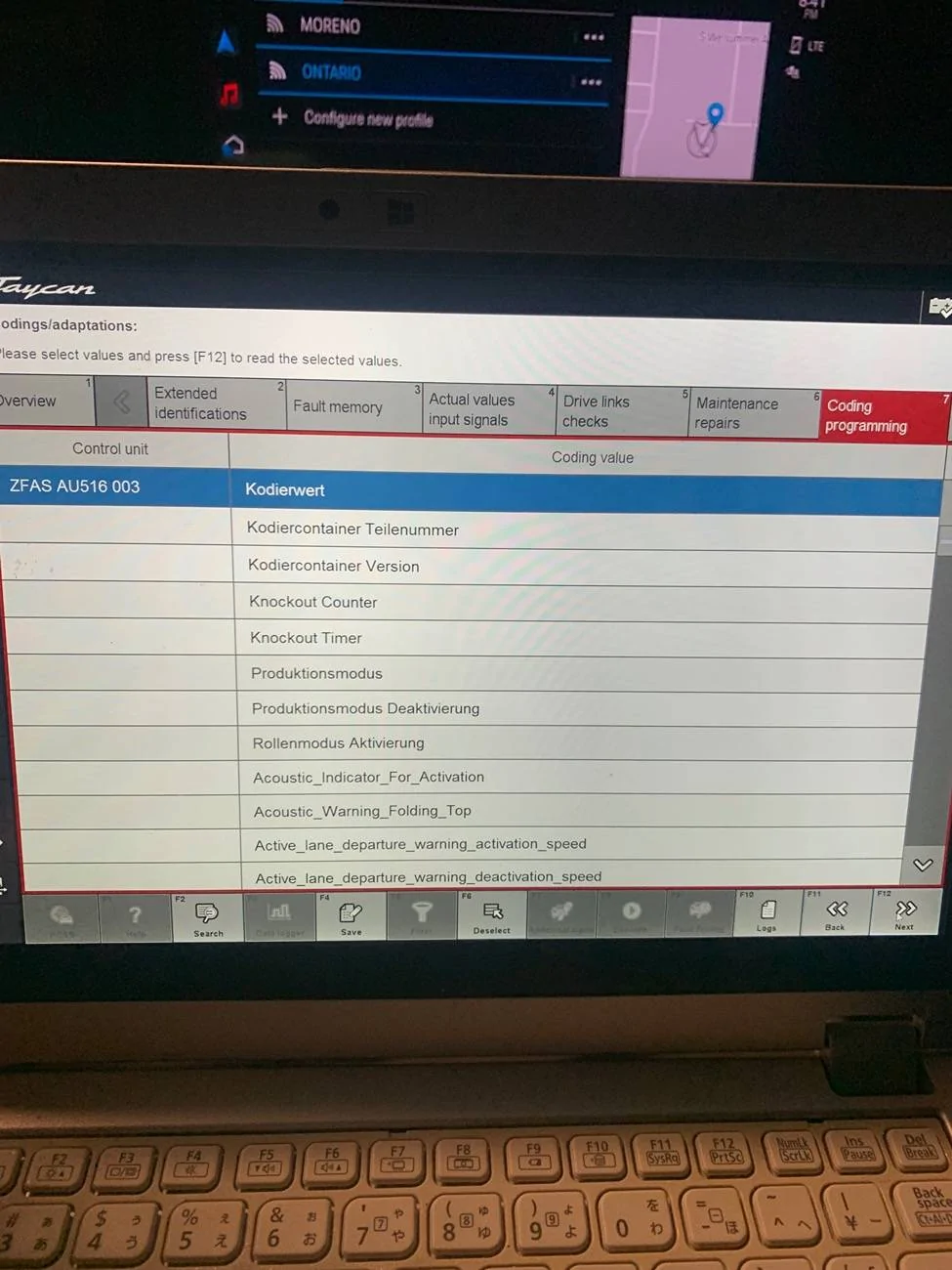
MRR_HR (Radar HR) -> Rear Radar S1 (Lane Assist Right) Kodierwert: Bitfield Rear_Cross_Traffic_Alert : with_RCTA

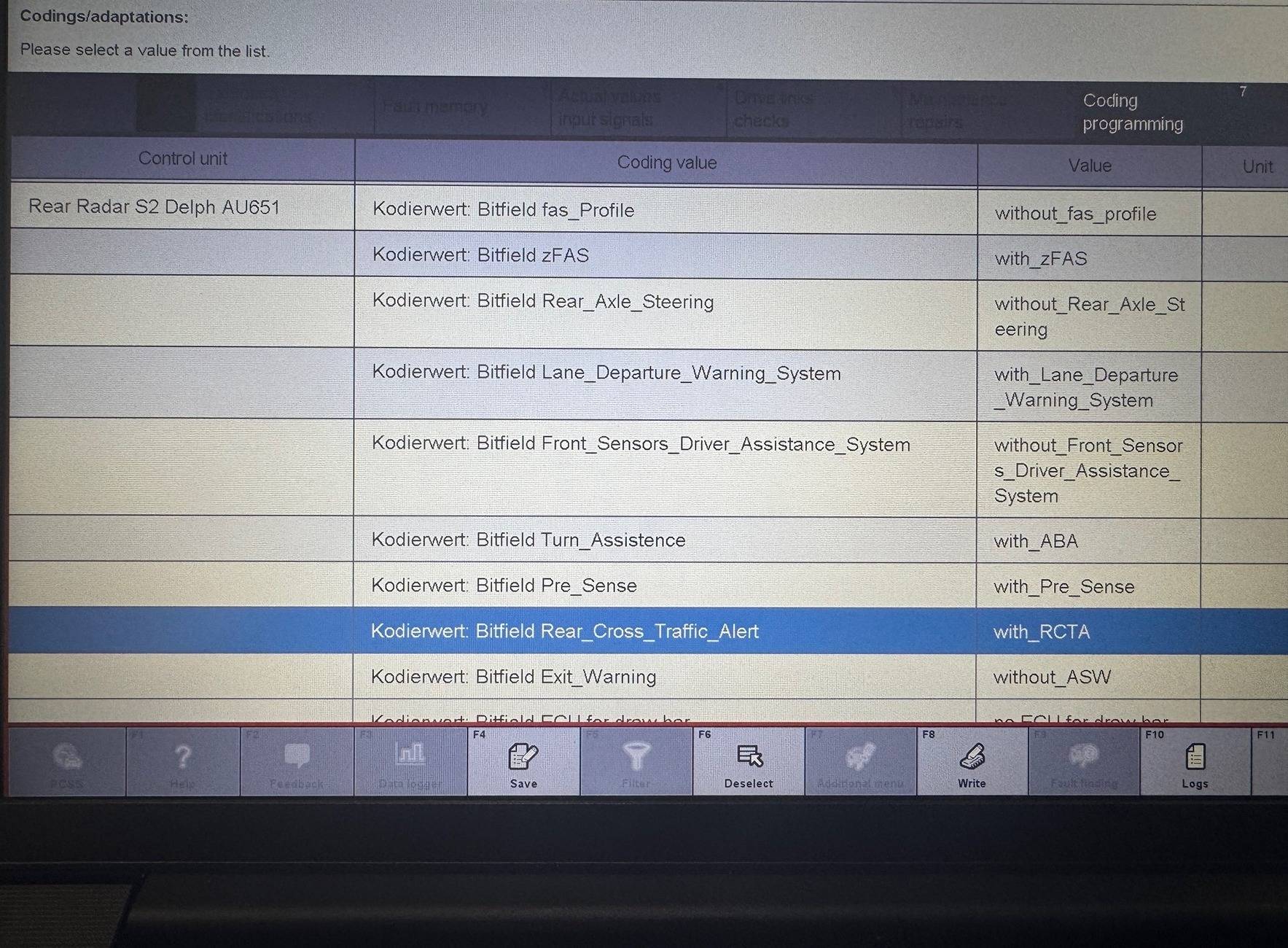
MRR_HL (Radar HL) -> Rear Radar S2 (Lane Assist Left) Kodierwert: Bitfield Rear_Cross_Traffic_Alert : with_RCTA

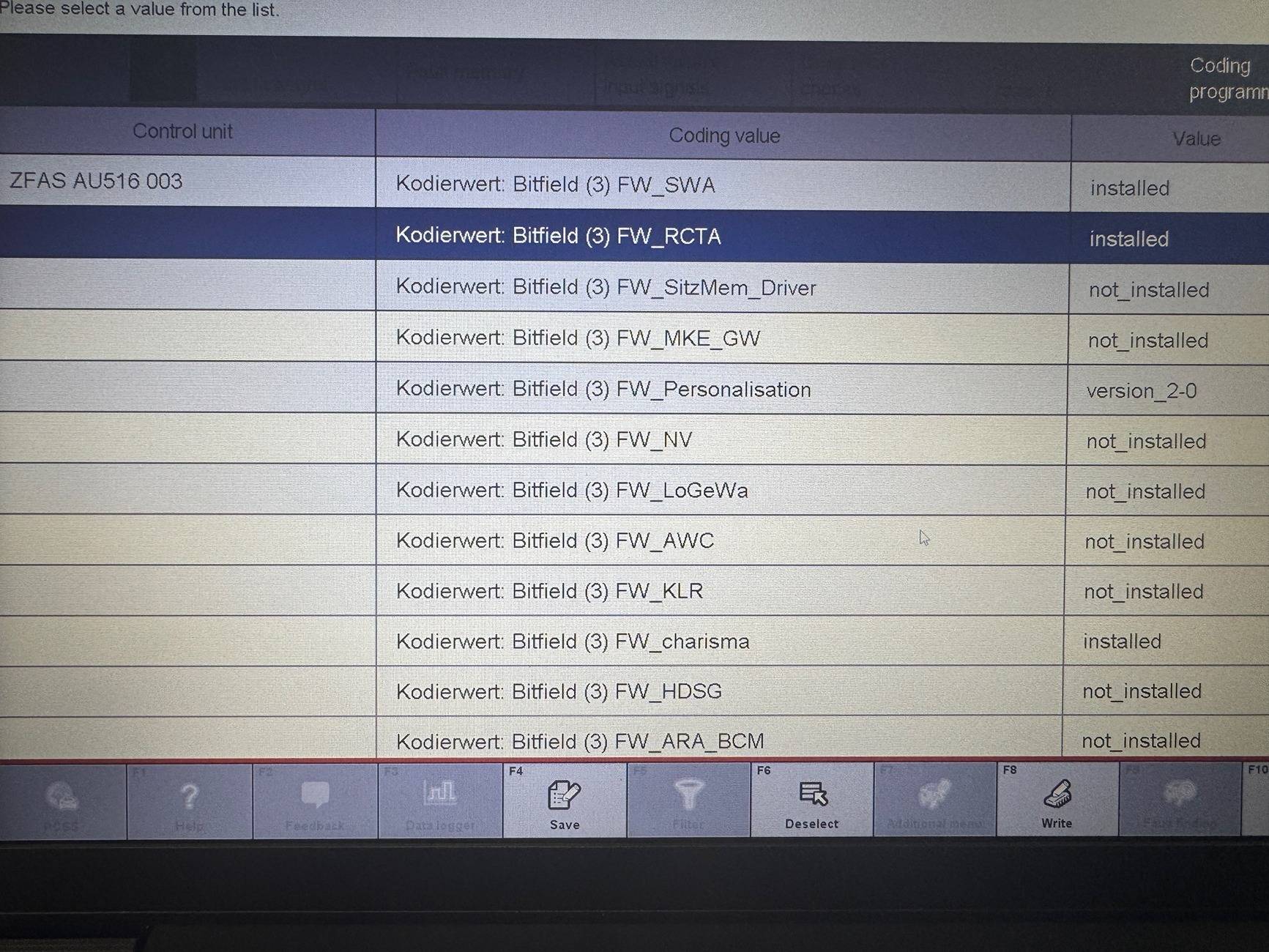
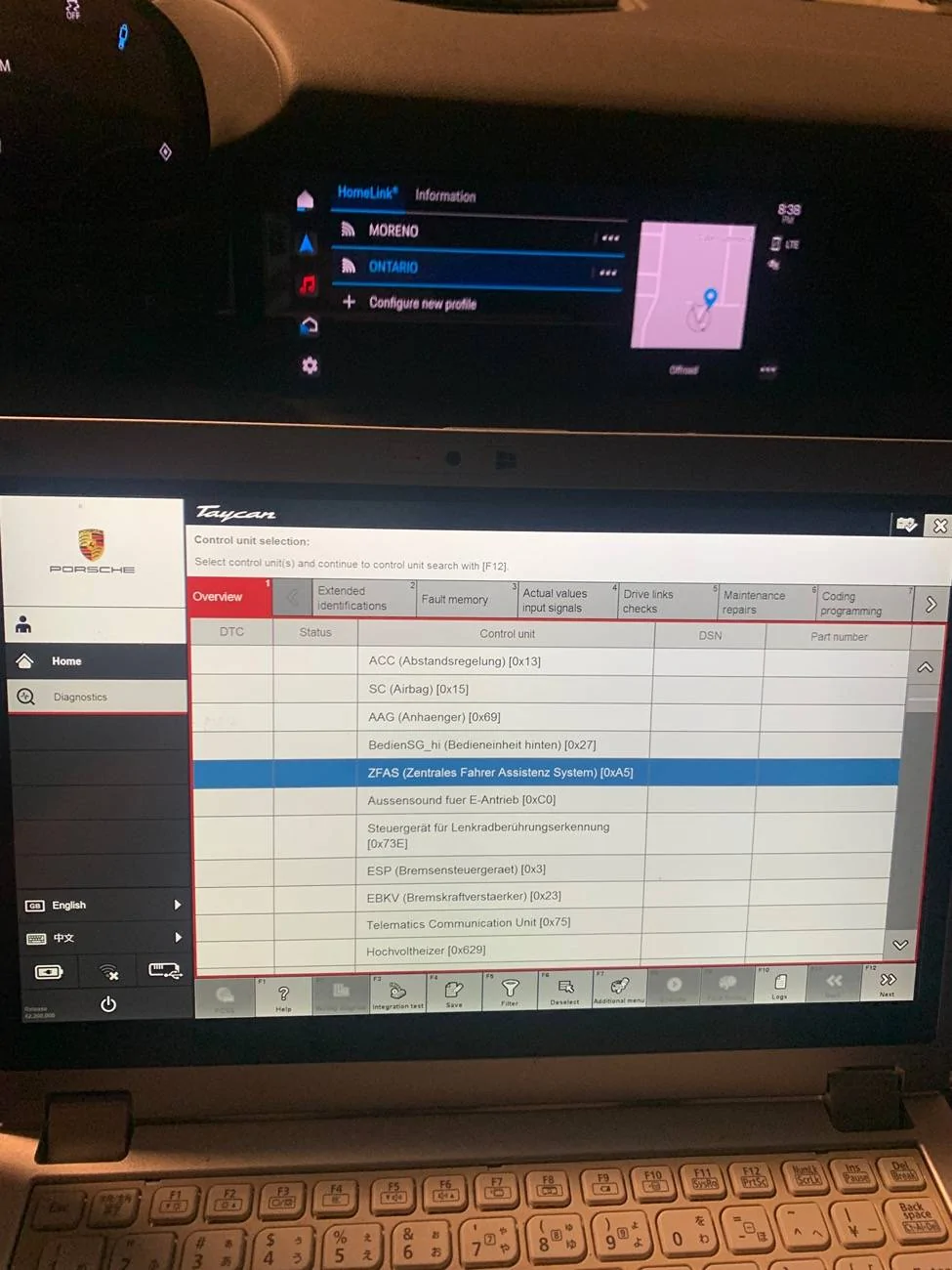
ZFAS (Zentrales Fahrer Assistenz System) -> ZFAS (Assist) Kodierwert: Bitfield (3) FW_RCTA : installed

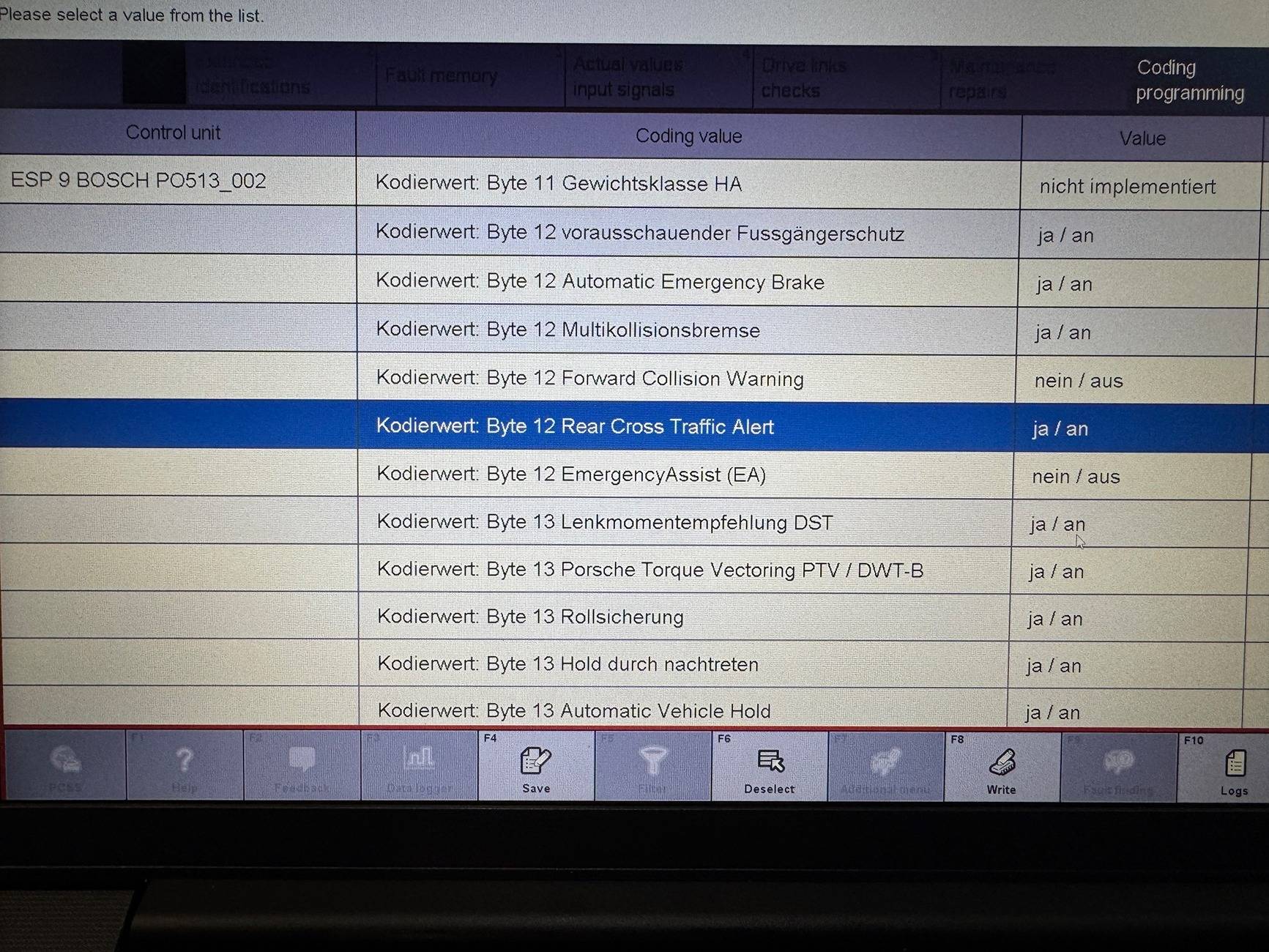
ESP (Bremsensteuergeraet)-> PSM (ESP) Kodierwert: Byte 12 Rear Cross Traffic Alert : ja / an

IMG_7477.JPG
IMG_7479.JPG
IMG_7476.JPG
IMG_7478.webp
Thank you! Wow, I was way off "VR...." LOL

Any idea what is hardware is required for Front cross traffic alerting? ACC module?
Sponsored

 

Elysium

Member
Joined
Mar 17, 2025
Threads
0
Messages
10
Reaction score
18
Location
USA
Vehicles
2021 Taycan
Country flag
Thank you! Wow, I was way off "VR...." LOL

Any idea what is hardware is required for Front cross traffic alerting? ACC module?
This post indicates the sensor layout a little better.

The hardware chart from this post also seems to indicate that exit warning is possible in any vehicle with LCA and doesn't require the ultrasonic sensors as described in the aforementioned post?

I have option code 7X2 for Front/Rear ultrasonic sensors and LCA so I have given it a shot. Proceed at your own risk.

Values to modify:
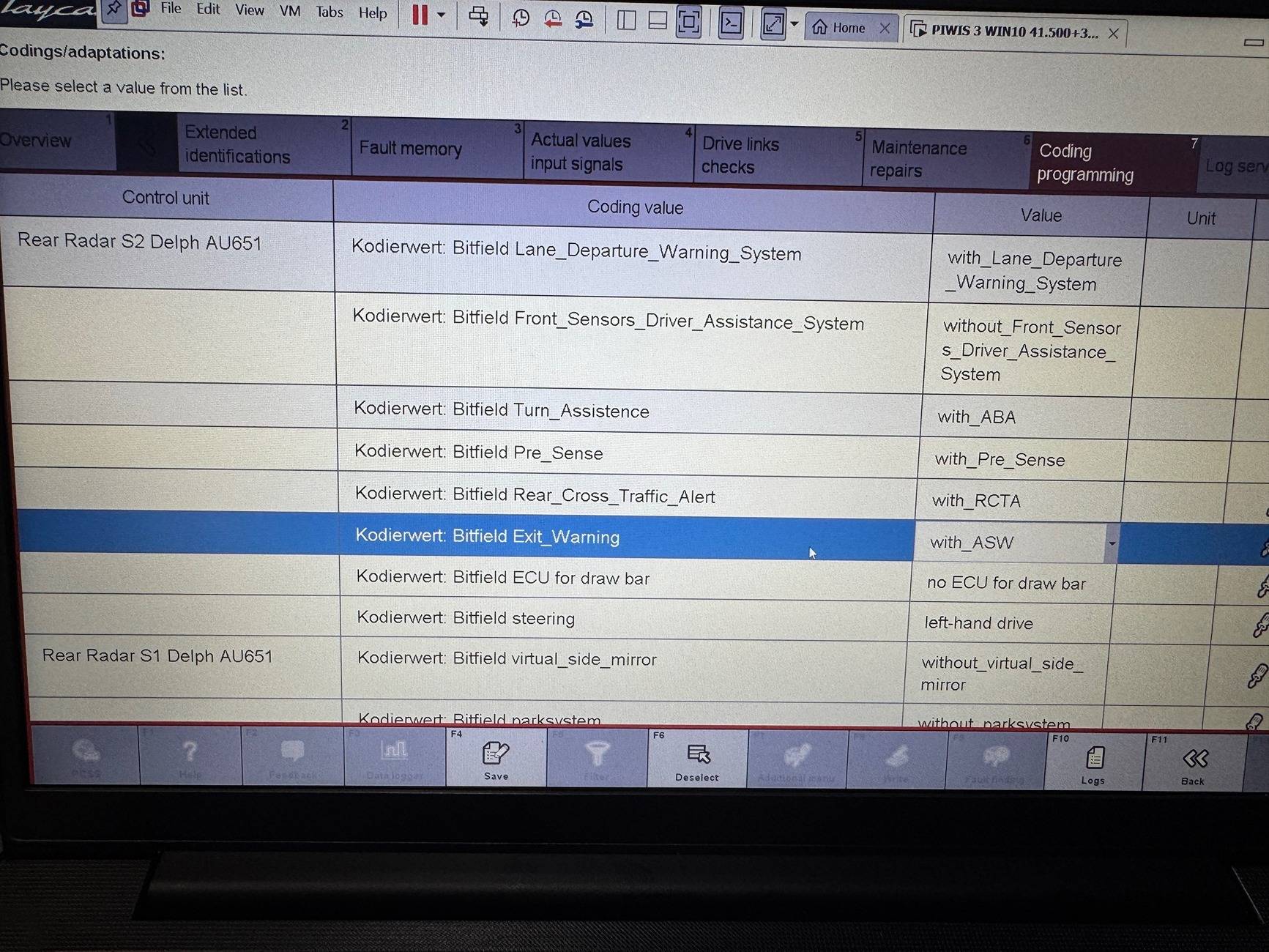
MRR_HR (Radar HR) -> Rear Radar S1 -> Kodierwert - Bitfield Exit_Warning : with_ASW

MRR_HL (Radar HL) -> Rear Radar S2 -> Kodierwert - Bitfield Exit_Warning : with_ASW

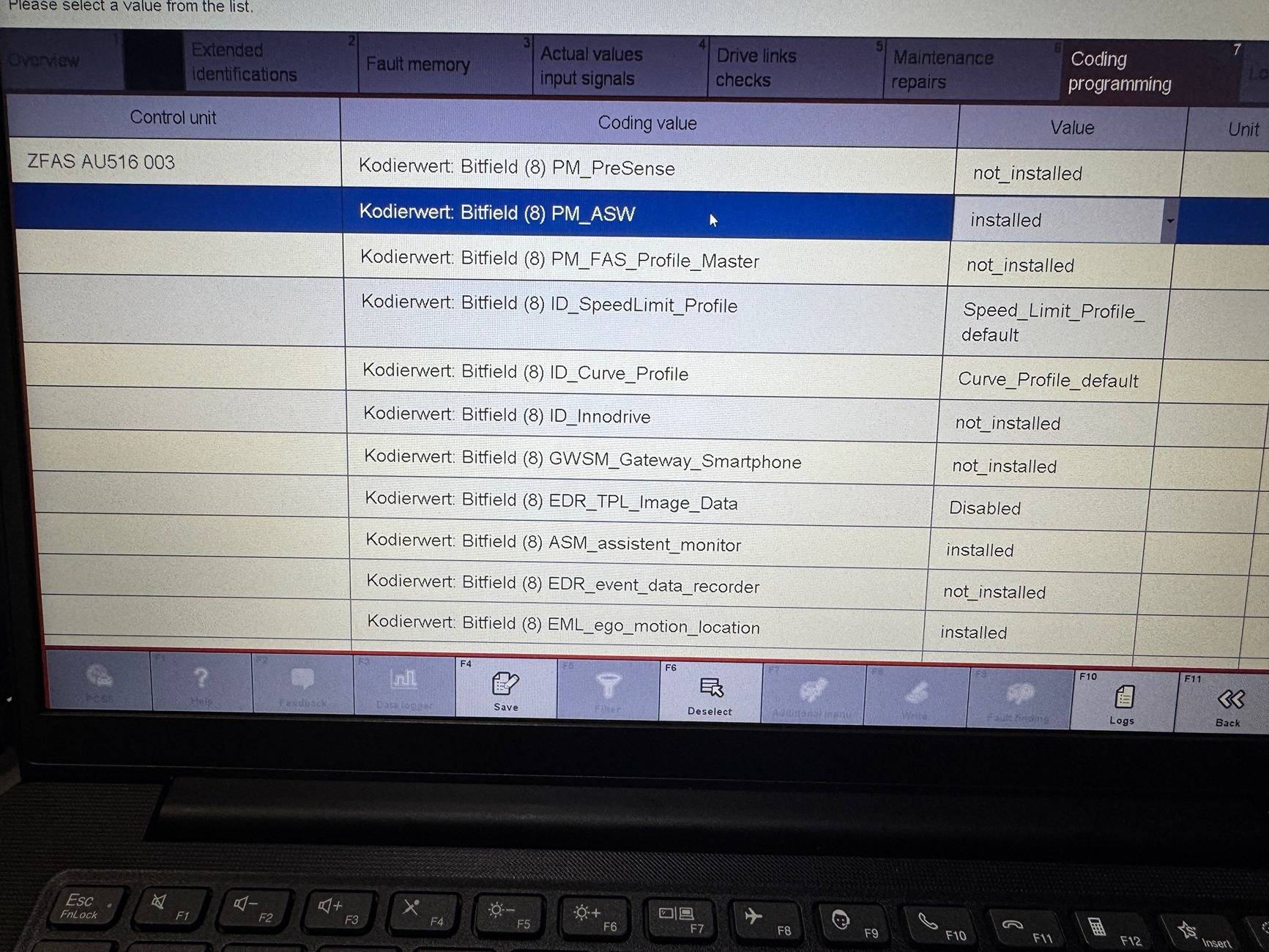
ZFAS (Zentrales Fahrer Assistenz System) -> ZFAS Kodierwert - Bitfield (8) PM_ASW : installed

Pictures:
Porsche Taycan Anyone with PIWIS? IMG_7482.JPG
Porsche Taycan Anyone with PIWIS? IMG_7483.JPG


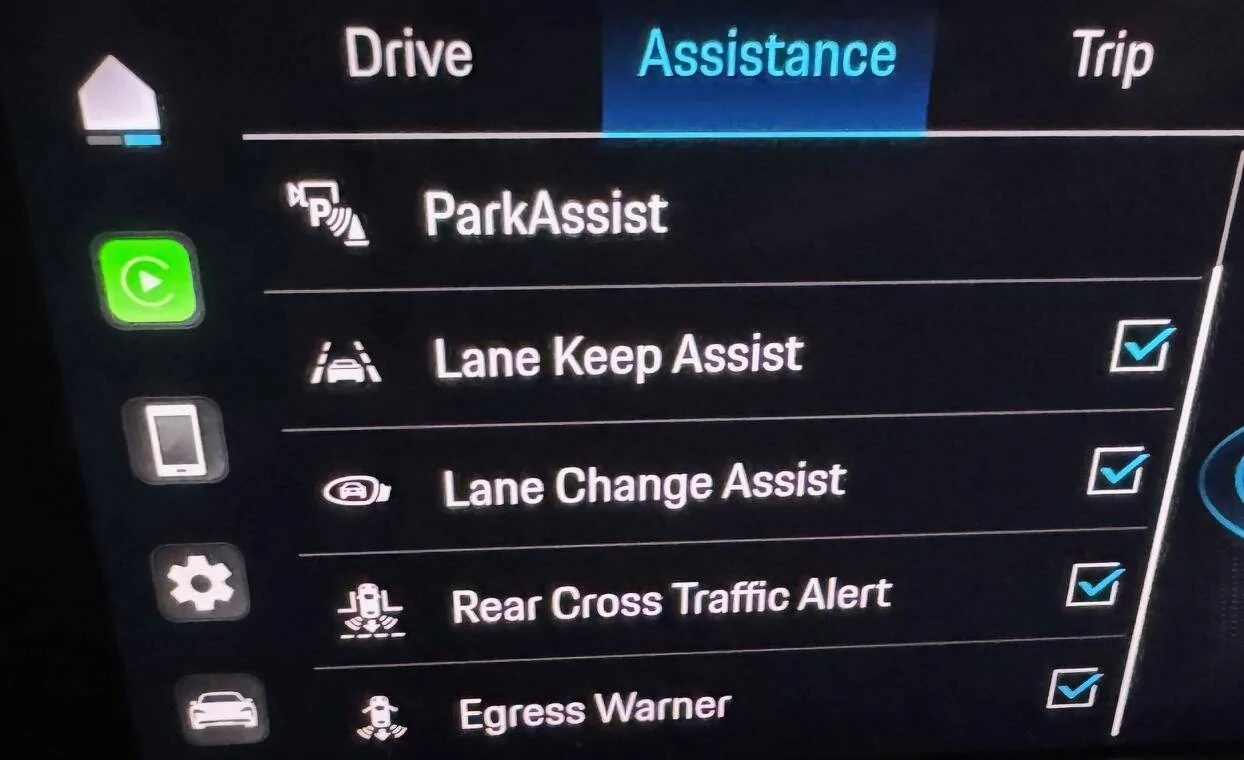
Porsche Taycan Anyone with PIWIS? assist


The only one I am confused on currently is this value:
ZFAS -> Kodierwert - Bitfield (5) TV_Crossing_Traffic_Recognition: off

Any ideas?
 
Last edited:

mystermykee

Well-Known Member
Joined
Mar 30, 2022
Threads
6
Messages
641
Reaction score
442
Location
Bay Area
Vehicles
9j1, 9y0 hybrid, 992.1
Country flag
This post indicates the sensor layout a little better.

The hardware chart from this post also seems to indicate that exit warning is possible in any vehicle with LCA and doesn't require the ultrasonic sensors as described in the aforementioned post?

I have option code 7X2 for Front/Rear ultrasonic sensors and LCA so I have given it a shot. Proceed at your own risk.

Values to modify:
MRR_HR (Radar HR) -> Rear Radar S1 -> Kodierwert - Bitfield Exit_Warning : with_ASW

MRR_HL (Radar HL) -> Rear Radar S2 -> Kodierwert - Bitfield Exit_Warning : with_ASW

ZFAS (Zentrales Fahrer Assistenz System) -> ZFAS Kodierwert - Bitfield (8) PM_ASW : installed

Pictures:
IMG_7482.JPG
IMG_7483.JPG


assist.webp


The only one I am confused on currently is this value:
ZFAS -> Kodierwert - Bitfield (5) TV_Crossing_Traffic_Recognition: off

Any ideas?
I believe TV_Crossing_Traffic_Recognition is supposed to activate traffic recognition.

So from the post you shared with the sensor locations and functions, if you have the front camera, have LCA/LKA/warn brake assist, you have the sensors needed for intersection assist.

Is ALK possible? LCA/LKA uses all the same sensors, but missing ACC radar. Or for ALK you'd need all sensors including the ACC radar?

Egress warner is different from front intersection assist. You should still be able to code intersection assist with the sensors you have.

Either way, great find and thank you for sharing.
 
Last edited:

Porsche-Guru

Well-Known Member
Joined
May 8, 2022
Threads
10
Messages
502
Reaction score
468
Location
United Kingdom
Vehicles
BMW M4, BMW 535, Taycan 4S, 911 (on order)
Country flag
@Elysium :

Thank you for your detailed posts above.

Q: Do you know how to decrease the delay for mirrors/ windows closing on remote lock?
If one continues to hold the remote lock key, eventually the mirrors close (and windows go up, if open).
- Does anyone know where this delay value is stored? I would like to shorten this delay to maybe 100ms.

I am aware that I can configure (in the PCM) the mirrors to auto close along with remote-lock , but that is not what I am looking for.
I want to code that the mirrors close on a shorter-hold of the remote lock button compared to the current long-hold.
 

Elysium

Member
Joined
Mar 17, 2025
Threads
0
Messages
10
Reaction score
18
Location
USA
Vehicles
2021 Taycan
Country flag
maybe one of these?

Code:
MU_TI_001010 >> Control unit, coding >> powermanagement_timer: t_mmi_off_1: 30
MU_TI_001010 >> Control unit, coding >> powermanagement_timer: t_mmi_off_2: 60
MU_TI_001010 >> Control unit, coding >> powermanagement_timer: t_mmi_standby: 31
MU_TI_001010 >> Control unit, coding >> powermanagement_timer: t_pdd: 10
MU_TI_001010 >> Control unit, coding >> powermanagement_timer: t_pdd_online_update: 20
MU_TI_001010 >> Control unit, coding >> powermanagement_timer: t_mmi_standby_pwr_save: 60
MU_TI_001010 >> Control unit, coding >> powermanagement_timer: t_shutdown_suspend: 120
MU_TI_001010 >> Control unit, coding >> powermanagement_timer: t_sleep: 10080
MU_TI_001010 >> Control unit, coding >> powermanagement_timer: t_mmi_on_tel: 60
MU_TI_001010 >> Control unit, coding >> powermanagement_timer: t_mmi_on_online_swdl: 600
MU_TI_001010 >> Control unit, coding >> powermanagement_timer: t_mmi_online_uota: 60
MU_TI_001010 >> Control unit, coding >> powermanagement_timer: t_mmi_online_delay: 4320
MU_TI_001010 >> Control unit, coding >> powermanagement_timer: t_bem_shutdown: 10
MU_TI_001010 >> Control unit, coding >> powermanagement_timer: t_max_cluster_wakeup: 240
MU_TI_001010 >> Control unit, coding >> powermanagement_timer: t_mmi_rtc: 60
MU_TI_001010 >> Control unit, coding >> powermanagement_timer: maxCarWakeup: 100
MU_TI_001010 >> Control unit, coding >> powermanagement_timer: maxUnitWakeup: 10
MU_TI_001010 >> Control unit, coding >> powermanagement_timer: maxRTCWakeup: 100
MU_TI_001010 >> Control unit, coding >> powermanagement_timer: t_mmi_dci: 120
MU_TI_001010 >> Control unit, coding >> powermanagement_timer: t_mmi_online_min: 120
Just wanted to add some more context to this since I was recently looking through this section.

MU_TI_001010 >> Control unit, coding >> powermanagement_timer: t_mmi_off_1: 30 seconds
MU_TI_001010 >> Control unit, coding >> powermanagement_timer: t_mmi_off_2: 60 seconds
MU_TI_001010 >> Control unit, coding >> powermanagement_timer: t_mmi_standby: 31 minutes
MU_TI_001010 >> Control unit, coding >> powermanagement_timer: t_pdd: 10 minutes
MU_TI_001010 >> Control unit, coding >> powermanagement_timer: t_pdd_online_update: 20 minutes
MU_TI_001010 >> Control unit, coding >> powermanagement_timer: t_mmi_standby_pwr_save: 60 seconds
MU_TI_001010 >> Control unit, coding >> powermanagement_timer: t_shutdown_suspend: 120 seconds
MU_TI_001010 >> Control unit, coding >> powermanagement_timer: t_sleep: 10080 minutes
MU_TI_001010 >> Control unit, coding >> powermanagement_timer: t_mmi_on_tel: 60 minutes
MU_TI_001010 >> Control unit, coding >> powermanagement_timer: t_mmi_on_online_swdl: 600 seconds
MU_TI_001010 >> Control unit, coding >> powermanagement_timer: t_mmi_online_uota: 60 minutes
MU_TI_001010 >> Control unit, coding >> powermanagement_timer: t_mmi_online_delay: 4320 minutes
MU_TI_001010 >> Control unit, coding >> powermanagement_timer: t_bem_shutdown: 10 seconds
MU_TI_001010 >> Control unit, coding >> powermanagement_timer: t_max_cluster_wakeup: 240 seconds
MU_TI_001010 >> Control unit, coding >> powermanagement_timer: t_mmi_rtc: 60 minutes
MU_TI_001010 >> Control unit, coding >> powermanagement_timer: maxCarWakeup: 100
MU_TI_001010 >> Control unit, coding >> powermanagement_timer: maxUnitWakeup: 10
MU_TI_001010 >> Control unit, coding >> powermanagement_timer: maxRTCWakeup: 100
MU_TI_001010 >> Control unit, coding >> powermanagement_timer: t_mmi_dci: 120 seconds
MU_TI_001010 >> Control unit, coding >> powermanagement_timer: t_mmi_online_min: 120 seconds


@Elysium :

Thank you for your detailed posts above.

Q: Do you know how to decrease the delay for mirrors/ windows closing on remote lock?
If one continues to hold the remote lock key, eventually the mirrors close (and windows go up, if open).
- Does anyone know where this delay value is stored? I would like to shorten this delay to maybe 100ms.

I am aware that I can configure (in the PCM) the mirrors to auto close along with remote-lock , but that is not what I am looking for.
I want to code that the mirrors close on a shorter-hold of the remote lock button compared to the current long-hold.
I just spent some time looking and I can't seem to find any variable that would control the button press time.

This is the closest I was able to find but I think the long-press is more than 900[ms] so that seems to rule this out.

Code:
            <VALUE FORMAT="NUM" LABEL="TABROW_RemotFunct.Param_RemotBeepActivTimeHigh"
                   TEXT="remote_functions - remote_beep_activation_time_high">100</VALUE>
            <VALUE FORMAT="NUM" LABEL="TABROW_RemotFunct.Param_RemotBeepActivTimeLow"
                   TEXT="remote_functions - remote_beep_activation_time_low">900</VALUE>
            <VALUE FORMAT="NUM" LABEL="TABROW_RemotFunct.Param_IdleTimeBapRemotBeep"
                   TEXT="remote_functions - idle_time_bap_remote_beep">500</VALUE>


ikrcolt

Member
Joined
Mar 30, 2025
Threads
1
Messages
14
Reaction score
6
Location
San Mateo
Vehicles
Taycan 2025 RWD
Country flag
Great thread, glad I stumbled upon it :)

Wondering if anyone has been able/ knows how to activate innodrive/ active lane keep? Bought on lot and that’s the one feature my 2025 is missing and Porsche hasn’t enabled downloading/ subscribing to any add’l functionalities for 2025 unfortunately…

I have the ACC/ park assist which I believe (but could be completely mistaken) includes all the sensors/ motors to enable it?

thanks for your help!
 

Porsche-Guru

Well-Known Member
Joined
May 8, 2022
Threads
10
Messages
502
Reaction score
468
Location
United Kingdom
Vehicles
BMW M4, BMW 535, Taycan 4S, 911 (on order)
Country flag
Just wanted to add some more context to this since I was recently looking through this section.

MU_TI_001010 >> Control unit, coding >> powermanagement_timer: t_mmi_off_1: 30 seconds
MU_TI_001010 >> Control unit, coding >> powermanagement_timer: t_mmi_off_2: 60 seconds
MU_TI_001010 >> Control unit, coding >> powermanagement_timer: t_mmi_standby: 31 minutes
MU_TI_001010 >> Control unit, coding >> powermanagement_timer: t_pdd: 10 minutes
MU_TI_001010 >> Control unit, coding >> powermanagement_timer: t_pdd_online_update: 20 minutes
MU_TI_001010 >> Control unit, coding >> powermanagement_timer: t_mmi_standby_pwr_save: 60 seconds
MU_TI_001010 >> Control unit, coding >> powermanagement_timer: t_shutdown_suspend: 120 seconds
MU_TI_001010 >> Control unit, coding >> powermanagement_timer: t_sleep: 10080 minutes
MU_TI_001010 >> Control unit, coding >> powermanagement_timer: t_mmi_on_tel: 60 minutes
MU_TI_001010 >> Control unit, coding >> powermanagement_timer: t_mmi_on_online_swdl: 600 seconds
MU_TI_001010 >> Control unit, coding >> powermanagement_timer: t_mmi_online_uota: 60 minutes
MU_TI_001010 >> Control unit, coding >> powermanagement_timer: t_mmi_online_delay: 4320 minutes
MU_TI_001010 >> Control unit, coding >> powermanagement_timer: t_bem_shutdown: 10 seconds
MU_TI_001010 >> Control unit, coding >> powermanagement_timer: t_max_cluster_wakeup: 240 seconds
MU_TI_001010 >> Control unit, coding >> powermanagement_timer: t_mmi_rtc: 60 minutes
MU_TI_001010 >> Control unit, coding >> powermanagement_timer: maxCarWakeup: 100
MU_TI_001010 >> Control unit, coding >> powermanagement_timer: maxUnitWakeup: 10
MU_TI_001010 >> Control unit, coding >> powermanagement_timer: maxRTCWakeup: 100
MU_TI_001010 >> Control unit, coding >> powermanagement_timer: t_mmi_dci: 120 seconds
MU_TI_001010 >> Control unit, coding >> powermanagement_timer: t_mmi_online_min: 120 seconds


I just spent some time looking and I can't seem to find any variable that would control the button press time.

This is the closest I was able to find but I think the long-press is more than 900[ms] so that seems to rule this out.

Code:
            <VALUE FORMAT="NUM" LABEL="TABROW_RemotFunct.Param_RemotBeepActivTimeHigh"
                   TEXT="remote_functions - remote_beep_activation_time_high">100</VALUE>
            <VALUE FORMAT="NUM" LABEL="TABROW_RemotFunct.Param_RemotBeepActivTimeLow"
                   TEXT="remote_functions - remote_beep_activation_time_low">900</VALUE>
            <VALUE FORMAT="NUM" LABEL="TABROW_RemotFunct.Param_IdleTimeBapRemotBeep"
                   TEXT="remote_functions - idle_time_bap_remote_beep">500</VALUE>
Thank you for your inputs... Will play around next weekend !
 

mystermykee

Well-Known Member
Joined
Mar 30, 2022
Threads
6
Messages
641
Reaction score
442
Location
Bay Area
Vehicles
9j1, 9y0 hybrid, 992.1
Country flag
Great thread, glad I stumbled upon it :)

Wondering if anyone has been able/ knows how to activate innodrive/ active lane keep? Bought on lot and that’s the one feature my 2025 is missing and Porsche hasn’t enabled downloading/ subscribing to any add’l functionalities for 2025 unfortunately…

I have the ACC/ park assist which I believe (but could be completely mistaken) includes all the sensors/ motors to enable it?

thanks for your help!
My wife's 9YA Cayenne has ACC and LCA, no innodrive. I was able to activate ALK the long way by coding all modules. Not saying you should do the same for the Taycan, but should at least point you in the right direction.

SPURHALTEASSISTENT - option 6I6


Porsche-Guru

Well-Known Member
Joined
May 8, 2022
Threads
10
Messages
502
Reaction score
468
Location
United Kingdom
Vehicles
BMW M4, BMW 535, Taycan 4S, 911 (on order)
Country flag
@Elysium @mystermykee

Finally got around to coding today morning…

Updates:
- Rear Cross Traffic Alert : Coded successfully
- Exit Alert : Coded successfully
- 3D parking view: Coded successfully

Many thanks to you & others for inputs.
—-


More questions and help needed:

1)!What are the coding parameters for Intersection Assist? I believe I have all the sensors.

2) How to change speed at which High Beam Assist is activated? I would like to lower the speed value.

3) How to change High Beam Assist to activate on ‘All Road Types’.
I maybe mistaken but currently it seems HBA only activates above a certain speed and only on certain road types.

4) Any means to activate ALK (Active Lane Keep)- that is the one feature that I miss.
I do have LCA (lane change assist), LKA (lane keep assist) and ACC - so I’m guessing I have the sensors.

Many thanks for your support…
 
Last edited:

Kimiko1136

Member
Joined
Nov 10, 2023
Threads
1
Messages
24
Reaction score
13
Location
California
Vehicles
Taycan
Country flag
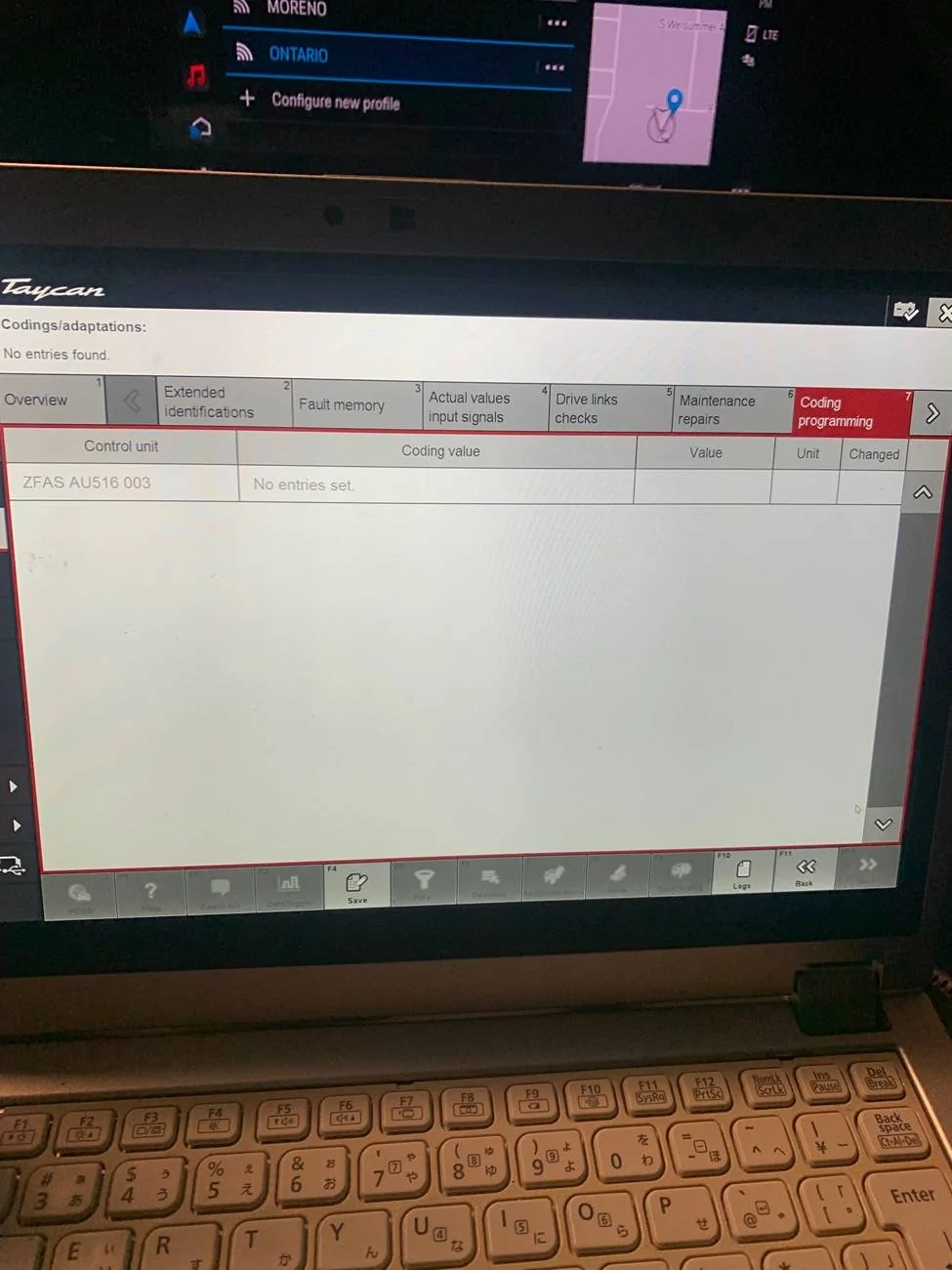
Anyone knows how to get to the page for changing coding value? I pick the control module-> coding programming. I can’t get to the page to change value or the value doesn’t display correctly? PIWIS 3 42.200

Porsche Taycan Anyone with PIWIS? IMG_8213


Porsche Taycan Anyone with PIWIS? IMG_8215


Porsche Taycan Anyone with PIWIS? IMG_8217


Porsche Taycan Anyone with PIWIS? IMG_8218
 
Last edited:

mystermykee

Well-Known Member
Joined
Mar 30, 2022
Threads
6
Messages
641
Reaction score
442
Location
Bay Area
Vehicles
9j1, 9y0 hybrid, 992.1
Country flag
@Elysium @mystermykee

Finally got around to coding today morning…

Updates:
- Rear Cross Traffic Alert : Coded successfully
- Exit Alert : Coded successfully
- 3D parking view: Coded successfully

Many thanks to you & others for inputs.
—-


More questions and help needed:

1)!What are the coding parameters for Intersection Assist? I believe I have all the sensors.
Same. I have been inquiring about the same thing.

2) How to change speed at which High Beam Assist is activated? I would like to lower the speed value.
No clue. I would start digging through ZFAS and/or BCM1

3) How to change High Beam Assist to activate on ‘All Road Types’.
I maybe mistaken but currently it seems HBA only activates above a certain speed and only on certain road types.
Only on certain road types? This is new to me. Can you clarify about which road types?
 

Porsche-Guru

Well-Known Member
Joined
May 8, 2022
Threads
10
Messages
502
Reaction score
468
Location
United Kingdom
Vehicles
BMW M4, BMW 535, Taycan 4S, 911 (on order)
Country flag
By road types, I mean road classification. e.g. like Highways, Motorways, A roads, B roads (as in the UK).

I may be wrong but it appears that HBA only activates on certain road types (e.g. highways, motorways and medium/high speed roads).

I have noticed that It never seems to activate on some B-roads (village roads) close to where i am, or within private estate roads; even when the speed is high.

I recall, this was a setting in BMWs about where HBA would activate and I had always coded that to all types; hence my corelation…
 

mystermykee

Well-Known Member
Joined
Mar 30, 2022
Threads
6
Messages
641
Reaction score
442
Location
Bay Area
Vehicles
9j1, 9y0 hybrid, 992.1
Country flag
By road types, I mean road classification. e.g. like Highways, Motorways, A roads, B roads (as in the UK).

I may be wrong but it appears that HBA only activates on certain road types (e.g. highways, motorways and medium/high speed roads).

I have noticed that It never seems to activate on some B-roads (village roads) close to where i am, or within private estate roads; even when the speed is high.

I recall, this was a setting in BMWs about where HBA would activate and I had always coded that to all types; hence my corelation…
As far as I know, matrix beam isn't dependent on road type--only speed and whether there is enough ambient light i.e other cars' headlights/taillights, street lights. .
Sponsored


Top