Sponsored

charging questions - new owner

IrwinJ

Well-Known Member
First Name
Irwin
Joined
Apr 17, 2022
Threads
43
Messages
197
Reaction score
71
Location
Asheville NC
Vehicles
Mercedes SL550
Country flag
I think I correctly set up a charging schedule - charge to 85% between hours of 10 pm and 6 am. Questions:

1. My dealer had already preset the "minimum charge" to 85% but I think "minimum" in this context really means not to continue charging when it hits 85% which is what I want. Is that correct?

2. Since I don't see the need to set up separate profiles, I did all that under the general profile. Is that okay? I think I saw a video that said put the "minimum charge" under general profile but then put charging hours on a new profile. I don't see the need for that, so I didn't do it. Am I okay with what I did?

3. I have the PMCC but haven't begun to read about how to use it, so I simply put the charger plug into my car, and now it has a green flashing circle. Does that mean it's not currently charging but waiting to start at 10 pm as per my general setup?

4. As I said I haven't read up on using the PMCC. The only thing I've done with the unit is to set my U.S. location. If anyone has some :"quick start" tips for using the PMCC, such as how to link it to my phone (which I assume includes telling it the WiFi network to use and password), please let me know.

Thanks for any advice you can share!
Sponsored
 

daveo4EV

Well-Known Member
First Name
David
Joined
Jan 28, 2019
Threads
192
Messages
7,007
Reaction score
10,478
Location
Santa Cruz
Vehicles
Cayenne Hybrid, 911(s) GT3/Convertable
Country flag
green flashing means actively charging
blue flashing means waiting for timer/schedule
PMCC doesn't need wifi - but if has wifi it will upload charging stats (consumption) mostly to my porche portal if you enter your porscheID into the charger's LCD screen.
you don't link it with your phone - you can access the settings on the PMCC to tell it your wifi network password - it's the "gear" icon in the lower right of the screen
honestly if you never set up the PMCC it will make no difference

EV chargers are simply an on/off value to control the flow of power - the car does all the work - and it's the vehicle that tells the PMCC (or any other EV charger) to turn the power flow on or off

the main purpose of the PMCC (and again any EV charger) is to do the following:
  • only let power flow if plugged into vehicle for safety - don't electrocute the owner when it's raining
  • tell the car how much power it can deliver (circuit breaker size) - so the car doesn't draw too much power
  • respond to the car's command to start/stop the flow of power
that's it - nothing more - that's all the PMCC/PMC+ does - the car does all the heavy lifting and manages the schedule and the charging of the power.

it's an on/off switch that is controlled by the Taycan - the power flowing through it is "raw" AC power unmodified into the car - where the car does wonderous AC to DC conversions to charge the battery - the PMCC is just a gatekeeper…

the wifi support it offers allows you to "see" consumption metrics about how much power has flowed through it - and date/time/duration of charging sessions - for this it needs WiFi and your porscheID…

it will still charge your Taycan if you do not set it up.
 
OP
OP
IrwinJ

IrwinJ

Well-Known Member
First Name
Irwin
Joined
Apr 17, 2022
Threads
43
Messages
197
Reaction score
71
Location
Asheville NC
Vehicles
Mercedes SL550
Country flag
If it’s actively charging that means I did not successfully schedule it to start charging at 10 o’clock. Any tips on that? and also I probably didn’t correctly set an 85% limit.
 

daveo4EV

Well-Known Member
First Name
David
Joined
Jan 28, 2019
Threads
192
Messages
7,007
Reaction score
10,478
Location
Santa Cruz
Vehicles
Cayenne Hybrid, 911(s) GT3/Convertable
Country flag
porsche's charging schedule is notoriously complex - coudl be a lot of things

the only real way to tell is to check the car - if it is showing charging on the lower center console screen then power is flowing - could be green but not charging

also on teh PMCC LCD screen if you "unlock" it - will will show "amps" on the bottom of the screen - if no amps are showing - it's not charging

you just need to look at some screens

what does the car say in the Charging User Interface?
 

Jhenson29

Well-Known Member
First Name
Jeremy
Joined
Feb 9, 2021
Threads
37
Messages
3,014
Reaction score
4,650
Location
St. Louis, MO
Vehicles
2022 Macan S; 2021 Taycan 4S
Country flag
I think I correctly set up a charging schedule - charge to 85% between hours of 10 pm and 6 am. Questions:
You should just set a timer for 6am @85% with no profile.

Porsche Taycan charging questions - new owner 1DBCE296-C6D2-48CE-B4F9-D6C93FF164C4


raharris

Well-Known Member
Joined
Dec 9, 2021
Threads
13
Messages
564
Reaction score
432
Location
Ohio
Vehicles
GMC AT4X, Macan S, Taycan Turbo, Cayenne Turbo GT
Country flag
I would set your general to something low - like 30% which will make sure you always have some usable distance; it will charge to this as soon as plugged in.

Then I would create a time profile that says you want the car at 85% by 6am. It will start charging at the time it needs to make sure it’s ready by 6am - and depending on your amps, should certainly mean a start time after 10pm in most cases.
 
OP
OP
IrwinJ

IrwinJ

Well-Known Member
First Name
Irwin
Joined
Apr 17, 2022
Threads
43
Messages
197
Reaction score
71
Location
Asheville NC
Vehicles
Mercedes SL550
Country flag
You should just set a timer for 6am @85% with no profile.

1DBCE296-C6D2-48CE-B4F9-D6C93FF164C4.jpeg
yes that is what I want to do, however, I want one additional thing. I don’t want it to begin charging until 10:00 PM. How do I do that with the general profile? I thought I sent it that way but when I plugged in the charger it began charging immediately
 

Jhenson29

Well-Known Member
First Name
Jeremy
Joined
Feb 9, 2021
Threads
37
Messages
3,014
Reaction score
4,650
Location
St. Louis, MO
Vehicles
2022 Macan S; 2021 Taycan 4S
Country flag
yes that is what I want to do, however, I want one additional thing. I don’t want it to begin charging until 10:00 PM. How do I do that with the general profile? I thought I sent it that way but when I plugged in the charger it began charging immediately
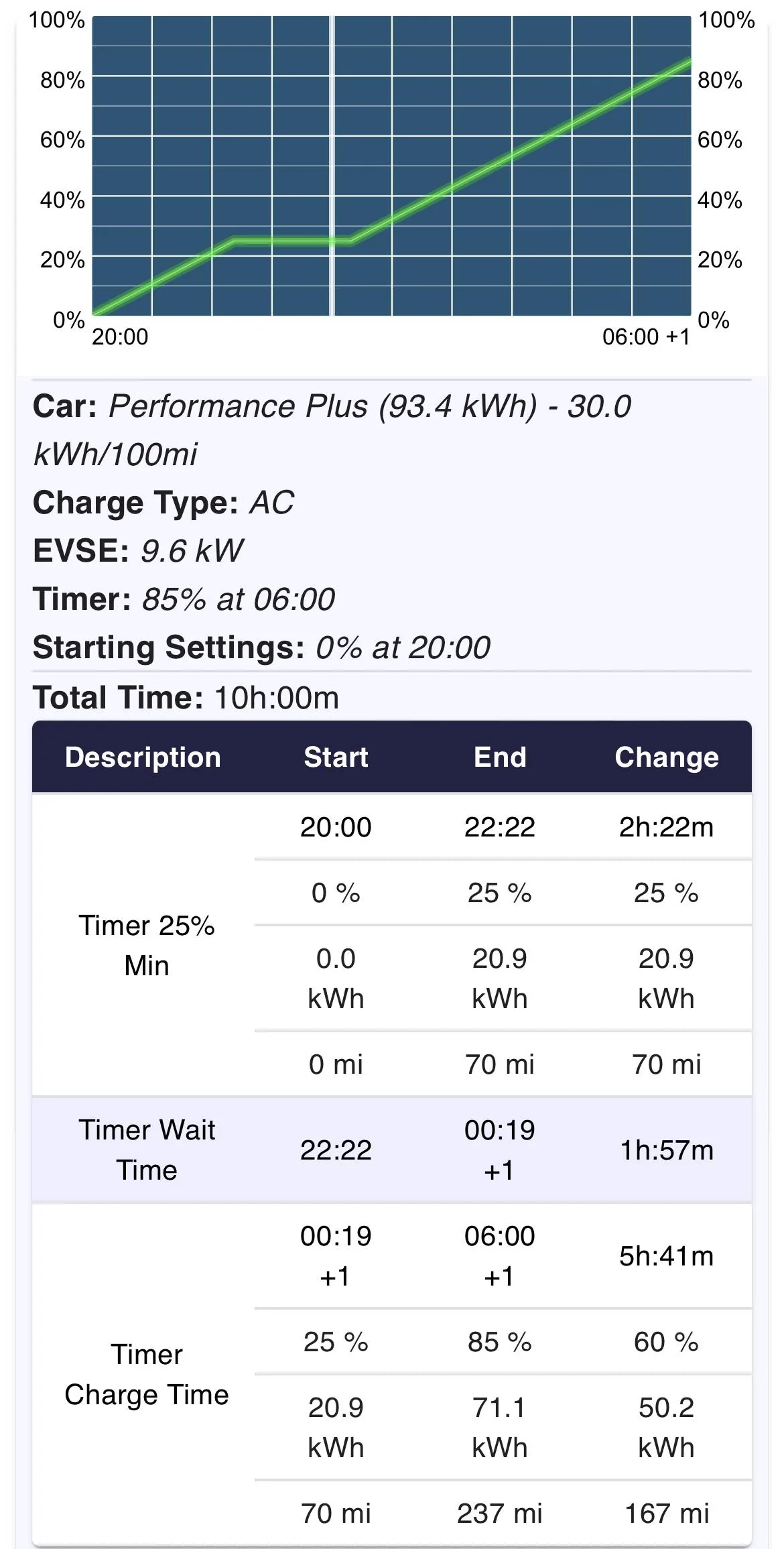
That’s because of your profile min. It charges to this immediately. Trust me. You want a timer at 6am at 85% and nothing else. Look at my graph. Even plugging in at zero%, it doesn’t start charging for the timer until after midnight.

Also, it will always charge immediately to at least a min of 25% no matter what. Nothing you can do about that.

So, because the timer limits your charge time as is, the profile serves no purpose. All you need is the timer.
 
Last edited:


Jhenson29

Well-Known Member
First Name
Jeremy
Joined
Feb 9, 2021
Threads
37
Messages
3,014
Reaction score
4,650
Location
St. Louis, MO
Vehicles
2022 Macan S; 2021 Taycan 4S
Country flag
Note that there is basically no way to start the charging at 10pm and limit It to 85%. Not without multiple cascading timers, which is just silly. But you don’t really need it to start at 10. You just need to to not start before 10. Which the timer accomplishes.
 

Jhenson29

Well-Known Member
First Name
Jeremy
Joined
Feb 9, 2021
Threads
37
Messages
3,014
Reaction score
4,650
Location
St. Louis, MO
Vehicles
2022 Macan S; 2021 Taycan 4S
Country flag
I would set your general to something low - like 30% which will make sure you always have some usable distance; it will charge to this as soon as plugged in.
Note that the timer will charge to a 25% min immediately with no profile.
 
OP
OP
IrwinJ

IrwinJ

Well-Known Member
First Name
Irwin
Joined
Apr 17, 2022
Threads
43
Messages
197
Reaction score
71
Location
Asheville NC
Vehicles
Mercedes SL550
Country flag
That’s because of your profile min. It charges to this immediately. Trust me. You want a timer at 6am at 85% and nothing else. Look at my graph. Even plugging in at zero%, it doesn’t start charging for the timer under after midnight.

Also, it will always charge immediately to at least a min of 25% no matter what. Nothing you can do about that.

So, because the timer limits your charge time as is, the profile serves no purposed. All you need is the timer.
Ok I’ll give that a try, and thanks so much!!!
 
OP
OP
IrwinJ

IrwinJ

Well-Known Member
First Name
Irwin
Joined
Apr 17, 2022
Threads
43
Messages
197
Reaction score
71
Location
Asheville NC
Vehicles
Mercedes SL550
Country flag
Report back for us. ?
Ok I just set a timer - departure time 6am, checked Repeat, and it says target charge 85%. I’m already at 85% so I can’t test it’s gonna work. But does this mean that if I plug in the charger say at 10 o’clock, the charging will not begin until however long and 85% charge occurs going backwards from 6 AM?
 

Jhenson29

Well-Known Member
First Name
Jeremy
Joined
Feb 9, 2021
Threads
37
Messages
3,014
Reaction score
4,650
Location
St. Louis, MO
Vehicles
2022 Macan S; 2021 Taycan 4S
Country flag
Ok I just set a timer - departure time 6am, checked Repeat, and it says target charge 85%. I’m already at 85% so I can’t test it’s gonna work. But does this mean that if I plug in the charger say at 10 o’clock, the charging will not begin until however long and 85% charge occurs going backwards from 6 AM?
Yes. Exactly. ? Excellent way to word it.


Top