Sponsored

My First Public Charge @ Electrify America (EA) - Massive Fail!

PanameraFrank

Well-Known Member
First Name
Frank
Joined
Sep 6, 2019
Threads
16
Messages
925
Reaction score
1,507
Location
Seattle
Vehicles
Taycan 4S
Country flag
I've used 350 kwh chargers 8 times.

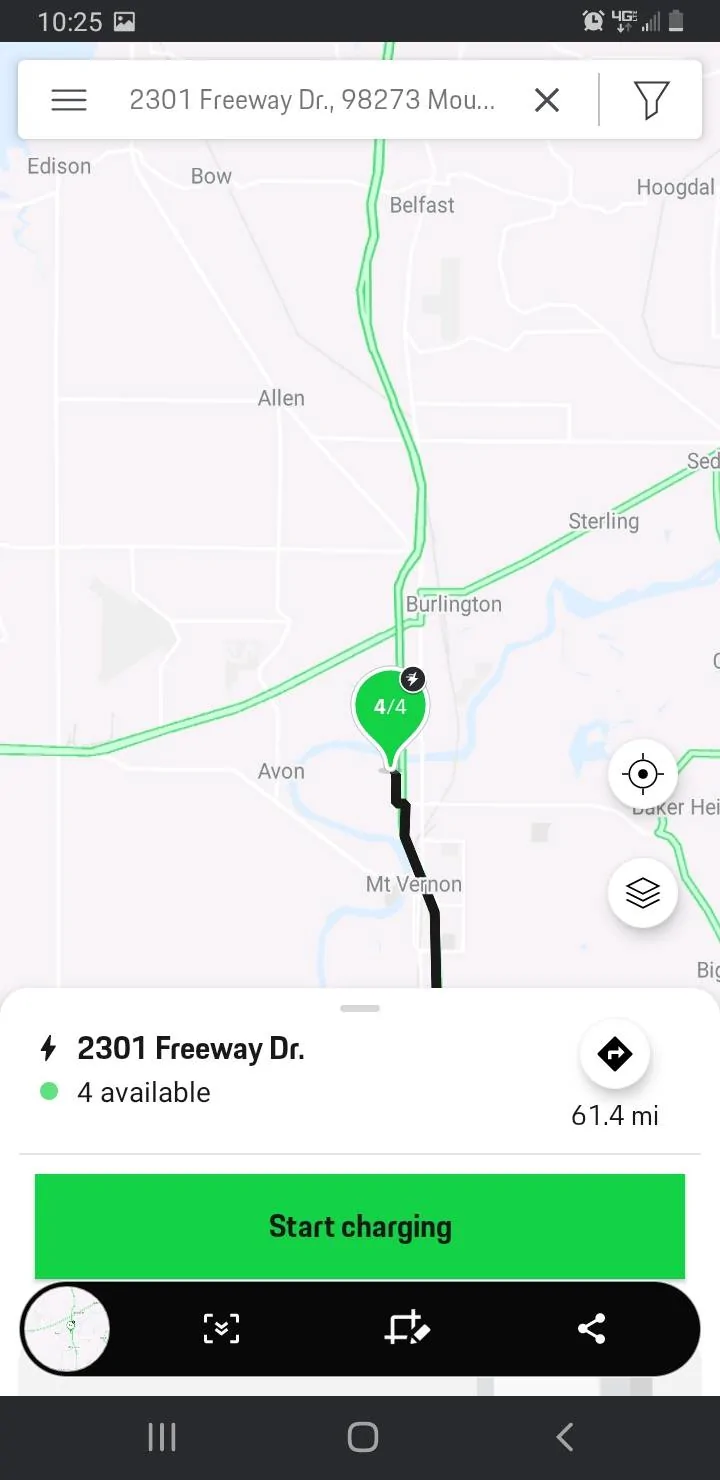
This is how you initiate a charge with the charging NA. Car OFF and UNLOCKED. Plug it in. Then open Charging NA and it will center on your location. Click that location.
Porsche Taycan My First Public Charge @ Electrify America (EA) - Massive Fail! Screenshot_20200823-222502_Charging

Click start charging.

Porsche Taycan My First Public Charge @ Electrify America (EA) - Massive Fail! Screenshot_20200823-222506_Charging

Swipe the matching charging (ie.. 100616-2)
Porsche Taycan My First Public Charge @ Electrify America (EA) - Massive Fail! Screenshot_20200823-222515_Charging


Is that what you're doing?

If it doesn't work try the second plug then just call EA and they'll immediately start a free charge.

I had the app fail once but overall 8/8 getting a charge from an EA 35O.
Sponsored


louv

Well-Known Member
First Name
Don
Joined
Sep 6, 2019
Threads
27
Messages
1,154
Reaction score
3,745
Location
Maine
Vehicles
Taycan Turbo (sold), Mini Cooper SE, Mercedes Sprinter RV, BMW K1600GT
Country flag
I’m afraid I haven’t used the Android app. I’m an iOS guy (mostly). The user interface is apparently different.

I am able to “start” a charging session on 350kW at my nearest station. (Even though I’m 5 miles away)

General comments:
It might be helpful to post screenshots (as PanameraFrank did) when you have app problems. Then we can all be on the same page.

Also, what station, and what “pad” were you using. That helps, in case others have used that station.

If you find a problem that is unique to the ChargingNA/ChargingAmerica app, the ONLY the Porsche support folks can help. EA can’t help (except to offer a free session)

If you find a problem that exists in both the Porsche and EA app, the EA can probably assist.


General Note:
350kW stations are nice, but as has been said, the time you’d spend Charging at a 350kW station is—in most case—only a few minutes less than being at a 150kW station. You could go from 10% to 80% on a 150kW station in about 30 minutes. In perfectly ideal situations, you could do that in 22 minutes if your car pulled a perfect maximum of 270kW at the start (it ramps down quickly).

I’m not sure if this is helpful. I’ve gotta run to my volunteer gig at a spay/neuter clinic. Back online later today.
 
OP
OP
evanevery

evanevery

Well-Known Member
First Name
Ed
Joined
Sep 10, 2019
Threads
38
Messages
998
Reaction score
1,143
Location
Wisconsin
Vehicles
2020 Taycan Turbo S, 2019 BMW i8, 2023 BMW iXM60
Country flag
This is about the inability to use the Charging NA app as intended. Charging problems with EA is a separate problem. It appears that Porsche has issues with their app. Lets try to get that addresses ASAP. This "free" charging is what we paid for. If this truly is an issue with their app, lets try to get them to fix it ASAP. We should have 350KW terminals available to us via Charging NA. Instead of saying 150KW "is good enough" Lets try to get that fixed.

I'm pretty sure the Porsche Fanbois would be all over this if it was a Tesla App that was failing. Denial and/or willful ignorance is not helpful here...

I'm going to start another thread (with a more focused title) to specifically discuss this issue now that we may have it cornered.

https://www.taycanforum.com/forum/t...owing-350kw-ea-terminals-to-be-selected.2174/
 
Last edited:
OP
OP
evanevery

evanevery

Well-Known Member
First Name
Ed
Joined
Sep 10, 2019
Threads
38
Messages
998
Reaction score
1,143
Location
Wisconsin
Vehicles
2020 Taycan Turbo S, 2019 BMW i8, 2023 BMW iXM60
Country flag
I have the Android Charging NA app. I just looked at a location that I have used in the past with 350kW chargers. The location shows both 350kW chargers as available and I can choose them on the list to activate (it won't actually activate since the car is not connected to the charger and the app says I am not at the charger location).
You are the only one in this thread reporting it is working as intended. Can you tell me what version of the Android App you are running? The one I have is the latest version and it has an update date of "18 Aug 2020". (I don't see any specific version info...)

Maybe, its a real-time database issue? Maybe they are linking the 350KW button in real time via XML or some other live code?

We need more data from other users...
 
OP
OP
evanevery

evanevery

Well-Known Member
First Name
Ed
Joined
Sep 10, 2019
Threads
38
Messages
998
Reaction score
1,143
Location
Wisconsin
Vehicles
2020 Taycan Turbo S, 2019 BMW i8, 2023 BMW iXM60
Country flag
I've used 350 kwh chargers 8 times.

This is how you initiate a charge with the charging NA. Car OFF and UNLOCKED. Plug it in. Then open Charging NA and it will center on your location. Click that location.
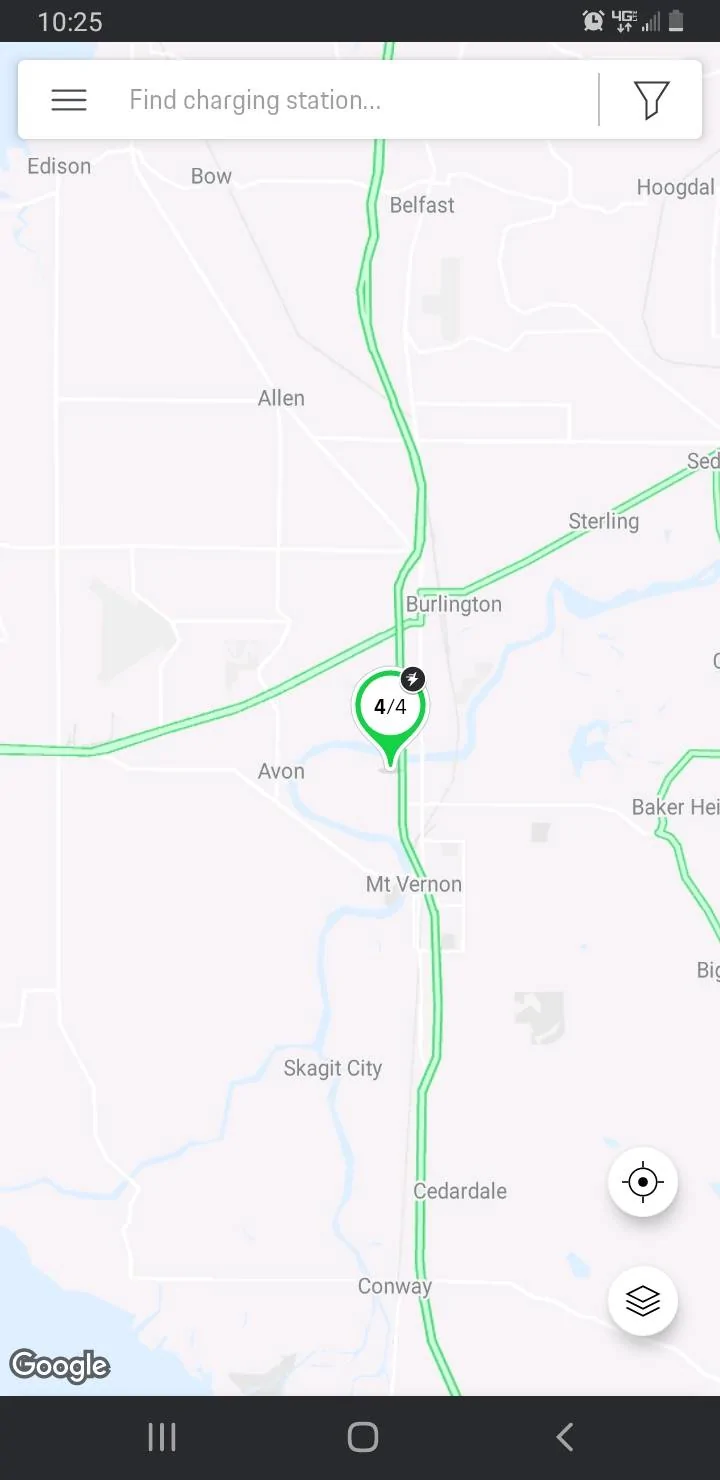
Screenshot_20200823-222502_Charging.jpg

Click start charging.

Screenshot_20200823-222506_Charging.jpg

Swipe the matching charging (ie.. 100616-2)
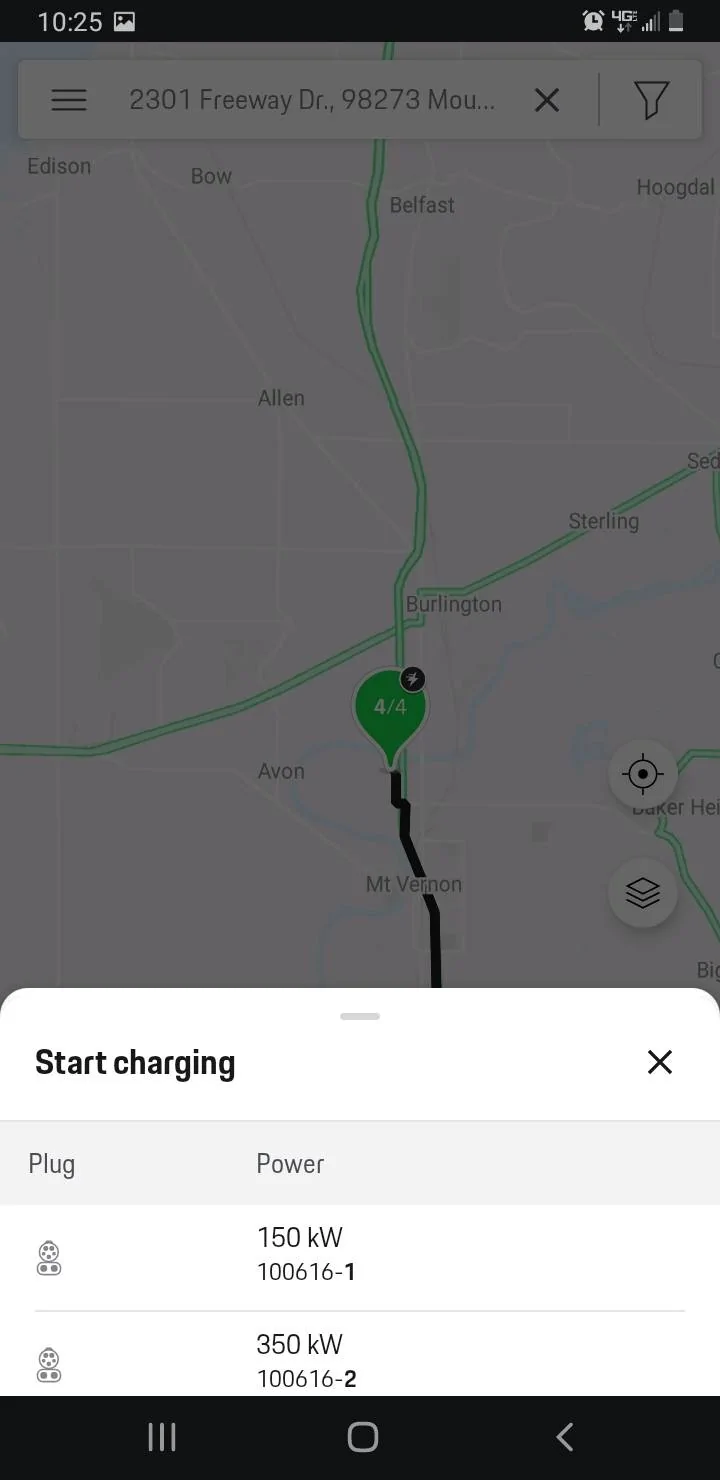
Screenshot_20200823-222515_Charging.jpg


Is that what you're doing?

If it doesn't work try the second plug then just call EA and they'll immediately start a free charge.

I had the app fail once but overall 8/8 getting a charge from an EA 35O.
Yes, that's exactly what I am doing... (Except I'm using the Android App)

Our interface is a little different, but when I click to LIST the available 350KW terminals (so I can activate one of them), it shows me the 150KW terminals instead.


Toby Pennycuff

Well-Known Member
First Name
Toby
Joined
Jun 12, 2019
Threads
5
Messages
172
Reaction score
204
Location
Dallas, TX
Vehicles
Porsche 911S, Porsche 930, Porsche GT3 Cup, Taycan 4S
Country flag
I just checked the ChargingAmerica app on my iPhone for the 350kW stations in Fort Worth. The app shows both 350kW stations (4 total positions) active and available. I can't initiate a charge since I am not in Fort Worth today. The last time I charged at that station (about two weeks ago and AFTER the WLG2 update), I had to get EA to start the session. I have not been back, but prior to the WLG2 update, I was able to "see" the 350kW stations (both of them) and initiate a charge with no issue whatsoever.

And BTW, there are a NUMBER of us in this forum who are "all over" Porsche about the quality of some items associated with our Taycans. This has NOTHING to do with whether we love or hate Teslas. This has everything to do with getting the platform "right". Having been through this with other Porsche models in the past, it does require a bit of patience.

You will find that you can charge for free at EA stations..... even if you have to call EA Customer Support. They are generally nice, helpful people who want to get you charged and on your way. The extra (maybe) 5 minutes you spend on the phone with them will usually produce results.

Toby
 
OP
OP
evanevery

evanevery

Well-Known Member
First Name
Ed
Joined
Sep 10, 2019
Threads
38
Messages
998
Reaction score
1,143
Location
Wisconsin
Vehicles
2020 Taycan Turbo S, 2019 BMW i8, 2023 BMW iXM60
Country flag
I just checked the ChargingAmerica app on my iPhone for the 350kW stations in Fort Worth. The app shows both 350kW stations (4 total positions) active and available. I can't initiate a charge since I am not in Fort Worth today. The last time I charged at that station (about two weeks ago and AFTER the WLG2 update), I had to get EA to start the session. I have not been back, but prior to the WLG2 update, I was able to "see" the 350kW stations (both of them) and initiate a charge with no issue whatsoever.

And BTW, there are a NUMBER of us in this forum who are "all over" Porsche about the quality of some items associated with our Taycans. This has NOTHING to do with whether we love or hate Teslas. This has everything to do with getting the platform "right". Having been through this with other Porsche models in the past, it does require a bit of patience.

You will find that you can charge for free at EA stations..... even if you have to call EA Customer Support. They are generally nice, helpful people who want to get you charged and on your way. The extra (maybe) 5 minutes you spend on the phone with them will usually produce results.

Toby
Thanks for the data. So maybe this is only an issue with the Android App? You don't actually have to complete the activation to test this. I can't even list the specific 350KW terminals (Terminal ID's) to have anything to select...

Can you give me the specific street address of one of the stations you tested so I can compare my findings?

I agree completely. Porsche needs to get this stuff right. Its very unfortunate they couldn't have done that BEFORE we got our cars. Some of the issue we are reporting could have been identified with decent testing or circumvented completely in the design phase.
 

Reg

Well-Known Member
Joined
Nov 17, 2019
Threads
55
Messages
1,352
Reaction score
1,635
Location
West Coast, The Best Coast
Vehicles
Taycan 4S
Country flag
Will someone please see if they can access a 350KW charging terminal at ANY EA station using the Charging NA App?
I used 2 different ones on the LA-SF route about 2 weeks ago and one last week. I will see if I can swing by one today - maybe there was a recent change?


Toby Pennycuff

Well-Known Member
First Name
Toby
Joined
Jun 12, 2019
Threads
5
Messages
172
Reaction score
204
Location
Dallas, TX
Vehicles
Porsche 911S, Porsche 930, Porsche GT3 Cup, Taycan 4S
Country flag
The Fort Worth EA station is located at 6760 Westworth Blvd, Westworth Village, TX 76114

The last time I charged at this station was 9-Aug. This was post-application of the WLG2 update to the car. I had to contact EA Customer Service to get the charge started. I reported the iPhone app failure to Porsche Connect and my dealer. I have auto update turned on for my phone so I constantly get the latest apps and iOS upgrades.
 
OP
OP
evanevery

evanevery

Well-Known Member
First Name
Ed
Joined
Sep 10, 2019
Threads
38
Messages
998
Reaction score
1,143
Location
Wisconsin
Vehicles
2020 Taycan Turbo S, 2019 BMW i8, 2023 BMW iXM60
Country flag
I used 2 different ones on the LA-SF route about 2 weeks ago and one last week. I will see if I can swing by one today - maybe there was a recent change?
You don't actually need to visit a station, or actually begin an activation. All you need to do is open the app, browse to station with 350KW terminals, and try to list them (by Terminal ID).

Again, this may only be an issue with the Android version of the app. Not sure yet. I'm on the phone right now with PorscheNA trying to find someone who has a clue about anything Taycan and ALSO has access to the Android Charging NA app. (Wish me luck...)
 

MissionC

Well-Known Member
Joined
Feb 15, 2019
Threads
7
Messages
297
Reaction score
400
Location
Boston
Vehicles
MY2020 Taycan 4S
Country flag
You don't actually need to visit a station, or actually begin an activation. All you need to do is open the app, browse to station with 350KW terminals, and try to list them (by Terminal ID).

Again, this may only be an issue with the Android version of the app. Not sure yet. I'm on the phone right now with PorscheNA trying to find someone who has a clue about anything Taycan and ALSO has access to the Android Charging NA app. (Wish me luck...)
I don’t think it’s purely an app issue — the iOS versions of the EA, NACharging, and Porsche Connect app (all latest versions) show no active 350kWh chargers in MA. Either the charging network is still undergoing an upgrade or the API the apps are using for charger status is returning bad data. I poked around on EA’s site, but couldn’t find any resources for developers, so the API is likely private.
 

dnanian

Well-Known Member
First Name
David
Joined
May 18, 2020
Threads
21
Messages
350
Reaction score
248
Location
Massachusetts
Vehicles
Taycan, Tesla Model S, BMW i3
Country flag
Thanks for the data. So maybe this is only an issue with the Android App? You don't actually have to complete the activation to test this. I can't even list the specific 350KW terminals (Terminal ID's) to have anything to select...
It's not just the Android app. As I indicated in another thread, it's also not just the NA app: there are database problems with EA's apps, and some chargers that are 350kW are showing up as 50kW or 150kW.

If you know the charger number you can start the charge no matter what it says.

It's definitely a problem (and there are a ton of chargers actually down right now, which isn't helping things), but it's more of a "data doesn't reflect the right info" thing.
 

LonePalmBJ

Well-Known Member
First Name
Brent
Joined
Feb 17, 2020
Threads
10
Messages
335
Reaction score
554
Location
Roswell, Georgia
Vehicles
2020 Taycan 4S Gentian Blue Metallic, Black/Chalk,
Country flag
You don't actually need to visit a station, or actually begin an activation. All you need to do is open the app, browse to station with 350KW terminals, and try to list them (by Terminal ID).

Again, this may only be an issue with the Android version of the app. Not sure yet. I'm on the phone right now with PorscheNA trying to find someone who has a clue about anything Taycan and ALSO has access to the Android Charging NA app. (Wish me luck...)

One more data point: Using version 10.81-na.rc on Android:

There's a EA station near me with nine bays: one CHAdeMO, seven 150kW CCS and two 350kW CCS

  • When I select the station in the App it correctly shows the three categories and charger counts
  • When I select CHAdeMO it correctly lists the one CHAdeMO station: 01
  • When I select 150kW it correctly lists the seven 150kW stations: 01, 04, 06, 07, 08, 09 and 10 (Presumably 01 has both a CHAdeMO and 150kW CCS)
  • When I select 350kW however it incorrectly lists the same seven charging stations as 150kW instead of the two 350kW stations, presumably 03 and 04
My guess is that this is a bug in the app, but at the moment I don't see how one could initiate a 350kW charge through the app without calling EA.

Brent
 
OP
OP
evanevery

evanevery

Well-Known Member
First Name
Ed
Joined
Sep 10, 2019
Threads
38
Messages
998
Reaction score
1,143
Location
Wisconsin
Vehicles
2020 Taycan Turbo S, 2019 BMW i8, 2023 BMW iXM60
Country flag
I've used 350 kwh chargers 8 times.

This is how you initiate a charge with the charging NA. Car OFF and UNLOCKED. Plug it in. Then open Charging NA and it will center on your location. Click that location.
Screenshot_20200823-222502_Charging.jpg

Click start charging.

Screenshot_20200823-222506_Charging.jpg

Swipe the matching charging (ie.. 100616-2)
Screenshot_20200823-222515_Charging.jpg


Is that what you're doing?

If it doesn't work try the second plug then just call EA and they'll immediately start a free charge.

I had the app fail once but overall 8/8 getting a charge from an EA 35O.

I just got off the phone with Porsche. They confirm this problem and that its not just with the Android app.

The reason why I am replying to your posting specifically, is that it appears that your screen shots are not strictly from the Charging NA app. It appears that its a mix of screens from Charging NA and Porsche Connect. The Charging NA app doesn't have a "Start Charging" button (as displayed in your screen shots) but the Porsche Connect App does. (At least this is the case on Android)
 

PanameraFrank

Well-Known Member
First Name
Frank
Joined
Sep 6, 2019
Threads
16
Messages
925
Reaction score
1,507
Location
Seattle
Vehicles
Taycan 4S
Country flag
I just got off the phone with Porsche. They confirm this problem and that its not just with the Android app.

The reason why I am replying to your posting specifically, is that it appears that your screen shots are not strictly from the Charging NA app. It appears that its a mix of screens from Charging NA and Porsche Connect. The Charging NA app doesn't have a "Start Charging" button (as displayed in your screen shots) but the Porsche Connect App does. (At least this is the case on Android)
Hmm, odd. My screenshots were directly from the latest version of Android Charging NA and the exact process I use to initiate charging. I don't use the EA or Connect app.

I agree that there are problems with some combination of the apps and communication to the chargers.

However, I think it's important we distinguish between a "Charging Failure" and an "App Failure". It sounds like you had an app failure but the chargers functioned fine. So you would have had to call the EA number but otherwise been A-Okay on a road trip.

They need to fix the apps and the connectivity, but so far I've found the actual chargers to be pretty reliable.
Sponsored


Top