Sponsored

Neither Wireless nor Wired CarPlay are working

Henke

Well-Known Member
Joined
Jun 27, 2021
Threads
42
Messages
420
Reaction score
251
Location
California
Vehicles
Taycan 4S
Country flag
MY22 4S, Carplay has mostly worked flawlessly for me since I got the car. Any occasional issues were fixed when the car was turned off or phone turned off.

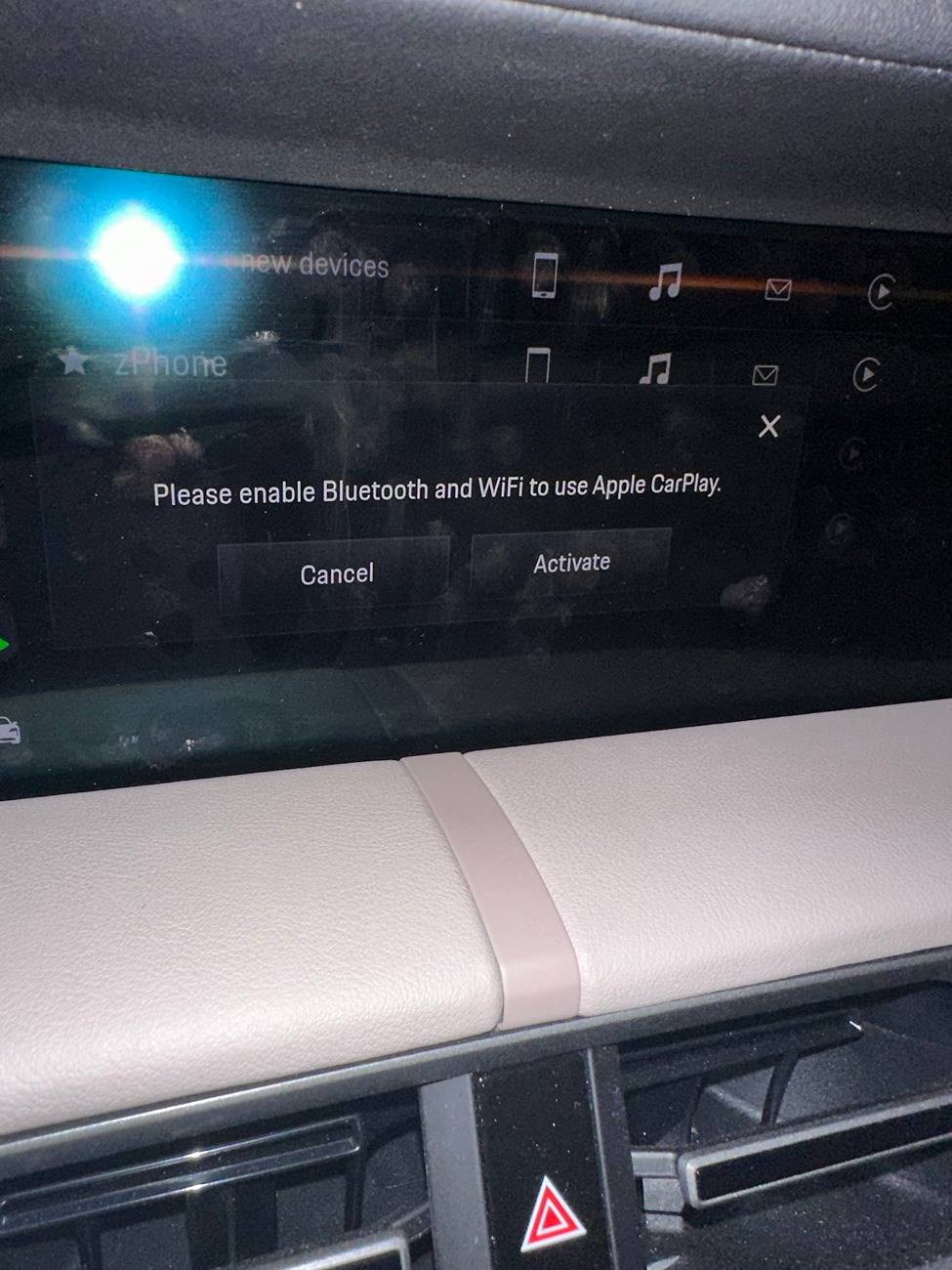
About a month ago, Carplay would connect as usual and then just decide to disconnect. Sometimes it would not happen until I had been driving for 10-15 mins but, at other times, it would happen within a few mins. I tried to remove the phone from PCM, remove Taycan from bluetooth and reboot the PCM & restart the car. That initially didn't seem to do anything but after a couple of days, I noticed that it had not disconnected, great. This lasted about a couple of weeks until recently where the problem has reoccured but even worse than before. Now the phone will not connect at all, neither wireless or wired. When i try to connect using the PCM or add a new device, it asks me to connect a USB device. Sometimes I get this warning to activate bluetooth and wifi but both of these are greyed out. I have again tried removing the phone, removing taycan from the phone and rebooting but the issue won't go away so effectively I no longer have carplay either wired or wireless. I am booked in for this to be looked at but not until end of month.

Has anyone experienced similar and been able to resolve? iPhone 14 Pro Max - the issue began on iOS 16.x and has persisted on iOS 18.0

Porsche Taycan Neither Wireless nor Wired CarPlay are working IMG_8315
Sponsored


BigBob

Well-Known Member
First Name
Rob
Joined
Nov 27, 2021
Threads
46
Messages
1,959
Reaction score
1,533
Location
London
Vehicles
Taycan CT 4S, Range Rover Sport
Country flag
Sort of - i had that message repeatedly too. I had tried to log into my fitcamx dash cam, but it and carplay seemed to be having a pissing contest about who should be logged in. From memory I 'forgot this network' for the taycan wifi on my iPhone to try and stop CarPlay from stopping me getting into the camera. The camera logged in after that, but getting CarPlay back afterwards was a real nightmare. I got that message, but i think i was able to get the phone (to make calls etc) to connect via bluetooth, but CarPlay wouldn't connect. I'm not entirely sure what it was that solved it, other than lots of trying to reconnect bluetooth and join the taycan wifi network.

Do you have anything else in the car using bluetooth or more likely that has its own discreet wifi network (like the taycan's), that could be conflicting? I'm not an expert, but think CarPlay isn't via bluetooth, but a wifi connection of some sort.
Try logging in away from your house or whatever incase something nearby that you log in to at home is causing a problem, and check if you're iphone wifi is logged into something like Taycan_1234_5Ghz when you're in the car and it's started.

Once it sorted itself there were no further problems, but it was a real pain getting the phone and the taycan wifi synced up again.
 
OP
OP
Henke

Henke

Well-Known Member
Joined
Jun 27, 2021
Threads
42
Messages
420
Reaction score
251
Location
California
Vehicles
Taycan 4S
Country flag
Sort of - i had that message repeatedly too. I had tried to log into my fitcamx dash cam, but it and carplay seemed to be having a pissing contest about who should be logged in. From memory I 'forgot this network' for the taycan wifi on my iPhone to try and stop CarPlay from stopping me getting into the camera. The camera logged in after that, but getting CarPlay back afterwards was a real nightmare. I got that message, but i think i was able to get the phone (to make calls etc) to connect via bluetooth, but CarPlay wouldn't connect. I'm not entirely sure what it was that solved it, other than lots of trying to reconnect bluetooth and join the taycan wifi network.

Do you have anything else in the car using bluetooth or more likely that has its own discreet wifi network (like the taycan's), that could be conflicting? I'm not an expert, but think CarPlay isn't via bluetooth, but a wifi connection of some sort.
Try logging in away from your house or whatever incase something nearby that you log in to at home is causing a problem, and check if you're iphone wifi is logged into something like Taycan_1234_5Ghz when you're in the car and it's started.

Once it sorted itself there were no further problems, but it was a real pain getting the phone and the taycan wifi synced up again.
I don’t have a dash cam or any other tech in the car. In the past, when connected to CarPlay, my phone WiFi connection would show as greyed out rather than blue. If I clicked on the wifi icon, it would say “would you like to disconnect CarPlay”. Lately it would show as blue when connected to CarPlay.

The frustrating thing though, it doesn’t work when connected via the USB cable and I’ve tried both ports in the console. After a while driving, occasionally it will connect via wired but there is no reason for it.
 

RBGtaycan

Well-Known Member
First Name
Bob
Joined
Feb 15, 2021
Threads
42
Messages
613
Reaction score
466
Location
Long Island, New York
Vehicles
Kia EV6; Taycan RWD....Past: 356, Cayman S
Country flag
I don’t have a dash cam or any other tech in the car. In the past, when connected to CarPlay, my phone WiFi connection would show as greyed out rather than blue. If I clicked on the wifi icon, it would say “would you like to disconnect CarPlay”. Lately it would show as blue when connected to CarPlay.

The frustrating thing though, it doesn’t work when connected via the USB cable and I’ve tried both ports in the console. After a while driving, occasionally it will connect via wired but there is no reason for it.
Perhaps try replacing the usb cable with a better (certified) cable? I had to do that at one time (on another car) and it worked.


OP
OP
Henke

Henke

Well-Known Member
Joined
Jun 27, 2021
Threads
42
Messages
420
Reaction score
251
Location
California
Vehicles
Taycan 4S
Country flag
@Henke: did you upgrade you phone to iOS 18?
I did, do you think that is the issue? Today initially it didnt connect and then later it connected via USB but not via bluetooth.

I upgraded iOS about a week ago. The problem started a few weeks before that but had stabilised a bit. It resurfaced and got worse a couple of days ago
 
OP
OP
Henke

Henke

Well-Known Member
Joined
Jun 27, 2021
Threads
42
Messages
420
Reaction score
251
Location
California
Vehicles
Taycan 4S
Country flag
Perhaps try replacing the usb cable with a better (certified) cable? I had to do that at one time (on another car) and it worked.
Good idea, I will give that a try. It is possible that squeezing the cable through the centre console has damaged it. Charging works fine and it still doesn't resolve my issue with wireless/bluetooth connectivity but worth a shot.
Sponsored


Top