Sponsored

Random questions for first time PCM user

Flying ace

Well-Known Member
First Name
Mike
Joined
Mar 24, 2024
Threads
41
Messages
1,293
Reaction score
987
Location
SF CA
Vehicles
GTS ST, 997.1 GT3, 991.1 GT3
Country flag
After spending my first 2 days with my 23 Taycan, I can't figure out some settings/features. I'm hoping people who have a lot of experience with this generation PCM have info on availability:

1. XM radio. When on the "List" view, under each radio station/channel name, there is a short description of the channel, and the tile to the right just displays channel logo.
Is there any way to have this screen display artist name, song or logo?

The only way I can see it is in the "Play" screen.

2. Is there any way to set my own defaults for Normal, Sport/+, and Range modes?

I can't figure out under what conditions it resets, as sometimes after a short shutdown, it retains my settings. Is the only saveable configuration Individual?

3. Is there a way to toggle and select certain Point of Interest markers defaults on the map? Currently it defaults to all POIs but it's also not clear what is being prioritized, I could be literally parked next to a fast charge station and it wouldn't display it. Hilariously, it also shows gas stations, literally useless.

4. After selecting a route, does PCM provide an alternative route?
Sponsored

 
Last edited:

Tooney

Well-Known Member
Joined
Aug 14, 2021
Threads
741
Messages
4,450
Reaction score
3,637
Location
Ohio
Vehicles
2022 Taycan 4S
Country flag
4. After selecting a route, does PCM provide an alternative route?
My 22 4S has PIRM option and it does provide alternative routes when a new destination is entered.
(There is an option in nav settings to enable displaying routes at start.) Not sure what happens if PIRM option was not included in the car.
While driving with destination in nav, the nav <. . . > setting menu will provide alternative route choices.
 
Last edited:

rim23

Well-Known Member
Joined
Feb 14, 2023
Threads
13
Messages
322
Reaction score
260
Location
Finland, Helsinki
Vehicles
BMW i5M60
Country flag
After spending my first 2 days with my 23 Taycan, I can't figure out some settings/features. I'm hoping people who have a lot of experience with this generation PCM have info on availability:

1. XM radio. When on the "List" view, under each radio station/channel name, there is a short description of the channel, and the tile to the right just displays channel logo.
Is there any way to have this screen display artist name, song or logo?

The only way I can see it is in the "Play" screen.

2. Is there any way to set my own defaults for Normal, Sport/+, and Range modes?

I can't figure out under what conditions it resets, as sometimes after a short shutdown, it retains my settings. Is the only saveable configuration Individual?

3. Is there a way to toggle and select certain Point of Interest markers defaults on the map? Currently it defaults to all POIs but it's also not clear what is being prioritized, I could be literally parked next to a fast charge station and it wouldn't display it. Hilariously, it also shows gas stations, literally useless.

4. After selecting a route, does PCM provide an alternative route?
1. This thing may not recognize songs correctly. When it doesn’t know that, it doesn’t write the song name. Most of the time it works for me. Though, I’m not sure about radio itself as I’ve mostly using digital radio app.

2. Only the Normal can remember the suspension settings. And nothing else. If you want custom settings, you have to use individual settings (not sure if you have it without sport chrono package)

3. It may not know all the charging stations as each manufacturer uses some “roaming” data from a desired supplier.

4. Yup, it does. Cannot tell you how to do that as I cannot remember the steps..… Try to play with it.
 

SergeyIndy

Well-Known Member
First Name
Sergey
Joined
Dec 19, 2021
Threads
41
Messages
2,441
Reaction score
1,826
Location
Indianapolis
Vehicles
24 Macan GTS, 23 Taycan Turbo, 20 Cayenne Turbo
Country flag
1. XM is very limited in this version of the PCM with no configurable views or features. The previous version 6 that runs on our 2020 Cayenne for example has many more features such the ability to rewind by scrolling the live marker or tagging artists and songs to be alerted when they are playing.

2. Default Saving for Modes. The way I understand it to work is that some settings are retained and others only retained if saved into the Individual mode. For example, Chassis setup and height appear to be saved from drive to drive but Recoup and Sport Sound are not.

3. POIs should be configurable from showing none, some, or all.

4. PCM map route feature is configurable to show or not who Alternate routes.
 
OP
OP
Flying ace

Flying ace

Well-Known Member
First Name
Mike
Joined
Mar 24, 2024
Threads
41
Messages
1,293
Reaction score
987
Location
SF CA
Vehicles
GTS ST, 997.1 GT3, 991.1 GT3
Country flag
1. XM is very limited in this version of the PCM with no configurable views or features. The previous version 6 that runs on our 2020 Cayenne for example has many more features such the ability to rewind by scrolling the live marker or tagging artists and songs to be alerted when they are playing.

2. Default Saving for Modes. The way I understand it to work is that some settings are retained and others only retained if saved into the Individual mode. For example, Chassis setup and height appear to be saved from drive to drive but Recoup and Sport Sound are not.

3. POIs should be configurable from showing none, some, or all.

4. PCM map route feature is configurable to show or not who Alternate routes.
Thanks!

Why would a newer version of PCM be stripped of very unique features than compared to an older version?

Re#3, do you know where in the instructions manual where to configure POIs?


W1NGE

Well-Known Member
First Name
Adrian
Joined
Jan 11, 2021
Threads
53
Messages
11,015
Reaction score
6,805
Location
Aberdeen, Scotland
Vehicles
992.2, ex GTS ST owner, Macan T
Country flag
Suggest reading the Owner's Manual....

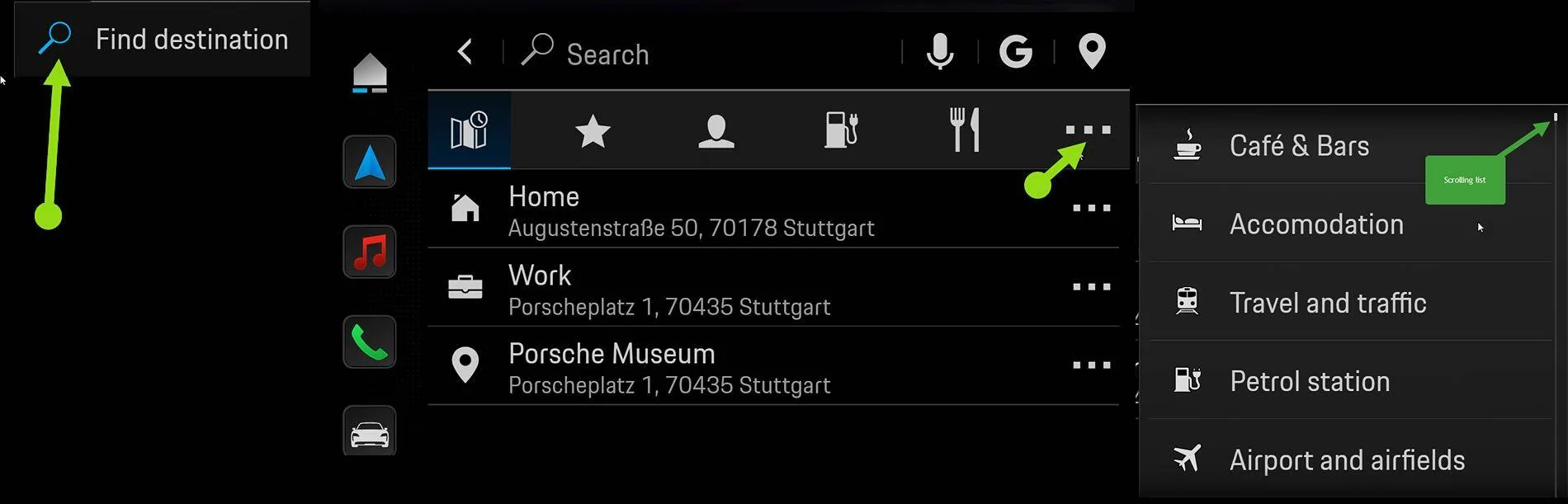
Press NAV, Finder, then ...

Porsche Taycan Random questions for first time PCM user 1731246659917-9q


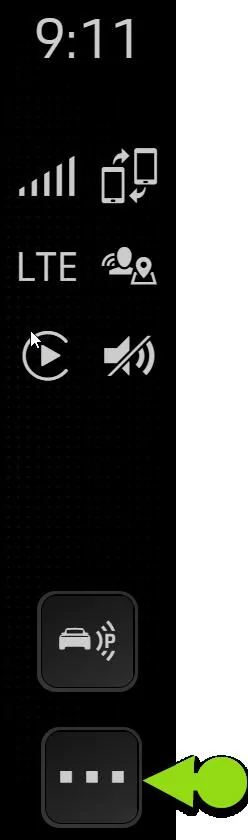
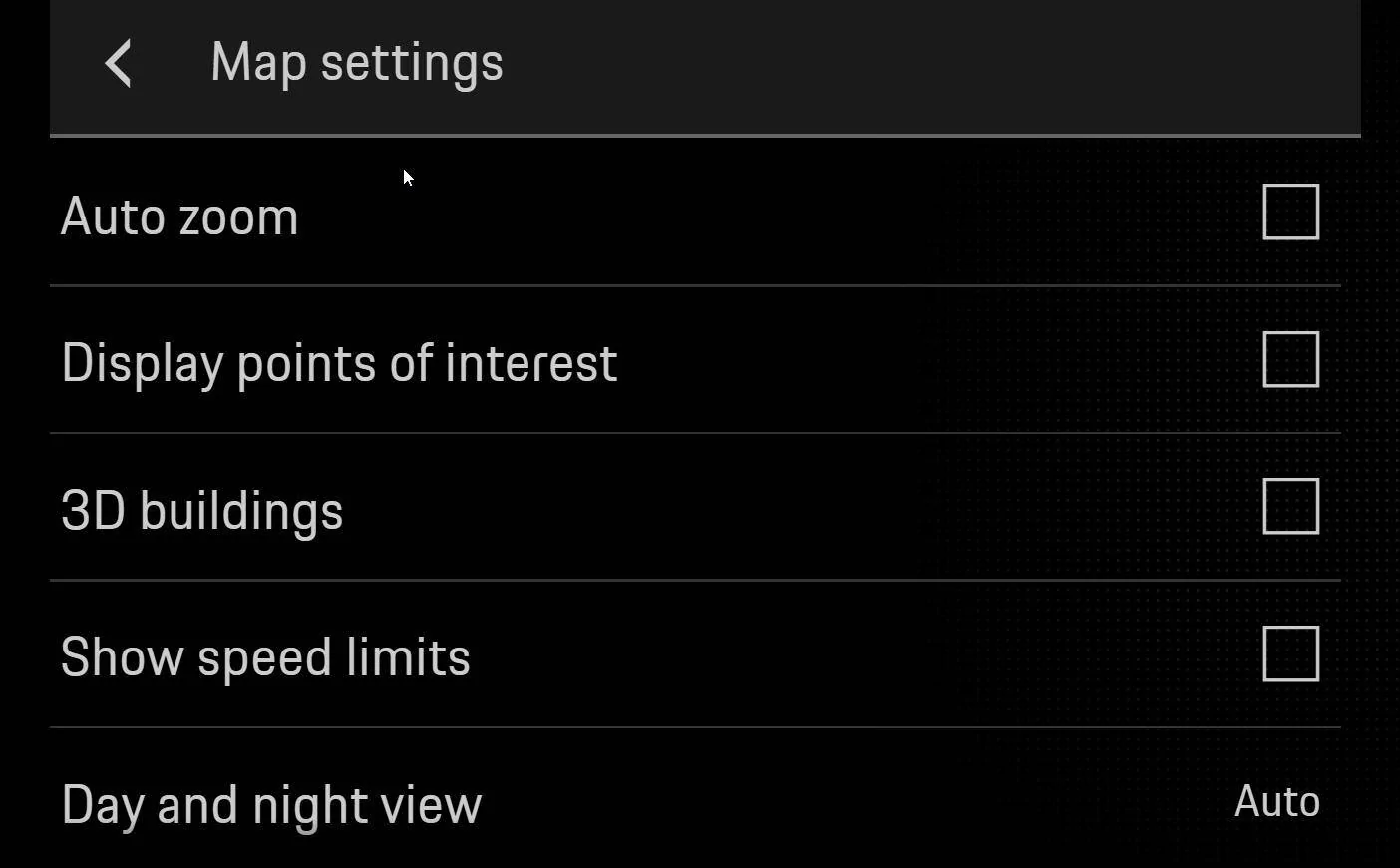
Also enable in NAV / MAP ( "..." bottom right of map then scroll to Navigation Settings then Map Settings and fill your boots)

Porsche Taycan Random questions for first time PCM user 1731246990862-c


Porsche Taycan Random questions for first time PCM user 1731246813374-bo
 
OP
OP
Flying ace

Flying ace

Well-Known Member
First Name
Mike
Joined
Mar 24, 2024
Threads
41
Messages
1,293
Reaction score
987
Location
SF CA
Vehicles
GTS ST, 997.1 GT3, 991.1 GT3
Country flag
I saw that displays it, but nowhere to select certain ones. Sorry Bear with me. Didn't mean to use you as tech support!
 

Tooney

Well-Known Member
Joined
Aug 14, 2021
Threads
741
Messages
4,450
Reaction score
3,637
Location
Ohio
Vehicles
2022 Taycan 4S
Country flag
I saw that displays it, but nowhere to select certain ones. Sorry Bear with me. Didn't mean to use you as tech support!
This forum, and @W1NGE in particular, provide excellent Taycan tech support. We keep our questions and learnings coming.


SergeyIndy

Well-Known Member
First Name
Sergey
Joined
Dec 19, 2021
Threads
41
Messages
2,441
Reaction score
1,826
Location
Indianapolis
Vehicles
24 Macan GTS, 23 Taycan Turbo, 20 Cayenne Turbo
Country flag
Thanks!

Why would a newer version of PCM be stripped of very unique features than compared to an older version?

Re#3, do you know where in the instructions manual where to configure POIs?
My only explanation for very bare XM implementation is because Taycan PCM is based on a different platform with many more music options available. I was surprised to see basic XM features that existed since PCM ver 3 are not there.

I spent time with the Map and Nav settings and sure enough there is no way to filter POIs. Only option is to Display them or not. Another disappointment.
 
OP
OP
Flying ace

Flying ace

Well-Known Member
First Name
Mike
Joined
Mar 24, 2024
Threads
41
Messages
1,293
Reaction score
987
Location
SF CA
Vehicles
GTS ST, 997.1 GT3, 991.1 GT3
Country flag
here's another one - is there a way to quickly mute and unmute the audio? I haven't found an easy way and resort to pushing and holding the volume button.
 

sveinaan

Well-Known Member
First Name
Svein
Joined
Jan 14, 2022
Threads
0
Messages
75
Reaction score
46
Location
Norway
Vehicles
21 Taycan 4s
Country flag
Just push the Rotary knob on steering wheel to mute audio. And once more to unmute.
 
OP
OP
Flying ace

Flying ace

Well-Known Member
First Name
Mike
Joined
Mar 24, 2024
Threads
41
Messages
1,293
Reaction score
987
Location
SF CA
Vehicles
GTS ST, 997.1 GT3, 991.1 GT3
Country flag
Just push the Rotary knob on steering wheel to mute audio. And once more to unmute.
I literally just figured this out 3 days ago. Lol


Top