Sponsored

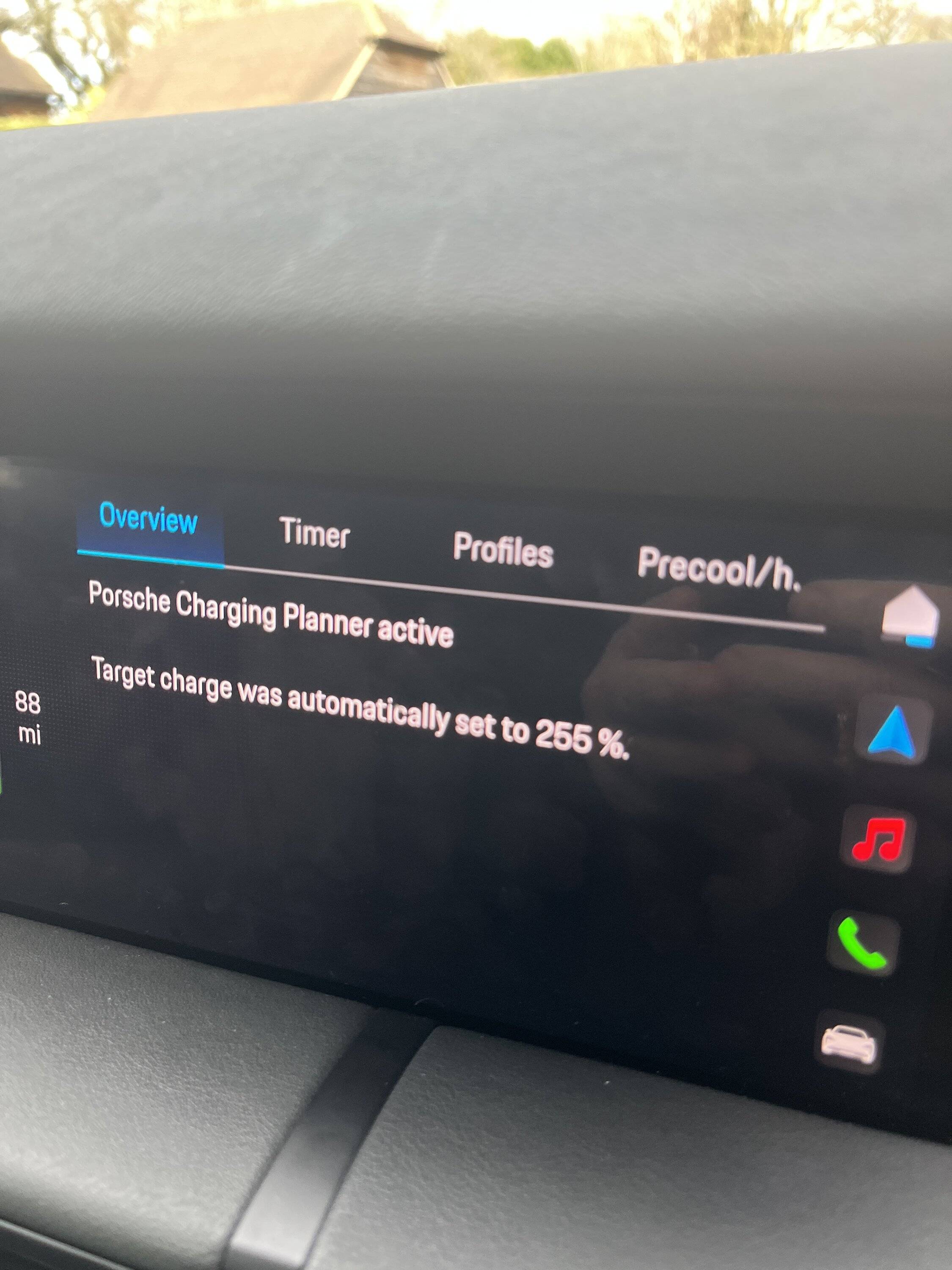
Target charge was automatically set to 255%

Kippax

Well-Known Member
First Name
Andrew
Joined
Mar 30, 2022
Threads
5
Messages
45
Reaction score
39
Location
United Kingdom
Vehicles
Taycan Sport Tursimo
Country flag
Anyone ever seen this before in the Charge menu? I didn't set it at 255% obviously.
Sponsored

 
Last edited:

DCYL725

Well-Known Member
Joined
Feb 9, 2022
Threads
28
Messages
458
Reaction score
298
Location
Asia
Vehicles
Taycan 2021
Country flag
Are you getting 500 plus miles from the guessometer?
 
OP
OP

Kippax

Well-Known Member
First Name
Andrew
Joined
Mar 30, 2022
Threads
5
Messages
45
Reaction score
39
Location
United Kingdom
Vehicles
Taycan Sport Tursimo
Country flag
Are you getting 500 plus miles from the guessometer?
No, usual 200-220. I actually think there is something wrong. It's not charging beyond 40%. I have no profiles activated.
 

Tooney

Well-Known Member
Joined
Aug 14, 2021
Threads
746
Messages
4,464
Reaction score
3,646
Location
Ohio
Vehicles
2022 Taycan 4S
Country flag
When charging at home, make sure the car does not have a destination/route active in the nav unit.


OP
OP

Kippax

Well-Known Member
First Name
Andrew
Joined
Mar 30, 2022
Threads
5
Messages
45
Reaction score
39
Location
United Kingdom
Vehicles
Taycan Sport Tursimo
Country flag
Hah! Sounds like a "full charge" in 8 bits! (11111111 is 255 in the base 2 system)
For the non-techy, what do you mean? There is definitely a fault? Note I have no profiles active despite it saying I do.
Porsche Taycan Target charge was automatically set to 255% IMG_6469.JPG
Porsche Taycan Target charge was automatically set to 255% IMG_6470.JPG
 
Last edited:

Tooney

Well-Known Member
Joined
Aug 14, 2021
Threads
746
Messages
4,464
Reaction score
3,646
Location
Ohio
Vehicles
2022 Taycan 4S
Country flag
Your photo above indicates "Porsche Charging Planner active". The only reason that message would occur is when the nav system has a destination/route it is trying to navigate to. Try bringing up nav display and pressing the red "stop route/navigation" button.
I've had problems with charging stopping prematurely when the charging planner is active/the nav system has a destination in it.
 
Last edited:


OP
OP

Kippax

Well-Known Member
First Name
Andrew
Joined
Mar 30, 2022
Threads
5
Messages
45
Reaction score
39
Location
United Kingdom
Vehicles
Taycan Sport Tursimo
Country flag
Your photo above indicates "Porsche Charging Planner active". The only reason that message would occur is when the nav system has a destination/route it is trying to navigate to. Try bringing up nav display and pressing the red "stop route/navigation" button.
I've had problems with charging stopping prematurely when the charging planner is active.
Thanks but there is no route to stop. And in the Nav menu, the active planner option is unticked. I've got it booked in for them to take a look.
 

Tooney

Well-Known Member
Joined
Aug 14, 2021
Threads
746
Messages
4,464
Reaction score
3,646
Location
Ohio
Vehicles
2022 Taycan 4S
Country flag
To possibly clear things up, enter a destination in the nav unit. Let it plot a route. Then stop the route. Turn off the car, get out of the car and take key fob out of range of the car for 30 minutes.

As long as that "charging planner active" message occurs when you are trying to charge, you will likely have problems. Maybe the 30 minute reset will clear things.

And do the above without connecting car to charger.
 
Last edited:

W1NGE

Well-Known Member
First Name
Adrian
Joined
Jan 11, 2021
Threads
53
Messages
11,016
Reaction score
6,805
Location
Aberdeen, Scotland
Vehicles
992.2, ex GTS ST owner, Macan T
Country flag
For the non-techy, what do you mean? There is definitely a fault? Note I have no profiles active despite it saying I do.
IMG_6469.JPG
IMG_6470.JPG
No profile active in the photo. Default is general but it is not active.

Check that the charging planner is t active in NAV.

Perform 12v battery disconnect to hard reset.
 

taycan_sportturismo

Well-Known Member
Joined
Aug 18, 2020
Threads
0
Messages
78
Reaction score
77
Location
USA
Vehicles
2016 BMW 320i xDrive
For the non-techy, what do you mean? There is definitely a fault? Note I have no profiles active despite it saying I do.
There must be some sort of glitch, especially if it's not letting you charge above 40% or if you don't have any profiles. The 255 may be representing 100% in binary (8 bit), where the car should display the decimal number for you instead. But I'm not actually sure what the glitch is or why it's happening.

As for how binary numbers work, 255 is the binary representation of the number 100 using 8 bits. Each bit can be a 0 or 1. The decimal number is determined by multiplying each bit (0 or 1) by a power of 2 corresponding to its position. The power increases beginning at 0 from right to left.

11111111 = 1*2^7 + 1*2^6 + ... + 1*2^0 = 255. This website explains it a lil better: https://www.rapidtables.com/convert/number/binary-to-decimal.html
 

slothinker

Well-Known Member
First Name
Todd
Joined
Mar 31, 2022
Threads
13
Messages
460
Reaction score
234
Location
San Luis Obispo, CA
Vehicles
Taycan RWD, Toyota MR2, Ioniq6
Country flag
To possibly clear things up, enter a destination in the nav unit. Let it plot a route. Then stop the route. Turn off the car, get out of the car and take key fob out of range of the car for 30 minutes.

As long as that "charging planner active" message occurs when you are trying to charge, you will likely have problems. Maybe the 30 minute reset will clear things.

And do the above without connecting car to charger.
I had the same "255" problem and followed Tooney's advice and that did resolve the problem. Thanks so much!!
 

magnitude

Well-Known Member
First Name
Heinz
Joined
Apr 13, 2023
Threads
13
Messages
326
Reaction score
222
Location
North California
Vehicles
2021 Taycan Turbo
Country flag
The 255 may be representing 100% in binary (8 bit), where the car should display the decimal number for you instead.
Hmm, a bit unlikely. The car probably just uses 0 to 100 internally, even though the byte can represent more.

Slightly more likely (but still just a guess) is that it's set as -1, as an internal value for "not set", which becomes 255 when displayed as an unsigned integer. The glitch is then that the car inconsistently tells you that a target charge level is set, when it does not actually appear to be set.

But who knows...
 

tophamn

Well-Known Member
First Name
Neil
Joined
Jul 17, 2024
Threads
1
Messages
708
Reaction score
474
Location
Bristol UK
Vehicles
Taycan ST GTS
Country flag
Did you get to the bottom of this issue, @Kippax? - I got this exact issue over the weekend and I now can't charge beyond about 23%. I did use route guidance to get me home Saturday and the nav wanted to send me to a charger, even though I was only a mile from home - so obviously I ignored it. I've cancelled navigation, there are no charging profiles or timers set. I also saw "Charging Planer" was active in the nav settings so I un-ticked it but I still have the "Target charge was automatically set to 255%" message. Any help appreciated.
Sponsored


Top