Sponsored

How to set to profile to only charge to 85%

SergeyIndy

Well-Known Member
First Name
Sergey
Joined
Dec 19, 2021
Threads
41
Messages
2,439
Reaction score
1,822
Location
Indianapolis
Vehicles
24 Macan GTS, 23 Taycan Turbo, 20 Cayenne Turbo
Country flag
I also would like help on this topic. I feel like I have read the manual page many times over, watched video after video, but in order to really get it, it must fit someone's use case. This is mine, so help is appreciated confirming if I am thinking it right.

What I know:

- Profiles/Timers/Direct feature only applies to AC charging and my use case is just Home, no other charge locations, or no difference in cost of electricity day/night.
- Profile is what happens when you Plug say on Arrival home (4pm) and Timer is what to happen at Departure in the morning (8am).
- I am still not clear how Profiles/Timers work together, and which one follows which specifically confused by the statement in the manual when the Timer expires and the car is charged to its target, then if the car is still plugged in, then after 30 min, it will just charge it to 100%, which is what I want to avoid.

My use case:

Option 1: Arrive Home at 4pm. If I am at low SOC (say 20%) and need to have 85% by Departure at 8am. I plug it in at 4pm. Set Timer for 8am with 85% on it. Expecting that the car will be at 85% by 8am so the charging will not start until early morning. However, if I say not leaving until 9am, delayed for some reason, then after 30 min, it will just go to 100%?

Option 2: Arrive Home at 4pm. If I am at low SOC (say 20%) and need to have 85% by Departure at 8am. I plug it in at 4pm. Set General Profile to 85%. Then the car will start charging right away until it is 85% and stop. Then it will be ready to drive at 85% by 8am in this case.

Option 3: What do I need to do so it charges to 85% by 8am but A) avoiding downside of Option 1 if I depart later than 8:30am so it does not sprint to 100% and B) avoiding downside of Option 2 if I do not want it to start charging right away at 4pm as we may be using appliances at this time, and just want it to be charging at night to not overlap with other normal electrical usage.

Question: What combination of settings via Profile and Timer needed for Home AC to be at 85% by 8am, charging happens at night, and avoiding it going to 100% if 30 min passed the Timer completion.
 

Scandinavian

Well-Known Member
First Name
Peter
Joined
Nov 3, 2019
Threads
52
Messages
3,904
Reaction score
3,549
Location
France
Vehicles
Taycan T, Aston Martin DB9, Porsche 996 C4 Cab, i4
Country flag
I also would like help on this topic. I feel like I have read the manual page many times over, watched video after video, but in order to really get it, it must fit someone's use case. This is mine, so help is appreciated confirming if I am thinking it right.

What I know:

- Profiles/Timers/Direct feature only applies to AC charging and my use case is just Home, no other charge locations, or no difference in cost of electricity day/night.
- Profile is what happens when you Plug say on Arrival home (4pm) and Timer is what to happen at Departure in the morning (8am).
- I am still not clear how Profiles/Timers work together, and which one follows which specifically confused by the statement in the manual when the Timer expires and the car is charged to its target, then if the car is still plugged in, then after 30 min, it will just charge it to 100%, which is what I want to avoid.

My use case:

Option 1: Arrive Home at 4pm. If I am at low SOC (say 20%) and need to have 85% by Departure at 8am. I plug it in at 4pm. Set Timer for 8am with 85% on it. Expecting that the car will be at 85% by 8am so the charging will not start until early morning. However, if I say not leaving until 9am, delayed for some reason, then after 30 min, it will just go to 100%?

Option 2: Arrive Home at 4pm. If I am at low SOC (say 20%) and need to have 85% by Departure at 8am. I plug it in at 4pm. Set General Profile to 85%. Then the car will start charging right away until it is 85% and stop. Then it will be ready to drive at 85% by 8am in this case.

Option 3: What do I need to do so it charges to 85% by 8am but A) avoiding downside of Option 1 if I depart later than 8:30am so it does not sprint to 100% and B) avoiding downside of Option 2 if I do not want it to start charging right away at 4pm as we may be using appliances at this time, and just want it to be charging at night to not overlap with other normal electrical usage.

Question: What combination of settings via Profile and Timer needed for Home AC to be at 85% by 8am, charging happens at night, and avoiding it going to 100% if 30 min passed the Timer completion.
Yes it is not very clear in the manual at all. One thing you did not mention is what power level you will have available and I reflect on the statement about using electricity in the rest of the house at the same time.

Here is one way you can achieve what you want easily

1. Arrive 4 pm and plug in the car
2.If I remember correctly you do not need the profile option and the car will charge directly to 25% as designed by Porsche. That seems to be nicer to the battery so you not leave it with very low charge for a longer period.
2.If you prefer a different minimum charge level Set the profile to say 40% in case you need the car later in the evening. ( Porsche will charge to 25% even without a Profile I think). Make sure to tick that box if you prefer it that way
3. Set your timer to departure at 8 am AND set the repeat to all weekdays or all days in total. This avoids that extra charge when left plugged in if you are leaving later or not at all. Tick that option as well.

You can then also set the car to preheat/cool at 8 am if you want to, but I have found that it will then do this also when not plugged in . Which not always is my wish. Very useful feature in hot or cold days.

It will work just fine since you have no preferred times with lower rates.

The only caveat here would be if you only have very low power levels available so the number of hours are insufficient to charge to 85% in the morning. Say 10 amps at 120 volt???
 

WasserGKuehlt

Well-Known Member
Joined
Sep 7, 2022
Threads
5
Messages
2,066
Reaction score
2,456
Location
WA
Vehicles
4CT, 996C2, MacanS
Country flag
@SergeyIndy my use case is the same as yours, so rather than choosing from your options, here is my setup - that’s been working reliably for 3 months now (and lost of charging):
- create a home profile, with location set to your home address. Set min to 25% - or whatever you prefer: this is the SoC level the car will charge to immediately upon plugging in -if the current level is lower-. Mine is set to 30, as that gives me buffer for any unexpected departure.
- also in the profile, set preferred charging hours to whenever you don’t have other appliances running etc. mine is set to 12-6am.
- create a timer, with departure for 8am and any pre-heating/-cooling you may want. Mine is set Mon-Thu around that same time, 85% SoC.

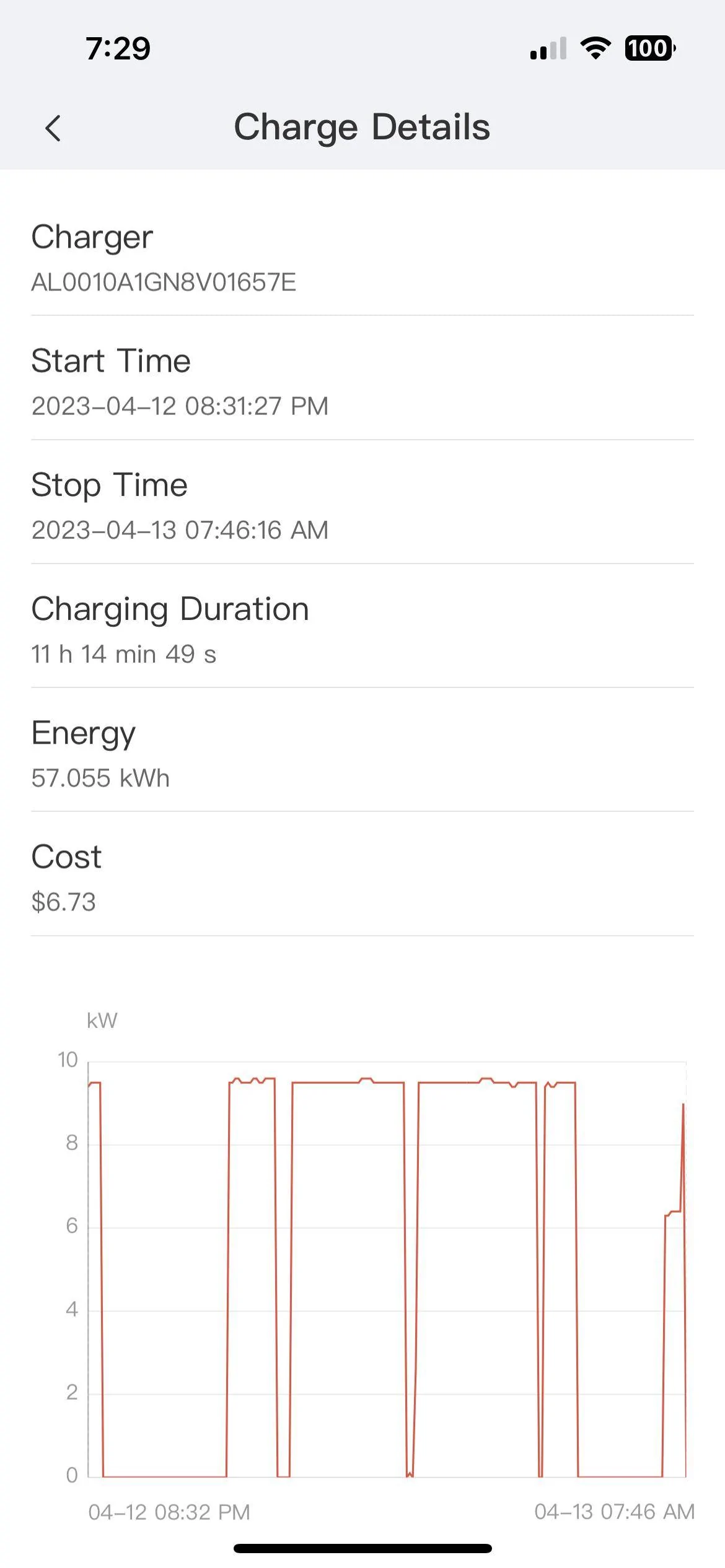
The shooting past target to 100 seems to be an Aberdeen quirk ?; I’ve tried repeatedly W1nge’s scenario and could not repro here in the US. I have screenshots - of the Porsche app, and can also produce charging graphs from my EVSE showing the charging stops well before the timer fires/expires. (see below yesterday’s session, following the setup described above).

I disabled the general profile, and also created one for work. For one-off trips, I have a disabled timer that doesn’t repeat and charges to 100%. The nice thing is that this timer is always presented in the app as being in the future - so you only need to enable it and disable the daily timer to charge to full.

Don’t enable direct charging.
Porsche Taycan How to set to profile to only charge to 85% DCA32979-58BE-4E14-AF99-487D0C921AF0
 

W1NGE

Well-Known Member
First Name
Adrian
Joined
Jan 11, 2021
Threads
53
Messages
11,015
Reaction score
6,805
Location
Aberdeen, Scotland
Vehicles
992.2, ex GTS ST owner, Macan T
Country flag
I also would like help on this topic. I feel like I have read the manual page many times over, watched video after video, but in order to really get it, it must fit someone's use case. This is mine, so help is appreciated confirming if I am thinking it right.

What I know:

- Profiles/Timers/Direct feature only applies to AC charging and my use case is just Home, no other charge locations, or no difference in cost of electricity day/night.
- Profile is what happens when you Plug say on Arrival home (4pm) and Timer is what to happen at Departure in the morning (8am).
- I am still not clear how Profiles/Timers work together, and which one follows which specifically confused by the statement in the manual when the Timer expires and the car is charged to its target, then if the car is still plugged in, then after 30 min, it will just charge it to 100%, which is what I want to avoid.

My use case:

Option 1: Arrive Home at 4pm. If I am at low SOC (say 20%) and need to have 85% by Departure at 8am. I plug it in at 4pm. Set Timer for 8am with 85% on it. Expecting that the car will be at 85% by 8am so the charging will not start until early morning. However, if I say not leaving until 9am, delayed for some reason, then after 30 min, it will just go to 100%?

Option 2: Arrive Home at 4pm. If I am at low SOC (say 20%) and need to have 85% by Departure at 8am. I plug it in at 4pm. Set General Profile to 85%. Then the car will start charging right away until it is 85% and stop. Then it will be ready to drive at 85% by 8am in this case.

Option 3: What do I need to do so it charges to 85% by 8am but A) avoiding downside of Option 1 if I depart later than 8:30am so it does not sprint to 100% and B) avoiding downside of Option 2 if I do not want it to start charging right away at 4pm as we may be using appliances at this time, and just want it to be charging at night to not overlap with other normal electrical usage.

Question: What combination of settings via Profile and Timer needed for Home AC to be at 85% by 8am, charging happens at night, and avoiding it going to 100% if 30 min passed the Timer completion.
1. A profile (location based - and call it Home), set minimum to 25% (if that's reasonable or higher if needed), set preferred times to your charging window e.g. 00:00 - 08:00

2. A timer - target charge 85%, repeat, 00:00 - 08:00

Profile is basically for setting a minimum charge level that you always feel comfortable with and so if when you connect your EVSE you are below it then charging will commence immediately until that level is reached REGARDLESS if you have a Timer set or not.

Timer let's you control the period when charging is to commence and finish along with pre-heating or cooling the interior cabin (if you want). Timer will 100% control the end time and as it is repeating nothing will happen until the next charging window (the next timer event). If you don't charge every day then no problem - if you don't connect your EVSE then any timer / profile combination will be skipped until you next connect.

Job done!


W1NGE

Well-Known Member
First Name
Adrian
Joined
Jan 11, 2021
Threads
53
Messages
11,015
Reaction score
6,805
Location
Aberdeen, Scotland
Vehicles
992.2, ex GTS ST owner, Macan T
Country flag
@SergeyIndy my use case is the same as yours, so rather than choosing from your options, here is my setup - that’s been working reliably for 3 months now (and lost of charging):
- create a home profile, with location set to your home address. Set min to 25% - or whatever you prefer: this is the SoC level the car will charge to immediately upon plugging in -if the current level is lower-. Mine is set to 30, as that gives me buffer for any unexpected departure.
- also in the profile, set preferred charging hours to whenever you don’t have other appliances running etc. mine is set to 12-6am.
- create a timer, with departure for 8am and any pre-heating/-cooling you may want. Mine is set Mon-Thu around that same time, 85% SoC.

The shooting past target to 100 seems to be an Aberdeen quirk ?; I’ve tried repeatedly W1nge’s scenario and could not repro here in the US. I have screenshots - of the Porsche app, and can also produce charging graphs from my EVSE showing the charging stops well before the timer fires/expires. (see below yesterday’s session, following the setup described above).

I disabled the general profile, and also created one for work. For one-off trips, I have a disabled timer that doesn’t repeat and charges to 100%. The nice thing is that this timer is always presented in the app as being in the future - so you only need to enable it and disable the daily timer to charge to full.

Don’t enable direct charging.
DCA32979-58BE-4E14-AF99-487D0C921AF0.png
Huh?

That is exactly what I've been preaching for the past 2.5 years - location based profile + timer!

I've now moved on with my clever new energy provider's app to get the same level of charge for 2/3 the price which creates its own profile / timer combo but use the trusty profile + timer at my other charging location.

I get the 100% nonsense with a profile only.
 

Scandinavian

Well-Known Member
First Name
Peter
Joined
Nov 3, 2019
Threads
52
Messages
3,904
Reaction score
3,549
Location
France
Vehicles
Taycan T, Aston Martin DB9, Porsche 996 C4 Cab, i4
Country flag
I get the 100% nonsense with a profile only.
That is very strange.

It works absolutely fine at what ever charge level I set 25% to 95%! It stops and stays there. Plugged in for 24 hours or a week but still at desired charge level.

I have had more trouble with the timer settings on trips with hotel charging points. They either load balance or they will not work with Porsche timers etc.
 

W1NGE

Well-Known Member
First Name
Adrian
Joined
Jan 11, 2021
Threads
53
Messages
11,015
Reaction score
6,805
Location
Aberdeen, Scotland
Vehicles
992.2, ex GTS ST owner, Macan T
Country flag
That is very strange.

It works absolutely fine at what ever charge level I set 25% to 95%! It stops and stays there. Plugged in for 24 hours or a week but still at desired charge level.

I have had more trouble with the timer settings on trips with hotel charging points. They either load balance or they will not work with Porsche timers etc.
I feel (if I had the energy) I need to try again someday.


WasserGKuehlt

Well-Known Member
Joined
Sep 7, 2022
Threads
5
Messages
2,066
Reaction score
2,456
Location
WA
Vehicles
4CT, 996C2, MacanS
Country flag
Huh?

That is exactly what I've been preaching for the past 2.5 years - location based profile + timer!
My apologies then, I thought you mentioned several times that under certain circumstances the charging goes past the timer's target.*

I've now moved on with my clever new energy provider's app to get the same level of charge for 2/3 the price which creates its own profile / timer combo but use the trusty profile + timer at my other charging location.
I've been reading that with interest; my worry, as @whitex also mentioned, is that you're disclosing your Porsche password in cleartext to another app/service. If they keep it on the device only then it's less of a problem, but this sounds like a backend/cloudy service which programs the charging. There's not much sensitive information in the MyPorsche account, should that password be leaked, but it's enough to be a bit worried: a) it reveals the car's location, and can unlock it, too and b) people tend to use patterns for passwords. (A secondary concern would be the reliability of setting the timer - connecting to my car is hit and miss ~75% success rate. Also, the car goes into private mode when it receives/applies OTA updates.)

*(It might have been @Dee - apologies to them as well, if that's not the case).
Anyway, an interesting observation that made for a somewhat stressful recent trip. Assume the following setup:
- timer A set for 7:30am, daily, to 85%
- timer B set for 7:45am, one time, to 100%

If the question is "what is the SoC at 7:50?", the answer is 86% (and rather obviously so in hindsight). Maybe they can hire an intern to fix that over the summer.
 

SergeyIndy

Well-Known Member
First Name
Sergey
Joined
Dec 19, 2021
Threads
41
Messages
2,439
Reaction score
1,822
Location
Indianapolis
Vehicles
24 Macan GTS, 23 Taycan Turbo, 20 Cayenne Turbo
Country flag
1. A profile (location based - and call it Home), set minimum to 25% (if that's reasonable or higher if needed), set preferred times to your charging window e.g. 00:00 - 08:00

2. A timer - target charge 85%, repeat, 00:00 - 08:00

Profile is basically for setting a minimum charge level that you always feel comfortable with and so if when you connect your EVSE you are below it then charging will commence immediately until that level is reached REGARDLESS if you have a Timer set or not.

Timer let's you control the period when charging is to commence and finish along with pre-heating or cooling the interior cabin (if you want). Timer will 100% control the end time and as it is repeating nothing will happen until the next charging window (the next timer event). If you don't charge every day then no problem - if you don't connect your EVSE then any timer / profile combination will be skipped until you next connect.

Job done!
This is exactly what I need. However, could you tell me how to overcome the situation, if all setup as exactly as suggested, when 8am arrives = 85% reached per timer, then 8:30am arrives = I am late to unplug, then per manual, charge restarts and goes to 100%.

Or, this is overcome by the fact that the General Profile is setup to 25% then at 8:30am, the car discovers that General Profile = 25% setting and current charge is 85% and therefore does not restart the charging process going to 100%, again per manual.
 

SergeyIndy

Well-Known Member
First Name
Sergey
Joined
Dec 19, 2021
Threads
41
Messages
2,439
Reaction score
1,822
Location
Indianapolis
Vehicles
24 Macan GTS, 23 Taycan Turbo, 20 Cayenne Turbo
Country flag
@SergeyIndy my use case is the same as yours, so rather than choosing from your options, here is my setup - that’s been working reliably for 3 months now (and lost of charging):
- create a home profile, with location set to your home address. Set min to 25% - or whatever you prefer: this is the SoC level the car will charge to immediately upon plugging in -if the current level is lower-. Mine is set to 30, as that gives me buffer for any unexpected departure.
- also in the profile, set preferred charging hours to whenever you don’t have other appliances running etc. mine is set to 12-6am.
- create a timer, with departure for 8am and any pre-heating/-cooling you may want. Mine is set Mon-Thu around that same time, 85% SoC.

The shooting past target to 100 seems to be an Aberdeen quirk ?; I’ve tried repeatedly W1nge’s scenario and could not repro here in the US. I have screenshots - of the Porsche app, and can also produce charging graphs from my EVSE showing the charging stops well before the timer fires/expires. (see below yesterday’s session, following the setup described above).

I disabled the general profile, and also created one for work. For one-off trips, I have a disabled timer that doesn’t repeat and charges to 100%. The nice thing is that this timer is always presented in the app as being in the future - so you only need to enable it and disable the daily timer to charge to full.

Don’t enable direct charging.
DCA32979-58BE-4E14-AF99-487D0C921AF0.webp
This makes total sense to me and I understand that the quirk is no longer true as presented in the manual which I only have access to for 2021 model in the Good to Know. I cannot figure out how to get a copy of any kind for 2023 model year.

I like this setup as described:

1. Ignore General Profile as it is confusing. Agree!

2. Set Home Profile (Location base to home address) with minimum preference (25% makes sense) with rationale: a) quick top up so it does not go to low for reasons such as feeding 12v battery and b) in case need to make unexpected trip in the evening so there is enough minimum for that. Perfect!

3. Set Timer (my daily preference recurrence when I go to work in the morning) to be at 85% for 8am. Then as I am ready to go, it is at 85%.

Question: Precool/Preheat cabin is nice but if it does that per someone's note when it is not plugged in, then I would not like that as a setting unless extreme cold/hot.

4. The quirk of going to 100% past 30 min mark when Timer is done hopefully no longer true. I can test that but others reporting this is no longer the case.

5. Direct Charge - do not use. I understand that this is more of on demand when needed to charge bypassing all Profiles/Timers. Great!

6. Optimized Charging - what is this about as I have no conditions that this would benefit such as communication with the power provider.

Question: Should I have that off and if not, what and when there is a benefit of having it on at a Home through a charger that will be set as a dumb charger just sending power over.
 

WasserGKuehlt

Well-Known Member
Joined
Sep 7, 2022
Threads
5
Messages
2,066
Reaction score
2,456
Location
WA
Vehicles
4CT, 996C2, MacanS
Country flag
[...]the manual which I only have access to for 2021 model in the Good to Know. I cannot figure out how to get a copy of any kind for 2023 model year.
I swear I found the manual online on Porsche.com but can't find it after a quick search. It is there, but even so I doubt much has changed functionality-wise since launch.

Question: Precool/Preheat cabin is nice but if it does that per someone's note when it is not plugged in, then I would not like that as a setting unless extreme cold/hot.
If plugged in, pre-climatization will use "shore power" - see the spike in the charging graph I posted above right at the end. If not plugged in, IME it uses about 7-10% of the battery ? - which is, indeed, a lot. But in the situations where I needed it, the drop was well worth it (see my avatar pic).

5. Direct Charge - do not use. I understand that this is more of on demand when needed to charge bypassing all Profiles/Timers. Great!
I've had to use this once with a public L2 charger, as the charging session would simply not start otherwise. I haven't debugged that, but the point is: do unset Direct Charging, but don't forget about it ;).

6. Optimized Charging - what is this about as I have no conditions that this would benefit such as communication with the power provider.

Question: Should I have that off and if not, what and when there is a benefit of having it on at a Home through a charger that will be set as a dumb charger just sending power over.
Optimized charging is for use in conjunction with a Home Energy Manager System (HEMS) - plenty of threads on that one. It's mutually exclusive with "preferred time/hours" which you'd be using in your scenario.
 

Raphie

Well-Known Member
Joined
Dec 15, 2022
Threads
30
Messages
619
Reaction score
611
Location
NL
Vehicles
Porsche Taycan 4s (21)
Country flag
Guys, we're going round in circles
- default profile (or any profile) minimum charge = minimum level with direct charging, if below direct charging starts.
- timer = the window that charging is allowed. The percentage only determines how early it need to start charging to reach your % at departure time. Let's say you want to depart at 08:00 with 85% and your car is at 30% then it knows it needs to start at 05:00 to get to 85% @ 08:00
When your car is at 70% it can start at 07:15 to be ready with 85% at 08:00

It's nothing more than that, it's not a ceiling it's a target SoC at departure time.
I've come to the conclusion that the app does not provide any more refined options to schedule charging AND hard stop at a pre defined ceiling. If you don't get in your car at 08:00 it will continue charging a bit later.

This is without 3rd PTY apps or energy managers. The energy managers I've seen so far can only schedule smart charging when the minimum slider is at 25% otherwise it will just omit the schedule and still charge directly to where ever the slider is set.
 

W1NGE

Well-Known Member
First Name
Adrian
Joined
Jan 11, 2021
Threads
53
Messages
11,015
Reaction score
6,805
Location
Aberdeen, Scotland
Vehicles
992.2, ex GTS ST owner, Macan T
Country flag
My apologies then, I thought you mentioned several times that under certain circumstances the charging goes past the timer's target.*


I've been reading that with interest; my worry, as @whitex also mentioned, is that you're disclosing your Porsche password in cleartext to another app/service. If they keep it on the device only then it's less of a problem, but this sounds like a backend/cloudy service which programs the charging. There's not much sensitive information in the MyPorsche account, should that password be leaked, but it's enough to be a bit worried: a) it reveals the car's location, and can unlock it, too and b) people tend to use patterns for passwords. (A secondary concern would be the reliability of setting the timer - connecting to my car is hit and miss ~75% success rate. Also, the car goes into private mode when it receives/applies OTA updates.)

*(It might have been @Dee - apologies to them as well, if that's not the case).
Anyway, an interesting observation that made for a somewhat stressful recent trip. Assume the following setup:
- timer A set for 7:30am, daily, to 85%
- timer B set for 7:45am, one time, to 100%

If the question is "what is the SoC at 7:50?", the answer is 86% (and rather obviously so in hindsight). Maybe they can hire an intern to fix that over the summer.
Yeah it does but not past 100% which is how I read the post.


Top