AmpedUp
Well-Known Member
- First Name
- Ryan
- Joined
- Mar 24, 2021
- Threads
- 7
- Messages
- 87
- Reaction score
- 74
- Location
- Mesa, Arizona
- Vehicles
- Taycan Turbo S, Toyota 4Runner

- Thread starter
- #1
I received a notice from Porsche North America this morning that Apple Maps EV Routing is now supported. I thought it might be useful to summarize the pros and cons with the three live-data routing options available in the N.A. market for those in the Apple ecosystem. I'd be interested to hear what others think about these options, too.
I was always disappointed with Porsche's built-in navigation system. It has some nice features, but it left me looking for other options. Last year, I got A Better Route Planner working with live battery information using a dongle plugged into the OBDII port. And this morning, I received an email from Porsche about the new integration with Apple Maps EV Routing. Each of these options will route you to your destination including charging sessions along the way, but they all have different capabilities. So here is my summary of the pros and cons of each. I hope this is helpful to drivers looking for the best option.
Porsche Navigation
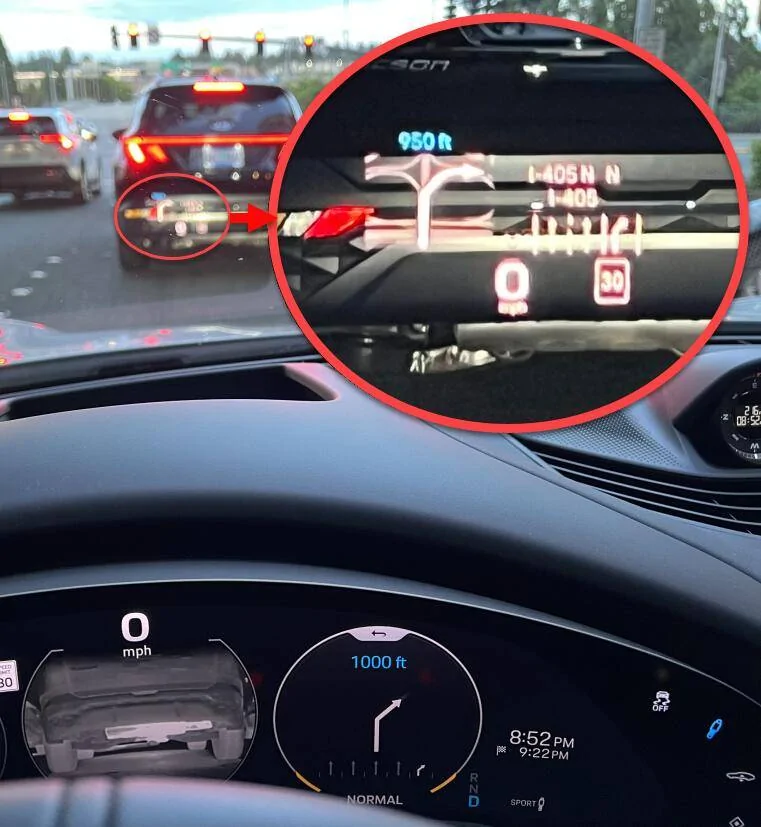
This option is available through the PCM and can display directions in various ways to the driver, including in the main dash and the heads-up display. Taking full advantage of this system requires additional options.
ABRP
This is a third-party app designed for optimizing EV routes for any make and model. It can be used with or without integration to the car's data, and considers many factors and is highly configurable when making routing plans. In my implementation, I have a Bluetooth dongle plugged into the OBDII port feeding the app with live SoC data, and this allows the app to build a profile of my vehicle's energy consumption. You can also change the configuration extensively, such as telling the app you have a roof rack installed.
Apple Maps EV Routing
Apple Maps incorporates EV routes for any make and model. It can be used with or without integration to the car's data, and considers many factors and is highly configurable when making routing plans. The Porsche app provides live SoC data and other data (see below), and this allows the app to build a profile of my vehicle's energy consumption during the trip.
I'm planning to test out the Apple solution on my next road trip and will report back. If it goes well, I might be removing the dongle and canceling my ABRP subscription soon.
What do you think? Any experience with it already?
I was always disappointed with Porsche's built-in navigation system. It has some nice features, but it left me looking for other options. Last year, I got A Better Route Planner working with live battery information using a dongle plugged into the OBDII port. And this morning, I received an email from Porsche about the new integration with Apple Maps EV Routing. Each of these options will route you to your destination including charging sessions along the way, but they all have different capabilities. So here is my summary of the pros and cons of each. I hope this is helpful to drivers looking for the best option.
Porsche Navigation
This option is available through the PCM and can display directions in various ways to the driver, including in the main dash and the heads-up display. Taking full advantage of this system requires additional options.
Pros:
- Can take advantage of screens Apple Carplay cannot, such as the heads-up display
- PCM will pre-condition the battery to accept a higher charge rate when a stop is scheduled in the route plan and you have Intelligent Range Manager
- Uses live battery readings to adjust plan in real time (e.g, add a charging stop)
- Considers changes in elevation and drive mode of the car
- Car will suggest changes to optimize your route (e.g., if you turn A/C on eco mode you can avoid a charge en route, or if you slow down to 55 mph you can avoid a charge)
Cons:
- Addresses or routing are way too frequently incorrect (e.g., routing to my old house address tried to send me down the alley behind my property, my new house shares an address with 35 other units so it sends me to wrong property, it sent me to a home address when routing to my doctor's office)
- Expensive options needed to take full advantage of features, such as the heads-up display
- Expensive options needed to take full advantage of features, such as the heads-up display
- Doesn't consider all available charging options (and non-configurable)... might even only consider Electrify America but I'm not sure
- Won't consider road conditions, wind, or other factors that might affect range
- $300 option for Intelligent Range Manager to incorporate charging along the route
ABRP
This is a third-party app designed for optimizing EV routes for any make and model. It can be used with or without integration to the car's data, and considers many factors and is highly configurable when making routing plans. In my implementation, I have a Bluetooth dongle plugged into the OBDII port feeding the app with live SoC data, and this allows the app to build a profile of my vehicle's energy consumption. You can also change the configuration extensively, such as telling the app you have a roof rack installed.
Pros:
- Routing is highly accurate, taking into account projected road surface conditions (e.g., rain / snow), wind, elevation changes, traffic, etc.
- Adjusts route using live SoC data and consumption
- Can include a wide array of charging options including Tesla adapters, RV parks, etc.
- Highly configurable - for example you can add a custom "overhead" per stop of 5 minutes or whatever number you want to account for hooking up the charger, figuring out payment, etc. Or you can tell it you want more or less frequent charging stops. You can even filter for charging speed or other factors.
- Can be displayed using CarPlay onto the car's screen
- Can mount the phone and use that as a screen, freeing up the car's screens for other purposes
Cons:
- Requires a dongle ($ and some tech experience / patience) that was not easy to set up
- Requires a subscription ($50 annually) to take full advantage of the features, including consumption of live battery SoC
- Cannot leverage driver dash or heads-up display
- Cannot precondition battery for faster charge speeds (because you cannot use ABRP and native navigation at the same time)
- Cannot precondition battery for faster charge speeds (because you cannot use ABRP and native navigation at the same time)
- Cannot determine the car's driving mode, but it will eventually adjust projections based on consumption during the trip
- OBDII port cannot be used for other purposes (e.g., car monitoring device, insurance discount device such as those from Progressive)
Apple Maps EV Routing
Apple Maps incorporates EV routes for any make and model. It can be used with or without integration to the car's data, and considers many factors and is highly configurable when making routing plans. The Porsche app provides live SoC data and other data (see below), and this allows the app to build a profile of my vehicle's energy consumption during the trip.
Pros:
- Routing is highly accurate, taking into account projected road surface conditions (e.g., rain / snow), wind, elevation changes, traffic, etc.
- Additionally, Porsche claims it takes into account A/C, heating, driving mode and "other factors" that may affect range, but I don't know what the other factors are
- Adjusts route using live SoC data and consumption rate
- Can include a wide array of charging options including Tesla adapters, RV parks, etc.
- I'm ASSUMING it is configurable, but as this is just out today, I haven't played with it much yet
- Can be displayed using CarPlay onto the car's screen
- Can mount the phone and use that as a screen, freeing up the car's screens for other purposes
- Free to use
Cons:
- Cannot leverage driver dash or heads-up display
- Cannot precondition battery for faster charge speeds (because you cannot use Apple Maps and native navigation at the same time)
- Have had issues with Apple Maps routing down alleys or other such nonsense, but this is not specific to this integration
- Cannot precondition battery for faster charge speeds (because you cannot use Apple Maps and native navigation at the same time)
- Have had issues with Apple Maps routing down alleys or other such nonsense, but this is not specific to this integration
My conclusion is that Apple Maps might be the best option for most people. If you only want to charge at Electrify America (to take advantage of free charging) and want to charge at the highest speeds (despite the potential for battery range damage), OR you value the heads-up display then the in-car navigation is the way to go. Otherwise, I think Apple Maps may be the best option because it's free, seems to incorporate more data than ABRP can get from a dongle, and otherwise seem to provide a similar experience as ABRP.I'm planning to test out the Apple solution on my next road trip and will report back. If it goes well, I might be removing the dongle and canceling my ABRP subscription soon.
What do you think? Any experience with it already?
Sponsored