Sponsored

Battery capacity and range estimates

f1eng

Well-Known Member
First Name
Frank
Joined
Aug 19, 2021
Threads
48
Messages
4,765
Reaction score
8,335
Location
Oxfordshire, UK
Vehicles
Taycan CT4S, Ferrari 355, Merc 500E, Prius PHV
Country flag
Taycan and if you are not using the route planner - ie using Waze or something else, you dont get that range estimate.
Ah so you do expect your car to be clairvoyant.
You are going to be disappointed forever I fear ;)

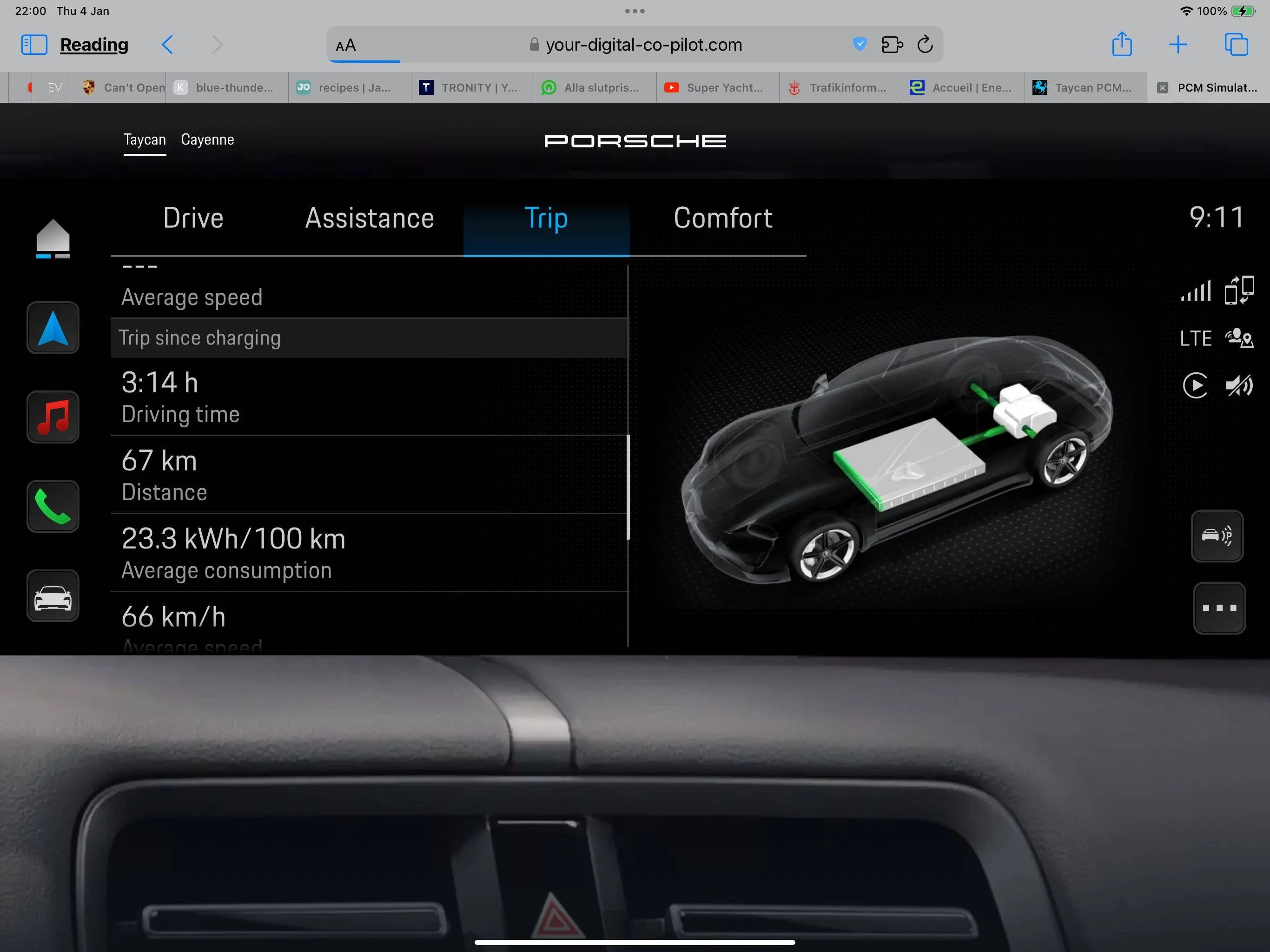
There is a page on the dash available to select that shows how a trip is going that I look at - can’t remember where I found it but I have it on the 3 page choice on the PCM along with map and music.
Sponsored

 

Dr Bob

Well-Known Member
First Name
Andy
Joined
Sep 16, 2023
Threads
6
Messages
123
Reaction score
174
Location
Falkirk
Vehicles
Taycan Turbo
Country flag
Strange???

When you say that it still shows the same range, have you then entered a destination going up or one going down in the PCM? My car has always done this since 2020. Standing in the garage I can easily get 3 ranges displayed.

1. No destination set
2. Destination going to the coast > greater. Consumption can be negative by a few kWh going Down. A drive of e0 km can show 10 kWh/100 km!

3. Destination to mountain pass. <. Less. Consumption can easily get up to 35 -45 kWh/100 km

It will also change range depending on which drive mode I choose and how I set the climate control.Range can differ by 1030 km depending on weather etc etc.

“””So ask me what range I get from my car, and I will answer the figure you like best??”””

If you do not see any difference when entering a destination, then maybe there is some data exchange missing in your car?

I agree that there is a lot of more data available in the Tesla, so I could adjust during style when navigating yo a destination. I mainly just use the battery %. I have so many charging stations around me. For Tesla SuC , there are about 36 charge points within 25 km radius. plus another 50 >150 kW CCS . And more stations are popping up at supermarkets like Leclerc,Carrefour, Lidl etc. Thanks to be close to the main route to Italy I guess.
Thanks Peter.

Interesting. I always go the downhill way when we go on a long trip from home so never tried what you are saying. We are now down in England for a couple of months so cant test it.
What I do see is no change in range on the guessometer as I
- go faster or slower (ie in my post above, driving at 50 mph instead of 70mph) either with a route planned or not.
- either have a destination set with a charger or not - you would expect a reduction in range if its heating the battery to 40°C
- go up and down hills with no route set (ie 1000ft up or down)
- prepare to start a long run (ie 300+ miles) compared to the days where I am just popping down the road for few cans of beer. The car then doesnt know where I am heading on the day to day driving where the range in the winter is significantly less than 215 miles - the number it nomally defaults to (assuming 100% SoC).
The tesla always adjusted its expected range with the type of driving you had recently done or were doing.

I was spoilt with the graphs you could get on the tesla.

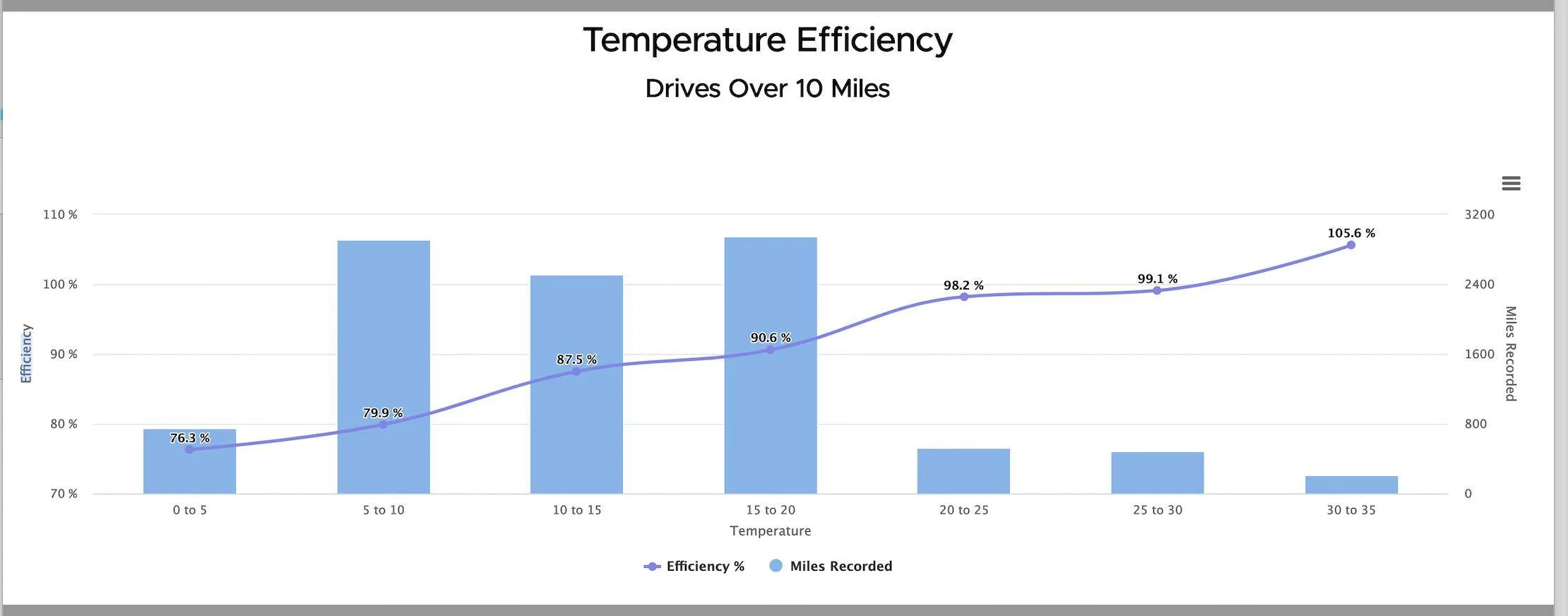
Some really interesting information. Here's a graph of performance against temp

Porsche Taycan Battery capacity and range estimates Screenshot 2024-01-04 at 16.53.15
 
Last edited:

Dr Bob

Well-Known Member
First Name
Andy
Joined
Sep 16, 2023
Threads
6
Messages
123
Reaction score
174
Location
Falkirk
Vehicles
Taycan Turbo
Country flag
You are going to be disappointed forever I fear ;)

There is a page on the dash available to select that shows how a trip is going that I look at - can’t remember where I found it but I have it on the 3 page choice on the PCM along with map and music.
And that is exactly the problem Frank. I am disappointed! I have to use the planner to see the range!!!! Why cant I see the range without the planner? I think I have seen you dont do many 300+ mile trips so you wont be faced with some of the limitations of the planner. It takes you to chargers that are not available ie Porsche South Lakes whose chargers are only available office hours or chargers that are really busy. The planner makes you fidle the destinations if you want to use Range mode and choose your own charger stops (Mrs Bob has her peferred sites to stop at). The planner software is not brilliant but I do use it . Alternatively, turn it off and use Waze or ABRP.

With the Tesla, you could see from the graph (was it Whr/mile? ...I cant remember) how well you were doing over the last 5/15/or 30 miles - 250 W/m was equiv to 300 mile range, 300 Whr/m was near 250 mile range and 200 Whr/m was 350 mile range. This was not linked to having to use the route planner. Yes, it wouldnt show you your total range but it was pretty accurate if you carried on driving at that power output. I could drive up the M6 in the summer with it showing 220 Whr/m over the last 30 miles on a flat section of road and thinking my range was 320+ miles - or in the winter it showing 450 Whr/m thinking I am going to need to stop a few times on this trip! This is why I say that the Taycan doesnt show nearly the same amount of info on range as the Tesla did.

Interested in the page on the dash showing how a trip is going. Maybe this is what I am missing!! Can you do a screen shot?
 

f1eng

Well-Known Member
First Name
Frank
Joined
Aug 19, 2021
Threads
48
Messages
4,765
Reaction score
8,335
Location
Oxfordshire, UK
Vehicles
Taycan CT4S, Ferrari 355, Merc 500E, Prius PHV
Country flag
Interested in the page on the dash showing how a trip is going. Maybe this is what I am missing!! Can you do a screen shot?
I will next time I am in the car. It shows how far you’ve gone, average speed and overall consumption since starting.

I haven’t had a Tesla but if it is predicting range on an unknown route as it goes along it doesn’t have the data to actually be accurate even if it displays something. My most common route is to visit my daughter on Anglesey, about 60% motorway then through Snowdonia. Any prediction at half distance in either direction would be wrong if the route isn’t known by the car system.

On the long routes I take I work out the route myself with the help of ABRP, ZapMap and a physical map to make sure I want to travel that way - I am retired and neither shortest nor fastest on sat-nav often appeal. They don’t have a “nice route any normal person would enjoy” option yet :)

I then use the PCM to navigate to the next charger location which may not be in the Porsche sat nav as a charger so don’t always get preheated.
I only stop at Porsche centres in working hours anyway otherwise no coffee and eye candy.
 

Scandinavian

Well-Known Member
First Name
Peter
Joined
Nov 3, 2019
Threads
52
Messages
3,904
Reaction score
3,549
Location
France
Vehicles
Taycan T, Aston Martin DB9, Porsche 996 C4 Cab, i4
Country flag
What I do see is no change in range on the guessometer as I
- go faster or slower (ie in my post above, driving at 50 mph instead of 70mph) either with a route planned or not.
- either have a destination set with a charger or not - you would expect a reduction in range if its heating the battery to 40°C
I have not checked th GOM in these scenarios but I have seen that the DoC at destination can vary a lot. If I have set a destination and it originally shows 15% at destination, it certainly changes that value if I hammer it on The Autobahn. So much so that it suddenly adds another charging stop if I want to maintain the set SoC at destination. But no idea about the GOM, but guessing it would change. Same when I get into STAU on the Autobahn.

go up and down hills with no route set (ie 1000ft up or down)
I am not home now but will try to look at that next trip down hill. I have a feeling it does change in so much that it will have the same range as at the start despite having driven for 15- 20 km. The value may not adjust, but will check.

The graph shown from the Tesla is a separate app or website though isn’t it? But still yes the Tesla provides such a ton of data and probably much much more to Freemount then we ever can imagine. It is an iPad on wheels!

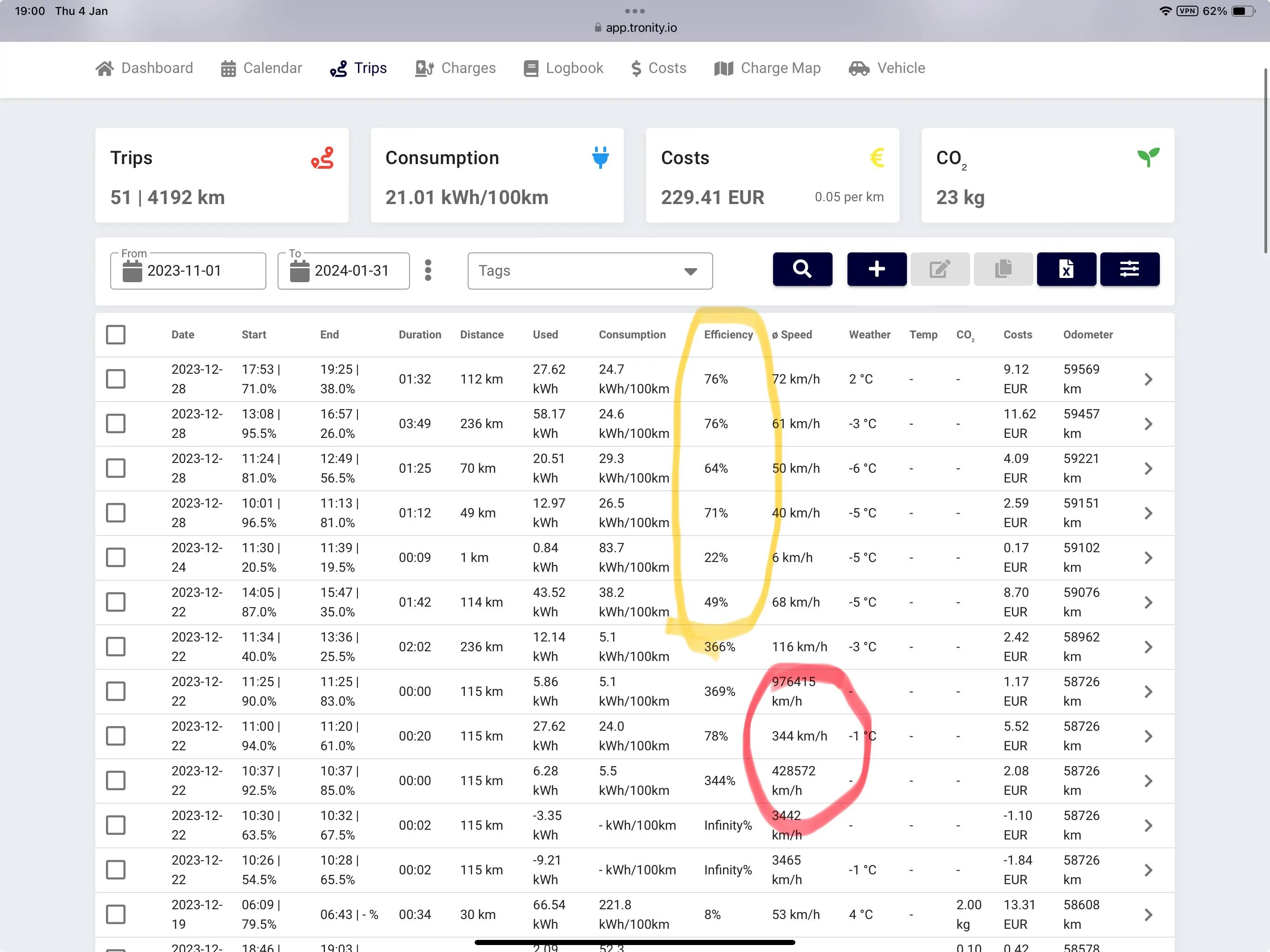
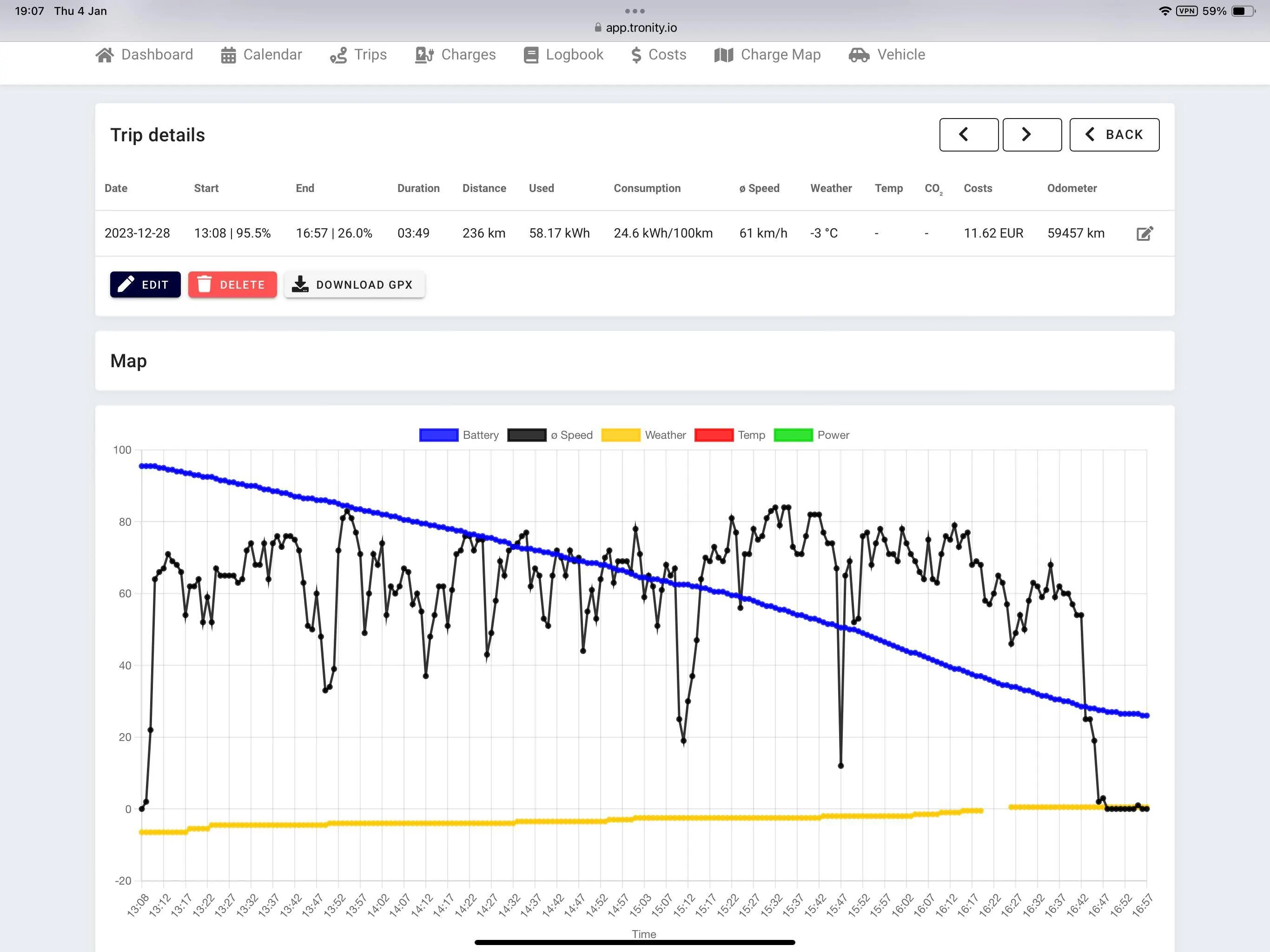
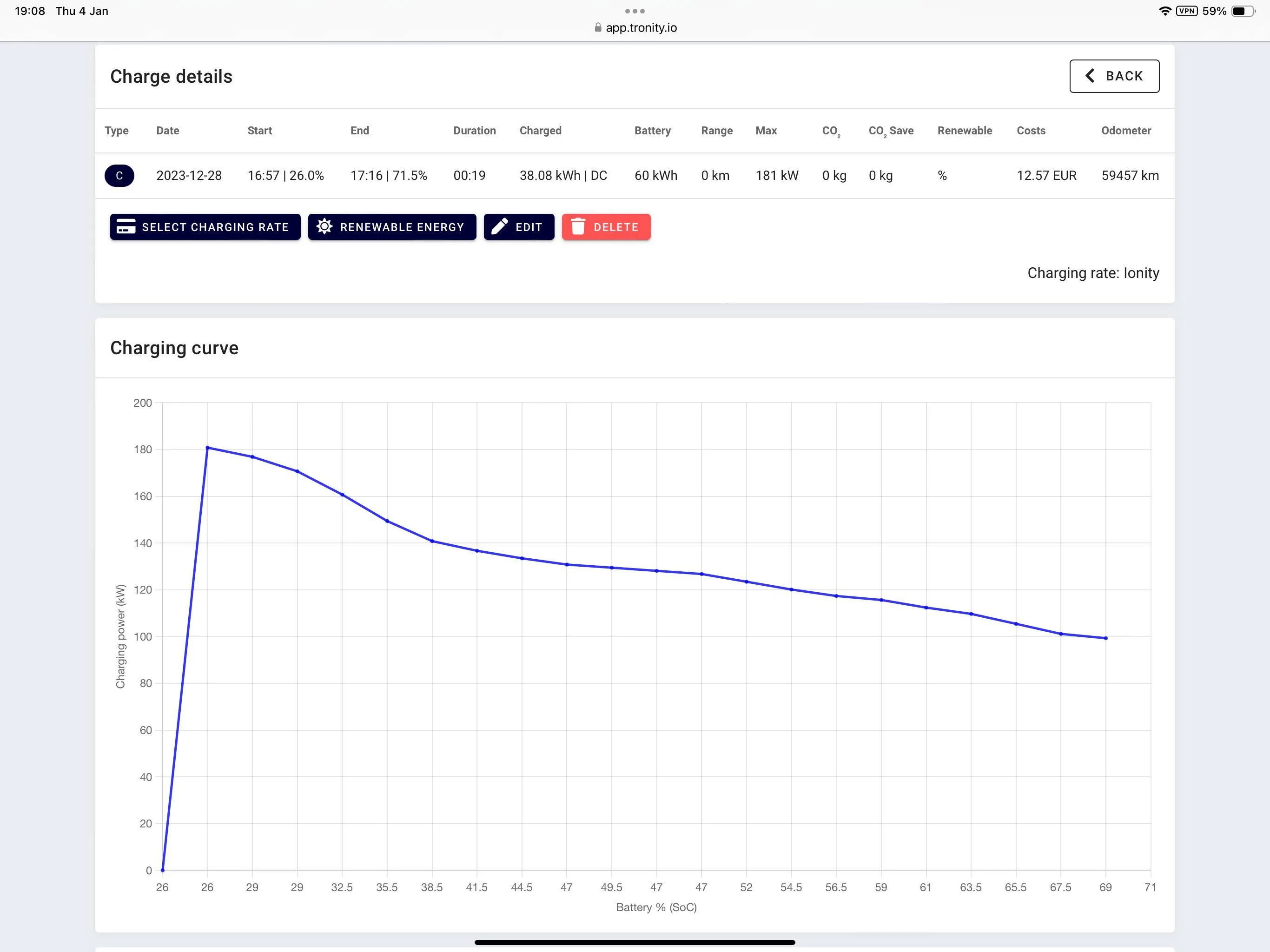
There is also a service where you can get a lot of info from the Taycan , efficiency, charging stats and speed averigaing etc. But that all relief on an API and information from the Porsche servers. We all know how reliabilitet the Porsche app workshop with the servers so the Tronity app stuffers the same. They try Yard to provocera useful inf and stats, but are relying on Porsche to share basic data. And how stable the communications between the car and the servers are. Unfortunately there is a lot to be desired there.

It is no way near what Tesla can provide, but there is some useful info in this. This tool was very helpful when I got the battery problem to convince Porsche that there was a problem. There app did not show anything at all.


Porsche Taycan Battery capacity and range estimates IMG_1876


Porsche Taycan Battery capacity and range estimates IMG_1877
Porsche Taycan Battery capacity and range estimates IMG_1878


WasserGKuehlt

Well-Known Member
Joined
Sep 7, 2022
Threads
5
Messages
2,066
Reaction score
2,456
Location
WA
Vehicles
4CT, 996C2, MacanS
Country flag
to Peter -and the others who think the Tayan is better at information on range

I agree the Taycan is good on estimating total range - BUT only via the route planner and the expected SoC at the end of the Journey - and is better than the Tesla in this respect.

However, my main gripe is that that is that is all you get with the Taycan and if you are not using the route planner - ie using Waze or something else, you dont get that range estimate. You are then left with the guessometer which is pretty poor.
Sorry, I'm trying to get your point, please be patient. So you agree the car's own range estimation when it's aware of the destination is correct, and you'd like to see the same when you're using a different navigation app? That is, when the car's own route planner is inactive?

The concerns I read earlier in this thread amounted to "range is not adjusted for current speed". I don't think anyone would want to see "remaining range: 100mi", "remaining range: 2mi", "remaining range: 240mi" as one modulates the pedal, overtakes or is coasting. That is, there is a smoothing of the instant prediction at various points in time - which is good for usability. The car can't possibly know if you're doing 100mph for a second, a minute or until it runs dry. At some point, the remaining range will reflect that, but it needs a long-enough sampling interval to look back to.
 

whitex

Well-Known Member
Joined
Jul 30, 2021
Threads
87
Messages
8,203
Reaction score
7,237
Location
WA, USA
Vehicles
2023 Taycan TCT, 2024 Q8 eTron P+
Country flag
However, my main gripe is that that is that is all you get with the Taycan and if you are not using the route planner - ie using Waze or something else, you dont get that range estimate. You are then left with the guessometer which is pretty poor. I prefer Waze on long trips as I can then choose where I stop, put in a destination 300 miles away and not worry about the range setting trying to slow me down!
Taycan has no clue where you're going if using Waze, hence it cannot account for current state of charge, battery temps, topography, or weather. Your gripe is that Waze does not give you range estimates (for which it would need data from the car, like Apple Maps gets).


Murph7355

Well-Known Member
First Name
Andy
Joined
Feb 1, 2022
Threads
25
Messages
1,777
Reaction score
1,552
Location
UK
Vehicles
GTS ST; TVR Griffith 500; Caterham 7; Volvo XC90
Country flag
And that is exactly the problem Frank. I am disappointed! I have to use the planner to see the range!!!! Why cant I see the range without the planner? I think I have seen you dont do many 300+ mile trips so you wont be faced with some of the limitations of the planner. It takes you to chargers that are not available ie Porsche South Lakes whose chargers are only available office hours or chargers that are really busy. The planner makes you fidle the destinations if you want to use Range mode and choose your own charger stops (Mrs Bob has her peferred sites to stop at). The planner software is not brilliant but I do use it . Alternatively, turn it off and use Waze or ABRP.

With the Tesla, you could see from the graph (was it Whr/mile? ...I cant remember) how well you were doing over the last 5/15/or 30 miles - 250 W/m was equiv to 300 mile range, 300 Whr/m was near 250 mile range and 200 Whr/m was 350 mile range. This was not linked to having to use the route planner. Yes, it wouldnt show you your total range but it was pretty accurate if you carried on driving at that power output. I could drive up the M6 in the summer with it showing 220 Whr/m over the last 30 miles on a flat section of road and thinking my range was 320+ miles - or in the winter it showing 450 Whr/m thinking I am going to need to stop a few times on this trip! This is why I say that the Taycan doesnt show nearly the same amount of info on range as the Tesla did.

Interested in the page on the dash showing how a trip is going. Maybe this is what I am missing!! Can you do a screen shot?
Trip meter in the third tube. You can press the right button and then show details since your journey started, last charge, total etc.

Consumption updates in there.

The 4 line custom view may get closer still to what you note.
 

Dr Bob

Well-Known Member
First Name
Andy
Joined
Sep 16, 2023
Threads
6
Messages
123
Reaction score
174
Location
Falkirk
Vehicles
Taycan Turbo
Country flag
Sorry, I'm trying to get your point, please be patient. So you agree the car's own range estimation when it's aware of the destination is correct, and you'd like to see the same when you're using a different navigation app? That is, when the car's own route planner is inactive?
Not quite.
I agree the car's own estimation is very good when its aware of its destination
but
It should also be able to give you information (not from Waze etc - but from its own data) on your current/previous energy usage - as the Tesla does. See the comment after the next quote.


The concerns I read earlier in this thread amounted to "range is not adjusted for current speed". I don't think anyone would want to see "remaining range: 100mi", "remaining range: 2mi", "remaining range: 240mi" as one modulates the pedal, overtakes or is coasting. That is, there is a smoothing of the instant prediction at various points in time - which is good for usability. The car can't possibly know if you're doing 100mph for a second, a minute or until it runs dry. At some point, the remaining range will reflect that, but it needs a long-enough sampling interval to look back to.
The tesla gives you a choice of sampling ranges of last 5 miles, last 10 miles and last 30 miles. I always used the last 30 miles (ie around 10% of charge). That smoothing is fine. If you want more detail then you can in press of a 'button' go to 5 miles.
The tesla is great on this information and pretty cr&p on everything else compared to the Taycan.


Taycan has no clue where you're going if using Waze, hence it cannot account for current state of charge, battery temps, topography, or weather. Your gripe is that Waze does not give you range estimates (for which it would need data from the car, like Apple Maps gets).
It can account for the last 30 miles driven which gives you information to work out your current driving range (as the Tesla does) - but this isnt done by the Taycan. On a motorway, in the Tesla you can see the average of the last 30 miles is say 250 Whr/mile which equates to a 300mile total range. if you keep going with similar driving/conditions/ same elevation then you have a pretty good estimate of range. When you know what your current usage is, you learn quickly then what the effect of other variable (ie battery heating on the Tesla increased energy use by 6-8% (if I remember rightly!) in 20°C ish temps.
I can guess it in the Taycan by working out how many miles I did in the last 10% of charge - but why cant the software do that for me? That is why I keep saying the Taycan information is not a good as the Tesla.
My gripe isnt that Waze doesnt give me range - when did I say that? My gripe is the Taycan doesnt report active power use other than via the end SoC on the route data.


Trip meter in the third tube. You can press the right button and then show details since your journey started, last charge, total etc.

Consumption updates in there.

The 4 line custom view may get closer still to what you note.
Ah well done!
I need to pay attention to that.
 

Hirschaj

Well-Known Member
First Name
Jim
Joined
Sep 5, 2021
Threads
68
Messages
2,223
Reaction score
2,617
Location
Austin TX
Vehicles
2022 Taycan CT4 - Mamba Green, 2022 Challenger
Country flag
The tesla gives you a choice of sampling ranges of last 5 miles, last 10 miles and last 30 miles. I always used the last 30 miles (ie around 10% of charge). That smoothing is fine. If you want more detail then you can in press of a 'button' go to 5 miles.
This sounds pretty cool. I’d like it if Porsche had something like this.
 

WasserGKuehlt

Well-Known Member
Joined
Sep 7, 2022
Threads
5
Messages
2,066
Reaction score
2,456
Location
WA
Vehicles
4CT, 996C2, MacanS
Country flag
Not quite.
It should also be able to give you information (not from Waze etc - but from its own data) on your current/previous energy usage - as the Tesla does.

[...]

The tesla gives you a choice of sampling ranges of last 5 miles, last 10 miles and last 30 miles. I always used the last 30 miles (ie around 10% of charge). That smoothing is fine. If you want more detail then you can in press of a 'button' go to 5 miles.
As @Scandinavian pointed out in the meantime, the Taycan shows you that data for the current trip. 5/10/30 mi is a random sampling method, not really relevant if that spans different trips (in different weather conditions, destinations etc.)
 

Dr Bob

Well-Known Member
First Name
Andy
Joined
Sep 16, 2023
Threads
6
Messages
123
Reaction score
174
Location
Falkirk
Vehicles
Taycan Turbo
Country flag
Is this the type of Ingo you are looking for? Not as detailed as Tesla but gives some info
IMG_1879.png
Thanks Peter,
I'll check that out. Andy (Murphxxx) had said you can see data in tube 3 which I had seen once but I will have a look at both.
Sponsored


Top