Sponsored

Porsche maps versus Google/Apple maps

IrwinJ

Well-Known Member
First Name
Irwin
Joined
Apr 17, 2022
Threads
43
Messages
197
Reaction score
71
Location
Asheville NC
Vehicles
Mercedes SL550
Country flag
in terms of navigating a route (as opposed to simply how the map looks and what landmarks/features it shows), how would you compare the navigation skills of the Porsche app in terms of choosing the best route to either Apple Maps or Google Maps?

I ask because if Apple or Google maps are superior in terms of navigation to Porsche, that would be the only reason I'd consider using Apple Car Play.
Sponsored
 

Ambroos

Well-Known Member
Joined
Jan 4, 2022
Threads
3
Messages
268
Reaction score
266
Location
Seattle / Belgium
Vehicles
Taycan (RWD)
Country flag
In situations with heavy traffic requiring rerouting nothing beats Google Maps (and maybe Apple Maps / Waze). The Porsche navigation gets some traffic information but it's not used to navigate all that well. As soon as I see the built-in navigation report traffic I switch to Google Maps.

Besides that, for most driving (especially long distance road trips), the built-in navigation is great and has several advantages you don't get with Android Auto or CarPlay navigation:

- preconditions the battery when navigating to fast chargers
- instructions/map in cockpit and heads-up display
- very accurate range estimates (really, they're spot on)
- passenger display copilot having a map
- built-in charging planner / range manager (mediocre to good depending on your region)

Downsides:

- kinda slow
- half-baked traffic routing, road closures are often missing
- "Hey Porsche" assistant understands you less than half the time
- needs actual map updates (automatic in the background)
- sending a destination from your phone to the car sometimes takes multiple minutes before it arrives

In summary: I use it only when I'm not in or expecting traffic, or when I need an accurate range estimates.
 
OP
OP
IrwinJ

IrwinJ

Well-Known Member
First Name
Irwin
Joined
Apr 17, 2022
Threads
43
Messages
197
Reaction score
71
Location
Asheville NC
Vehicles
Mercedes SL550
Country flag
In situations with heavy traffic requiring rerouting nothing beats Google Maps (and maybe Apple Maps / Waze). The Porsche navigation gets some traffic information but it's not used to navigate all that well. As soon as I see the built-in navigation report traffic I switch to Google Maps.

Besides that, for most driving (especially long distance road trips), the built-in navigation is great and has several advantages you don't get with Android Auto or CarPlay navigation:

- preconditions the battery when navigating to fast chargers
- instructions/map in cockpit and heads-up display
- very accurate range estimates (really, they're spot on)
- passenger display copilot having a map
- built-in charging planner / range manager (mediocre to good depending on your region)

Downsides:

- kinda slow
- half-baked traffic routing, road closures are often missing
- "Hey Porsche" assistant understands you less than half the time
- needs actual map updates (automatic in the background)
- sending a destination from your phone to the car sometimes takes multiple minutes before it arrives

In summary: I use it only when I'm not in or expecting traffic, or when I need an accurate range estimates.
Thanks, that’s exactly what I wanted to know!
 

daveo4EV

Well-Known Member
First Name
David
Joined
Jan 28, 2019
Threads
192
Messages
7,006
Reaction score
10,476
Location
Santa Cruz
Vehicles
Cayenne Hybrid, 911(s) GT3/Convertable
Country flag
i use porsche nav to estimate battery % at destination and the other reasons mentioned above

if i don’t care about the EV stats waze/apple/google are the way. to go
 
  • Like
Reactions: B61

Scandinavian

Well-Known Member
First Name
Peter
Joined
Nov 3, 2019
Threads
52
Messages
3,904
Reaction score
3,549
Location
France
Vehicles
Taycan T, Aston Martin DB9, Porsche 996 C4 Cab, i4
Country flag
In situations with heavy traffic requiring rerouting nothing beats Google Maps (and maybe Apple Maps / Waze). The Porsche navigation gets some traffic information but it's not used to navigate all that well. As soon as I see the built-in navigation report traffic I switch to Google Maps.

Besides that, for most driving (especially long distance road trips), the built-in navigation is great and has several advantages you don't get with Android Auto or CarPlay navigation:

- preconditions the battery when navigating to fast chargers
- instructions/map in cockpit and heads-up display
- very accurate range estimates (really, they're spot on)
- passenger display copilot having a map
- built-in charging planner / range manager (mediocre to good depending on your region)

Downsides:

- kinda slow
- half-baked traffic routing, road closures are often missing
- "Hey Porsche" assistant understands you less than half the time
- needs actual map updates (automatic in the background)
- sending a destination from your phone to the car sometimes takes multiple minutes before it arrives

In summary: I use it only when I'm not in or expecting traffic, or when I need an accurate range estimates.
Well said!

I actually try to run Google maps on the phone and not connect Apple CarPlay. It does not work 100% gor me since the GPS signal seems too weak that way?? But Google maps certainly picks up trafgic much better and reroutes.

All other reasons for using the built in nav system. And the arrival SIC has been very accurate ( within a percentage or two) for trips of more than 250 km’s.
 
  • Like
Reactions: B61


OP
OP
IrwinJ

IrwinJ

Well-Known Member
First Name
Irwin
Joined
Apr 17, 2022
Threads
43
Messages
197
Reaction score
71
Location
Asheville NC
Vehicles
Mercedes SL550
Country flag
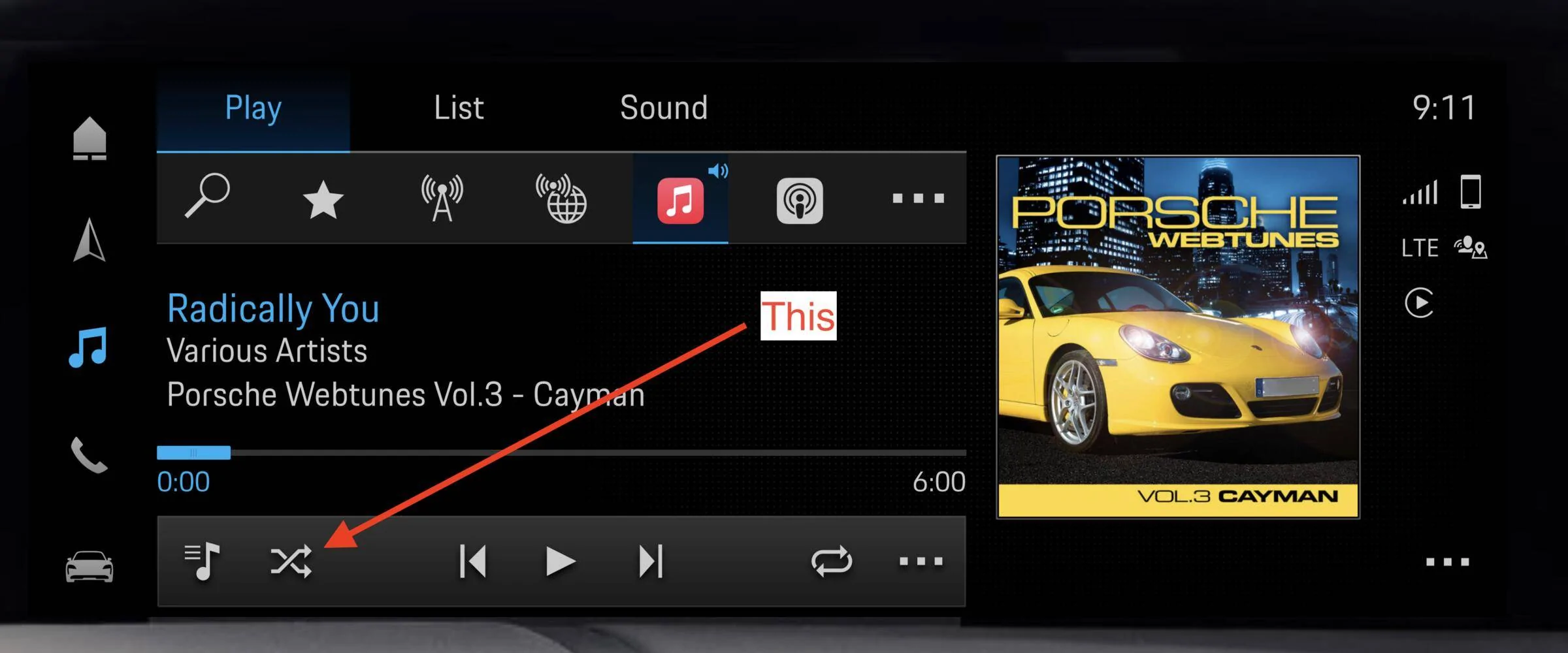
If I could just figure a way to shuffle my Apple Music songs when playing it within PMC then I’d be happy, would have zero use of Car Play
 
OP
OP
IrwinJ

IrwinJ

Well-Known Member
First Name
Irwin
Joined
Apr 17, 2022
Threads
43
Messages
197
Reaction score
71
Location
Asheville NC
Vehicles
Mercedes SL550
Country flag
I saw that, but what is it shuffling? My music library consists separately of my playlists and then generally, Songs which is all the tunes in my library (as opposed to the massive Apple Music library). So when I push that button, is it juggling my Songs, or is it juggling my Songs and playlists?


Pozuelo

Well-Known Member
First Name
Roberto
Joined
Feb 14, 2020
Threads
94
Messages
689
Reaction score
952
Location
Madrid, Spain
Vehicles
2025 Taycan Turbo Sport Turismo, 2018 AMG E63S Estate, 2023 AMG A45S
Country flag
From my experience it only shuffles the first part of the playlist (songs beginning with "A" and a few with "B" on my alphabetic playlist...
 
OP
OP
IrwinJ

IrwinJ

Well-Known Member
First Name
Irwin
Joined
Apr 17, 2022
Threads
43
Messages
197
Reaction score
71
Location
Asheville NC
Vehicles
Mercedes SL550
Country flag
From my experience it only shuffles the first part of the playlist (songs beginning with "A" and a few with "B" on my alphabetic playlist...
I suspected that because when I clicked the shuffle icon it didn't seem to do much.

Of course I could play Apple Music on my phone without going through Car Play, shuffle on the phone, and it would play out my speakers since the phone is connected via blue tooth.
Sponsored


Top