ciaranob
Well-Known Member
- Joined
- Jul 3, 2021
- Threads
- 83
- Messages
- 3,547
- Reaction score
- 2,639
- Location
- Houston, TX
- Vehicles
- CT4S 2022 Mini Cooper S 2024 Electric in 2025/6

- Thread starter
- #1
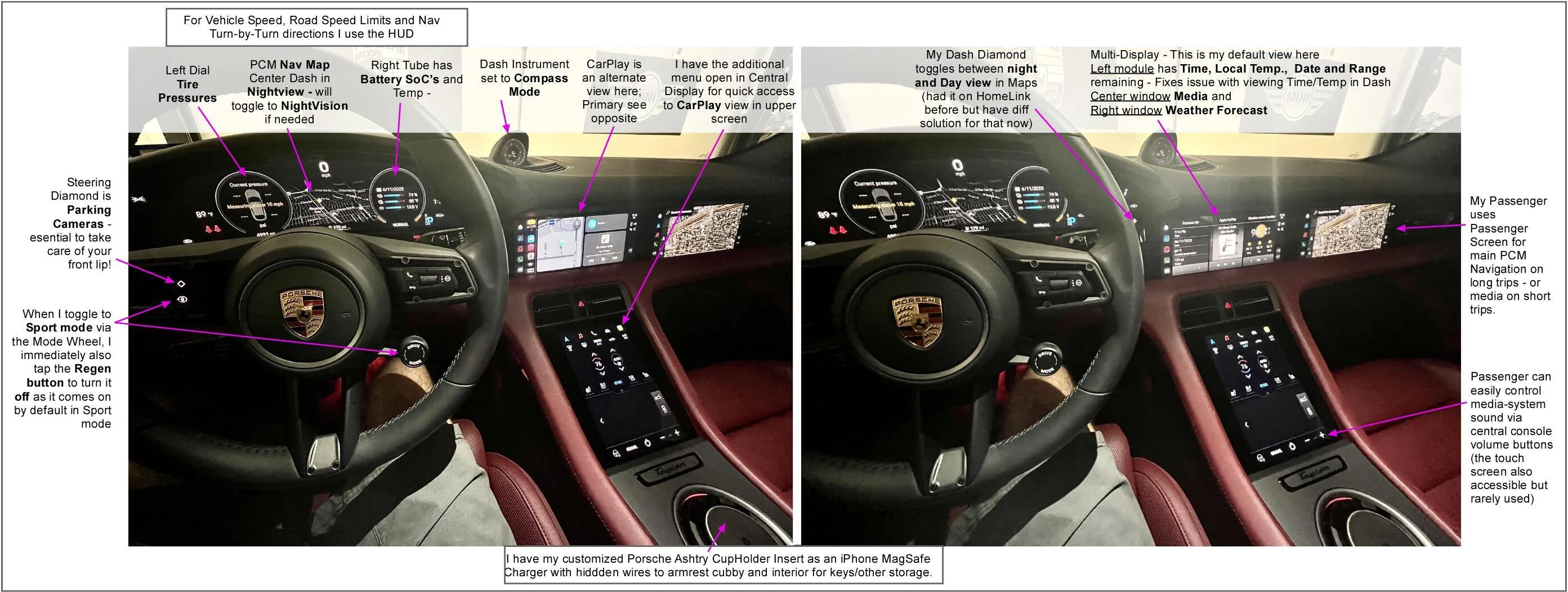
Not a new thread theme but thought that after driving this car for 1.5 years I'd share my most useful day-to-day screen layouts - including Diamond button assignations. My car does have HUD and the Passenger Screen which influence my layout. I also have a separate HomeLink solution so despite it working in the car I don't actually need it (only relevant as I previously had a Diamond button assigned to HomeLink).
Might be useful to newer owners looking for an optimal and efficient layout of the multiple info streams your car can provide.
On cross country/State trips I am always (to date) with my wife who can avail of the Passenger Screen to modify/update any planned routes using the full PCM navigation map whereas in my primary layout I only use the dash map view (traffic congestion, road works etc) and occasionally might toggle to Apple Maps via CarPlay. Waze is always on with CarPlay and feeds info from the background.
Of course all of this a very personal thing but curious what other 'long term owners' find most efficient:

Might be useful to newer owners looking for an optimal and efficient layout of the multiple info streams your car can provide.
On cross country/State trips I am always (to date) with my wife who can avail of the Passenger Screen to modify/update any planned routes using the full PCM navigation map whereas in my primary layout I only use the dash map view (traffic congestion, road works etc) and occasionally might toggle to Apple Maps via CarPlay. Waze is always on with CarPlay and feeds info from the background.
Of course all of this a very personal thing but curious what other 'long term owners' find most efficient:
Sponsored
Last edited: