
Sponsored

Intelligent Octopus Go - Working!

Cappo

Active Member
First Name
Chris
Joined
Nov 2, 2024
Threads
2
Messages
26
Reaction score
13
Location
Bristol, UK
Vehicles
Taycan 4S
Country flag
I took delivery of my Taycan 4S last week. Really loving it so far. Awesome car ??

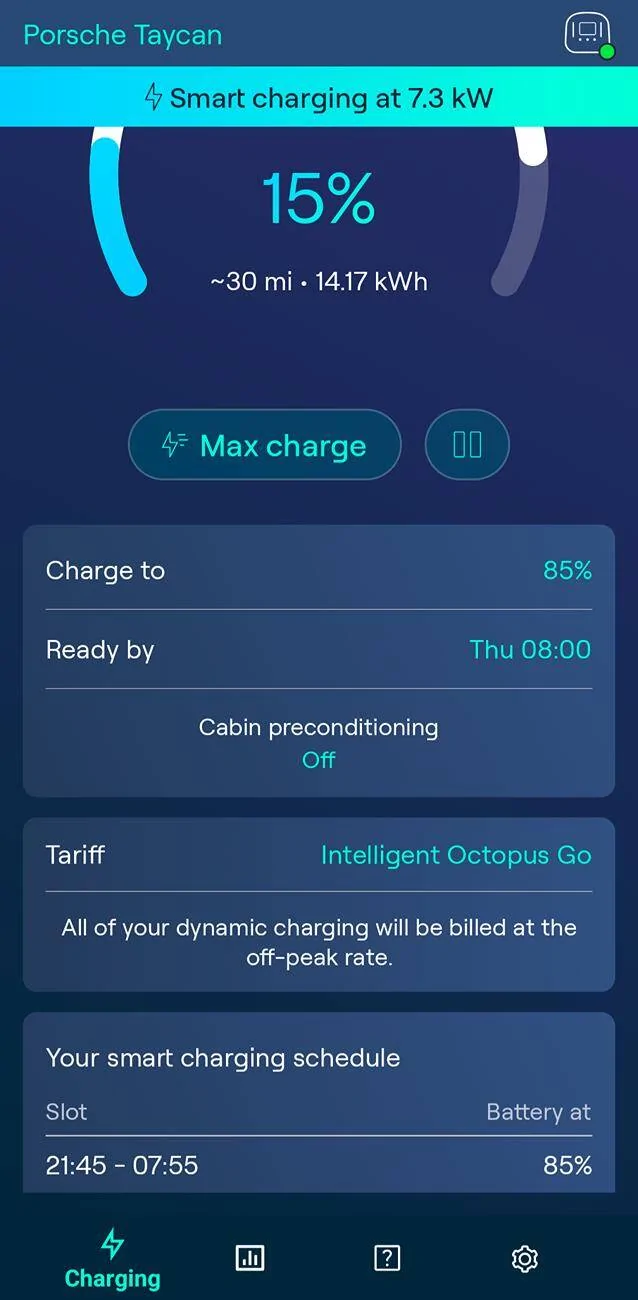
Just thought I'd give anyone who is on the Intelligent Octopus tariff a heads up that it seems to be communicating nicely with my Taycan at the moment.

When I switched the car to the Taycan in my Ohme app (from my wife's car) it prompted me to sign in to my Porsche account. Now it sees the state of charge and is doing all charging at the cheap off-peak rate. Fingers crossed it continues to work! Not sure if you need Connected Services for it to work?

Let us know if it's working for you!

Porsche Taycan Intelligent Octopus Go - Working! 1000000306
Sponsored


nxdtravis

Member
First Name
Neil
Joined
Nov 8, 2024
Threads
3
Messages
19
Reaction score
27
Location
Northumberland
Vehicles
Porsche Taycan 4S
Country flag
I assume your car is under 3 years old and has Porsche Connect functions. As mine is 4 year old and I don’t subscribe to Porsche App Octopus App cannot communicate with my car. However I am still able to take advantage of cheap overnight electricity by using Porsche App timers to start charging.
 

Kendo70

New Member
First Name
Martin
Joined
Jan 3, 2025
Threads
0
Messages
1
Reaction score
0
Location
UK
Vehicles
Taycan Turbo
Country flag
Mine works fine like this but the car stills says an error when connected as on a schedule charge there is no power there and then. It still works fine at the required time etc just annoying that the car doesn’t read what the ohme charger wants to do and when. I have raised it with ohme tech team but no answer yet. I would have thought it would be that hard to fix this issue but who knows, outside of that ohme charger and octopus go works well for me
 

tophamn

Well-Known Member
First Name
Neil
Joined
Jul 17, 2024
Threads
1
Messages
708
Reaction score
474
Location
Bristol UK
Vehicles
Taycan ST GTS
Country flag
Mine works fine like this but the car stills says an error when connected as on a schedule charge there is no power there and then. It still works fine at the required time etc just annoying that the car doesn’t read what the ohme charger wants to do and when. I have raised it with ohme tech team but no answer yet. I would have thought it would be that hard to fix this issue but who knows, outside of that ohme charger and octopus go works well for me
The car has no concept of your wall-box withholding power when connected. Assuming the state-of-charge is below the profile setting, the car wants to take power as soon as it's plugged in - if the wall-box doesn't supply power you get the error and I'm not sure what Ohme could do about that.

Ultimately it all works when the charger decides to power the car; just ignore the error.
 

tophamn

Well-Known Member
First Name
Neil
Joined
Jul 17, 2024
Threads
1
Messages
708
Reaction score
474
Location
Bristol UK
Vehicles
Taycan ST GTS
Country flag
I took delivery of my Taycan 4S last week. Really loving it so far. Awesome car ??

Just thought I'd give anyone who is on the Intelligent Octopus tariff a heads up that it seems to be communicating nicely with my Taycan at the moment.

When I switched the car to the Taycan in my Ohme app (from my wife's car) it prompted me to sign in to my Porsche account. Now it sees the state of charge and is doing all charging at the cheap off-peak rate. Fingers crossed it continues to work! Not sure if you need Connected Services for it to work?

Let us know if it's working for you!
I'm surprised to read that Ohme communicates with your car (via the cable or through Porsche's server?). From reading many threads in this forum it seems problems occur whenever the Porsche server cannot communicate with the car.

I have Octopus Intelligent go and a Myenergi Zappi EVSE. I have settings in the Myenergi app but no option for it to talk directly with the car. Note that in this config there is no way to determine the current level of charge in the car.

My options are to use the Octopus system to control either the car or the charger - for the sporadic issues communicating with the car I opt to control the Zappi charger. The working solution I have is to use the Octopus app to set a % of charge to add - if I over state the % charge required I then rely on the car's profile/timer settings to limit the charge. Octopus then control the Zappi charger to add charge to the car at their cheap rate (which is usually in blocks through the night) - and again note that if the charger doesn't allow the car to charge before it reaches the required level it shows the error.


OP
OP
Cappo

Cappo

Active Member
First Name
Chris
Joined
Nov 2, 2024
Threads
2
Messages
26
Reaction score
13
Location
Bristol, UK
Vehicles
Taycan 4S
Country flag
I'm surprised to read that Ohme communicates with your car (via the cable or through Porsche's server?). From reading many threads in this forum it seems problems occur whenever the Porsche server cannot communicate with the car.

I have Octopus Intelligent go and a Myenergi Zappi EVSE. I have settings in the Myenergi app but no option for it to talk directly with the car. Note that in this config there is no way to determine the current level of charge in the car.

My options are to use the Octopus system to control either the car or the charger - for the sporadic issues communicating with the car I opt to control the Zappi charger. The working solution I have is to use the Octopus app to set a % of charge to add - if I over state the % charge required I then rely on the car's profile/timer settings to limit the charge. Octopus then control the Zappi charger to add charge to the car at their cheap rate (which is usually in blocks through the night) - and again note that if the charger doesn't allow the car to charge before it reaches the required level it shows the error.
The communication is via the Porsche server. When I selected the Taycan in the app, it prompted me to sign in to my Porsche account. From the comments above I'm thinking you have to have an active Connected Services subscription for this to work. Mine is under 3 years old so still has that. I'm also not sure that the Zappi charger has the capability to connect with the Porsche server.

I do think it's a bit lame that you have to subscribe to the Connect Services for this to work. I'll enjoy it for now and possibly re-subscribe when it expires because it is a nice feature
 

thefunkygibbon

Well-Known Member
Joined
Mar 14, 2025
Threads
16
Messages
254
Reaction score
139
Location
Peterborough
Vehicles
Taycan Turbo
Country flag
so do any home chargers actually have the ability to determine the SoC of the taycan/car outside of using Connect? I don't subscribe anymore as it generally isn't worth 300quid a year to me, but obviously it would be handy to see the SoC from within the hypervolt/octopus app.
 

tophamn

Well-Known Member
First Name
Neil
Joined
Jul 17, 2024
Threads
1
Messages
708
Reaction score
474
Location
Bristol UK
Vehicles
Taycan ST GTS
Country flag
so do any home chargers actually have the ability to determine the SoC of the taycan/car outside of using Connect? I don't subscribe anymore as it generally isn't worth 300quid a year to me, but obviously it would be handy to see the SoC from within the hypervolt/octopus app.
Certainly the Myenegi Zappi home charger does NOT read the car's SoC.

I'm on Octopus Go and use the Octopus app, tied to the Zappi charger, to control the charging times but rely on the in-car profiles/timers to control when charging stops (i.e. max battery charge). Just set Octopus to give you more charge than you need. No Porsche Connect needed.


thefunkygibbon

Well-Known Member
Joined
Mar 14, 2025
Threads
16
Messages
254
Reaction score
139
Location
Peterborough
Vehicles
Taycan Turbo
Country flag
yeah, I guess it's no biggy really. I just kinda hoped I would have a way to check current charge without connect. but I guess I'll just keep it plugged in for most of the time anyway.
 

Remedy234

Well-Known Member
Joined
Nov 24, 2023
Threads
28
Messages
194
Reaction score
101
Location
Sheffield
Vehicles
Taycan
Country flag
I’ve recently signed up to octopus go and using a Hypervolt charger but it’s all confusing me. The octopus app is set up to charge at off peak hours but do I need to do anything in my Porsche app or / and my Hypervolt app?
And would you recommend I let octopus communicate with my car or my charger? It’s currently set to my car but happy set up again if necessary.
 
Last edited:

Leccy61

Well-Known Member
Joined
Nov 18, 2024
Threads
4
Messages
308
Reaction score
227
Location
United Kingdom
Vehicles
Taycan Cross Turismo, 986 Boxster S, VW ID.3 Pro S
Country flag
@Remedy234 I have the Octopus Intelligent Go tariff i.e. 23:30-05:30 fixed period for cheap rate and Octopus initiated smart charging at the cheap rate outside that window.

No experience of Octopus communicating with an EVSE as my podpoint is not one they support. Taycan was added as a “device” within the Octopus app. When it’s connected to the podpoint Octopus will charge it to the SoC and time that is set in Octopus app. A normal rate “bump charge” can be initiated within the octopus app when cheap rate isn’t available (e.g. peak times like 4pm-7pm).

Works great so long as:-
- Your car is set up correctly as a device in the Octopus app
- Octopus is the sole controller of a/c charging*
- Your car isn’t in a dodgy connectivity area on your drive

*Entering your own charging timers or profiles switched on in the Porsche app or schedules/other features turned on in your EVSE and you will run into problems.
Sponsored


Top