Sponsored

Can someone decode this map for me please?

4thPcar

Well-Known Member
First Name
Ian
Joined
Aug 11, 2021
Threads
74
Messages
909
Reaction score
837
Location
Del Mar CA
Vehicles
Previously: 914, 944 and 997 911S. Now Taycan
Country flag
I'm still torn between Siri & Apple Maps (dependable - works most every time) and Hey Porsche/PCM (she just doesn't seem to "get me" - but when it works its more feature rich).

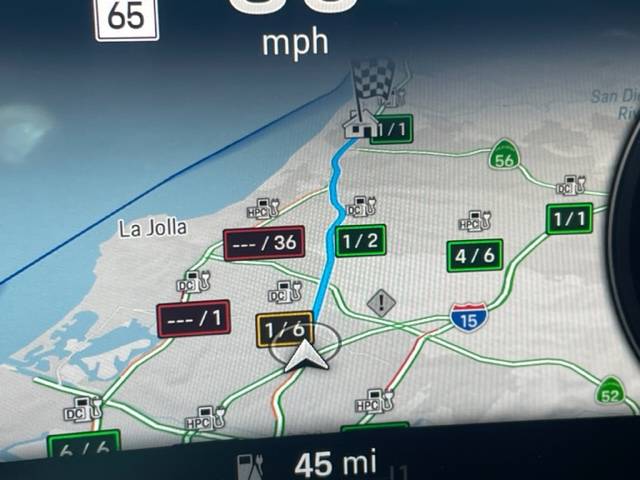
In that vein, I have this map which I don't get. There are colors, boxes and ratios that make no sense to me. On my Charging App there are no EV stations in these spots. I certainly wouldn't care about gas stations. DC vs HPC? I didn't get the memo about all this. Maybe there are stations there and I need to look harder.

Porsche Taycan Can someone decode this map for me please? IMG_4748
Sponsored


Oink

Well-Known Member
Joined
Sep 8, 2020
Threads
11
Messages
379
Reaction score
271
Location
Norway
Vehicles
Taycan 4S+, M3P
Country flag
Red: Unknown/none amount free out of 36
Yellow: Only 1 free out of 6
Green: Same as yellow, bar the 1/6.
 

tigerbalm

Well-Known Member
First Name
Damien
Joined
Oct 11, 2020
Threads
94
Messages
3,514
Reaction score
7,912
Location
Dublin, Ireland
Website
www.targatrips.com
Vehicles
911 Targa 4 GTS, Fiat 500 EV. Sold: Taycan Turbo S, Taycan 4S; Panamera Turbo S
Country flag
DC: 50kW DC chargers
HPC (High Performance Charging): >= 150 kW DC Chargers

All are DC charging stations beings shown – not petrol stations – though the chargers could be at such stations.
 

W1NGE

Well-Known Member
First Name
Adrian
Joined
Jan 11, 2021
Threads
53
Messages
11,016
Reaction score
6,805
Location
Aberdeen, Scotland
Vehicles
992.2, ex GTS ST owner, Macan T
Country flag
I'm still torn between Siri & Apple Maps (dependable - works most every time) and Hey Porsche/PCM (she just doesn't seem to "get me" - but when it works its more feature rich).

In that vein, I have this map which I don't get. There are colors, boxes and ratios that make no sense to me. On my Charging App there are no EV stations in these spots. I certainly wouldn't care about gas stations. DC vs HPC? I didn't get the memo about all this. Maybe there are stations there and I need to look harder.
IMG_4748.jpg
These relate to the number of EVSE stations available where the right hand side is the total number of connectors available and the left hand side indicates the number in use. So 0/6 would translate as 6 connectors and none in use.

HPC will be DC > 50kW and up to 350kW.

If you tap one then Nav should bring up more details about the EVSE capabilities and facilities.
 

ithinkmac

Well-Known Member
Joined
Mar 19, 2021
Threads
22
Messages
304
Reaction score
267
Location
SF Bay Area
Vehicles
'17 3, '22 4S CT, '22 MXP
Country flag
I have not look it up either, but just based on logic.

The green color means all good, yellow might mean some are not working?

red would suggest - no info or malfunction as others have suggested.

-ThinkMac-


MrBlueSky

Well-Known Member
First Name
Mark
Joined
Jan 10, 2022
Threads
4
Messages
355
Reaction score
409
Location
Northern Ireland
Vehicles
Taycan CT 4S
Country flag
These relate to the number of EVSE stations available where the right hand side is the total number of connectors available and the left hand side indicates the number in use. So 0/6 would translate as 6 connectors and none in use.

HPC will be DC > 50kW and up to 350kW.

If you tap one then Nav should bring up more details about the EVSE capabilities and facilities.
I wonder why they have done it that way? It seems counter intuitive to me that, using the OP's map, 1/6 is colour coded yellow but it actually means there are 5 connectors available (so should be green)?

If 1/6 meant there was 1 connector available out of the 6 then I could understand their colour coding. Hey ho.
 

WattTurbo

Well-Known Member
First Name
Kevin
Joined
Nov 13, 2021
Threads
11
Messages
748
Reaction score
619
Location
Katy, TX
Vehicles
911 C2S, Taycan Turbo
Country flag
I wonder why they have done it that way? It seems counter intuitive to me that, using the OP's map, 1/6 is colour coded yellow but it actually means there are 5 connectors available (so should be green)?

If 1/6 meant there was 1 connector available out of the 6 then I could understand their colour coding. Hey ho.
Yeah it seems post from @Oink tend to agree with you and contradicts @W1NGE post. Now I’m not sure which is correct.
 

W1NGE

Well-Known Member
First Name
Adrian
Joined
Jan 11, 2021
Threads
53
Messages
11,016
Reaction score
6,805
Location
Aberdeen, Scotland
Vehicles
992.2, ex GTS ST owner, Macan T
Country flag
No the colours don't relate to availability.

Green are ultrafast (HPC} units eg 350kW that you'd get at Porsche.

Black with a red box are DC up to 50kW.

Yellow somewhere in between.

I'm sure there's more to it but for now that's my interpretation.


MrBlueSky

Well-Known Member
First Name
Mark
Joined
Jan 10, 2022
Threads
4
Messages
355
Reaction score
409
Location
Northern Ireland
Vehicles
Taycan CT 4S
Country flag
No the colours don't relate to availability.

Green are ultrafast (HPC} units eg 350kW that you'd get at Porsche.

Black with a red box are DC up to 50kW.

Yellow somewhere in between.

I'm sure there's more to it but for now that's my interpretation.
Understood - thanks.
 

Jhenson29

Well-Known Member
First Name
Jeremy
Joined
Feb 9, 2021
Threads
37
Messages
3,014
Reaction score
4,650
Location
St. Louis, MO
Vehicles
2022 Macan S; 2021 Taycan 4S
Country flag
Green are ultrafast (HPC} units eg 350kW that you'd get at Porsche.

Black with a red box are DC up to 50kW.
But in the picture, aren’t there red ones marked DC and HPC and green ones marked DC and HPC?
 

ciaranob

Well-Known Member
Joined
Jul 3, 2021
Threads
83
Messages
3,547
Reaction score
2,639
Location
Houston, TX
Vehicles
CT4S 2022 Mini Cooper S 2024 Electric in 2025/6
Country flag
In my experience the colors refer to whether units are functioning (green), malfunctioning/limited power (yellow) and out of service (red) - red may also be assigned when a unit is occupied (see comment at end of post).

In the MyPorsche app map view for example (when searching for stations using the 'pump' icon) you’ll first see stations with highest available chargers as the main icon e.g.. 350 vs 150 - in the OP's dash view the color coding I believe is the same as for the app, however, in the cars dash view numbers are all white but the surrounding box is color coded instead.

Back in the app, tapping one of these icons displays a ‘ratio’ of say for example 3:6 meaning 3 of the 6 chargers are available. If all numbers are green all units are working. If one of the other colors are present just tap the listed ratio onscreen - this highlights the stations address at bottom of screen (if not already showing) - now tap the address (NOT the send destination option) and you’ll see a full listing of which chargers are functioning correctly by color code as above at that station and also which are being used or are open.

The colors do not refer to the charger type or power. A yellow 3 beside a green 6 in a ratio means (I believe) whilst 3 units are available one or more may not be functioning correctly.

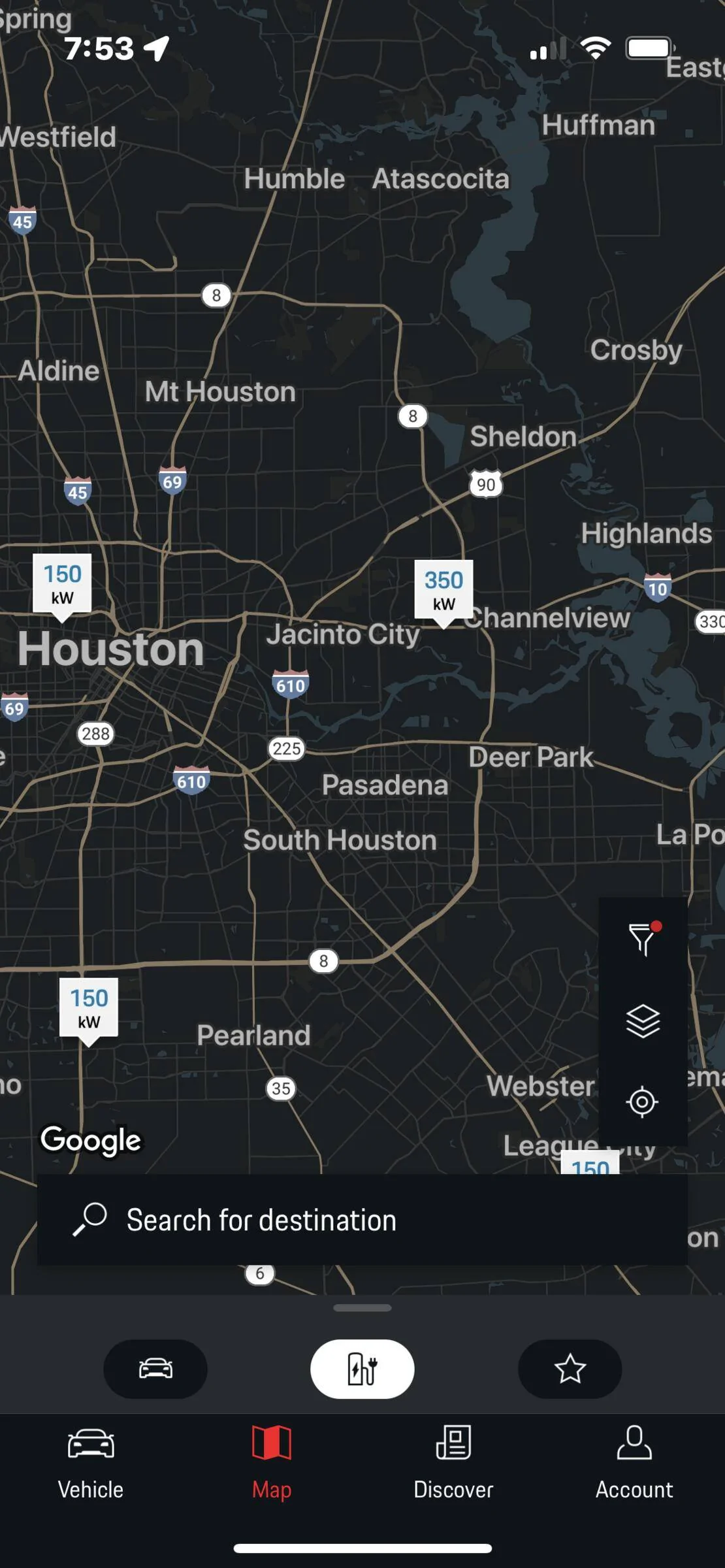
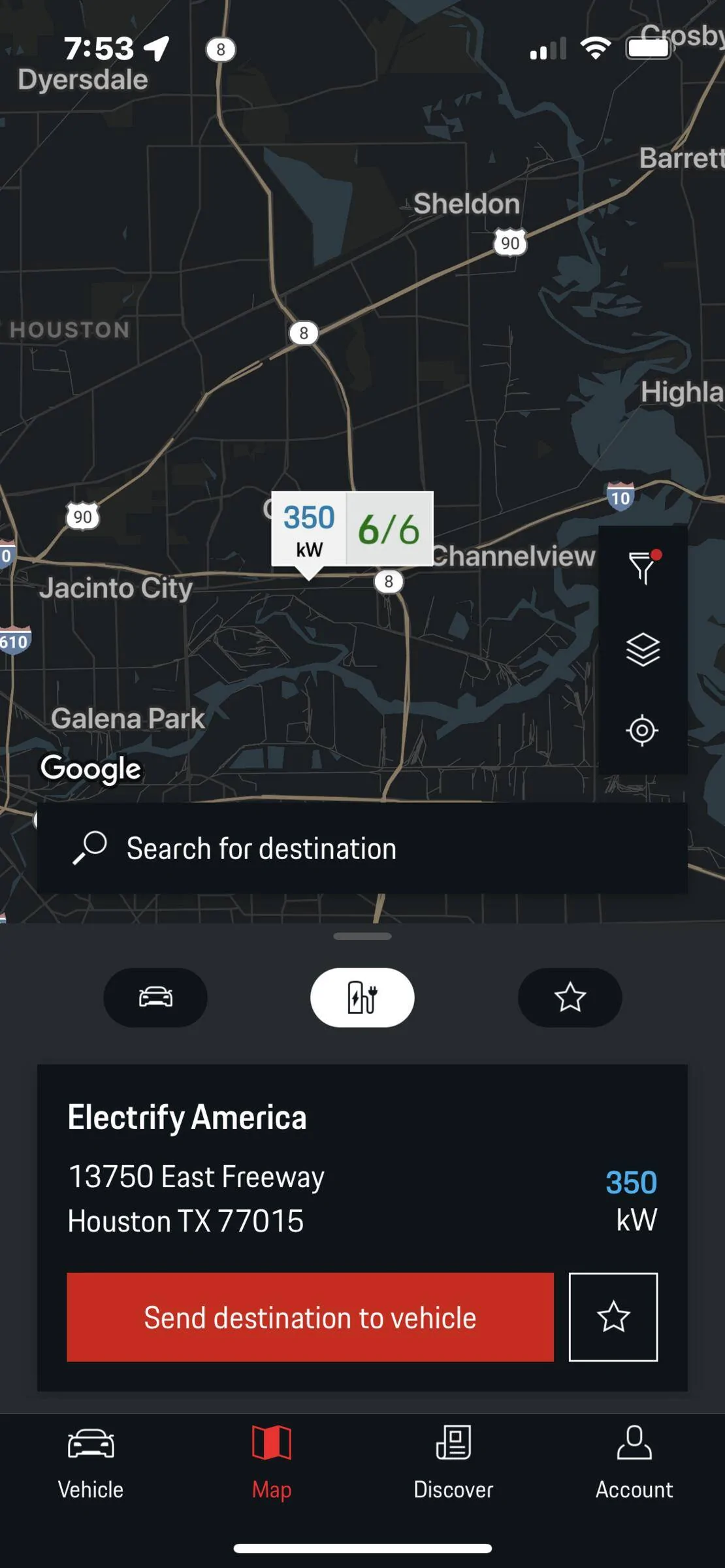
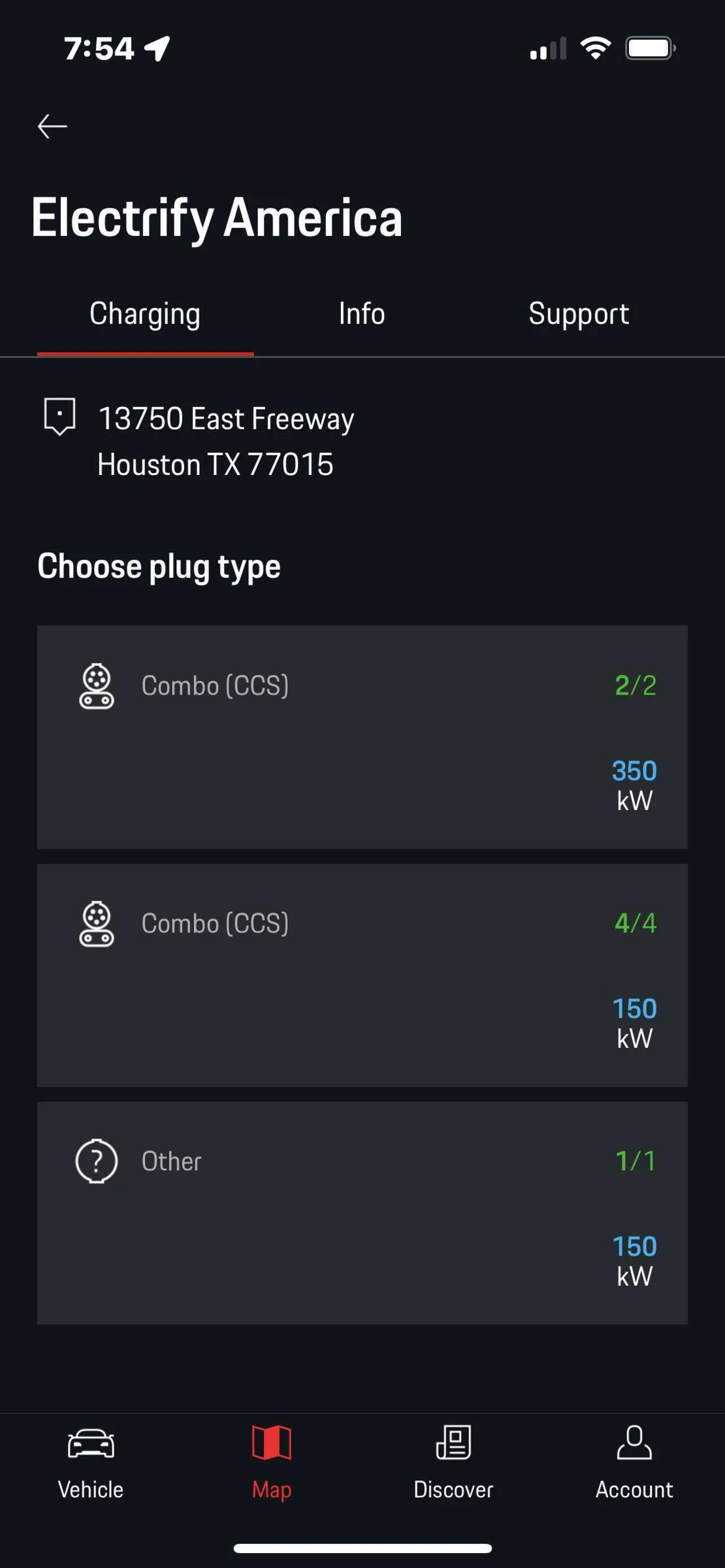
In this first map example here from the app I chose the 350 station icon:

First pic - you see icons showing station locations and max available charger
Second pic - after tapping the 350 icon it shows the ratio of available units and whether all working or not (by color code) and
Third pic - what appears after you tap the address field for that station at base of screen, which is details of each unit at that address showing exactly which units are functional and/or available

Porsche Taycan Can someone decode this map for me please? 77E80DB7-C584-4F51-87FE-986EF68DC6A2


Porsche Taycan Can someone decode this map for me please? 248968E3-B4CF-4EBC-BC52-9D0A55E86793


Porsche Taycan Can someone decode this map for me please? 3B7EB229-7863-42E8-AF63-5257A973B413


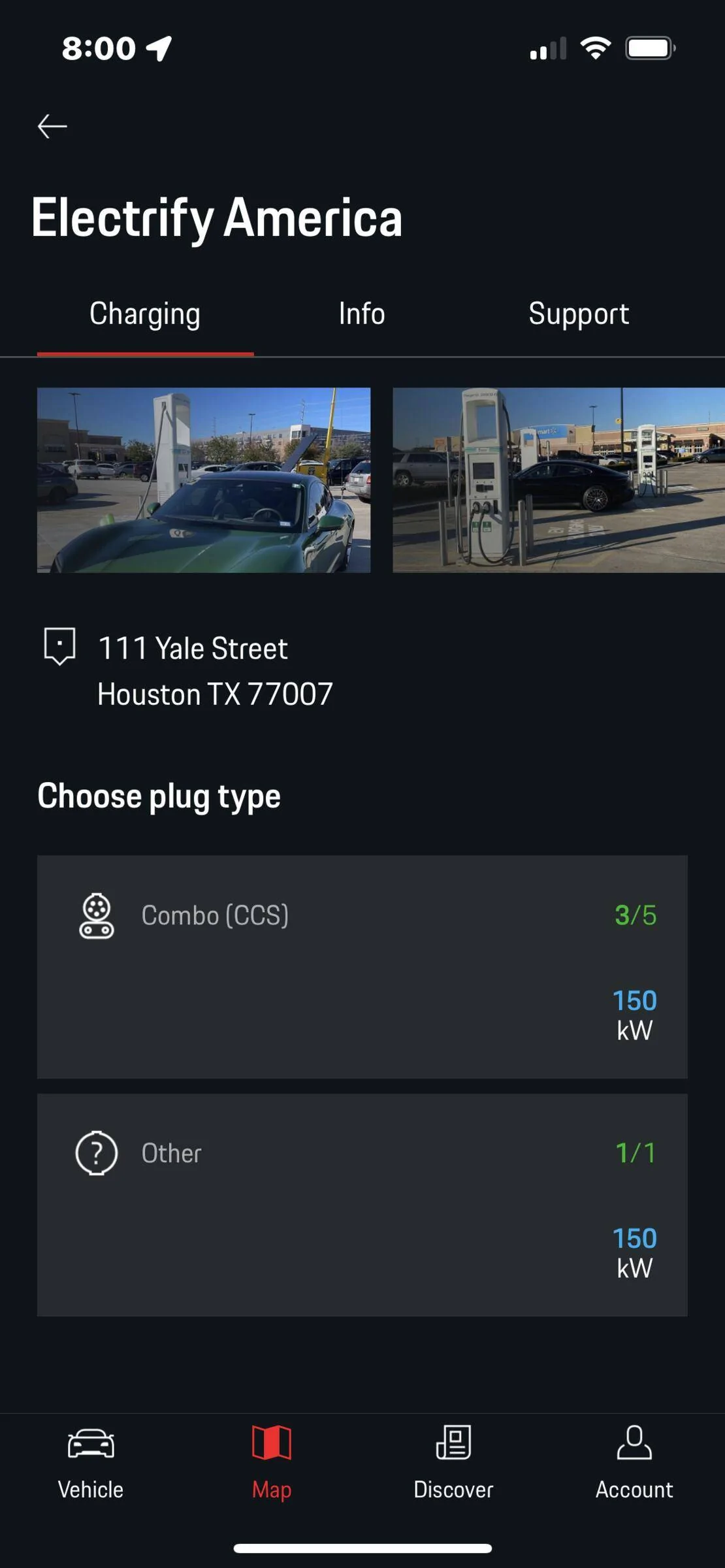
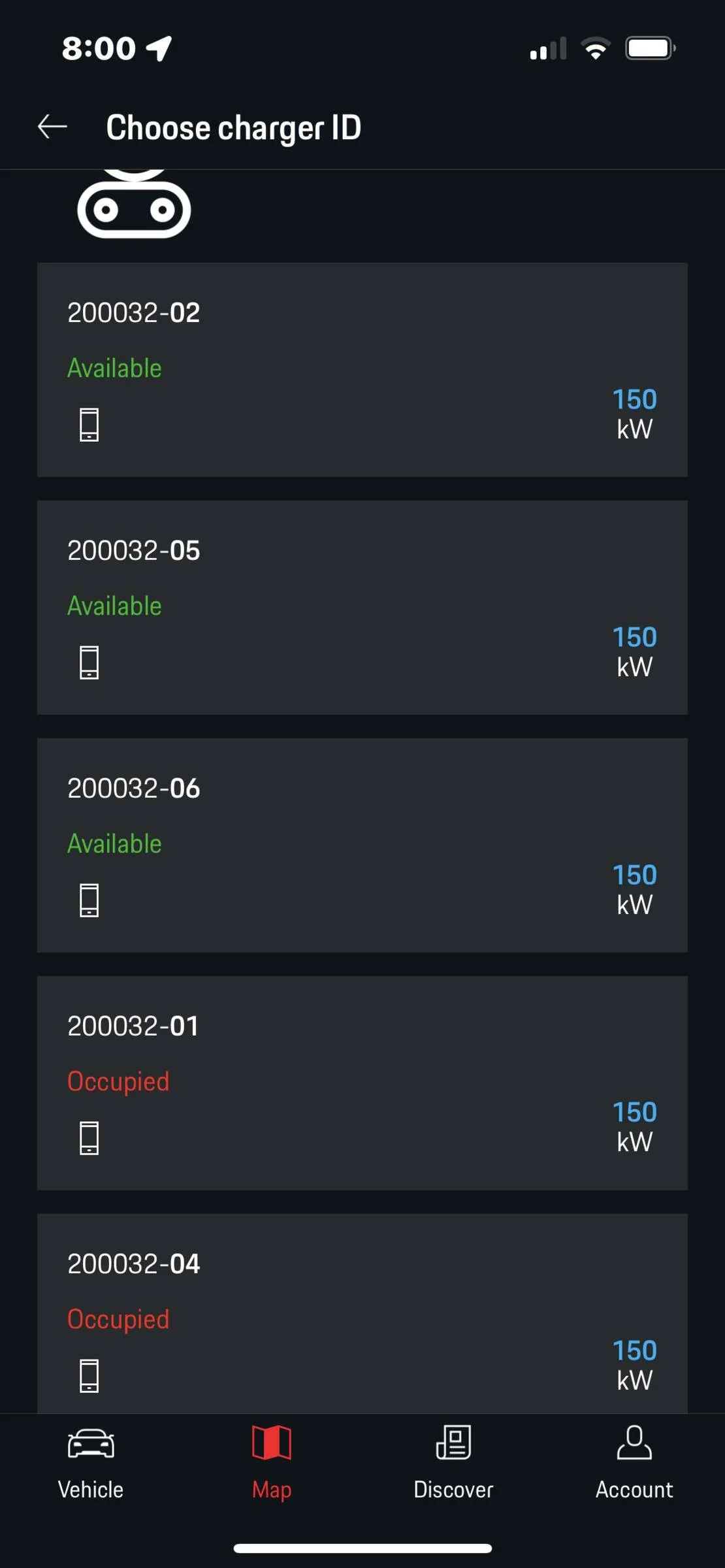
in this next example from the same map view at a different station with max charger being a 150 only, it states 3:5 all green meaning 3 of 5 units available and two occupied - look at detail and it shows all 5 are operating hence the 3 and 5 numerals are all green. Admittedly in the detail view an occupied station has red text so maybe red can signify occupied instead of or in addition to malfunction?

Porsche Taycan Can someone decode this map for me please? 39006FA5-9DD0-49CA-B871-C3CAD3135858
Porsche Taycan Can someone decode this map for me please? 0957E232-FFAA-4D91-9CDA-165176CB3AA6
 
Last edited:
OP
OP
4thPcar

4thPcar

Well-Known Member
First Name
Ian
Joined
Aug 11, 2021
Threads
74
Messages
909
Reaction score
837
Location
Del Mar CA
Vehicles
Previously: 914, 944 and 997 911S. Now Taycan
Country flag
WOW - I was embarrassed to make this post thinking I missed some obvious training. Now not so much. My understanding is Porsche offers a "second orientation" to owners for stuff like this. I could really use it - I got my training from the front desk receptionist when I picked mine up. Learning more stuff everyday - mostly from you guys. Bless you all.
 
OP
OP
4thPcar

4thPcar

Well-Known Member
First Name
Ian
Joined
Aug 11, 2021
Threads
74
Messages
909
Reaction score
837
Location
Del Mar CA
Vehicles
Previously: 914, 944 and 997 911S. Now Taycan
Country flag
In my experience the colors refer to whether units are functioning (green), malfunctioning/limited power (yellow) and out of service (red) - red may also be assigned when a unit is occupied (see comment at end of post).

In the MyPorsche app map view for example (when searching for stations using the 'pump' icon) you’ll first see stations with highest available chargers as the main icon e.g.. 350 vs 150 - in the OP's dash view the color coding I believe is the same as for the app, however, in the cars dash view numbers are all white but the surrounding box is color coded instead.

Back in the app, tapping one of these icons displays a ‘ratio’ of say for example 3:6 meaning 3 of the 6 chargers are available. If all numbers are green all units are working. If one of the other colors are present just tap the listed ratio onscreen - this highlights the stations address at bottom of screen (if not already showing) - now tap the address (NOT the send destination option) and you’ll see a full listing of which chargers are functioning correctly by color code as above at that station and also which are being used or are open.

The colors do not refer to the charger type or power. A yellow 3 beside a green 6 in a ratio means (I believe) whilst 3 units are available one or more may not be functioning correctly.

In this first map example here from the app I chose the 350 station icon:

First pic - you see icons showing station locations and max available charger
Second pic - after tapping the 350 icon it shows the ratio of available units and whether all working or not (by color code) and
Third pic - what appears after you tap the address field for that station at base of screen, which is details of each unit at that address showing exactly which units are functional and/or available

77E80DB7-C584-4F51-87FE-986EF68DC6A2.png


248968E3-B4CF-4EBC-BC52-9D0A55E86793.png


3B7EB229-7863-42E8-AF63-5257A973B413.png


in this next example from the same map view at a different station with max charger being a 150 only, it states 3:5 all green meaning 3 of 5 units available and two occupied - look at detail and it shows all 5 are operating hence the 3 and 5 numerals are all green. Admittedly in the detail view an occupied station has red text so maybe red can signify occupied instead of or in addition to malfunction?

39006FA5-9DD0-49CA-B871-C3CAD3135858.png
0957E232-FFAA-4D91-9CDA-165176CB3AA6.png
I am still charging mostly at home so don't have as much experience in this app. But elsewhere due to problems with the alarm going off, owners have been told to delete this app. I am having the alarm problem. Maybe I need a new thread on this whole topic, but I am wondering between MyPorche, Porsche Connect, PlugShare, Charging, and EA what are the minimum number of functional reliable apps (and which are they) to get the job done with regard to finding and activating these chargers under the Porsche program?
 

Skilly

Well-Known Member
First Name
Matt
Joined
Sep 12, 2021
Threads
6
Messages
492
Reaction score
381
Location
Livermore CA
Vehicles
2020 Taycan Turbo
Country flag
Colors appear to be availability for the most part. Whether it be out of service or in use. It's about the likelihood of being able to charge at the location, HPC can be both red(none available) and green (4/6 available).

The UI is lacking almost as much as the training one gets on it during a delivery. A simple filter option would be ideal where you can limit views (if you wanted) to nav only showing HPC and available...would save a LOT of guesswork.
 
OP
OP
4thPcar

4thPcar

Well-Known Member
First Name
Ian
Joined
Aug 11, 2021
Threads
74
Messages
909
Reaction score
837
Location
Del Mar CA
Vehicles
Previously: 914, 944 and 997 911S. Now Taycan
Country flag
In my experience the colors refer to whether units are functioning (green), malfunctioning/limited power (yellow) and out of service (red) - red may also be assigned when a unit is occupied (see comment at end of post).

In the MyPorsche app map view for example (when searching for stations using the 'pump' icon) you’ll first see stations with highest available chargers as the main icon e.g.. 350 vs 150 - in the OP's dash view the color coding I believe is the same as for the app, however, in the cars dash view numbers are all white but the surrounding box is color coded instead.

Back in the app, tapping one of these icons displays a ‘ratio’ of say for example 3:6 meaning 3 of the 6 chargers are available. If all numbers are green all units are working. If one of the other colors are present just tap the listed ratio onscreen - this highlights the stations address at bottom of screen (if not already showing) - now tap the address (NOT the send destination option) and you’ll see a full listing of which chargers are functioning correctly by color code as above at that station and also which are being used or are open.

The colors do not refer to the charger type or power. A yellow 3 beside a green 6 in a ratio means (I believe) whilst 3 units are available one or more may not be functioning correctly.

In this first map example here from the app I chose the 350 station icon:

First pic - you see icons showing station locations and max available charger
Second pic - after tapping the 350 icon it shows the ratio of available units and whether all working or not (by color code) and
Third pic - what appears after you tap the address field for that station at base of screen, which is details of each unit at that address showing exactly which units are functional and/or available

77E80DB7-C584-4F51-87FE-986EF68DC6A2.png


248968E3-B4CF-4EBC-BC52-9D0A55E86793.png


3B7EB229-7863-42E8-AF63-5257A973B413.png


in this next example from the same map view at a different station with max charger being a 150 only, it states 3:5 all green meaning 3 of 5 units available and two occupied - look at detail and it shows all 5 are operating hence the 3 and 5 numerals are all green. Admittedly in the detail view an occupied station has red text so maybe red can signify occupied instead of or in addition to malfunction?

39006FA5-9DD0-49CA-B871-C3CAD3135858.png
0957E232-FFAA-4D91-9CDA-165176CB3AA6.png
You suggest red means out of service, but it shows 36 stations at a big mall near us and its in a red box. Surely 36 stations are not out of service. I am assuming ---/36 in red means, basically, "we have no f*cking clue how many may or may not work, you are basically on your own." Would that be the proper interpretation? I am glad I charge virtually always at home!
Sponsored


Top