Sponsored

Murph7355

Well-Known Member
First Name
Andy
Joined
Feb 1, 2022
Threads
25
Messages
1,777
Reaction score
1,552
Location
UK
Vehicles
GTS ST; TVR Griffith 500; Caterham 7; Volvo XC90
Country flag
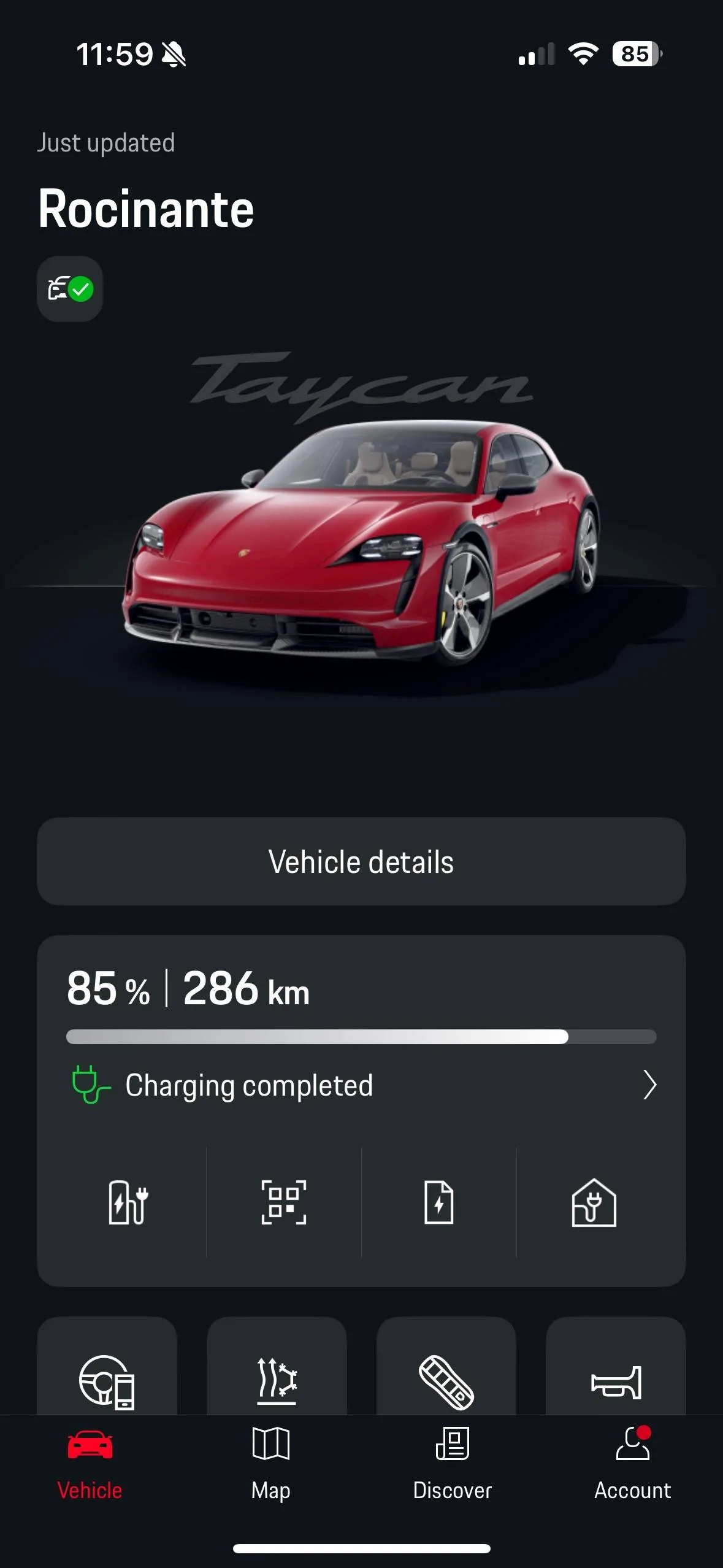
I can’t decide if I should be happy that they improved the app or annoyed over how half-arsed it is. As usual when it comes to Porsche and software, they manage to take it 85% of the way and then botch it up right at the end.

So they've updated the main view to use a completely different design language. Looks great, but they couldn't be bothered to update anything else to align with this design so now the main view looks completely different than anything else in the entire app. Now they're essentially running two fundamentally different UI's in the same app.

Also, somehow they managed to introduce an overflow issue where the content stretches beyond the viewport on a standard iPhone 15 Pro, creating a few pixels worth of vertical scrollbar for no reason. Adding a constraint to scale the gigantic photo of the car at the top to make everything fit in the viewport is absolutely trivial, yet for whatever reason, they couldn't be bothered to do that.

IMG_0205.webp
I agree.

And I find it even more annoying that they're 85% there... It's not a big enough miss to think they're just rubbish. It's that final ounce of thought and QA (especially the mini scroll thing ?).

Same goes with PCM. It could be brilliant so easily.... But it misses out because of dumb arsed bugs and lack of thought as to how things are used day to day.
Sponsored
 

Scandinavian

Well-Known Member
First Name
Peter
Joined
Nov 3, 2019
Threads
52
Messages
3,904
Reaction score
3,549
Location
France
Vehicles
Taycan T, Aston Martin DB9, Porsche 996 C4 Cab, i4
Country flag
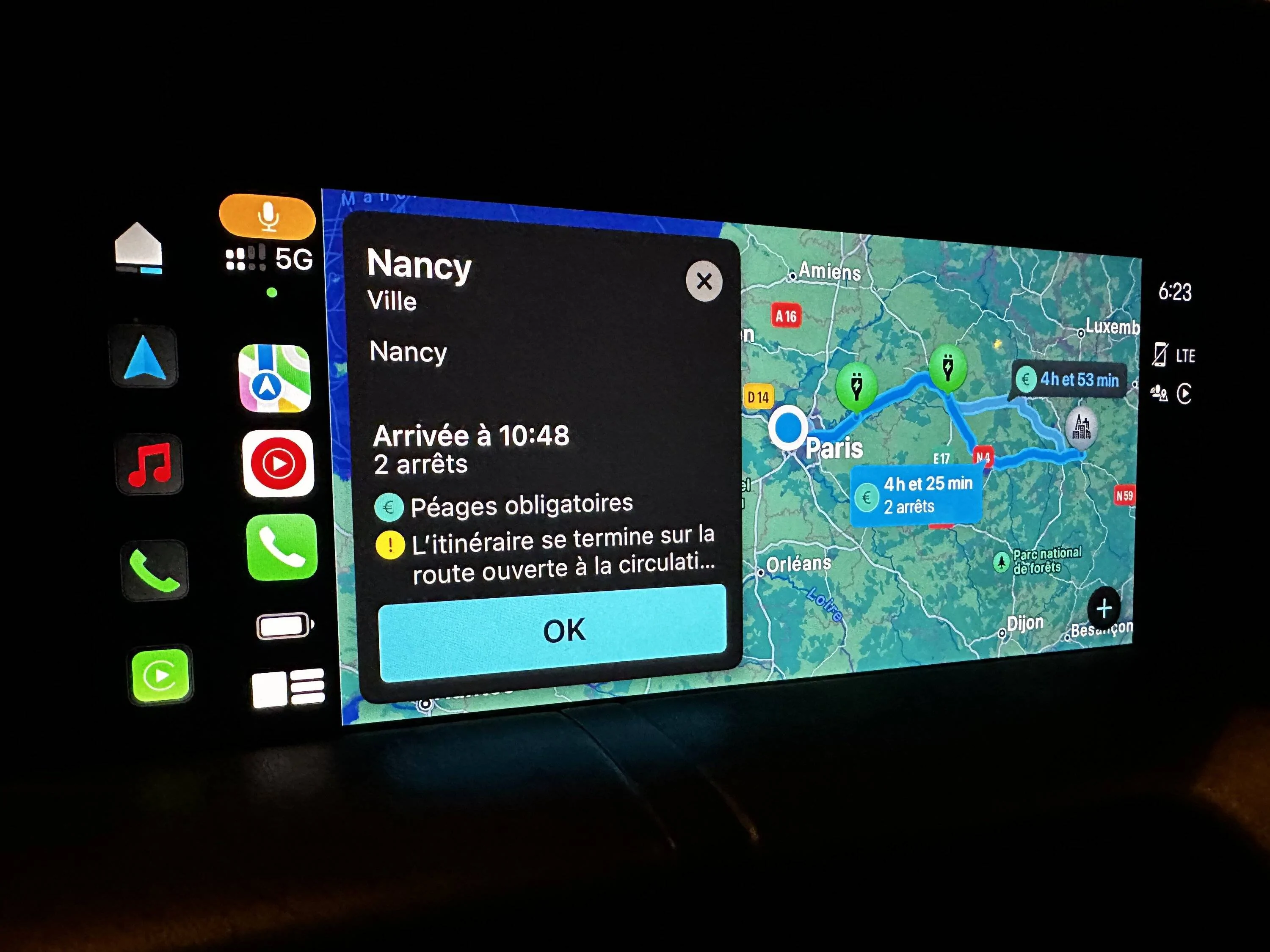
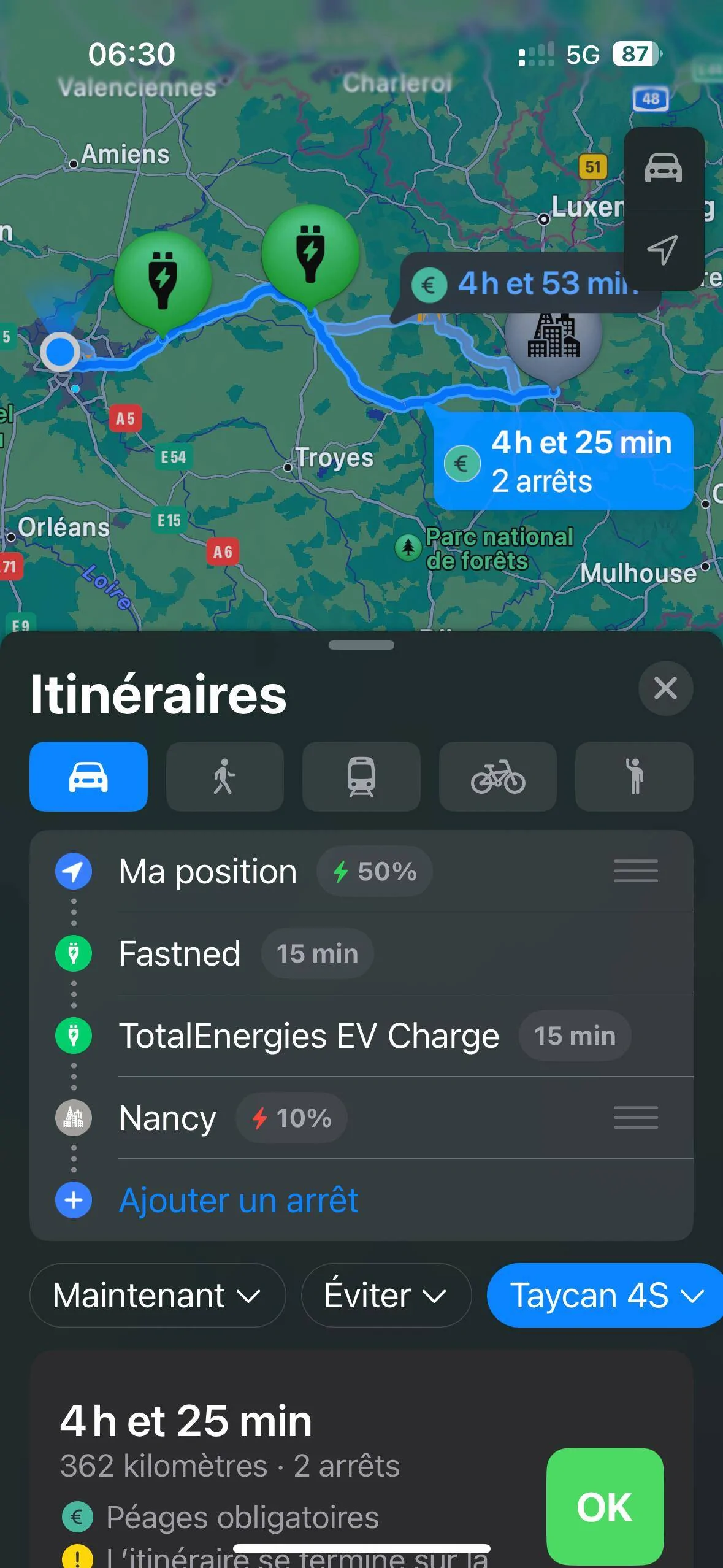
No mention of pre heating when navigating with Apple Maps
 

whitex

Well-Known Member
Joined
Jul 30, 2021
Threads
87
Messages
8,193
Reaction score
7,236
Location
WA, USA
Vehicles
2023 Taycan TCT, 2024 Q8 eTron P+
Country flag
My hopes that they fixed functionality were dashed. The windows always open is back, only disappeared for a couple of days after updating the app - must have reset something which fixed it temporarily. The new “just updated” is just as useless as the green dot used to be - the current status shown seems to have nothing to do with it (e.g. status changes while while the app says “just updated”, for example just checked the app, it tells me “just updated” and that my car is unlocked, WTF, but give it a minute or two and now car shows locked - I looked out the window and the car was locked all the time, so Porsche app just seems to display randomly outdated status even when it says “just updated”). So it seems the update is mostly cosmetic :(


Jasper4S

Well-Known Member
First Name
Jasper
Joined
Oct 5, 2022
Threads
27
Messages
1,467
Reaction score
2,139
Location
Netherlands
Vehicles
Taycan 4s ST, Jeep Avenger EV, KTM Duke 790
Country flag
My hopes that they fixed functionality were dashed. The windows always open is back, only disappeared for a couple of days after updating the app - must have reset something which fixed it temporarily. The new “just updated” is just as useless as the green dot used to be - the current status shown seems to have nothing to do with it (e.g. status changes while while the app says “just updated”, for example just checked the app, it tells me “just updated” and that my car is unlocked, WTF, but give it a minute or two and now car shows locked - I looked out the window and the car was locked all the time, so Porsche app just seems to display randomly outdated status even when it says “just updated”). So it seems the update is mostly cosmetic :(
Are you sure the window thing is software related? When you lock the car, does the car make a beep? That beep indicates something is open, could be a falsy sensor or something
 

freeforall

Well-Known Member
Joined
Sep 30, 2022
Threads
5
Messages
211
Reaction score
215
Location
Paris
Vehicles
Taycan Sport Turismo
Country flag
It works as expected on my phone/car.

IMG_1583.jpeg


IMG_1588.png
@allroadusa I am also in France and I am not able to connect Apple Maps to MyPorsche. I initially thought that it wasn’t available in France yet but I see that you have it. When I try to set it up it takes me to “Véhicules” menu in Apple Maps which appears to be empty and there is no way to add a car. Any tips? ? Did you update your PCM to WPN8 or WPN9?(because I did not yet and I am wondering whether it is the reason)
 

whitex

Well-Known Member
Joined
Jul 30, 2021
Threads
87
Messages
8,193
Reaction score
7,236
Location
WA, USA
Vehicles
2023 Taycan TCT, 2024 Q8 eTron P+
Country flag
Are you sure the window thing is software related? When you lock the car, does the car make a beep? That beep indicates something is open, could be a falsy sensor or something
No sound when locking the car. Double blink once locked IIRC. After app update it disappeared for a couple of days, then came back.


allroadusa

Well-Known Member
First Name
Jerome
Joined
Sep 2, 2023
Threads
12
Messages
375
Reaction score
544
Location
France
Vehicles
Taycan 4S+ Pure White
Country flag
@allroadusa I am also in France and I am not able to connect Apple Maps to MyPorsche. I initially thought that it wasn’t available in France yet but I see that you have it. When I try to set it up it takes me to “Véhicules” menu in Apple Maps which appears to be empty and there is no way to add a car. Any tips? ? Did you update your PCM to WPN8 or WPN9?(because I did not yet and I am wondering whether it is the reason)
Greetings from France! Indeed I had the WPN8 update last November and I advise it as my PCM has been bug free since. however I think it has nothing to do with this MyPorsche update.
For first use you need to link your car with Apple Plans while connected to Carplay. To do this, just click on this menu in the app

Porsche Taycan [Updated] My Porsche App updated w/ new interface and functions IMG_1592
 

freeforall

Well-Known Member
Joined
Sep 30, 2022
Threads
5
Messages
211
Reaction score
215
Location
Paris
Vehicles
Taycan Sport Turismo
Country flag
@allroadusa I am also in France and I am not able to connect Apple Maps to MyPorsche. I initially thought that it wasn’t available in France yet but I see that you have it. When I try to set it up it takes me to “Véhicules” menu in Apple Maps which appears to be empty and there is no way to add a car. Any tips? ? Did you update your PCM to WPN8 or WPN9?(because I did not yet and I am wondering whether it is the reason)
Yes that is what I did. Then in the next screen I click on “Ouvrir Apple Plans”

Porsche Taycan [Updated] My Porsche App updated w/ new interface and functions IMG_9654


Which opens Apple Maps and shows a Véhicules empty screen.

Porsche Taycan [Updated] My Porsche App updated w/ new interface and functions IMG_9655

And of course I did all of this with CarPlay launched in the car.
 

tigerbalm

Well-Known Member
First Name
Damien
Joined
Oct 11, 2020
Threads
94
Messages
3,514
Reaction score
7,912
Location
Dublin, Ireland
Website
www.targatrips.com
Vehicles
911 Targa 4 GTS, Fiat 500 EV. Sold: Taycan Turbo S, Taycan 4S; Panamera Turbo S
Country flag
No mention of pre heating when navigating with Apple Maps
I'm starting to wonder is that a current limitation of Apple Maps. That it has no concept of pre-heating and doesn't know to call the appropriate API or CANBUS function.

Porsche mentions battery pre-conditioning a lot in their blurb around PCM Navigation and the Intelligent Range Manager to just not bother.

I think it is something that we will get when Apple introduces the concept.
 

Perry

Well-Known Member
First Name
Daniel
Joined
Mar 26, 2021
Threads
14
Messages
382
Reaction score
672
Location
Sweden
Vehicles
Tesla SP85D, Model P3D, Taycan Turbo S CT
Country flag
I'm starting to wonder is that a current limitation of Apple Maps. That it has no concept of pre-heating and doesn't know to call the appropriate API or CANBUS function.

Porsche mentions battery pre-conditioning a lot in their blurb around PCM Navigation and the Intelligent Range Manager to just not bother.

I think it is something that we will get when Apple introduces the concept.
If you look at Porsche's FAQ on the Maps integration, they appear to explicitly note that no data is communicated back from Maps to the car. Whether this is just bad wording from their part is a different question, though.
 

whitex

Well-Known Member
Joined
Jul 30, 2021
Threads
87
Messages
8,193
Reaction score
7,236
Location
WA, USA
Vehicles
2023 Taycan TCT, 2024 Q8 eTron P+
Country flag
If you look at Porsche's FAQ on the Maps integration, they appear to explicitly note that no data is communicated back from Maps to the car. Whether this is just bad wording from their part is a different question, though.
Apple phones can do things like change HVAC temperatures, so there is a conduit for commands from the phone to the PCM. "Preheat battery for DC charging" could just be another command, like "preheat the cabin".
 

Perry

Well-Known Member
First Name
Daniel
Joined
Mar 26, 2021
Threads
14
Messages
382
Reaction score
672
Location
Sweden
Vehicles
Tesla SP85D, Model P3D, Taycan Turbo S CT
Country flag
Apple phones can do things like change HVAC temperatures, so there is a conduit for commands from the phone to the PCM. "Preheat battery for DC charging" could just be another command, like "preheat the cabin".
I am pretty sure that Maps has no such functionality. I think the most likely way preheating could work is if navigational data was communicated back to the car that could then in turn handle preheating.

I think the chance of Porsche doing this, seeing how they still don't even display Maps navigation in the main display, is however next to none.
 

anonymouse

Well-Known Member
Joined
May 12, 2023
Threads
44
Messages
756
Reaction score
899
Location
Oxfordshire UK
Vehicles
Taycan Turbo Sport Turismo J1.2
Country flag
I think the route planner is very optimistic. ABRP is too pessimistic.
Yes. I did a plan last week and the app underestimated batter usage by more than TWENTY PERCENT! i think it must be taking no account of weather or driving style.

ABRP was pessimistic, but on closer inspection that was because it was looking at current weather which had 20mph headwinds and I think it have been accurate. Switching to “seasonal average”, or coming back when I was actually going to do the drive and the storm was over, produced an ABRP estimate within 2% of actual.

The calculation in the car was also optimistic but not by much. I guess it was assuming I would drive at the speed limit :)

Based on this test I will never use the app to estimate a long journey.
Sponsored


Top